
Foto per blog di viaggio
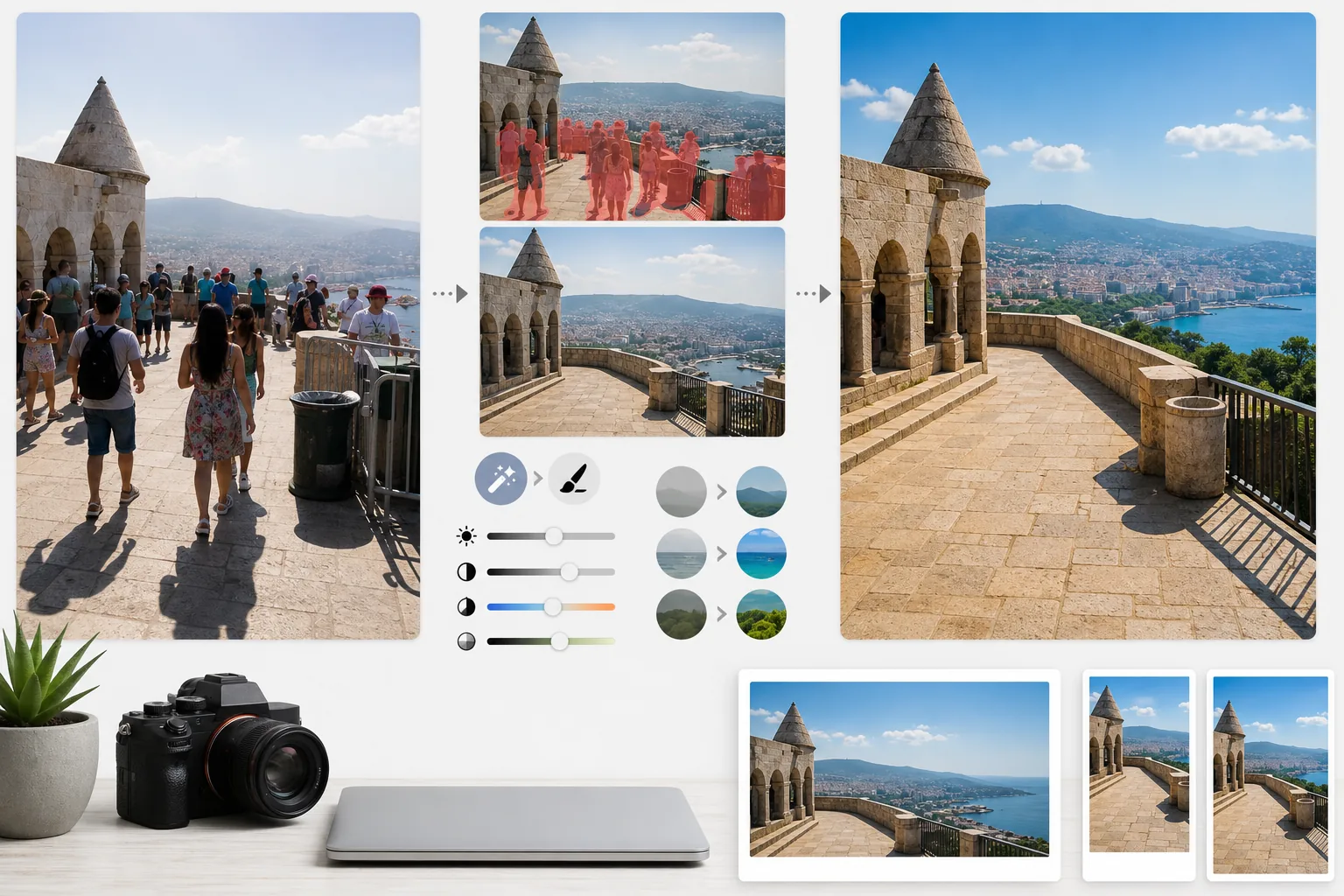
Trasforma gli scatti di viaggio affollati in fotografie di destinazione di qualità editoriale. Questo modello rimuove turisti, intrusi e disordine visivo dagli scatti di monumenti e paesaggi con Magic Eraser, quindi applica AI Enhance per correggere le difficili condizioni di esposizione comuni nella fotografia di viaggio — sole intenso di mezzogiorno, interni bui dei templi, tramonti in controluce — ed esalta i colori naturali per immagini che fanno venire ai lettori la voglia di prenotare il viaggio.
Prova gratis questo modelloPersonal template preview
Cosa fa questo modello
Risolve i due maggiori problemi della fotografia di viaggio: la folla e la luce cattiva. Magic Eraser rimuove i turisti piazzati davanti ai monumenti, gli intrusi che attraversano l'inquadratura e il disordine visivo come cestini, barriere di cantiere e segnaletica temporanea che rovinano l'atmosfera del luogo. L'IA ricostruisce l'architettura, la pavimentazione e il paesaggio dietro le persone e gli oggetti rimossi utilizzando il contesto circostante. AI Enhance affronta poi le sfide di esposizione tipiche del viaggio — interni di cattedrali e templi con finestre bruciate e ombre nere, sole intenso di mezzogiorno che appiattisce i colori nelle mete tropicali e scene di tramonto in controluce in cui il primo piano resta in silhouette. I colori vengono esaltati per riflettere come la destinazione appare realmente all'occhio umano, qualcosa che le fotocamere sottorappresentano costantemente nella gamma dinamica.
Impostazioni del modello
| Rimozione dei turisti | Rileva e rimuove automaticamente le persone dagli scatti di monumenti e paesaggi |
| Correzione dell'esposizione | Recupero in stile HDR di luci e ombre per luce difficile |
| Miglioramento del colore | Esalta la saturazione naturale (cielo, acqua, vegetazione) senza un aspetto artificiale |
| Rimozione della foschia | Attraversa la foschia atmosferica per paesaggi lontani più nitidi |
| Risoluzione di output | 4000px sul lato lungo (immagini di apertura del blog in qualità Retina) |
Come usare questo modello
Carica la tua foto di viaggio
Carica qualsiasi foto di viaggio — monumenti affollati, ampi panorami, scene di strada, architettura d'interni. Il modello gestisce i file JPEG di smartphone, fotocamere mirrorless e action cam. Sono accettati anche i file RAW per la massima flessibilità di modifica.
Rimuovi folla e disordine
Magic Eraser rileva le persone nell'inquadratura e le rimuove. Puoi scegliere di rimuovere tutte le persone, mantenerne alcune specifiche (te stesso o i tuoi compagni di viaggio) o rimuovere in modo selettivo solo quelle che coprono elementi architettonici o paesaggistici importanti. L'IA riempie le aree mancanti con terreno, muri e scenario ricostruiti.
Migliora luce e colore
AI Enhance applica un'elaborazione in stile HDR che recupera i cieli bruciati e schiarisce le ombre profonde — frequenti negli interni dei templi e nelle strette vie europee. I colori vengono esaltati per corrispondere a ciò che i tuoi occhi hanno visto sul posto, in particolare gli azzurri del cielo, i turchesi del mare e i verdi della vegetazione. La foschia atmosferica viene ridotta per panorami di montagne e città più nitidi.
Esporta per blog e social
Scarica a 4000px sul lato lungo per immagini di apertura del blog in qualità Retina, oppure nelle dimensioni specifiche per Instagram, Pinterest e Facebook. Il file mantiene i dati EXIF ottimizzati per i fotografi che geotaggano i propri lavori.
Consigli da professionista per risultati ottimali
- ✓Scatta più foto della stessa scena a pochi secondi di distanza. Quando i turisti si spostano tra un fotogramma e l'altro, l'IA dispone di informazioni di riferimento sul terreno e sui muri dietro di loro, producendo ricostruzioni più pulite rispetto a un singolo scatto.
- ✓Per gli interni di chiese, templi e musei, sovraesponi leggermente la foto in fase di scatto. Per l'IA è più facile recuperare le alte luci che schiarire ombre estremamente scure, e gli scatti d'interni tendono a essere sottoesposti per impostazione predefinita.
- ✓Fotografa i paesaggi durante l'ora d'oro o l'ora blu quando possibile. AI Enhance può esaltare i colori nella luce piatta di mezzogiorno, ma la luce calda e direzionale dell'ora d'oro crea nei paesaggi ombre e tridimensionalità che nessuna correzione del colore può replicare.
Strumenti
Domande frequenti
Posso rimanere io nella foto ma rimuovere gli altri turisti?
+
Sì. Puoi contrassegnare te stesso o i tuoi compagni di viaggio come soggetti protetti. L'IA rimuove tutte le altre persone dalla scena mantenendo i soggetti protetti al loro posto, con posizione, illuminazione e ombra originali intatte.
Quanto funziona bene con scene molto affollate?
+
Funziona meglio quando la folla copre meno di circa il 40% dell'inquadratura. Le scene estremamente affollate — come una piazza gremita in cui non si vede il terreno tra le persone — offrono troppo pochi riferimenti di sfondo per una ricostruzione pulita. In questi casi, la rimozione parziale delle prime file produce spesso un risultato convincente.
La rimozione della foschia renderà la foto innaturale?
+
La riduzione della foschia è calibrata per risultati dall'aspetto naturale. Rimuove la dispersione atmosferica grigio-azzurra che oscura montagne ed edifici lontani, ma preserva la sottile prospettiva aerea che dà profondità alle foto di paesaggio. Il risultato sembra uno scatto in una giornata limpida e tersa, anziché un'immagine filtrata o sovraelaborata.
Mostra ogni destinazione al suo meglio, senza folla
Carica le foto di viaggio e ottieni immagini senza turisti e dai colori esaltati che faranno venire ai tuoi lettori la voglia di fare le valigie.
Provalo gratisRelated templates
More personal templates for your workflow.
Crea foto identificative conformi per visti, patenti di guida e documenti d'identità nazionali con colori di sfondo, dimensioni della testa e requisiti di espressione facciale adeguati.
Migliora le foto di laurea con la pulizia dello sfondo, il berretto e l'abito Color correction, la rimozione delle imperfezioni e la nitidezza pronta per la stampa per cornici e annunci.
Migliora le foto di concerti ed eventi con la riduzione del rumore in condizioni di scarsa illuminazione, l'illuminazione del palco correzione del colore, la rimozione delle distrazioni della folla e il recupero dei dettagli dagli scatti in luoghi bui.
Crea bellissime foto per cartoline di nascita con sfondi tenui, gradazione del colore delicata, rimozione del disordine ospedaliero e dimensioni pronte per la stampa per la spedizione.
Prepara foto di famiglia e ritratti per biglietti di auguri natalizi con sfondi festivi, gradazione di colori caldi, effetti neve e dimensioni standard dei biglietti per la stampa.
Ripristina e migliora le foto dei tributi commemorativi con ritocchi delicati, semplificazione dello sfondo, gradazione dei colori calda e rispettosa e dimensioni pronte per la stampa per i servizi.