
Foto di concerti ed eventi
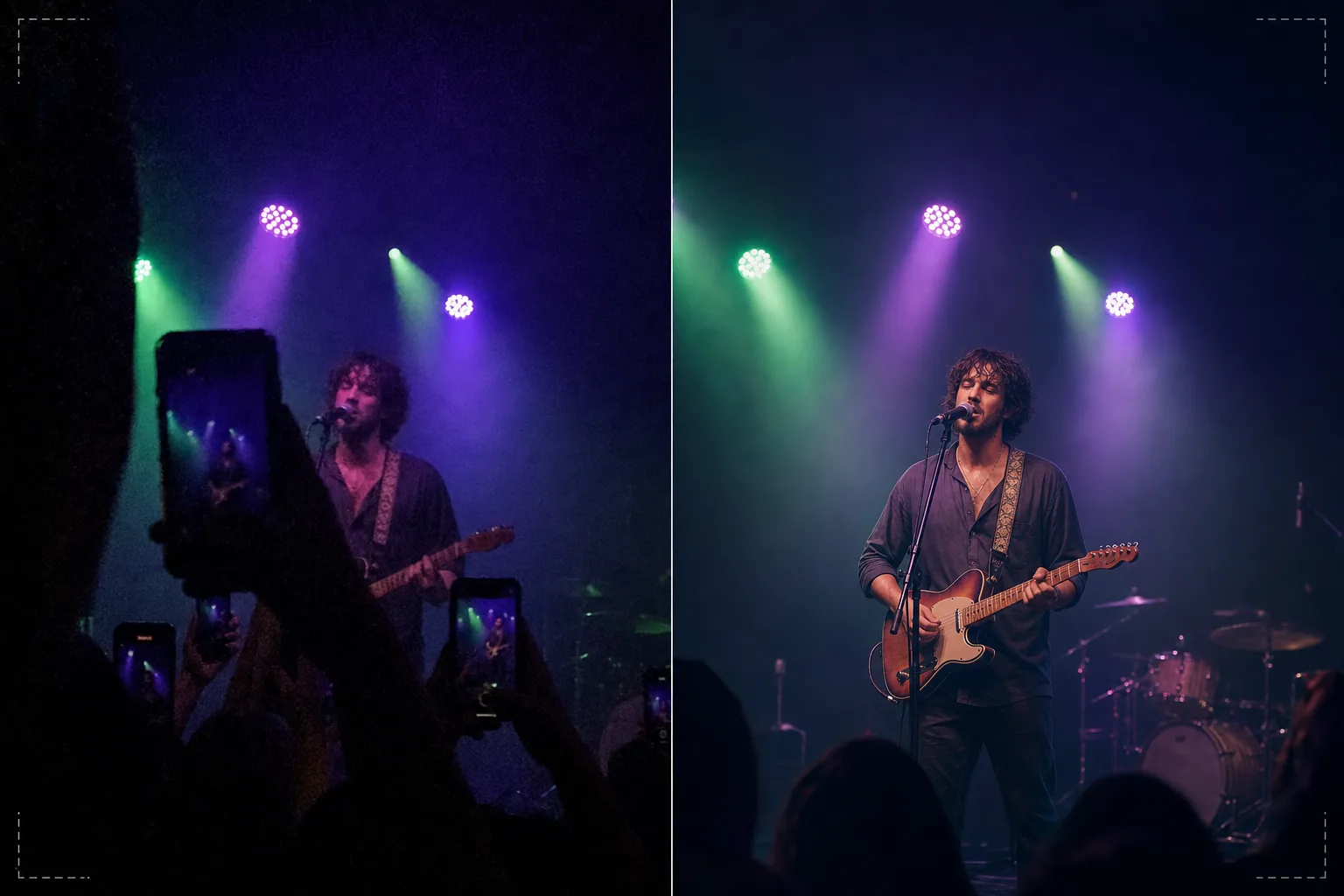
Recupera le foto di concerti ed eventi scure e rumorose trasformandole in ricordi condivisibili. Questo modello riduce drasticamente il rumore in condizioni di scarsa illuminazione, recupera i dettagli dagli scatti sottoesposti, corregge le dominanti di colore aggressive dell'illuminazione del palco, rimuove braccia e telefoni che bloccano la visuale e mette a fuoco l'artista o il soggetto dell'evento.
Prova gratis questo modelloPersonal template preview
Cosa fa questo modello
Recupera le foto difficili scattate a concerti, festival, eventi sportivi ed esibizioni al chiuso, dove le condizioni di illuminazione mettono in difficoltà le fotocamere degli smartphone. Le foto dei concerti sono gli scatti tecnicamente più difficili che le persone fanno regolarmente: la luce estremamente scarsa impone un rumore ISO elevato, l'illuminazione del palco con colori misti crea bizzarre dominanti di colore e la distanza dal palco rende volti e dettagli piccoli e poco nitidi. AI Enhance applica una riduzione del rumore intelligente che elimina il pattern di grana recuperando al contempo il dettaglio sottostante, corregge le dominanti viola, verdi e rosse dell'illuminazione del palco per rivelare toni naturali di pelle e strumenti, e mette a fuoco l'artista per far risaltare le espressioni del viso e i dettagli degli strumenti. Magic Eraser rimuove le braccia alzate, i telefoni e le teste di altri spettatori che bloccano la tua visuale.
Impostazioni del modello
| Riduzione del rumore | Riduzione del rumore con IA (recupera il dettaglio dalla grana ad alti ISO fino a ISO 12800) |
| Correzione del colore | Rimozione delle dominanti dell'illuminazione del palco (viola, verde, rosso, blu neutralizzati) |
| Recupero delle ombre | Recupero delle aree sottoesposte fino a 3 stop |
| Rimozione della folla | Rimozione di braccia alzate, telefoni e teste che ostruiscono |
| Nitidezza del soggetto | Nitidezza selettiva di artista/palco (preserva l'atmosfera del bokeh) |
Come usare questo modello
Carica la tua foto del concerto
Carica foto da telefono o fotocamera scattate a concerti, festival, spettacoli teatrali, show comici o eventi sportivi. Il modello gestisce le condizioni estreme che questi luoghi presentano: esposizioni quasi al buio, luci del palco molto colorate, sfocatura da movimento degli artisti in movimento e visuali ostruite dagli spettatori.
Riduzione del rumore e recupero dei dettagli
AI Enhance elimina la grana del rumore ad alti ISO preservando il dettaglio sottostante dell'immagine. Le ombre sottoesposte vengono recuperate per rivelare volti, strumenti ed elementi del palco quasi invisibili nello scatto originale. La riduzione del rumore è calibrata per mantenere la qualità atmosferica del luogo anziché rendere l'immagine artificialmente liscia.
Correzione di colore e illuminazione
Le dominanti di colore aggressive dell'illuminazione del palco vengono corrette in modo che toni della pelle, abbigliamento e strumenti appaiano in colori riconoscibili. Puoi scegliere di neutralizzare completamente l'illuminazione del palco per un aspetto naturale, oppure correggere parzialmente per conservare parte dell'illuminazione colorata atmosferica riducendo le dominanti più estreme.
Esporta i tuoi ricordi migliorati
Scarica la foto migliorata per condividerla sui social media, archiviarla personalmente o stamparla. Il risultato preserva la qualità atmosferica dell'evento dal vivo rendendo al contempo l'immagine abbastanza chiara perché volti, espressioni e momenti siano visibili e significativi come ricordi.
Consigli da professionista per risultati ottimali
- ✓Scatta nei momenti di illuminazione del palco intensa — riflettori, pirotecnica, transizioni dello schermo — anziché durante i segmenti scuri e atmosferici. Il modello può recuperare un dettaglio delle ombre significativo, ma le foto catturate nei momenti più luminosi dispongono dei maggiori dati sottostanti su cui lavorare.
- ✓Usa la modalità raffica quando fotografi artisti in movimento. La sfocatura da movimento del gesto della mano di un cantante o del braccio di un chitarrista che pizzica le corde non può essere rimossa a posteriori, ma un fotogramma in una raffica di dieci potrebbe catturare un momento nitido che il modello può poi migliorare.
- ✓Tieni il telefono con entrambe le mani e appoggia i gomiti al corpo per ridurre al minimo il tremolio. Il mosso da fotocamera aggrava la difficoltà della fotografia di concerti in scarsa illuminazione. Una foto sorgente più stabile fornisce all'algoritmo di riduzione del rumore dati più puliti e produce un'immagine finale più nitida.
Strumenti
Domande frequenti
Può correggere foto quasi completamente scure?
+
Il modello può recuperare il dettaglio da scatti sottoesposti di 2-3 stop — immagini in cui riesci a malapena a vedere il soggetto. Oltre i 3 stop di sottoesposizione, i dati del sensore sono per lo più rumore e l'immagine recuperata mostrerà artefatti significativi. Più luminosa è l'acquisizione originale, migliore è il risultato.
E per quanto riguarda i filmati video dei concerti?
+
Estrai i migliori fotogrammi fissi dal video del tuo concerto ed elaborali singolarmente. I fotogrammi video hanno una risoluzione inferiore alle foto fisse, ma traggono notevole beneficio dalla riduzione del rumore e dalla correzione del colore, producendo immagini condivisibili da filmati troppo rumorosi come video.
La rimozione delle ostruzioni della folla apparirà naturale?
+
Rimuovere telefoni alzati, braccia e teste dalla folla davanti a te funziona bene quando l'ostruzione copre una piccola porzione dell'inquadratura. L'IA ricostruisce il palco e lo sfondo dietro gli elementi rimossi. Rimuovere grandi ostruzioni che coprono la maggior parte del soggetto è meno efficace.
Trasforma gli scatti scuri dei concerti in ricordi vividi
Carica le tue foto dell'evento e recupera i momenti che la tua fotocamera ha faticato a catturare nella difficile illuminazione del locale.
Provalo gratisRelated templates
More personal templates for your workflow.
Crea foto identificative conformi per visti, patenti di guida e documenti d'identità nazionali con colori di sfondo, dimensioni della testa e requisiti di espressione facciale adeguati.
Migliora le foto di laurea con la pulizia dello sfondo, il berretto e l'abito Color correction, la rimozione delle imperfezioni e la nitidezza pronta per la stampa per cornici e annunci.
Crea bellissime foto per cartoline di nascita con sfondi tenui, gradazione del colore delicata, rimozione del disordine ospedaliero e dimensioni pronte per la stampa per la spedizione.
Prepara foto di famiglia e ritratti per biglietti di auguri natalizi con sfondi festivi, gradazione di colori caldi, effetti neve e dimensioni standard dei biglietti per la stampa.
Ripristina e migliora le foto dei tributi commemorativi con ritocchi delicati, semplificazione dello sfondo, gradazione dei colori calda e rispettosa e dimensioni pronte per la stampa per i servizi.
Trasforma le foto dei rifugi e dei salvataggi degli animali domestici con la sostituzione dello sfondo, la correzione dell'illuminazione e il miglioramento dei dettagli della pelliccia per aiutare gli animali a trovare casa più velocemente.