
Foto tributo commemorativo
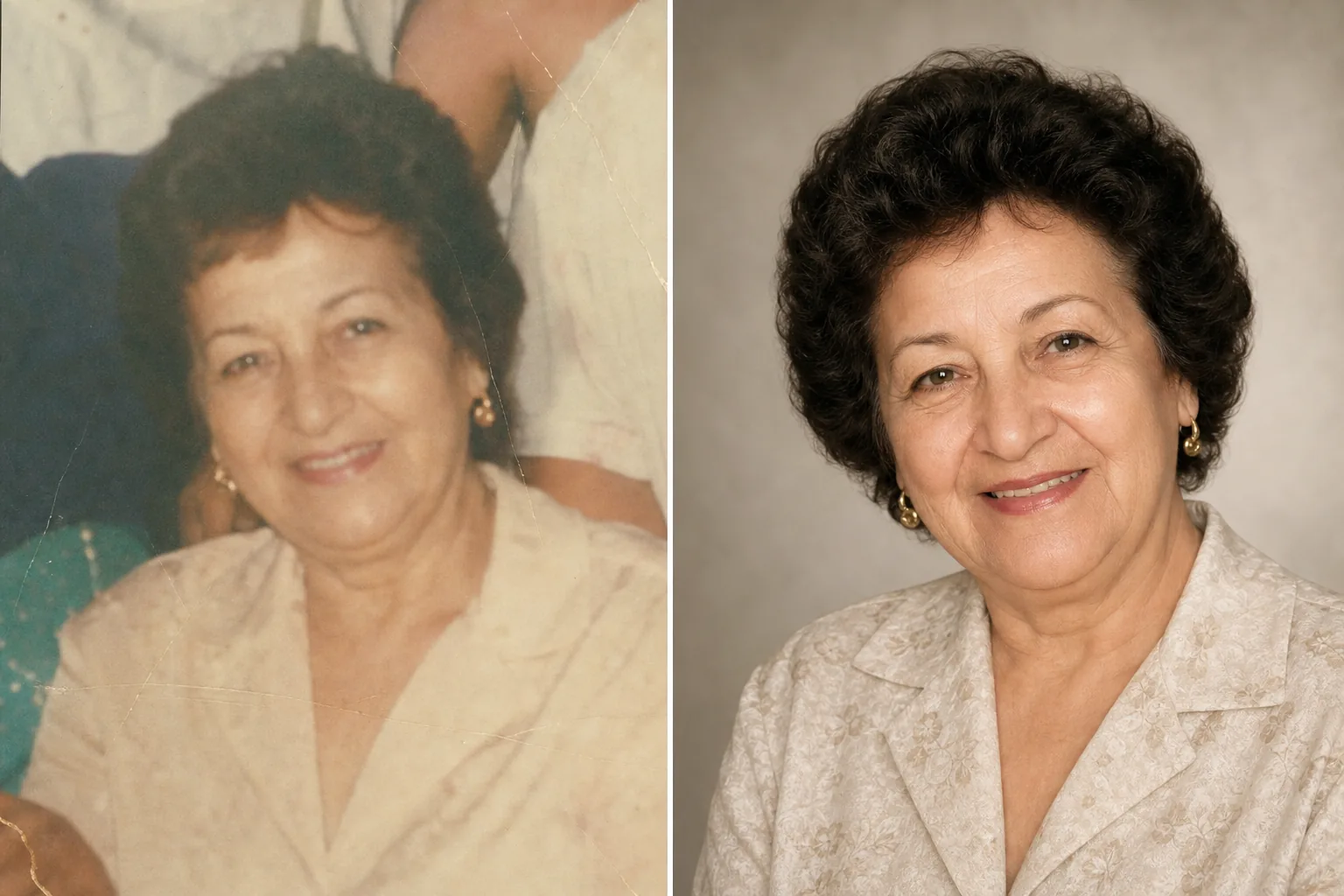
Onora le persone care con una foto tributo splendidamente valorizzata. Questo modello ripristina con delicatezza le foto più vecchie, ne migliora la nitidezza e il colore a partire da originali sbiaditi, rimuove gli sfondi che distraggono e produce un ritratto dignitoso e pronto per la stampa, adatto a cerimonie commemorative, necrologi e allestimenti di ricordo duraturi.
Prova questo modello gratisPersonal template preview
Cosa fa questo modello
Prepara ritratti per cerimonie commemorative, necrologi, programmi funebri, allestimenti di ricordo e montaggi tributo con la cura e il rispetto che l'occasione richiede. Spesso la migliore foto disponibile di una persona cara è stata scattata anni fa: può essere un'istantanea spontanea, una foto di gruppo da cui isolarla o una stampa sbiadita che è stata scansionata. AI Enhance ripristina colore e nitidezza delle foto vecchie o sbiadite, schiarisce le immagini sottoesposte e attenua con delicatezza piccole imperfezioni preservando la somiglianza autentica della persona. Magic Eraser rimuove gli elementi di disturbo sullo sfondo e può isolare una persona da una foto di gruppo. Il tono complessivo è caldo, dignitoso e rispettoso, mai eccessivamente elaborato.
Impostazioni del modello
| Restauro della foto | Recupera colore e dettaglio da foto sbiadite o invecchiate |
| Sfondo | Sfumatura neutra delicata, colore pieno o originale semplificato |
| Gradazione del colore | Calda e dignitosa (toni naturali della pelle, calore delicato) |
| Livello di miglioramento | Discreto e rispettoso (preserva la somiglianza autentica) |
| Dimensioni di output | 8×10 in a 300 DPI (ritratto commemorativo standard) o personalizzato |
Come usare questo modello
Carica il ritratto
Carica la migliore foto disponibile della persona: un ritratto dedicato, un ritaglio da una foto di gruppo o la scansione di una fotografia stampata. Il modello gestisce foto di qualsiasi epoca e condizione, comprese vecchie stampe con sbiadimento del colore, pieghe e piccoli danni.
Ripristina e migliora
AI Enhance recupera i colori sbiaditi, rende più nitidi i dettagli ammorbiditi e corregge la dominante gialla o blu che si sviluppa nelle fotografie invecchiate. Per le foto scansionate da stampe, gli artefatti di scansione e la trama della carta vengono ridotti. Il miglioramento è volutamente discreto: l'obiettivo è presentare la persona com'era, con nitidezza e calore, senza alterarne l'aspetto.
Sfondo e inquadratura
Lo sfondo viene sostituito con un'opzione delicata e neutra: una sfumatura morbida, un colore pieno attenuato o una versione ammorbidita dell'ambientazione originale. Se la foto proviene da un gruppo, la persona viene isolata e inquadrata come ritratto a sé stante. La composizione viene adattata alle proporzioni standard di un ritratto commemorativo.
Esporta per cerimonie e esposizione
Scarica a 8×10 pollici a 300 DPI per la stampa presso l'agenzia funebre e durante la cerimonia commemorativa, oppure in dimensioni personalizzate per pubblicazioni di necrologi, biglietti del ricordo ed esposizioni tributo digitali. L'output è adatto sia alla stampa a colori sia in bianco e nero.
Consigli professionali per risultati ottimali
- ✓Scegli una foto in cui l'espressione e la personalità della persona risaltino, anche se la qualità tecnica non è perfetta. Il modello può migliorare notevolmente la qualità dell'immagine, ma il legame emotivo con la foto conta più della risoluzione.
- ✓Quando scansioni foto stampate, usa il DPI più alto supportato dal tuo scanner (minimo 600 DPI) e scansiona su una superficie pulita e piana. Le scansioni ad alta risoluzione forniscono al modello più dati su cui lavorare per ripristinare i dettagli e correggere lo sbiadimento.
- ✓Se non esiste un ritratto singolo, il modello può isolare una persona da una foto di gruppo. Scegli una foto di gruppo in cui il viso della persona sia chiaramente visibile, non coperto e rivolto verso la fotocamera per ottenere il miglior risultato di isolamento.
- ✓Valuta di realizzare sia una versione a colori sia una in bianco e nero. I ritratti commemorativi in bianco e nero hanno una qualità intramontabile e dignitosa e funzionano bene quando la foto a colori originale presenta uno sbiadimento marcato o danni di colore non del tutto recuperabili.
Strumenti
Domande frequenti
Può ripristinare foto molto danneggiate?
+
Il modello gestisce danni moderati: sbiadimento, alterazioni di colore, pieghe lievi e morbidezza dovuta all'età. Danni gravi come grandi strappi, forti macchie d'acqua o porzioni mancanti consistenti richiedono un restauro manuale da parte di un ritoccatore professionista. Il modello è più efficace quando il viso e i tratti principali sono visibili e intatti nell'originale.
La foto migliorata avrà un aspetto naturale?
+
Sì. Il miglioramento è calibrato per essere discreto e rispettoso. La persona apparirà come sé stessa: non più giovane, non più anziana, non diversa. L'obiettivo è presentare la foto come se fosse stata scattata con una luce migliore, una fotocamera migliore e in una giornata migliore, preservando ogni aspetto di chi era la persona.
Posso usarlo per una presentazione tributo in video?
+
Sì. Elabora ogni foto con il modello usando impostazioni di sfondo e colore coerenti per una presentazione armoniosa. Il trattamento uniforme unisce foto di epoche e fonti diverse in un tributo visivo unitario.
Una foto tributo bella quanto i ricordi
Carica una qualsiasi foto di una persona cara e ricevi un ritratto delicatamente ripristinato e valorizzato con calore, pronto per le cerimonie commemorative e per un ricordo duraturo.
Provalo gratisRelated templates
More personal templates for your workflow.
Crea foto identificative conformi per visti, patenti di guida e documenti d'identità nazionali con colori di sfondo, dimensioni della testa e requisiti di espressione facciale adeguati.
Migliora le foto di laurea con la pulizia dello sfondo, il berretto e l'abito Color correction, la rimozione delle imperfezioni e la nitidezza pronta per la stampa per cornici e annunci.
Migliora le foto di concerti ed eventi con la riduzione del rumore in condizioni di scarsa illuminazione, l'illuminazione del palco correzione del colore, la rimozione delle distrazioni della folla e il recupero dei dettagli dagli scatti in luoghi bui.
Crea bellissime foto per cartoline di nascita con sfondi tenui, gradazione del colore delicata, rimozione del disordine ospedaliero e dimensioni pronte per la stampa per la spedizione.
Prepara foto di famiglia e ritratti per biglietti di auguri natalizi con sfondi festivi, gradazione di colori caldi, effetti neve e dimensioni standard dei biglietti per la stampa.
Trasforma le foto dei rifugi e dei salvataggi degli animali domestici con la sostituzione dello sfondo, la correzione dell'illuminazione e il miglioramento dei dettagli della pelliccia per aiutare gli animali a trovare casa più velocemente.