
Ritocco delle foto di laurea
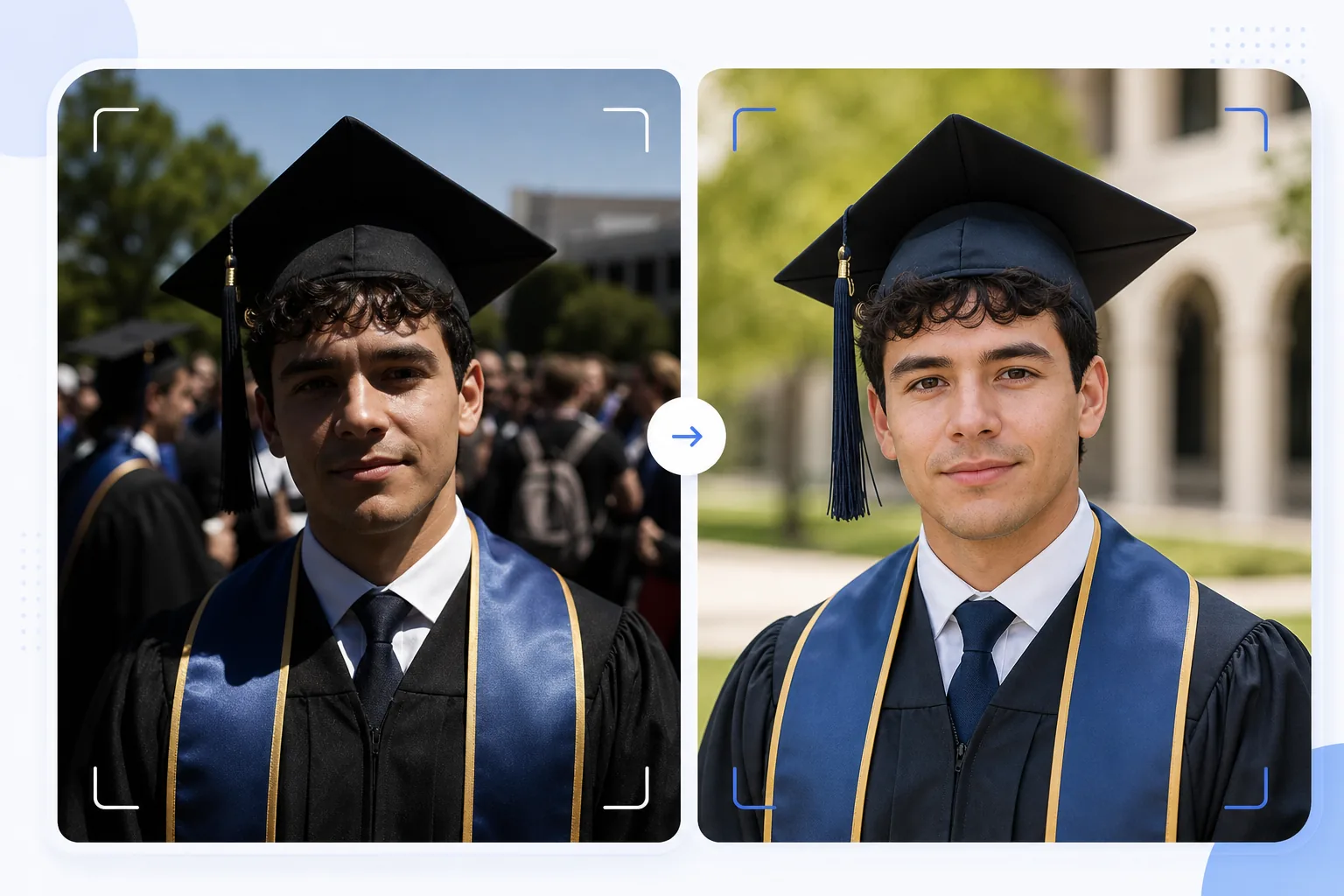
Trasforma le istantanee spontanee della laurea in ritratti degni di una cornice. Questo modello corregge la luce esterna dura tipica delle cerimonie di laurea, rimuove gli intrusi e la confusione della folla dietro il laureato, esalta i colori del tocco e della toga e rende l'immagine più nitida per la stampa in grandi formati da appendere a pareti e mensole.
Prova gratis questo modelloPersonal template preview
Cosa fa questo modello
Trasforma le istantanee veloci del giorno della laurea in ritratti rifiniti, adatti per cornici, annunci e condivisione sui social media. Le cerimonie di laurea vengono fotografate in condizioni difficili: il sole forte di mezzogiorno crea ombre da occhiaie sotto la visiera del tocco, gli sfondi affollati sono caotici e i colori delle toghe appaiono slavati alla luce diretta del sole. AI Enhance corregge l'esposizione per riempire le ombre sotto il tocco, ripristina i colori intensi di toghe e stole e rende più nitidi i dettagli del viso che risultano sfocati negli scatti frettolosi tra la folla. Magic Eraser rimuove gli intrusi, le persone visibili dietro il laureato, i cartelli che distraggono e gli altri elementi superflui della cerimonia per isolare il laureato su uno sfondo più pulito.
Impostazioni del modello
| Recupero delle ombre | Riempimento delle ombre sotto il tocco (schiarisce il viso senza bruciare le alte luci) |
| Esaltazione del colore della toga | Ripristino del colore del tessuto per toghe nere, blu navy, cardinale e oro |
| Levigatura della pelle | Lieve riduzione delle imperfezioni preservando la texture naturale della pelle |
| Pulizia dello sfondo | Rimuovere intrusi e persone della folla dietro il laureato |
| Risoluzione di output | 5000px sul lato lungo (pronto per la stampa a 300 DPI fino a 16×12 pollici) |
| Nitidezza | Nitidezza ottimizzata per i ritratti (dettaglio del viso + texture del tessuto della toga) |
Come usare questo modello
Carica la tua foto di laurea
Carica qualsiasi foto della cerimonia di laurea: un ritratto in posa, uno scatto mentre attraversi il palco, il lancio del tocco o un momento spontaneo di festa. Il modello gestisce foto scattate con smartphone e reflex in qualsiasi condizione di luce, dal sole intenso all'aperto agli auditorium interni poco illuminati.
Correggi luce e colore
AI Enhance corregge le ombre dure proiettate dal tocco quadrato, che di solito scuriscono gli occhi e la parte superiore del viso del laureato. I colori di toga e stola vengono ripristinati nelle loro autentiche tonalità intense: le toghe nere riacquistano profondità invece di apparire grigio scuro, e le stole d'onore mostrano tutta la loro saturazione di colore.
Rimuovi le distrazioni
Magic Eraser rimuove le persone della folla, gli altri laureati, le sedie pieghevoli e i cartelli visibili dietro il soggetto. L'IA ricostruisce lo sfondo con una versione pulita del luogo (prato, facciata dell'edificio o tenda), creando una composizione da ritratto a partire da una scena affollata.
Esporta per la stampa e la condivisione
Scarica a 5000px sul lato lungo per stampe incorniciate fino a 16×12 pollici a 300 DPI, oppure a 2000px per i social media e gli annunci digitali. Il profilo colore è impostato su sRGB per la visualizzazione su schermo o Adobe RGB per la stampa professionale.
Consigli da professionisti per risultati ottimali
- ✓Se puoi pianificare in anticipo, scatta il ritratto formale subito dopo la cerimonia in una zona in ombra anziché alla luce diretta del sole. L'ombra elimina le ombre dure del tocco, che sono il problema più difficile da correggere. Il modello può correggere le ombre del sole, ma l'ombra produce il risultato più naturale.
- ✓Cattura sia un ritratto in posa tradizionale sia un momento spontaneo di festa (abbracciare la famiglia, lanciare il tocco). Il modello migliora entrambi gli stili, e avere una versione rifinita di ciascuno ti dà la scelta tra stampe incorniciate e post sui social media.
- ✓Per le foto di gruppo con la famiglia, posiziona il laureato leggermente davanti al gruppo. Questo crea una separazione di profondità naturale che aiuta Magic Eraser a isolare e rimuovere le distrazioni sullo sfondo senza interessare i familiari.
Strumenti
Domande frequenti
Può correggere foto di laurea sfocate?
+
AI Enhance può rendere più nitide le foto con una leggera mancanza di nitidezza dovuta a un piccolo tremolio della mano o a una messa a fuoco automatica leggermente imprecisa. Tuttavia, le foto molto sfocate a causa di un forte mosso (come uno scatto mentre si attraversa il palco ripreso da lontano) non possono essere recuperate del tutto: il modello migliora i dettagli ma non può creare una nitidezza mai catturata.
E le foto delle cerimonie al chiuso?
+
Le foto di laurea al chiuso con illuminazione da auditorium (giallo caldo o fluorescente misto) vengono corrette nella temperatura colore. Il modello regola il bilanciamento del bianco in modo che gli incarnati appaiano naturali e i colori delle toghe risultino fedeli. Il rumore in condizioni di scarsa luce dovuto a impostazioni ISO elevate viene ridotto preservando i dettagli del viso.
Posso rimuovere completamente lo sfondo?
+
Sì. Puoi usare la pulizia dello sfondo per rimuovere tutti gli elementi dello sfondo e sostituirli con un colore pieno o una sfumatura per un effetto da ritratto in studio. Funziona bene quando lo sfondo originale della cerimonia è troppo affollato per una rimozione selettiva.
Ritratti di laurea degni di una cornice dalle istantanee della cerimonia
Carica le tue foto del giorno della laurea e ottieni ritratti migliorati e pronti per la stampa, con sfondi puliti e colori vivaci di tocco e toga.
Provalo gratisRelated templates
More personal templates for your workflow.
Crea foto identificative conformi per visti, patenti di guida e documenti d'identità nazionali con colori di sfondo, dimensioni della testa e requisiti di espressione facciale adeguati.
Migliora le foto di concerti ed eventi con la riduzione del rumore in condizioni di scarsa illuminazione, l'illuminazione del palco correzione del colore, la rimozione delle distrazioni della folla e il recupero dei dettagli dagli scatti in luoghi bui.
Crea bellissime foto per cartoline di nascita con sfondi tenui, gradazione del colore delicata, rimozione del disordine ospedaliero e dimensioni pronte per la stampa per la spedizione.
Prepara foto di famiglia e ritratti per biglietti di auguri natalizi con sfondi festivi, gradazione di colori caldi, effetti neve e dimensioni standard dei biglietti per la stampa.
Ripristina e migliora le foto dei tributi commemorativi con ritocchi delicati, semplificazione dello sfondo, gradazione dei colori calda e rispettosa e dimensioni pronte per la stampa per i servizi.
Trasforma le foto dei rifugi e dei salvataggi degli animali domestici con la sostituzione dello sfondo, la correzione dell'illuminazione e il miglioramento dei dettagli della pelliccia per aiutare gli animali a trovare casa più velocemente.