
Biglietto di annuncio neonato
Trasforma le foto scattate in ospedale e nel primo giorno in splendide immagini per biglietti di annuncio. Questo modello rimuove il disordine dello sfondo ospedaliero, applica una gradazione del colore calda e tenue, isola il neonato su sfondi puliti o pastello e produce immagini pronte per la stampa nelle dimensioni standard dei biglietti per la spedizione fisica e la condivisione digitale.
Prova gratuitamente questo modelloPersonal template preview
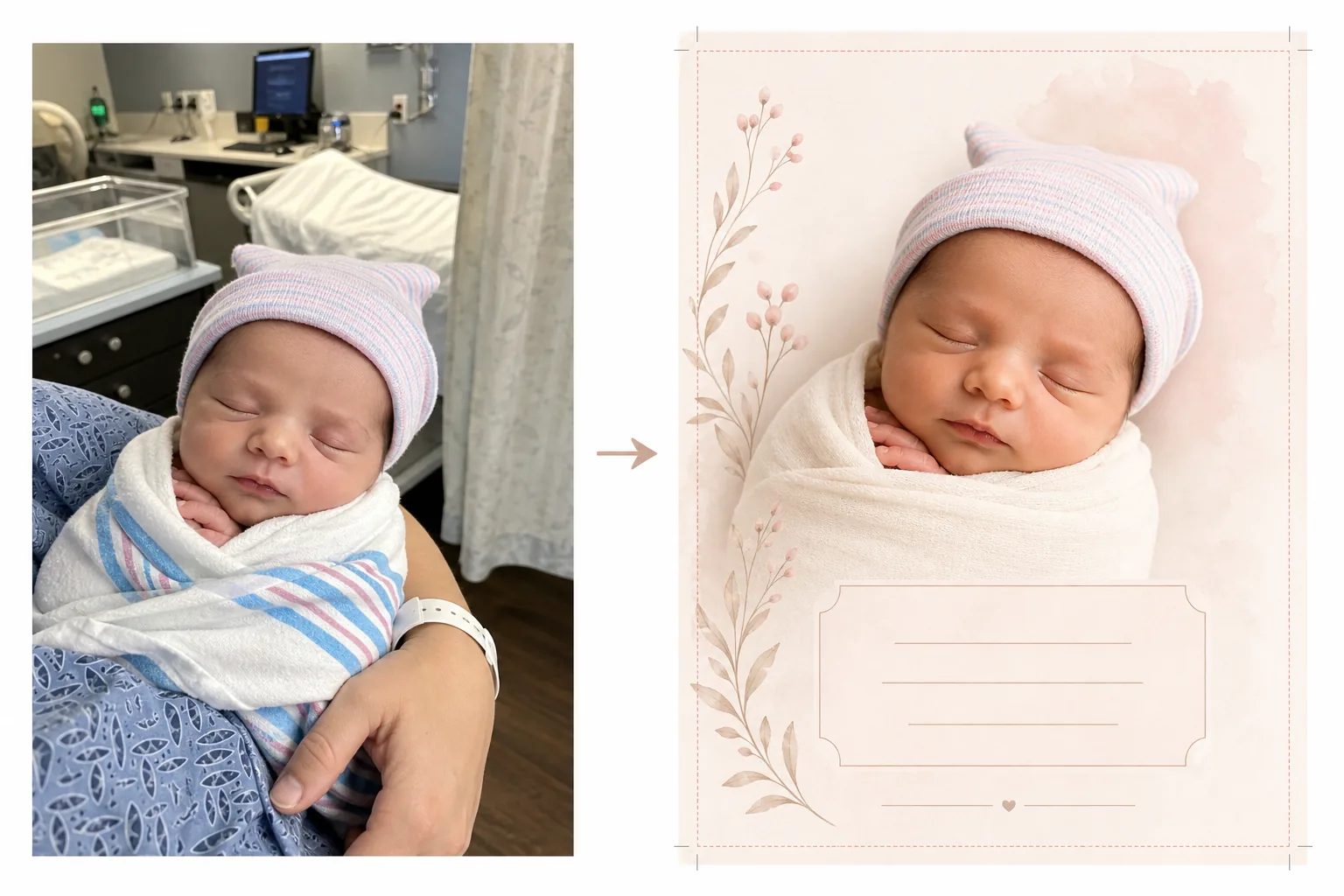
Cosa fa questo modello
Prepara le foto del neonato per i biglietti di annuncio di nascita trasformando le istantanee della stanza d'ospedale in immagini pulite e tenere, adatte sia ai biglietti stampati sia agli annunci digitali. Le stanze d'ospedale hanno attrezzature mediche, illuminazione fluorescente e sfondi istituzionali che sminuiscono l'intimità di una foto di un neonato. Background Eraser isola il bambino e sostituisce l'ambiente ospedaliero con uno sfondo morbido e pulito in tonalità bianche, crema o pastello. AI Enhance corregge la fredda illuminazione fluorescente dell'ospedale con toni caldi e delicati che fanno apparire la pelle sana e naturale. Il risultato è una foto degna di un annuncio, interamente concentrata sul nuovo arrivato, senza alcun contesto medico visibile.
Impostazioni del modello
| Sfondo | Bianco tenue, crema, rosa cipria o verde salvia (adatto ai biglietti di annuncio) |
| Gradazione del colore | Toni caldi e delicati (corregge il fluorescente dell'ospedale in calore naturale) |
| Tono della pelle | Miglioramento naturale della pelle del neonato (morbida, calda, sana) |
| Dimensioni del biglietto | 5×7 in, 4×6 in o A6 (dimensioni standard dei biglietti di annuncio) |
| Risoluzione di output | 300 DPI alle dimensioni del biglietto (pronto per tipografia e stampante domestica) |
Come usare questo modello
Carica la foto del neonato
Carica una foto del neonato — nella culla dell'ospedale, tra le braccia di un genitore o avvolto in una coperta. Il modello gestisce varie composizioni, tra cui primi piani del viso, pose avvolte a figura intera e ritratti genitore-bambino. I camici dell'ospedale, i monitor e i braccialetti visibili sul genitore vengono ripuliti automaticamente.
Trasformazione dello sfondo e del colore
Background Eraser rimuove la stanza d'ospedale e la sostituisce con uno sfondo morbido e pulito nel colore scelto. La fredda illuminazione fluorescente viene corretta in toni caldi e naturali. La pelle viene migliorata delicatamente per apparire sana e naturale, con il caldo e morbido bagliore associato alla fotografia di neonati.
Formattazione del biglietto
L'immagine viene formattata secondo le dimensioni del biglietto scelte, con margini di abbondanza adeguati per la stampa professionale. Viene riservato spazio per le sovrapposizioni di testo — nome, data, peso e lunghezza — posizionate secondo i layout standard dei biglietti di annuncio, con la foto del bambino come fulcro visivo.
Esporta per la stampa e la condivisione
Scarica a 300 DPI nelle dimensioni del biglietto scelte per la stampa presso una tipografia professionale, un servizio di biglietti online o una stampante domestica. Viene fornita anche una versione ottimizzata per il web per gli annunci via e-mail e la condivisione sui social media.
Consigli da professionisti per risultati ottimali
- ✓Per la foto più utilizzabile per un biglietto di annuncio, cattura un primo piano del viso del neonato mentre dorme. I bambini addormentati hanno espressioni rilassate e serene che si fotografano splendidamente e funzionano bene come punto focale del layout di un biglietto.
- ✓Avvolgi il bambino in una coperta bianca o di colore chiaro prima di fotografarlo. Questo crea un confine visivo netto tra il bambino e lo sfondo che aiuta Background Eraser a produrre il bordo più pulito possibile, soprattutto intorno alle minuscole dita e ai capelli sottili.
- ✓Se le mani o le braccia di un genitore sono visibili mentre tengono il bambino, va bene — il modello migliora anche le tonalità della pelle del genitore. I braccialetti dell'ospedale al polso del genitore vengono rimossi automaticamente per un aspetto più pulito.
- ✓Scatta più foto e scegli quella con l'espressione e la posizione delle mani migliori. I neonati si muovono in modo imprevedibile — catturare più opzioni garantisce di avere uno scatto in cui le minuscole dita, la bocca e gli occhi appaiono al massimo della loro fotogenia.
Strumenti
Domande frequenti
Può rimuovere le attrezzature ospedaliere dallo sfondo?
+
Sì. Il modello è progettato specificamente per questo scopo — rimuove culle d'ospedale, monitor, aste per flebo, tende e luci fluorescenti a soffitto, sostituendole con uno sfondo pulito e adatto a un annuncio. Il bambino e qualsiasi genitore che lo tiene vengono isolati dall'ambiente medico.
Quali dimensioni del biglietto sono disponibili?
+
Sono supportate le dimensioni standard dei biglietti di annuncio: 5×7 pollici (le più popolari per gli annunci spediti per posta), 4×6 pollici (stile cartolina) e A6 (standard internazionale). L'output include margini di abbondanza adeguati per la stampa professionale.
Posso aggiungere del testo al biglietto?
+
Il modello prepara la foto con spazio riservato alle sovrapposizioni di testo ma non aggiunge testo direttamente. Usa l'immagine esportata in Canva, Shutterfly, Minted o qualsiasi servizio di progettazione di biglietti per aggiungere il nome del bambino, la data di nascita, il peso, la lunghezza e un messaggio personale.
Annuncia il tuo nuovo arrivato con una splendida foto
Carica le foto scattate in ospedale o nel primo giorno e ottieni immagini morbide, calde e pronte per la stampa, perfette per i biglietti di annuncio di nascita.
Provalo gratisRelated templates
More personal templates for your workflow.
Crea foto identificative conformi per visti, patenti di guida e documenti d'identità nazionali con colori di sfondo, dimensioni della testa e requisiti di espressione facciale adeguati.
Migliora le foto di laurea con la pulizia dello sfondo, il berretto e l'abito Color correction, la rimozione delle imperfezioni e la nitidezza pronta per la stampa per cornici e annunci.
Migliora le foto di concerti ed eventi con la riduzione del rumore in condizioni di scarsa illuminazione, l'illuminazione del palco correzione del colore, la rimozione delle distrazioni della folla e il recupero dei dettagli dagli scatti in luoghi bui.
Prepara foto di famiglia e ritratti per biglietti di auguri natalizi con sfondi festivi, gradazione di colori caldi, effetti neve e dimensioni standard dei biglietti per la stampa.
Ripristina e migliora le foto dei tributi commemorativi con ritocchi delicati, semplificazione dello sfondo, gradazione dei colori calda e rispettosa e dimensioni pronte per la stampa per i servizi.
Trasforma le foto dei rifugi e dei salvataggi degli animali domestici con la sostituzione dello sfondo, la correzione dell'illuminazione e il miglioramento dei dettagli della pelliccia per aiutare gli animali a trovare casa più velocemente.