
Foto prodotto occhiali da sole
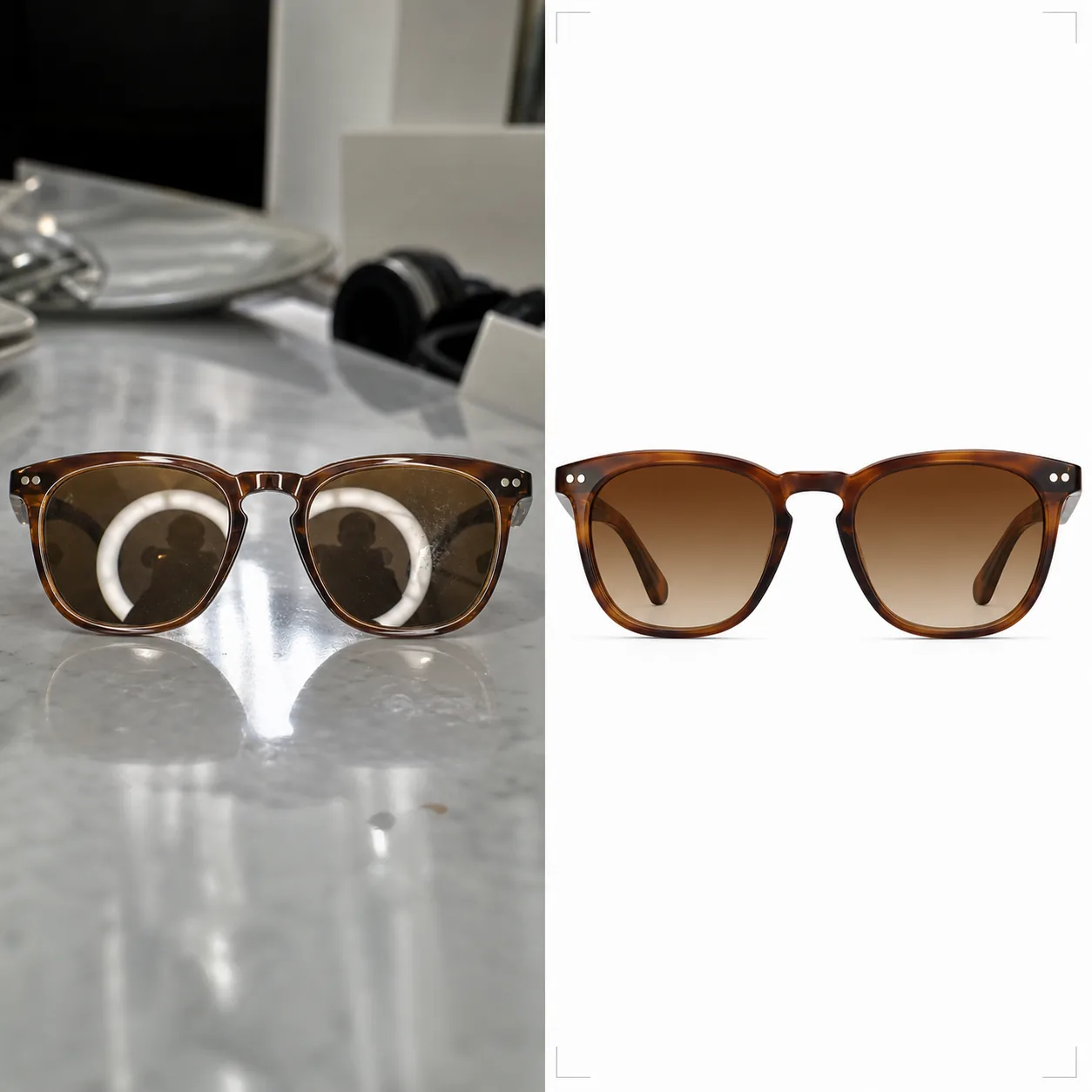
Realizza fotografie di occhiali da sole pronte per l'e-commerce con sfondi puliti, colori delle lenti accurati e superfici prive di riflessi. Questo modello rimuove i riflessi indesiderati da lenti e montature, sostituisce gli sfondi disordinati con bianco puro o superfici stilizzate e valorizza i dettagli dei materiali, così i clienti possono vedere chiaramente le texture della montatura, la costruzione delle cerniere e le transizioni sfumate delle lenti.
Prova gratis questo modelloE-commerce template preview
Cosa fa questo modello
Affronta le sfide uniche della fotografia di occhiali per la vendita al dettaglio online. Gli occhiali da sole sono tra i prodotti più difficili da fotografare perché ogni superficie curva riflette lo studio, la fotocamera e il fotografo. Background Eraser isola gli occhiali da sole da qualsiasi superficie e sostituisce lo sfondo con bianco puro (conforme ai marketplace), grigio neutro o una superficie stilizzata come marmo o legno. AI Enhance rimuove i riflessi indesiderati da lenti e montature metalliche preservando al contempo la riflettività intenzionale che rende il prodotto attraente. I colori della tinta delle lenti vengono corretti per corrispondere alle specifiche del produttore, così le lenti ambrate, verdi, grigie e sfumate mostrano il loro vero colore sullo schermo. Le texture della montatura — la grana dell'acetato, la spazzolatura del metallo, il titanio opaco — vengono nitidate per dare ai clienti la sicurezza di un esame in negozio.
Impostazioni del modello
| Sfondo | Bianco puro (#FFFFFF), grigio neutro o superficie stilizzata (marmo, legno, tessuto) |
| Rimozione dei riflessi | Rimuovere i riflessi di studio, fotocamera e fotografo da lenti e montature |
| Correzione della tinta delle lenti | Far corrispondere il colore delle lenti alle specifiche del produttore (ambra, grigio, verde, sfumato) |
| Miglioramento dei dettagli della montatura | Nitidare la grana dell'acetato, la spazzolatura del metallo, la ferramenta delle cerniere e il logo sull'asta |
| Risoluzione di output | 3000×3000px (quadrato 1:1 per i marketplace o 4:3 per i cataloghi di marca) |
Come usare questo modello
Carica la foto dei tuoi occhiali da sole
Carica una foto prodotto degli occhiali da sole — in piano, inclinati, chiusi o sul viso di una modella. Il modello gestisce tutte le angolazioni. Per la massima accuratezza della tinta delle lenti, assicurati che la foto originale sia stata scattata con luce diurna neutra o con illuminazione da studio a 5500K.
Pulisci sfondo e riflessi
Background Eraser isola gli occhiali da sole e sostituisce lo sfondo. I riflessi sulle lenti che mostrano l'allestimento dello studio, la ring light o il fotografo vengono rimossi, preservando al contempo i riflessi speculari naturali che trasmettono la qualità del materiale delle lenti. I riflessi su montature in acetato lucido o metallo lucidato vengono puliti allo stesso modo.
Correggi il colore e migliora i dettagli
La tinta delle lenti viene corretta per mostrare il colore esatto che i clienti vedranno di persona. AI Enhance nitida la texture della montatura — il motivo della grana dell'acetato, la finitura spazzolata del titanio, la superficie lucidata dell'acciaio inossidabile — così i clienti possono valutare la qualità costruttiva dalla sola foto.
Esporta per gli annunci
Scarica a 3000×3000px per gli annunci su Amazon, Shopify e marketplace, oppure con rapporto 4:3 per i layout dei cataloghi di marca. La versione con sfondo bianco soddisfa i requisiti di Amazon e Google Shopping per le immagini principali del prodotto.
Consigli da professionisti per i migliori risultati
- ✓Fotografa gli occhiali da sole leggermente aperti (aste inclinate a circa 20 gradi) anziché completamente chiusi o completamente aperti. Questa angolazione mostra il maggior numero di dettagli della montatura — aste, cerniere e branding interno dell'asta — in un solo scatto.
- ✓Posiziona gli occhiali da sole su una superficie opaca anziché riflettente. I tavoli di vetro e i banconi lucidi creano doppi riflessi che complicano la pulizia delle lenti. Un pannello di cartone schiuma bianco funziona perfettamente come superficie di scatto.
- ✓Scatta da più angolazioni: frontale, tre quarti, profilo laterale e chiusi. Il modello elabora ogni immagine in modo coerente e gli annunci sui marketplace con quattro o più angolazioni convertono nettamente meglio rispetto a quelli con una sola immagine.
Strumenti
E-commerce workflow
Product photo hub
Use this template with the full ecommerce product photo workflow for marketplace backgrounds, cleanup, compression, resizing, and listing-ready exports.
View ecommerce product photo workflowDomande frequenti
La tinta delle lenti apparirà accurata sullo schermo?
+
Il modello corregge la tinta delle lenti per farla corrispondere al colore specificato dal produttore con luce diurna neutra (illuminante D65). Per le lenti sfumate, la transizione dallo scuro al chiaro viene preservata con un posizionamento accurato. La calibrazione del monitor lato spettatore resta la variabile rimanente, ma il file in sé è fedele nel colore in sRGB.
Posso mostrare gli occhiali da sole sul viso di una modella?
+
Sì. Quando il modello rileva uno scatto sul viso, preserva la pelle e i tratti del viso della modella pulendo solo i riflessi delle lenti e migliorando i dettagli della montatura. La sostituzione dello sfondo continua a funzionare dietro la modella.
Funziona anche per gli occhiali da vista?
+
Sì. Le lenti da vista trasparenti presentano le stesse sfide di riflesso degli occhiali da sole tinti. Il modello rimuove i riflessi dalle lenti trasparenti preservando al contempo la visibilità del bordo della lente, che mostra ai clienti lo spessore e la qualità del taglio della lente.
Mostra ogni montatura al suo massimo livello di nitidezza e fedeltà
Carica le foto degli occhiali da sole e ottieni immagini prodotto prive di riflessi e fedeli nel colore, pronte per marketplace e cataloghi di marca.
Provalo gratisRelated templates
More e-commerce templates for your workflow.
Modello di sfondo bianco puro per le foto dei prodotti. Impostazioni pronte per Amazon, Shopify e marketplace per immagini di prodotti pulite e professionali che convertono.
Modello di foto per inserzioni ottimizzate per Etsy. Converte gli scatti lifestyle in sfondi bianchi puliti a 2000px, migliora i dettagli dei prodotti fatti a mano e soddisfa le linee guida sulle immagini di Etsy.
Modello di foto per inserzioni ottimizzate per eBay. Sfondo bianco per le immagini della galleria, miglioramento della documentazione sulle condizioni e layout multi-angolo che soddisfano gli standard delle immagini di eBay.
Modello professionale per fotografia di gioielli per anelli, collane e orologi. Controlla i riflessi, migliora la brillantezza delle pietre preziose e fornisce immagini pronte per il mercato su sfondi puliti.
Modello fotografico professionale per mobili per inserzioni sul marketplace. Rimuovi il disordine dalla stanza, mostra le dimensioni reali e presenta i pezzi su sfondi puliti o in contesti di stanze in stile.
Pulisci le foto piatte degli indumenti con rimozione delle rughe, pulizia dei pelucchi, sfondi bianchi puri e colori accurati del tessuto. Pronto per Shopify, Amazon e boutique.