
Home staging virtuale immobiliare
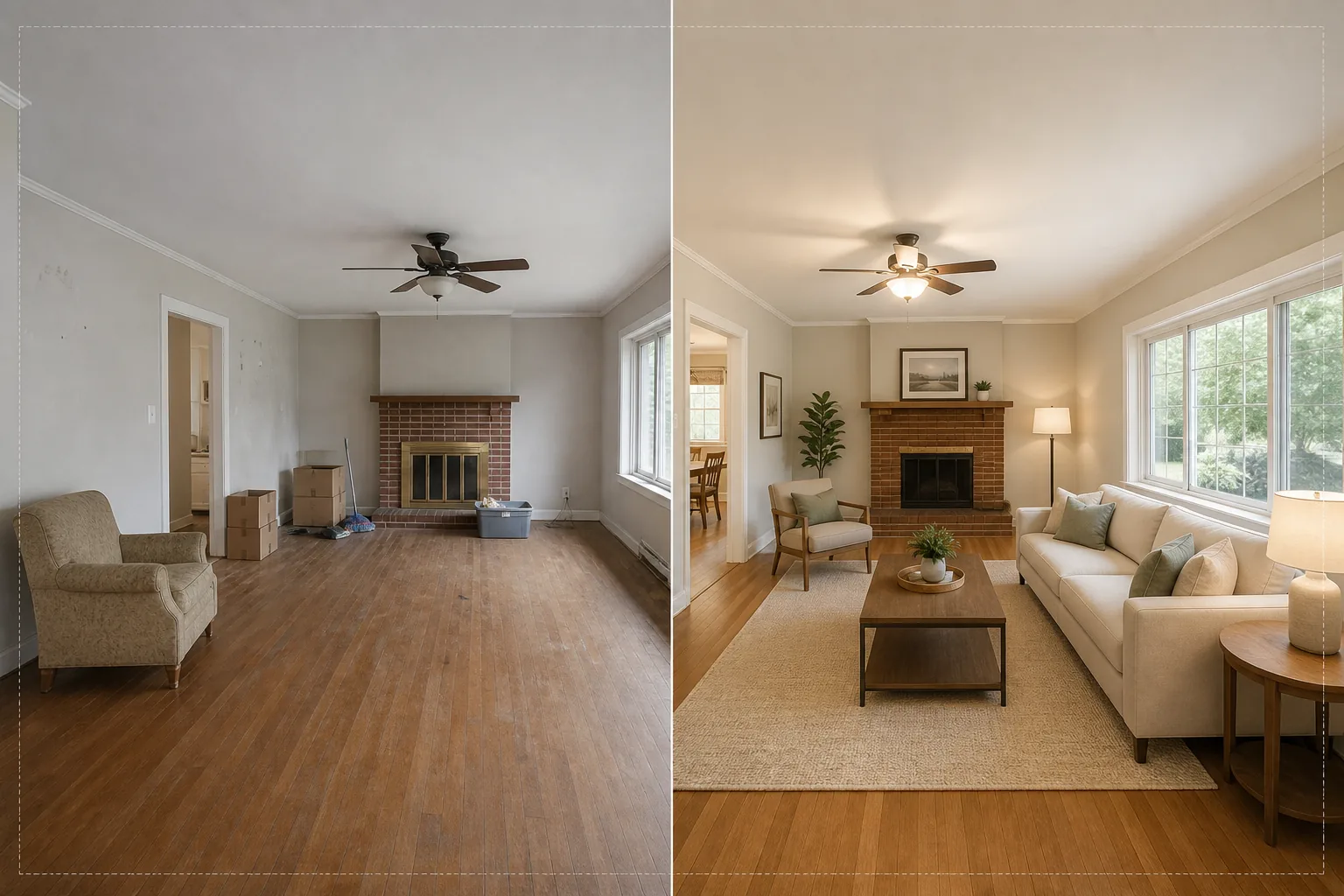
Allestisci stanze vuote con mobili e decorazioni fotorealistici senza spostare un solo mobile fisico. Questo modello usa AI Fill per collocare divani, tavoli, tappeti e opere d'arte nelle stanze vuote, mentre Magic Eraser rimuove il disordine esistente, i vecchi mobili e gli oggetti personali prima che inizi l'allestimento. Il risultato è una foto dell'annuncio calda e accogliente che aiuta gli acquirenti a immaginarsi mentre vivono nello spazio.
Prova gratis questo modelloReal Estate template preview
Cosa fa questo modello
Risolve la sfida più grande della fotografia immobiliare: far sembrare una casa anche le stanze vuote o disordinate. Magic Eraser rimuove innanzitutto qualsiasi disordine esistente: vecchi mobili, scatole del trasloco, effetti personali, segni sulle pareti e graffi sui pavimenti. AI Fill colloca poi mobili adatti al contesto nella stanza ripulita, adeguando lo stile all'architettura. Un loft moderno riceve pezzi in stile mid-century con accenti industriali, mentre una casa coloniale tradizionale ottiene mobili imbottiti classici e calde tonalità del legno. L'illuminazione e le ombre dei mobili virtuali sono calcolate a partire dalla luce della finestra già presente nella foto, così l'allestimento sembra fisicamente presente anziché incollato.
Impostazioni del modello
| Stile di allestimento | Moderno, Tradizionale, Scandinavo, Mid-Century o Coastal |
| Tipo di stanza | Rilevamento automatico (soggiorno, camera da letto, sala da pranzo, ufficio, cucina) |
| Rimozione del disordine | Rimozione automatica di scatole, oggetti personali e vecchi mobili prima dell'allestimento |
| Rendering delle ombre | Adattato alla direzione e all'intensità della luce della finestra esistente |
| Risoluzione di output | 4000×3000px (conforme MLS a 300 DPI) |
| Temperatura colore | Interno caldo (3200K–4000K per adattarsi alla tipica illuminazione interna) |
Come usare questo modello
Carica la foto della stanza vuota o disordinata
Carica una foto grandangolare della stanza. Scatta da un angolo per inquadrare due pareti e il pavimento e ottenere l'allestimento più realistico. Il modello funziona con foto da smartphone, reflex digitali e fotocamere professionali per immobili, inclusi gli obiettivi ultra-grandangolari.
Rimuovi il disordine esistente
Magic Eraser rileva e rimuove automaticamente scatole del trasloco, vecchi mobili, foto personali alle pareti e disordine sul pavimento. L'IA ricostruisce la pavimentazione, la vernice delle pareti e i battiscopa dietro gli oggetti rimossi, così la stanza appare pulita e vuota.
Allestisci con mobili virtuali
AI Fill colloca mobili adatti al tipo di stanza rilevato e allo stile selezionato. Un soggiorno riceve un divano, un tavolino, un tappeto, tavolini d'appoggio e opere a parete. Una camera da letto riceve un letto, comodini, lampade e cuscini decorativi. I mobili si adattano alle dimensioni della stanza e proiettano ombre realistiche.
Esporta per MLS e annunci
Scarica la foto allestita in 4000×3000px, pronta per i caricamenti su MLS, Zillow, Realtor.com e per le brochure stampate. L'immagine include tag di metadati per una facile catalogazione nel tuo sistema di gestione degli annunci.
Consigli professionali per i migliori risultati
- ✓Scatta da un angolo a circa 1,20 m di altezza: così inquadri due pareti e una superficie di pavimento sufficiente perché l'IA collochi i mobili con la prospettiva corretta e ombre di contatto a terra.
- ✓Accendi tutte le luci della stanza prima di fotografare. L'IA utilizza le sorgenti di luce visibili e i riflessi delle finestre per calcolare dove devono cadere le ombre sui mobili allestiti.
- ✓Per gli annunci con più stanze, usa lo stesso stile di allestimento in tutte le stanze per creare una storia di design coerente, come se un vero arredatore avesse arredato l'intera casa.
Strumenti
Domande frequenti
Il home staging virtuale è conforme alle regole MLS?
+
La maggior parte dei sistemi MLS consente le foto allestite virtualmente purché siano etichettate come tali. Il modello non aggiunge l'etichetta automaticamente: controlla le regole del tuo MLS locale e aggiungi una didascalia di divulgazione come 'Allestimento virtuale' al momento del caricamento.
Posso allestire un patio o un balcone esterno?
+
Sì. Il modello rileva gli spazi abitativi esterni e li allestisce con mobili da patio, fioriere e tappeti da esterno adeguati. I calcoli dell'illuminazione tengono conto del cielo aperto e della luce solare diretta anziché della luce ambientale interna.
Quanto sono realistici i mobili?
+
I mobili allestiti proiettano ombre coerenti con la direzione della luce esistente della stanza, poggiano sul piano del pavimento con la prospettiva corretta e riflettono il colore ambientale delle pareti circostanti. A una normale distanza di osservazione, l'allestimento è indistinguibile da una fotografia realmente arredata.
Allestisci qualsiasi stanza in pochi secondi, non in ore
Carica le foto di stanze vuote e ottieni splendide immagini d'annuncio arredate che fanno innamorare gli acquirenti di ogni spazio.
Provalo gratisRelated templates
More real estate templates for your workflow.
Modello fotografico professionale per immobili per inserzioni MLS. Miglioramento simile all'HDR, sostituzione del cielo, rimozione del disordine e correzione del colore per foto di proprietà che si vendono più velocemente.
Migliora le foto di esterni architettonici con correzione delle linee verticali, sostituzione del cielo, rimozione di auto e pedoni e color grading dell'ora dorata per annunci e portfolio.
Trasforma le foto di Airbnb e delle case vacanze con l'illuminazione della stanza, la rimozione del disordine, Color correction e la correzione della distorsione dell'obiettivo grandangolare per tassi di prenotazione più elevati.
Migliora le foto del portfolio di interior design con l'illuminazione della stanza, la rimozione del disordine, la nitidezza della trama dei materiali e la resa cromatica accurata di finiture e tessuti.
Migliora la fotografia aerea dei droni con la sostituzione del cielo, l'evidenziazione dei confini delle proprietà, la vivacità dei colori Boost e la rimozione delle distrazioni per rilievi immobiliari e fondiari.
Pulisci, migliora e standardizza le immagini delle planimetrie per gli annunci immobiliari con la rimozione delle macchie, la nitidezza delle linee e uno stile coerente.