
Portfolio di interior design
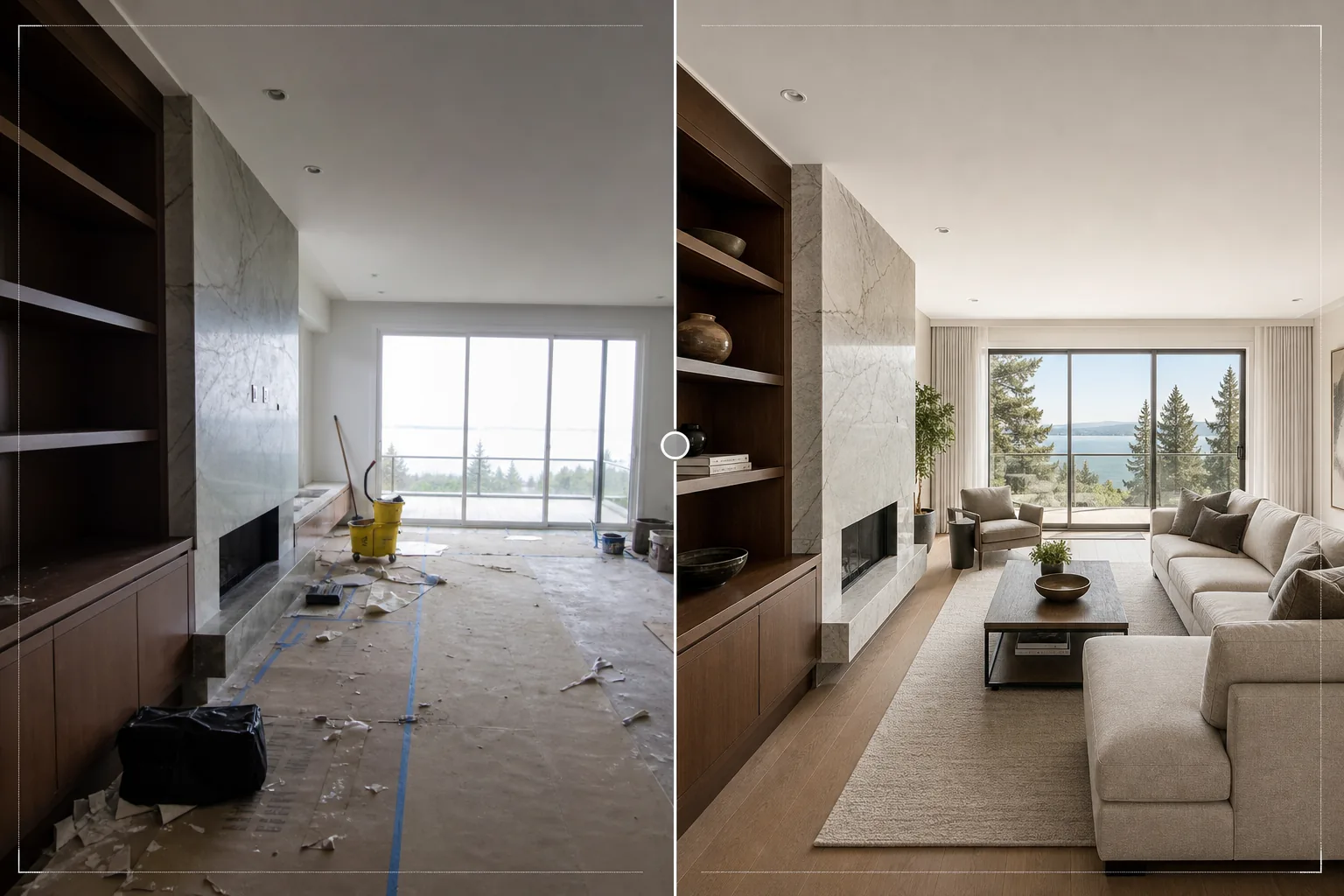
Presenta i progetti di interior design con la qualità visiva che meritano. Questo modello illumina gli ambienti per mostrare il flusso della luce naturale, rimuove i detriti di cantiere e gli oggetti personali, valorizza le texture dei materiali come legno, pietra e tessuto e corregge la precisione cromatica affinché le finiture appaiano fedeli alle specifiche del progettista.
Prova gratis questo modelloReal Estate template preview
Cosa fa questo modello
Perfeziona le foto dei progetti di interior design per portfolio, profili Houzz, feed Instagram e presentazioni ai clienti. La fotografia di interior design richiede di rappresentare con precisione le scelte di materiali e colori del progettista: un pavimento in noce deve sembrare noce, non mogano. Questo modello utilizza AI Enhance per applicare una correzione fedele del colore che preserva i toni reali delle venature del legno, delle venature della pietra, delle texture dei tessuti e dei colori delle vernici come specificato dal progettista. Magic Eraser rimuove i detriti di cantiere rimasti da un'installazione recente, gli oggetti personali dei clienti non rimossi prima del servizio fotografico, le prese e gli interruttori visibili che interrompono le superfici pulite delle pareti e ogni altro elemento che sminuisce il progetto stesso. L'illuminazione dell'ambiente garantisce che gli spazi appaiano illuminati in modo naturale e aperti.
Impostazioni del modello
| Illuminazione dell'ambiente | Riempimento delle ombre + recupero dell'esposizione delle finestre (resa con luce naturale) |
| Fedeltà dei materiali | Resa cromatica fedele per legno, pietra, piastrelle e tessuto |
| Nitidezza delle texture | Miglioramento dei dettagli di venatura, trama e venature della pietra |
| Rimozione del disordine | Rimuove oggetti personali, detriti di cantiere ed elementi di disturbo |
| Risoluzione di output | 6000px sul lato lungo (pronta per stampa di portfolio e caricamento su Houzz) |
| Correzione dell'obiettivo | Raddrizzamento verticale e correzione della distorsione a barilotto del grandangolo |
Come usare questo modello
Carica la tua foto d'interni
Carica foto degli ambienti da qualsiasi fase del progetto: installazione appena completata, servizio fotografico curato, o anche un lavoro in corso se gli elementi di design sono già al loro posto. Il modello gestisce foto da smartphone, fotocamere a obiettivo intercambiabile e obiettivi architettonici tilt-shift.
Illumina e correggi il colore
Il modello aumenta la luminosità dell'ambiente per mostrare l'intera qualità spaziale del progetto, recupera le finestre sovraesposte per mostrare la vista oltre e corregge la temperatura del colore affinché le finiture dei materiali appaiano fedeli al loro aspetto reale. Le linee verticali vengono raddrizzate e la distorsione del grandangolo viene corretta.
Rimuovi gli elementi di disturbo
Magic Eraser rimuove effetti personali, attrezzi da cantiere, prodotti per la pulizia, prese elettriche visibili e altri elementi che interrompono lo spazio progettato. L'IA ricostruisce la parete, il pavimento o la superficie dietro gli oggetti rimossi utilizzando il motivo del materiale circostante.
Esporta per il portfolio
Scarica a 6000px sul lato lungo per stampe di portfolio, caricamenti di progetti su Houzz e presentazioni ad alta risoluzione. L'output Adobe RGB preserva le sottili differenze cromatiche tra finiture simili, importanti nella documentazione di interior design.
Consigli da professionisti per risultati ottimali
- ✓Fotografa di giorno con tutte le tende e le persiane aperte. La luce naturale del giorno mostra come uno spazio progettato viene realmente percepito dagli abitanti e rivela i colori autentici delle finiture. Il modello valorizza la luce naturale ma non può riprodurre la qualità della vera luce diurna in una foto notturna.
- ✓Includi sia scatti ampi dell'ambiente sia primi piani dettagliati delle combinazioni di materiali: dove il pavimento in legno incontra il rivestimento in pietra del camino, dove il paraschizzi incontra il piano di lavoro. Il modello rende nitide queste intersezioni di materiali che mettono in risalto la competenza del progettista nella scelta delle specifiche.
- ✓Se possibile, spegni tutte le luci artificiali e affidati solo alla luce del giorno. L'illuminazione mista (luce diurna dalle finestre più luce artificiale calda) crea zone di temperatura colore nell'ambiente che il modello deve mediare, compromettendo potenzialmente la precisione dei colori dei materiali in una delle due zone.
Strumenti
Domande frequenti
Può arredare virtualmente una stanza vuota?
+
No. Il modello migliora le foto di ambienti che contengono già gli elementi di design: mobili, finiture, sanitari e accessori. Non aggiunge mobili o accessori virtuali agli spazi vuoti. Per l'arredamento virtuale, utilizza un servizio di home staging dedicato e poi elabora il risultato con questo modello per affinare colore e illuminazione.
Con quanta precisione riproduce i colori dei materiali?
+
Il modello utilizza una correzione cromatica bilanciata sulla luce diurna che preserva le sottotonalità specifiche dei materiali: grigi caldi rispetto a freddi, toni del legno rossicci rispetto a dorati, venature della pietra bluastre rispetto a verdastre. Su un monitor calibrato, le immagini elaborate corrispondono all'aspetto reale del materiale abbastanza fedelmente per l'uso in portfolio e nelle specifiche.
E per quanto riguarda le piastrelle di bagno e cucina?
+
Le fughe e i motivi delle piastrelle vengono resi nitidi per mostrare la qualità della posa. Il modello gestisce sia le piastrelle di grande formato sia i motivi a mosaico dettagliati, esaltando la precisione geometrica che dimostra una lavorazione di qualità.
Mostra ogni progetto nella sua migliore veste progettuale
Carica le foto degli interni e ottieni immagini di qualità da portfolio con colori dei materiali accurati, luce naturale brillante e composizioni prive di distrazioni.
Provalo gratisRelated templates
More real estate templates for your workflow.
Modello fotografico professionale per immobili per inserzioni MLS. Miglioramento simile all'HDR, sostituzione del cielo, rimozione del disordine e correzione del colore per foto di proprietà che si vendono più velocemente.
Migliora le foto di esterni architettonici con correzione delle linee verticali, sostituzione del cielo, rimozione di auto e pedoni e color grading dell'ora dorata per annunci e portfolio.
Trasforma le foto di Airbnb e delle case vacanze con l'illuminazione della stanza, la rimozione del disordine, Color correction e la correzione della distorsione dell'obiettivo grandangolare per tassi di prenotazione più elevati.
Migliora la fotografia aerea dei droni con la sostituzione del cielo, l'evidenziazione dei confini delle proprietà, la vivacità dei colori Boost e la rimozione delle distrazioni per rilievi immobiliari e fondiari.
Metti in scena virtualmente stanze vuote con mobili, decorazioni e illuminazione realistici. Aiuta gli acquirenti a visualizzare gli spazi abitativi senza costi di allestimento fisico.
Pulisci, migliora e standardizza le immagini delle planimetrie per gli annunci immobiliari con la rimozione delle macchie, la nitidezza delle linee e uno stile coerente.