
Esterni di architettura
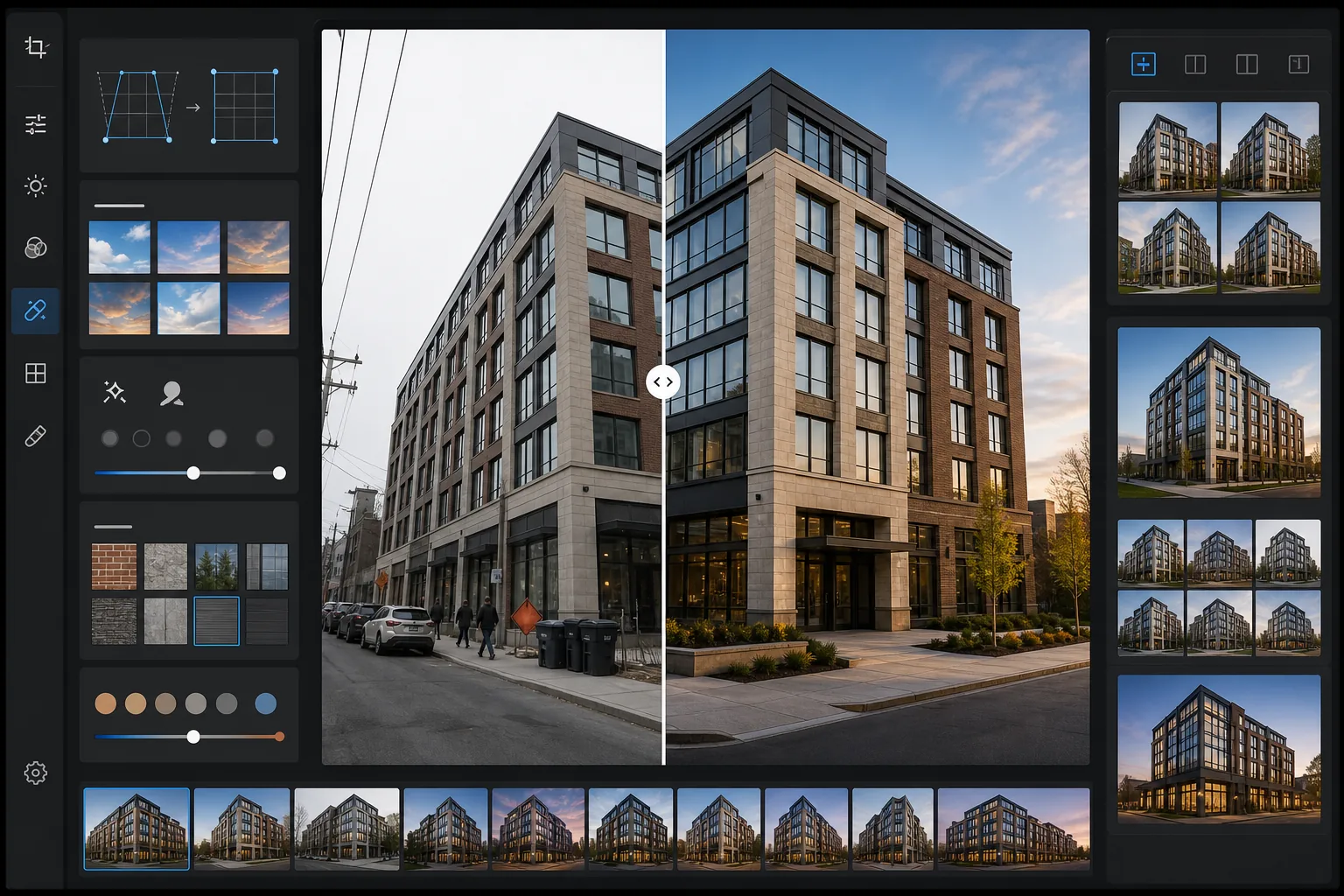
Trasforma le foto di esterni di edifici in immagini architettoniche di qualità da portfolio. Questo modello corregge le linee verticali convergenti dovute a fotocamere inclinate, sostituisce cieli coperti o sovraesposti con alternative blu nitido o ora dorata, rimuove auto parcheggiate e pedoni dalla scena e applica un color grading che valorizza le texture dei materiali in pietra, vetro e metallo.
Prova gratis questo modelloReal Estate template preview
Cosa fa questo modello
Risolve i problemi più comuni della fotografia di esterni architettonici. Le verticali convergenti — dove i bordi dell'edificio si inclinano verso l'interno perché la fotocamera è stata puntata verso l'alto — vengono corrette per rendere i muri perfettamente dritti. I cieli bianchi sovraesposti delle giornate coperte vengono sostituiti con cielo azzurro naturale o toni dell'ora dorata che corrispondono alla direzione della luce già presente sull'edificio. Magic Eraser rimuove auto parcheggiate, pedoni, bidoni della spazzatura, attrezzature di cantiere e cartellonistica temporanea che affollano la composizione. AI Enhance applica un color grading delicato che esalta il calore del mattone, la riflettività delle facciate continue in vetro e la texture del cemento e delle facciate in pietra.
Impostazioni del modello
| Correzione verticale | Regolazione keystone automatica (correzione inclinazione ±15°) |
| Sostituzione del cielo | Cielo azzurro naturale con direzione della luce corrispondente (o ora dorata) |
| Esaltazione dei materiali | Nitidezza della texture per mattone, pietra, vetro e metallo |
| Color grading | Architettura calda (toni ora dorata sulle facciate, ombre fredde) |
| Rimozione delle distrazioni | Rileva e rimuove automaticamente veicoli, pedoni e bidoni |
| Risoluzione di output | 6000px sul lato lungo (portfolio e stampa a 300 DPI fino a 20×13) |
Come usare questo modello
Carica la tua foto dell'esterno
Carica una foto dell'esterno dell'edificio scattata dal livello della strada, da una posizione rialzata o da drone. Il modello gestisce immagini da smartphone, reflex e obiettivi grandangolari. La distorsione a barilotto del grandangolo viene corretta automaticamente insieme alla distorsione keystone verticale.
Correggi prospettiva e cielo
Le linee verticali vengono raddrizzate affinché i bordi dell'edificio siano paralleli e corretti. Se il cielo originale è bruciato bianco o di un grigio spento, viene sostituito con un cielo naturale che corrisponde alla direzione della luce già visibile sulla facciata. Puoi scegliere tra cielo azzurro limpido e caldi toni dell'ora dorata.
Rimuovi gli elementi di disturbo
Magic Eraser rimuove auto parcheggiate, pedoni, contenitori dei rifiuti, cartellonistica temporanea, ponteggi di cantiere e linee elettriche aeree. L'IA ricostruisce il marciapiede, il verde e le superfici dell'edificio dietro gli oggetti rimossi usando il contesto circostante.
Esporta per portfolio o annuncio
Scarica l'immagine corretta a 6000px sul lato lungo per stampe di portfolio architettonico, annunci immobiliari o materiali di marketing dei costruttori. Il profilo colore è impostato su Adobe RGB per la stampa o sRGB per il web, a seconda dell'output previsto.
Consigli da professionista per i risultati migliori
- ✓Per la sostituzione del cielo più naturale, inquadra in modo che l'edificio non occupi più del 60-70% dell'altezza del fotogramma. Questo lascia abbastanza cielo originale perché l'IA faccia corrispondere l'angolo di illuminazione e la direzione del gradiente del cielo sostitutivo alla scena esistente.
- ✓Quando fotografi facciate molto vetrate, il riflesso nelle finestre influisce sulla sostituzione del cielo. Se il cielo coperto originale è visibile come riflesso nel vetro, il cielo sostitutivo non altererà i riflessi, quindi gli edifici molto vetrati appaiono più naturali se fotografati in giornate con almeno un po' di cielo azzurro.
- ✓Rimuovi auto e persone un lato del fotogramma alla volta. Per scene complesse come un parcheggio pieno di auto davanti a un edificio, l'IA produce risultati più puliti quando lavori per sezioni anziché selezionare tutto il primo piano in una volta.
- ✓Se possibile, scatta durante l'ora dorata del mattino o del tardo pomeriggio. Il modello può applicare un color grading dell'ora dorata alle foto di metà giornata, ma la vera luce dell'ora dorata crea ombre direzionali sulle facciate che aggiungono una profondità che nessun color grading può replicare.
Strumenti
Domande frequenti
Quanta inclinazione verticale si può correggere?
+
Il modello corregge fino a 15 gradi di distorsione keystone verticale, coprendo la maggior parte degli scatti a mano libera fatti dal livello della strada guardando verso l'alto un edificio. Un'inclinazione estrema oltre i 15 gradi può essere corretta, ma può ritagliare porzioni significative dei bordi dell'immagine, riducendo l'area utilizzabile del fotogramma.
Il cielo sostituito sembrerà naturale?
+
Il cielo sostitutivo è abbinato alla direzione della luce che già cade sull'edificio. Se la luce solare proviene da sinistra nella foto originale, il gradiente del cielo sostitutivo e la disposizione delle nuvole sono orientati in modo coerente. La transizione all'orizzonte, dove il cielo incontra la linea del tetto, viene fusa per corrispondere alla foschia atmosferica e alla morbidezza dei bordi dell'originale.
Può rimuovere un ponteggio da un edificio in ristrutturazione?
+
Un ponteggio che copre una piccola sezione della facciata (fino a circa il 20% della superficie dell'edificio) può essere rimosso, con l'IA che ricostruisce il materiale dell'edificio e lo schema delle finestre dietro di esso. Un ponteggio che copre l'intero edificio è troppo esteso per una rimozione pulita, perché non resta abbastanza facciata visibile a cui l'IA possa fare riferimento durante la ricostruzione.
Presenta ogni edificio al suo meglio architettonico
Carica le foto degli esterni e ottieni immagini con prospettiva corretta, cielo migliorato e prive di elementi di disturbo, pronte per portfolio, annunci e marketing dei costruttori.
Provalo gratisRelated templates
More real estate templates for your workflow.
Modello fotografico professionale per immobili per inserzioni MLS. Miglioramento simile all'HDR, sostituzione del cielo, rimozione del disordine e correzione del colore per foto di proprietà che si vendono più velocemente.
Trasforma le foto di Airbnb e delle case vacanze con l'illuminazione della stanza, la rimozione del disordine, Color correction e la correzione della distorsione dell'obiettivo grandangolare per tassi di prenotazione più elevati.
Migliora le foto del portfolio di interior design con l'illuminazione della stanza, la rimozione del disordine, la nitidezza della trama dei materiali e la resa cromatica accurata di finiture e tessuti.
Migliora la fotografia aerea dei droni con la sostituzione del cielo, l'evidenziazione dei confini delle proprietà, la vivacità dei colori Boost e la rimozione delle distrazioni per rilievi immobiliari e fondiari.
Metti in scena virtualmente stanze vuote con mobili, decorazioni e illuminazione realistici. Aiuta gli acquirenti a visualizzare gli spazi abitativi senza costi di allestimento fisico.
Pulisci, migliora e standardizza le immagini delle planimetrie per gli annunci immobiliari con la rimozione delle macchie, la nitidezza delle linee e uno stile coerente.