
Spinner prodotto 360
Crea visualizzazioni rotanti del prodotto a 360 gradi di livello professionale a partire da foto scattate su piattaforma girevole. Questo modello rimuove lo sfondo da ogni angolo di rotazione, garantisce illuminazione e colore coerenti su tutti i fotogrammi, elimina polvere e imperfezioni della superficie e produce un set di immagini uniforme pronto per i visualizzatori 360 interattivi delle tue pagine prodotto.
Prova gratis questo modelloE-commerce template preview
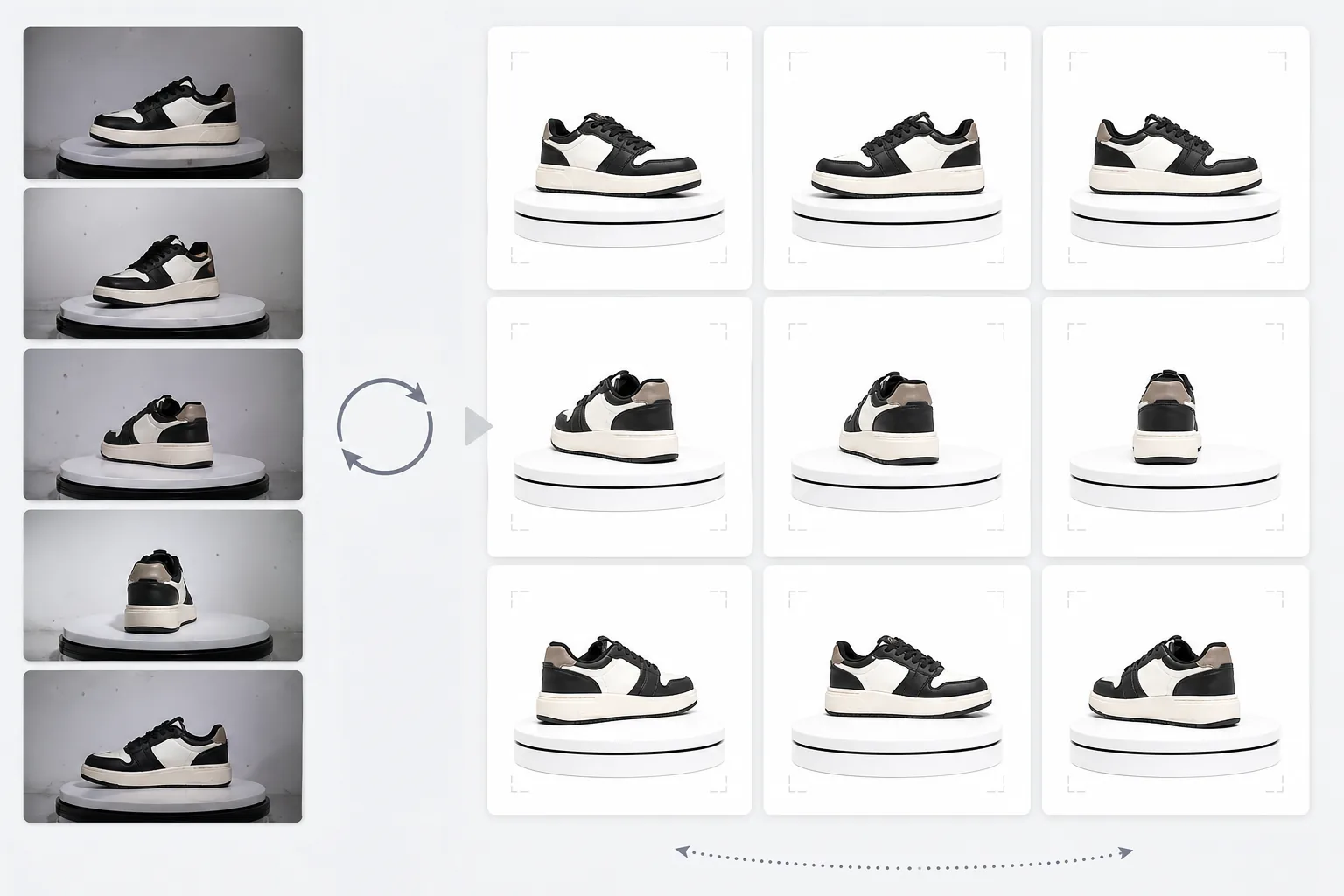
Cosa fa questo modello
Elabora foto di prodotto scattate da più angolazioni in un set coerente adatto ai visualizzatori rotanti interattivi a 360 gradi dei siti di e-commerce. Quando fotografi un prodotto su una piattaforma girevole da 24 o 36 angolazioni, piccole incongruenze di sfondo, illuminazione e ombra si accumulano e creano un'esperienza di rotazione a scatti e poco professionale. Questo modello usa Background Eraser per isolare il prodotto da ogni angolazione con un trattamento dei bordi coerente, normalizza illuminazione e temperatura colore su tutti i fotogrammi affinché il prodotto non sfarfalli tra toni caldi e freddi durante la rotazione, e usa Magic Eraser per rimuovere polvere, impronte digitali e imperfezioni della superficie che diventano fastidiose quando compaiono su un fotogramma ma non sul successivo.
Impostazioni del modello
| Sfondo | Bianco puro (#FFFFFF) — coerente su tutti i fotogrammi di rotazione |
| Normalizzazione dell'illuminazione | Coerenza tra i fotogrammi (elimina lo sfarfallio tra le angolazioni) |
| Pulizia della superficie | Rimuove polvere, impronte digitali e riflessi su ogni fotogramma |
| Centratura del prodotto | Centra automaticamente il prodotto in ogni fotogramma per un asse di rotazione fluido |
| Dimensioni di output | 1500 × 1500 px per fotogramma (ottimizzato per i visualizzatori 360 web) |
| Numero di fotogrammi | Supporta sequenze di 12, 24 o 36 fotogrammi |
Come usare questo modello
Carica le tue foto della piattaforma girevole
Carica l'intero set di foto di rotazione (12, 24 o 36 fotogrammi) scattate su una piattaforma girevole a intervalli regolari. Assegna ai file nomi sequenziali (da 001.jpg a 036.jpg) in modo che il modello li elabori nell'ordine di rotazione corretto. Il modello gestisce foto con qualsiasi sfondo: fondale bianco, grigio o colorato.
Rimozione dello sfondo e coerenza
Background Eraser rimuove lo sfondo da ogni fotogramma usando le stesse impostazioni di rilevamento dei bordi, garantendo che il contorno del prodotto sia coerente in tutte le angolazioni. Il prodotto viene centrato automaticamente in ogni fotogramma in modo che l'asse di rotazione rimanga stabile e la rotazione non oscilli.
Normalizzazione tra i fotogrammi
Illuminazione, temperatura colore ed esposizione vengono normalizzate su tutti i fotogrammi. Questo elimina le sottili fluttuazioni di luminosità e colore che si verificano quando l'illuminazione della piattaforma girevole non è perfettamente uniforme da ogni angolazione. Le imperfezioni della superficie visibili in alcune angolazioni vengono ripulite per coerenza.
Esporta la sequenza di fotogrammi
Scarica la sequenza completa di fotogrammi a 1500 × 1500 px per fotogramma in formato JPEG. I file sono numerati in sequenza e pronti per l'importazione diretta in plugin per visualizzatori 360 come Magic 360, Sirv o Webrotate 360. La dimensione totale dei file è ottimizzata per un caricamento web veloce.
Consigli da professionisti per risultati ottimali
- ✓Usa una piattaforma girevole manuale con segni di gradi anziché una rotazione a mano libera. Intervalli regolari di 10 gradi (36 fotogrammi) producono la rotazione più fluida. Il modello può gestire lievi incongruenze di rotazione, ma una spaziatura uniforme produce un risultato notevolmente più fluido.
- ✓Blocca la fotocamera su un treppiede e usa impostazioni di esposizione manuale per tutti i fotogrammi. L'esposizione automatica fa sì che la fotocamera regoli la luminosità in modo diverso a ogni angolazione, creando l'effetto sfarfallio che il modello deve poi correggere. Le impostazioni manuali offrono al modello un punto di partenza più pulito.
- ✓Pulisci accuratamente il prodotto prima di fotografarlo: polvere e impronte digitali sono più visibili e fastidiose in una rotazione a 360 gradi che in una singola foto statica, perché compaiono e scompaiono mentre il prodotto ruota. Il modello le rimuove, ma partire da una superficie pulita produce risultati migliori.
Strumenti
E-commerce workflow
Product photo hub
Use this template with the full ecommerce product photo workflow for marketplace backgrounds, cleanup, compression, resizing, and listing-ready exports.
View ecommerce product photo workflowDomande frequenti
Di quanti fotogrammi ho bisogno?
+
36 fotogrammi (intervalli di 10 gradi) producono la rotazione più fluida per la maggior parte dei prodotti. 24 fotogrammi (intervalli di 15 gradi) sono accettabili per prodotti senza dettagli fini. 12 fotogrammi (intervalli di 30 gradi) sono il minimo per una rotazione riconoscibile, ma risulteranno a scatti per prodotti dettagliati come orologi o dispositivi elettronici.
Posso elaborare fotogrammi da un video?
+
Sì, se estrai i fotogrammi da un video della piattaforma girevole a intervalli regolari. Esporta i fotogrammi alla massima risoluzione disponibile e assicura una distribuzione angolare uniforme lungo l'intero arco di 360 gradi. I fotogrammi video possono avere una qualità inferiore rispetto alle foto fisse dedicate a causa del mosso e della compressione video.
Quali plugin per visualizzatori 360 sono compatibili?
+
L'output JPEG sequenziale è compatibile con tutte le principali soluzioni di visualizzatori 360, tra cui Magic 360, Sirv 360, Webrotate 360, jQuery Reel e implementazioni personalizzate. Le dimensioni coerenti e la convenzione di denominazione semplificano l'importazione.
Offri agli acquirenti la vista prodotto a 360 gradi che si aspettano
Carica le foto della piattaforma girevole e ottieni una sequenza di fotogrammi pulita e coerente, pronta per i visualizzatori rotanti 360 interattivi delle tue pagine prodotto.
Provalo gratisRelated templates
More e-commerce templates for your workflow.
Modello di sfondo bianco puro per le foto dei prodotti. Impostazioni pronte per Amazon, Shopify e marketplace per immagini di prodotti pulite e professionali che convertono.
Modello di foto per inserzioni ottimizzate per Etsy. Converte gli scatti lifestyle in sfondi bianchi puliti a 2000px, migliora i dettagli dei prodotti fatti a mano e soddisfa le linee guida sulle immagini di Etsy.
Modello di foto per inserzioni ottimizzate per eBay. Sfondo bianco per le immagini della galleria, miglioramento della documentazione sulle condizioni e layout multi-angolo che soddisfano gli standard delle immagini di eBay.
Modello professionale per fotografia di gioielli per anelli, collane e orologi. Controlla i riflessi, migliora la brillantezza delle pietre preziose e fornisce immagini pronte per il mercato su sfondi puliti.
Modello fotografico professionale per mobili per inserzioni sul marketplace. Rimuovi il disordine dalla stanza, mostra le dimensioni reali e presenta i pezzi su sfondi puliti o in contesti di stanze in stile.
Pulisci le foto piatte degli indumenti con rimozione delle rughe, pulizia dei pelucchi, sfondi bianchi puri e colori accurati del tessuto. Pronto per Shopify, Amazon e boutique.