
Foto di prodotto per borse
Crea foto di prodotto di qualità lusso per borse, pochette, portafogli e pelletteria. Questo modello isola la borsa da qualsiasi superficie, sostituisce lo sfondo con un'ambientazione da studio pulita o lifestyle, valorizza la grana della pelle e i dettagli delle cuciture e rende nitidi gli elementi hardware come cerniere, chiusure e fibbie, così i clienti possono valutare la lavorazione artigianale da ogni angolazione.
Prova gratis questo modelloE-commerce template preview
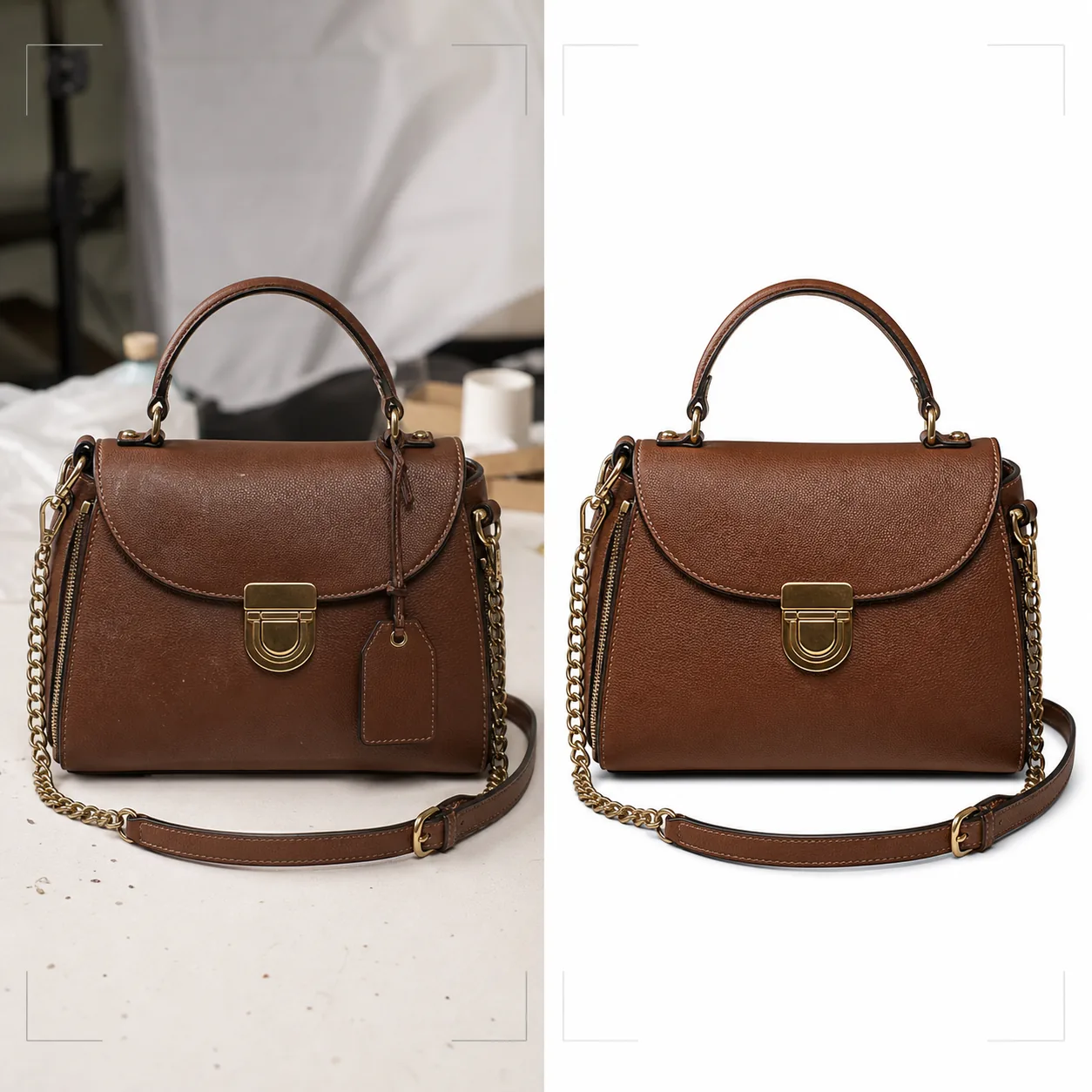
Cosa fa questo modello
Offre lo standard visivo che i brand di borse di lusso e di fascia media richiedono per la vendita al dettaglio online. Background Eraser isola la borsa da piani d'appoggio, superfici di ripresa e disordine dello studio, sostituendo l'ambiente con bianco puro per la conformità ai marketplace o con sfondi stilizzati in linea con l'estetica del brand. Magic Eraser rimuove particelle di polvere, impronte digitali sull'hardware e cartellini del prezzo sfuggiti durante lo shooting. Il miglioramento con IA esalta la grana della pelle, la trama del canvas o la texture del tessuto che comunica qualità, mentre gli elementi hardware — cerniere, chiusure, tracolle a catena e placche con logo — vengono resi nitidi affinché i clienti possano ispezionare la qualità della finitura come se tenessero la borsa in una boutique.
Impostazioni del modello
| Sfondo | Bianco puro, crema o superficie stilizzata (marmo, lino, mensola in legno) |
| Miglioramento della pelle | Nitidezza della texture della grana con conservazione della lucentezza naturale |
| Dettaglio hardware | Rendi nitidi cerniere, chiusure, fibbie e placche con logo in metallo |
| Rimozione di polvere e impronte | Rileva e rimuove automaticamente particelle di superficie e sbavature sull'hardware |
| Stile dell'ombra | Ombra portata naturale o ombra riflessa su sfondo bianco |
| Risoluzione di output | 3000×3000px (1:1 per i marketplace) o 2400×3200px (3:4 per i siti del brand) |
Come usare questo modello
Carica la foto della tua borsa
Carica una foto di prodotto della borsa — frontale, angolata per mostrare la profondità o in flat lay con la borsa aperta. Includi scatti da più angolazioni per un annuncio completo. Il modello gestisce foto da fotocamere di smartphone, set da studio e attrezzature DSLR.
Pulisci lo sfondo e rimuovi le imperfezioni
Background Eraser separa la borsa dalla superficie di ripresa con un rilevamento dei bordi che preserva i bordi morbidi della pelle, le tracolle pendenti e i dettagli della catena. Magic Eraser rimuove i granelli di polvere sulla pelle, le sbavature di impronte sull'hardware lucido e qualsiasi cartellino del prezzo o sensore di sicurezza ancora attaccato.
Migliora materiali e hardware
La texture della pelle viene resa nitida per rivelare i motivi della grana e le cuciture. Gli elementi hardware vengono migliorati per maggiore chiarezza — i clienti possono vedere se le cerniere sono YKK, se le chiusure sono in ottone massiccio o placcate e se le cuciture sono uniformi e ben tese. La correzione del colore garantisce che la pelle appaia nella sua vera tonalità di tintura.
Esporta per l'e-commerce
Scarica a 3000×3000px per Amazon, eBay e Poshmark, oppure in proporzioni personalizzate per il sito web del tuo brand. La versione con sfondo bianco puro soddisfa i requisiti d'immagine dei marketplace. Le versioni con sfondo lifestyle funzionano per social media e campagne email.
Consigli da professionisti per risultati ottimali
- ✓Riempi la borsa con carta velina prima di fotografarla per darle la forma e la struttura previste. Una borsa vuota si affloscia e si piega in modi che la fanno sembrare meno premium di quanto sia di persona.
- ✓Fotografa separatamente i primi piani dell'hardware. Sebbene il modello migliori l'hardware negli scatti della borsa intera, un primo piano dedicato della chiusura, del cursore della cerniera e della placca con logo offre ai clienti l'esperienza di ispezione dei dettagli che hanno in un negozio fisico.
- ✓Pulisci l'hardware con un panno in microfibra prima dello scatto. Il modello rimuove digitalmente le impronte digitali, ma sbavature pesanti su hardware lucido in oro o argento possono ridurre la chiarezza della finitura metallica sottostante anche dopo la pulizia con IA.
Strumenti
E-commerce workflow
Product photo hub
Use this template with the full ecommerce product photo workflow for marketplace backgrounds, cleanup, compression, resizing, and listing-ready exports.
View ecommerce product photo workflowDomande frequenti
Può gestire borse realizzate in canvas o nylon?
+
Sì. Il modello rileva il tipo di materiale e adatta di conseguenza il miglioramento della texture. Le texture della trama del canvas e del nylon ripstop vengono rese nitide in modo diverso dalla grana della pelle per evidenziare le qualità caratteristiche di ciascun materiale.
Il dettaglio della tracolla a catena sarà preservato durante la rimozione dello sfondo?
+
Sì. Il rilevamento dei bordi è calibrato per dettagli metallici fini come anelli della catena, sottili tracolle in pelle e cursori della cerniera pendenti. Questi elementi vengono preservati con bordi puliti sul nuovo sfondo.
Posso aggiungere un'ombra riflessa su sfondo bianco?
+
Sì. Il modello offre sia un'ombra portata naturale (come se la borsa poggiasse su una superficie bianca illuminata dall'alto) sia un'ombra riflessa (una sfumatura speculare sotto la borsa) comunemente usata nella fotografia di prodotti di lusso.
Presenta ogni borsa con un livello di dettaglio da boutique
Carica le foto delle borse e ottieni immagini di prodotto di qualità lusso con texture della pelle migliorata, hardware nitido e sfondi puliti.
Provalo gratisRelated templates
More e-commerce templates for your workflow.
Modello di sfondo bianco puro per le foto dei prodotti. Impostazioni pronte per Amazon, Shopify e marketplace per immagini di prodotti pulite e professionali che convertono.
Modello di foto per inserzioni ottimizzate per Etsy. Converte gli scatti lifestyle in sfondi bianchi puliti a 2000px, migliora i dettagli dei prodotti fatti a mano e soddisfa le linee guida sulle immagini di Etsy.
Modello di foto per inserzioni ottimizzate per eBay. Sfondo bianco per le immagini della galleria, miglioramento della documentazione sulle condizioni e layout multi-angolo che soddisfano gli standard delle immagini di eBay.
Modello professionale per fotografia di gioielli per anelli, collane e orologi. Controlla i riflessi, migliora la brillantezza delle pietre preziose e fornisce immagini pronte per il mercato su sfondi puliti.
Modello fotografico professionale per mobili per inserzioni sul marketplace. Rimuovi il disordine dalla stanza, mostra le dimensioni reali e presenta i pezzi su sfondi puliti o in contesti di stanze in stile.
Pulisci le foto piatte degli indumenti con rimozione delle rughe, pulizia dei pelucchi, sfondi bianchi puri e colori accurati del tessuto. Pronto per Shopify, Amazon e boutique.