
Foto di prodotto elettronico
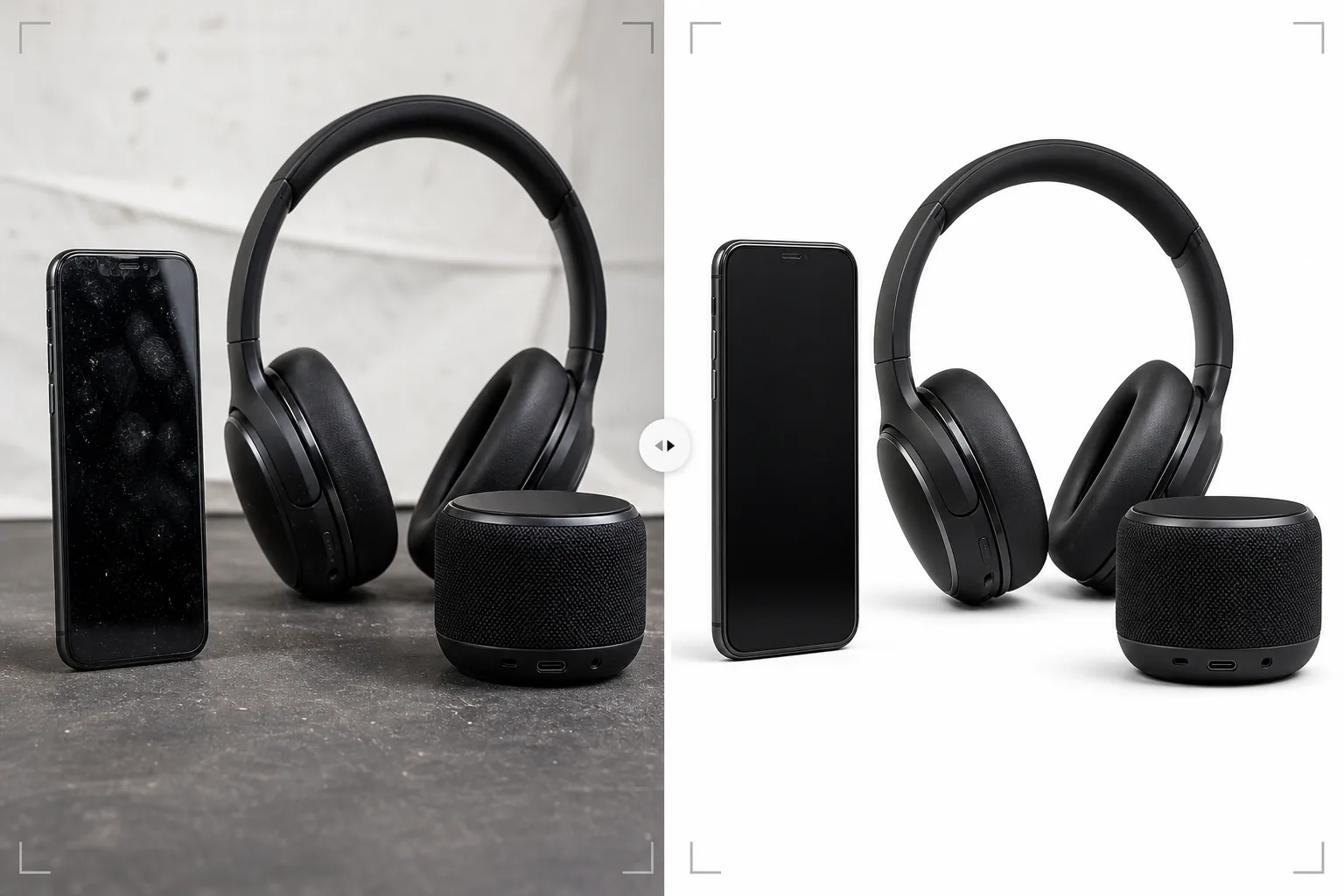
Presenta l'elettronica di consumo con una nitidezza da showroom. Questo modello rimuove impronte e aloni da schermi e superfici lucide, mette a fuoco i dettagli di porte e pulsanti, migliora le schermate per rendere visibili gli elementi dell'interfaccia e produce immagini di prodotto pulite, pronte per le inserzioni nei marketplace e le pagine del marchio.
Prova gratis questo modelloE-commerce template preview
Cosa fa questo modello
Affronta le sfide fotografiche specifiche dell'elettronica di consumo — smartphone, laptop, tablet, cuffie, altoparlanti e accessori — dove superfici riflettenti, porte intricate e schermi richiedono un'elaborazione specializzata. Schermi lucidi e scocche in metallo accumulano impronte all'istante durante la manipolazione, e Magic Eraser le rimuove insieme alle particelle di polvere e ai micrograffi superficiali che appaiono a forte ingrandimento. AI Enhance mette a fuoco i dettagli fini come l'interno delle porte USB, le texture dei pulsanti, i motivi delle griglie degli altoparlanti e il testo del marchio che gli acquirenti esaminano da vicino per valutare la qualità costruttiva. Background Eraser isola i prodotti con bordi puliti attorno a forme complesse come antenne, porte e aperture per i cavi.
Impostazioni del modello
| Pulizia della superficie | Rimuovi impronte, polvere e micrograffi da schermi e scocca |
| Nitidezza dei dettagli | Miglioramento di porte, pulsanti, griglie degli altoparlanti e testo del marchio |
| Visualizzazione dello schermo | Schiarisci e rendi nitida l'interfaccia sullo schermo (o sostituiscila con uno screenshot pulito) |
| Sfondo | Bianco puro (#FFFFFF) o gradiente per un posizionamento premium |
| Dimensioni di output | 2500 × 2500 px (zoom ad alta risoluzione per l'ispezione dell'acquirente) |
| Finitura metallica | Migliora le texture di alluminio anodizzato, acciaio spazzolato e plastica opaca |
Come usare questo modello
Carica la tua foto di elettronica
Carica le foto del prodotto — viste frontale, posteriore, laterale e di dettaglio di porte e pulsanti. Il modello gestisce smartphone, laptop, tablet, cuffie, altoparlanti, smartwatch e accessori. Includi almeno un'angolazione con lo schermo acceso se il dispositivo ha un display.
Pulizia della superficie e rimozione delle impronte
Magic Eraser rimuove impronte, aloni e polvere da schermi, scocche in metallo e superfici in plastica lucida. Vengono eliminati anche i piccoli graffi e segni dovuti alla manipolazione delle unità campione. L'IA preserva le caratteristiche di superficie intenzionali, come la grana del metallo spazzolato e le texture opache.
Miglioramento dei dettagli e dello schermo
AI Enhance mette a fuoco le aperture delle porte, i bordi dei pulsanti, i motivi delle griglie degli altoparlanti e il testo del marchio. Se il dispositivo ha uno schermo, la visualizzazione viene schiarita e resa nitida in modo che gli elementi dell'interfaccia siano visibili e accattivanti. I riflessi dell'illuminazione da studio sullo schermo vengono ridotti mantenendo l'aspetto attivo del display.
Esporta per marketplace o sito del marchio
Scarica a 2500 × 2500 px per le inserzioni nei marketplace con zoom completo, o in dimensioni personalizzate per siti web del marchio e materiali di marketing. Le opzioni di sfondo includono il bianco puro per i marketplace e un gradiente o sfondi scuri per un posizionamento del marchio premium.
Consigli da professionisti per risultati ottimali
- ✓Indossa guanti di cotone quando maneggi il prodotto per la fotografia. Le impronte sull'elettronica sono il problema di ritocco più comune e, sebbene il modello le rimuova efficacemente, una foto sorgente senza impronte preserva più texture originale della superficie nell'immagine finale.
- ✓Fotografa gli schermi con un'interfaccia reale visualizzata anziché uno schermo vuoto o spento. Uno schermo attivo mostra agli acquirenti come appare il dispositivo in uso. Il modello rende nitido e schiarisce il contenuto visualizzato riducendo i riflessi dell'illuminazione da studio sulla superficie dello schermo.
- ✓Includi una foto che mostri specificamente la disposizione delle porte — USB, jack per cuffie, slot per schede, porta di ricarica. Questi scatti di dettaglio sono tra le immagini più viste nelle inserzioni di elettronica, e il modello rende nitido l'interno delle porte per mostrare chiaramente i dettagli del connettore.
- ✓Per cuffie e altoparlanti, includi un'angolazione che mostri chiaramente il dettaglio del driver o della griglia. Il modello migliora le texture della rete e della griglia per trasmettere la qualità costruttiva e la raffinatezza del design acustico.
Strumenti
E-commerce workflow
Product photo hub
Use this template with the full ecommerce product photo workflow for marketplace backgrounds, cleanup, compression, resizing, and listing-ready exports.
View ecommerce product photo workflowDomande frequenti
Può gestire l'elettronica nera lucida?
+
Le superfici nere lucide (come gli smartphone nero pianoforte e le cornici dei laptop) sono impegnative perché riflettono tutto. Il modello rimuove le impronte e riduce i riflessi ambientali, ma una parte del riflesso viene mantenuta per trasmettere la qualità della superficie lucida. Per risultati ottimali, fotografa i prodotti neri lucidi in un ambiente controllato con il minimo di fonti di riflesso ambientali.
E i prodotti con indicatori LED?
+
Le spie di stato LED, l'illuminazione RGB delle periferiche e gli schermi vengono preservati e migliorati. Il modello riconosce gli elementi illuminati e li rende nitidi mantenendo il loro effetto di bagliore sulla superficie del prodotto.
Posso aggiungere uno screenshot a uno schermo vuoto?
+
Il modello ottimizza le foto con contenuto dello schermo esistente ma non compone nuovi screenshot su schermi vuoti. Per la composizione con sostituzione dello schermo, fotografa il dispositivo con lo schermo acceso e il modello migliorerà il contenuto visualizzato.
Elettronica che online appare bella quanto in mano
Carica le foto del prodotto e ottieni immagini senza impronte e con dettagli nitidi, pronte per le inserzioni nei marketplace e le pagine prodotto del marchio.
Provalo gratisRelated templates
More e-commerce templates for your workflow.
Modello di sfondo bianco puro per le foto dei prodotti. Impostazioni pronte per Amazon, Shopify e marketplace per immagini di prodotti pulite e professionali che convertono.
Modello di foto per inserzioni ottimizzate per Etsy. Converte gli scatti lifestyle in sfondi bianchi puliti a 2000px, migliora i dettagli dei prodotti fatti a mano e soddisfa le linee guida sulle immagini di Etsy.
Modello di foto per inserzioni ottimizzate per eBay. Sfondo bianco per le immagini della galleria, miglioramento della documentazione sulle condizioni e layout multi-angolo che soddisfano gli standard delle immagini di eBay.
Modello professionale per fotografia di gioielli per anelli, collane e orologi. Controlla i riflessi, migliora la brillantezza delle pietre preziose e fornisce immagini pronte per il mercato su sfondi puliti.
Modello fotografico professionale per mobili per inserzioni sul marketplace. Rimuovi il disordine dalla stanza, mostra le dimensioni reali e presenta i pezzi su sfondi puliti o in contesti di stanze in stile.
Pulisci le foto piatte degli indumenti con rimozione delle rughe, pulizia dei pelucchi, sfondi bianchi puri e colori accurati del tessuto. Pronto per Shopify, Amazon e boutique.