
Foto lifestyle per e-commerce
将平淡的产品照片转化为生活方式图像,在真实场景中展示您的商品——在厨房台面上、客厅里、书桌旁或户外。此模板会移除原始背景,并将您的产品放入精心策划的生活方式场景中,配以匹配的光照和自然的阴影,为您的商品列表提供推动购买决策的情境图像,而无需昂贵的拍摄。
免费试用此模板E-commerce template preview
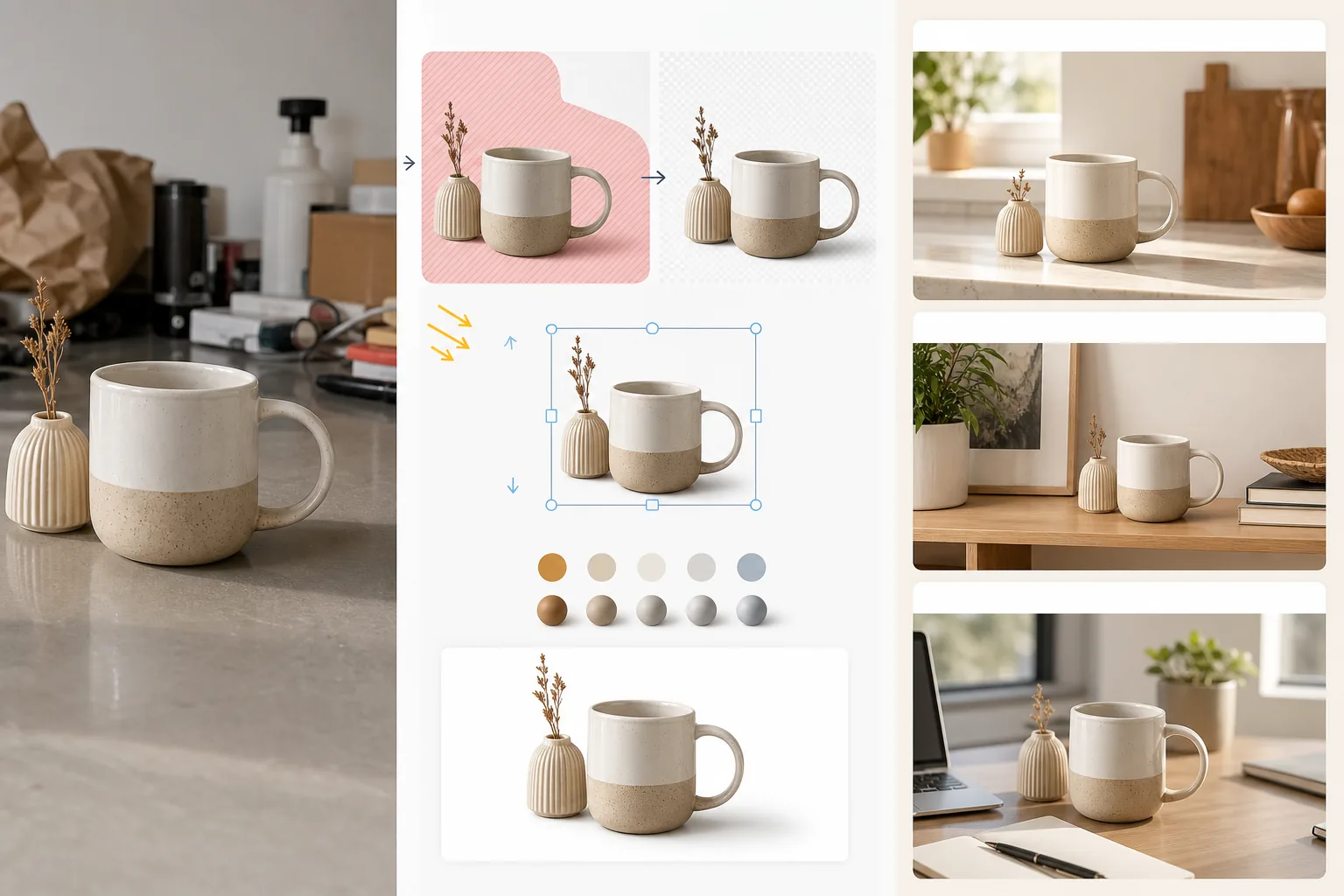
此模板的功能
将标准的白底产品图像或随手拍摄的产品照片转化为生活方式场景,帮助顾客想象拥有和使用该商品的情景。Magic Eraser 会移除原始背景以及产品周围任何分散注意力的元素。随后 AI Enhance 将产品放入精心策划的生活方式环境中——厨具放在厨房台面上,家居装饰放在客厅搁架上,电子产品放在书桌布置中,园艺用品放在户外露台上——并配以与场景相匹配的光照方向和阴影渲染。产品的颜色和曝光会与环境协调,使合成图像看起来像是在精心布置的场景中拍摄的一张照片。这弥合了纯白底市场要求(销售功能)与生活方式情境(销售欲望)之间的差距,而电商转化研究一致表明后者能推动更高的加入购物车率。
模板设置
| 场景类别 | 厨房、客厅、浴室、书桌/办公室、户外或平铺拍摄表面 |
| 光照协调 | 使产品的光照方向和色温与场景相匹配 |
| 阴影渲染 | 与场景几何结构相匹配的自然接触阴影和环境光遮蔽 |
| 产品比例 | 相对于场景家具和物体自动检测或手动调整尺寸 |
| 色彩协调 | 调整产品的白平衡以匹配场景的环境光 |
| 输出分辨率 | 3000×3000px(1:1 正方形)或 3000×2250px(适用于品牌网站的 4:3) |
如何使用此模板
上传您的产品照片
上传在任何背景下拍摄的产品照片——白色影棚、桌面,甚至是您的厨房台面。原始背景越干净,产品抠图效果越好,但此模板也能处理杂乱的环境。请包含完整的产品,不要裁掉边缘。
选择一个生活方式场景
选择一个与顾客使用产品方式相符的场景类别。AI 会根据产品类型和尺寸在该类别中选择一个具体环境。如果第一个建议不符合您的品牌美学,您可以浏览其他备选方案。
将产品协调融入场景
产品会以匹配的光照方向、适当的阴影渲染和色温调整合成到场景中。AI 确保产品看起来真实存在——放在台面上、搁在搁架上、立在书桌上——而不是漂浮在表面之上。
为商品列表和营销导出
以 3000×3000px 下载用于市场平台的生活方式图像位,或以 4:3 用于品牌网站产品页面。与您的白底主图搭配使用——生活方式照片展示情境和欲望,而白底图像展示细节和规格。
获得最佳效果的专业提示
- ✓拍摄产品时让光线从左上方照入。大多数生活方式场景环境都是从左上方照明的,因此从一开始就匹配这个方向能生成最令人信服的合成图像,使产品与环境之间的阴影方向保持一致。
- ✓在原始产品照片中包含一小块地面表面。产品底部与表面之间的接触点有助于 AI 理解产品的透视关系,并令人信服地将其放置在新的场景表面上。
- ✓在市场平台列表中将生活方式图像用于次要位。为符合市场平台规范,将主图保持为干净的白底主图,并在第 2 至第 5 位使用生活方式图像来展示产品的情境。这种组合始终优于全白底或全生活方式的方法。
Strumenti
E-commerce workflow
Product photo hub
Use this template with the full ecommerce product photo workflow for marketplace backgrounds, cleanup, compression, resizing, and listing-ready exports.
View ecommerce product photo workflow常见问题
产品看起来会像是粘贴到场景上的吗?
+
不会。此模板会使产品的光照方向、色温和阴影角度与场景环境相匹配。产品与表面接触处的接触阴影会以与场景环境光相匹配的柔和半影渲染。最终效果看起来就像产品是在该场景中拍摄的。
我可以使用自己的自定义场景照片吗?
+
可以。您可以上传自己的生活方式场景照片作为背景环境。AI 会协调产品的光照和色彩以匹配您的自定义场景,就像处理内置场景库一样。
产品比例会自动处理吗?
+
会。AI 会根据原始照片估算产品的真实尺寸,并相对于场景中的家具和物体进行适当缩放。咖啡杯在厨房台面上会显示为杯子大小,而不是灯罩那么大。如果自动检测需要修正,您可以手动调整比例。
Related templates
More e-commerce templates for your workflow.
Modello di sfondo bianco puro per le foto dei prodotti. Impostazioni pronte per Amazon, Shopify e marketplace per immagini di prodotti pulite e professionali che convertono.
Modello di foto per inserzioni ottimizzate per Etsy. Converte gli scatti lifestyle in sfondi bianchi puliti a 2000px, migliora i dettagli dei prodotti fatti a mano e soddisfa le linee guida sulle immagini di Etsy.
Modello di foto per inserzioni ottimizzate per eBay. Sfondo bianco per le immagini della galleria, miglioramento della documentazione sulle condizioni e layout multi-angolo che soddisfano gli standard delle immagini di eBay.
Modello professionale per fotografia di gioielli per anelli, collane e orologi. Controlla i riflessi, migliora la brillantezza delle pietre preziose e fornisce immagini pronte per il mercato su sfondi puliti.
Modello fotografico professionale per mobili per inserzioni sul marketplace. Rimuovi il disordine dalla stanza, mostra le dimensioni reali e presenta i pezzi su sfondi puliti o in contesti di stanze in stile.
Pulisci le foto piatte degli indumenti con rimozione delle rughe, pulizia dei pelucchi, sfondi bianchi puri e colori accurati del tessuto. Pronto per Shopify, Amazon e boutique.