
Foto di prodotto cosmetico
Metti in mostra i prodotti di bellezza con la precisione del colore e la qualità della superficie che gli acquirenti pretendono. Questo modello definisce le etichette delle confezioni e il testo degli ingredienti, riproduce i colori dei campioni con una fedeltà conforme allo schermo, controlla i riflessi su tubetti e cipriere lucide e produce sfondi puliti secondo lo standard del settore della bellezza.
Prova gratis questo modelloE-commerce template preview
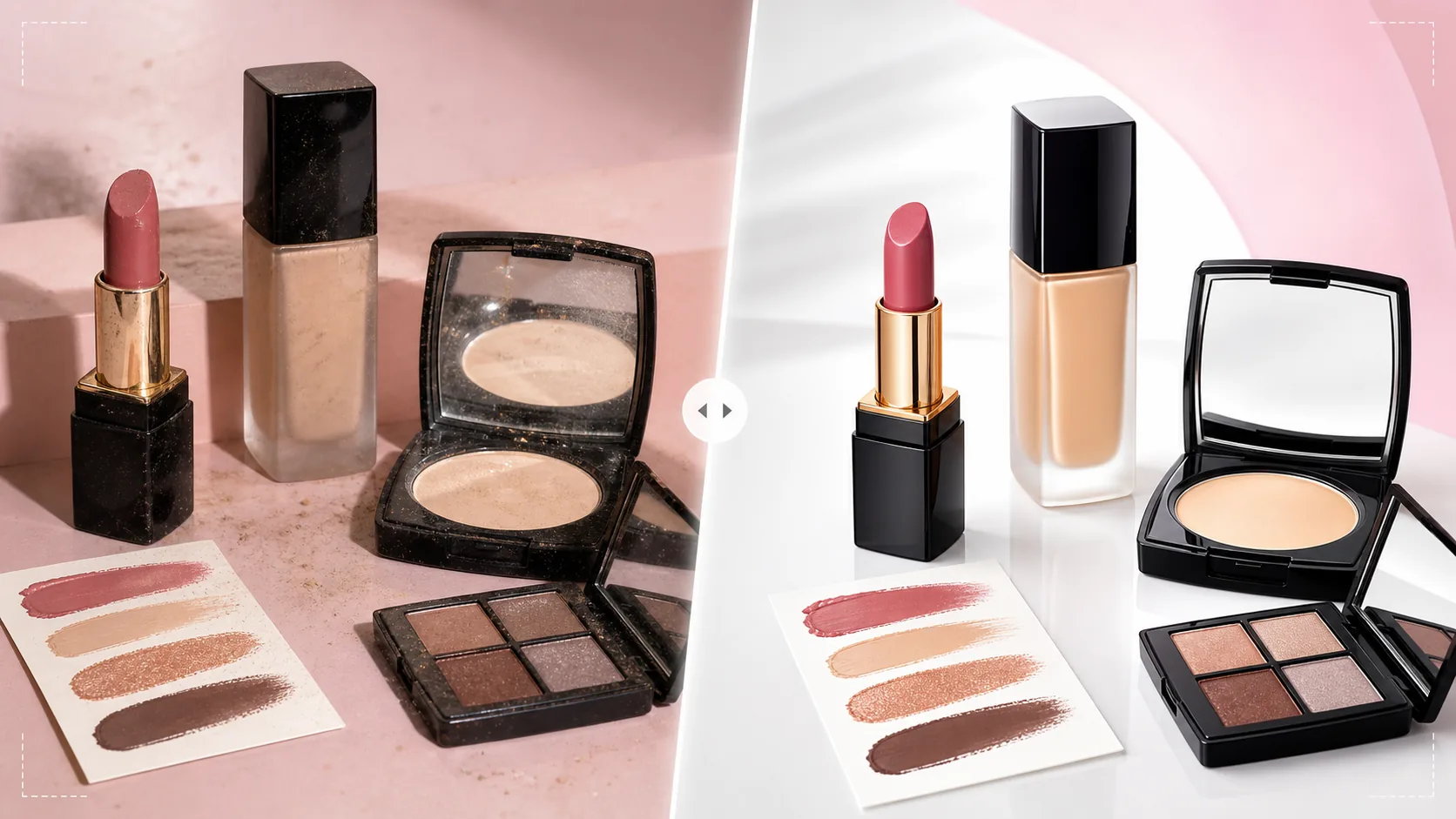
Cosa fa questo modello
Affronta le sfide specifiche della fotografia di prodotti cosmetici e di bellezza, in cui la precisione del colore influisce direttamente sulle decisioni di acquisto e sui tassi di reso. I campioni di fondotinta, rossetto, ombretto e smalto devono apparire sullo schermo il più vicino possibile al loro colore reale — questo modello applica una correzione del colore calibrata sul display che garantisce che ciò che gli acquirenti vedono sullo schermo corrisponda a ciò che arriva nella confezione. Background Eraser isola i prodotti con bordi precisi attorno a forme di confezione complesse come tubetti di rossetto curvi, specchietti delle cipriere e flaconi contagocce. AI Enhance definisce il testo delle etichette, gli elenchi degli ingredienti e i nomi delle tonalità in modo che siano leggibili anche sugli schermi mobili. I riflessi delle superfici lucide vengono ridotti per mostrare il colore del prodotto attraverso la confezione anziché le luci dello studio.
Impostazioni del modello
| Precisione del colore | Calibrato per display sRGB (riduce al minimo lo scarto di colore tra schermo e prodotto) |
| Definizione delle etichette | Microdefinizione di testo e logo per la leggibilità su mobile |
| Controllo dei riflessi | Ridurre i riflessi speculari su tubetti e cipriere lucide |
| Sfondo | Bianco puro, pastello o texture in marmo (standard del settore della bellezza) |
| Dimensioni di output | 2000 × 2000 px (marketplace) o 1200 × 1200 px (social) |
Come usare questo modello
Carica la tua foto di cosmetici
Carica foto di prodotti singoli, set o cartoncini di campioni. Il modello gestisce tutti i tipi di confezione — flaconi di vetro, tubetti di plastica, cipriere, palette, vasetti e dispenser a pompa. Includi sia scatti del prodotto confezionato sia scatti del prodotto aperto che mostrino il colore reale (mine di rossetto, cialde di ombretto, texture di crema).
Correzione e precisione del colore
Il modello regola il bilanciamento del bianco su luce diurna neutra e applica una correzione del colore calibrata sRGB. È fondamentale per i cosmetici, dove la precisione della tonalità determina se gli acquirenti si fidano dell'inserzione. I colori dei campioni vengono migliorati per la precisione, non per l'intensità — l'obiettivo è una resa fedele alla realtà, non la sovrasaturazione.
Miglioramento di superficie ed etichette
I riflessi delle confezioni lucide vengono ridotti affinché gli acquirenti possano vedere il colore del prodotto e l'etichetta attraverso il materiale della confezione. Il testo delle etichette, i nomi delle tonalità e gli elenchi degli ingredienti vengono definiti per la leggibilità su mobile. Le impronte e la polvere sulle superfici delle confezioni vengono rimosse automaticamente.
Esporta per inserzioni e social
Scarica a 2000 × 2000 px per le inserzioni sui marketplace con zoom, oppure a 1200 × 1200 px per i post di prodotto su Instagram e sui social media. Il profilo colore sRGB garantisce una resa cromatica coerente su dispositivi e browser diversi.
Consigli professionali per risultati ottimali
- ✓Fotografa i cosmetici con una sorgente luminosa bilanciata sulla luce diurna (5500K). Le luci al tungsteno calde o i LED freddi creano dominanti di colore che il modello corregge, ma partire da una luce bilanciata sulla luce diurna produce i colori dei campioni più accurati nel risultato finale.
- ✓Includi sia foto con la confezione chiusa sia con la confezione aperta. Gli acquirenti vogliono vedere la confezione del marchio e il colore reale del prodotto — una mina di rossetto, una palette di ombretti aperta per mostrare tutte le tonalità, o un vasetto di crema con il coperchio rimosso che mostra la texture del prodotto.
- ✓Per le foto dei campioni sulla pelle, fotografa su uno sfondo neutro e assicurati che la pelle sia pulita e priva di crema. Il modello migliora la visibilità del colore del campione mantenendo un tono naturale della pelle sullo sfondo, il che aiuta gli acquirenti a immaginare il colore sulla propria pelle.
- ✓Pulisci tutte le confezioni con un panno privo di lanugine prima di scattare. Le confezioni dei cosmetici raccolgono facilmente impronte e polvere e, sebbene il modello le rimuova, partire da una confezione pulita preserva più dettagli della superficie originale nell'immagine elaborata.
Strumenti
E-commerce workflow
Product photo hub
Use this template with the full ecommerce product photo workflow for marketplace backgrounds, cleanup, compression, resizing, and listing-ready exports.
View ecommerce product photo workflowDomande frequenti
Quanto sono accurati i colori dei campioni elaborati?
+
Il modello applica una correzione del colore calibrata sRGB per ridurre al minimo lo scarto tra la visualizzazione sullo schermo e il prodotto fisico. Su un monitor calibrato, i campioni elaborati rientreranno entro Delta E 3 dal colore del prodotto fisico — abbastanza vicino da far sì che la maggior parte degli osservatori li percepisca come identici.
Può elaborare palette di ombretti con molte tonalità?
+
Sì. Le palette multi-tonalità con 8, 12 o più cialde vengono elaborate con una precisione cromatica individuale per ogni tonalità. Il modello definisce i bordi delle cialde e i nomi delle tonalità mantenendo la composizione complessiva della palette.
E le confezioni trasparenti o satinate?
+
Le confezioni in vetro trasparente e in plastica satinata richiedono un trattamento dei bordi speciale durante la rimozione dello sfondo. Il modello preserva la trasparenza della confezione sul nuovo sfondo garantendo al contempo che il prodotto all'interno sia chiaramente visibile.
Vendi la bellezza con immagini di prodotto fedeli nel colore
Carica le foto dei cosmetici e ottieni immagini fedeli nel colore, con etichette nitide e una finitura professionale che rafforzano la fiducia dell'acquirente in ogni tonalità.
Provalo gratisRelated templates
More e-commerce templates for your workflow.
Modello di sfondo bianco puro per le foto dei prodotti. Impostazioni pronte per Amazon, Shopify e marketplace per immagini di prodotti pulite e professionali che convertono.
Modello di foto per inserzioni ottimizzate per Etsy. Converte gli scatti lifestyle in sfondi bianchi puliti a 2000px, migliora i dettagli dei prodotti fatti a mano e soddisfa le linee guida sulle immagini di Etsy.
Modello di foto per inserzioni ottimizzate per eBay. Sfondo bianco per le immagini della galleria, miglioramento della documentazione sulle condizioni e layout multi-angolo che soddisfano gli standard delle immagini di eBay.
Modello professionale per fotografia di gioielli per anelli, collane e orologi. Controlla i riflessi, migliora la brillantezza delle pietre preziose e fornisce immagini pronte per il mercato su sfondi puliti.
Modello fotografico professionale per mobili per inserzioni sul marketplace. Rimuovi il disordine dalla stanza, mostra le dimensioni reali e presenta i pezzi su sfondi puliti o in contesti di stanze in stile.
Pulisci le foto piatte degli indumenti con rimozione delle rughe, pulizia dei pelucchi, sfondi bianchi puri e colori accurati del tessuto. Pronto per Shopify, Amazon e boutique.