
Foto di evento in chiesa
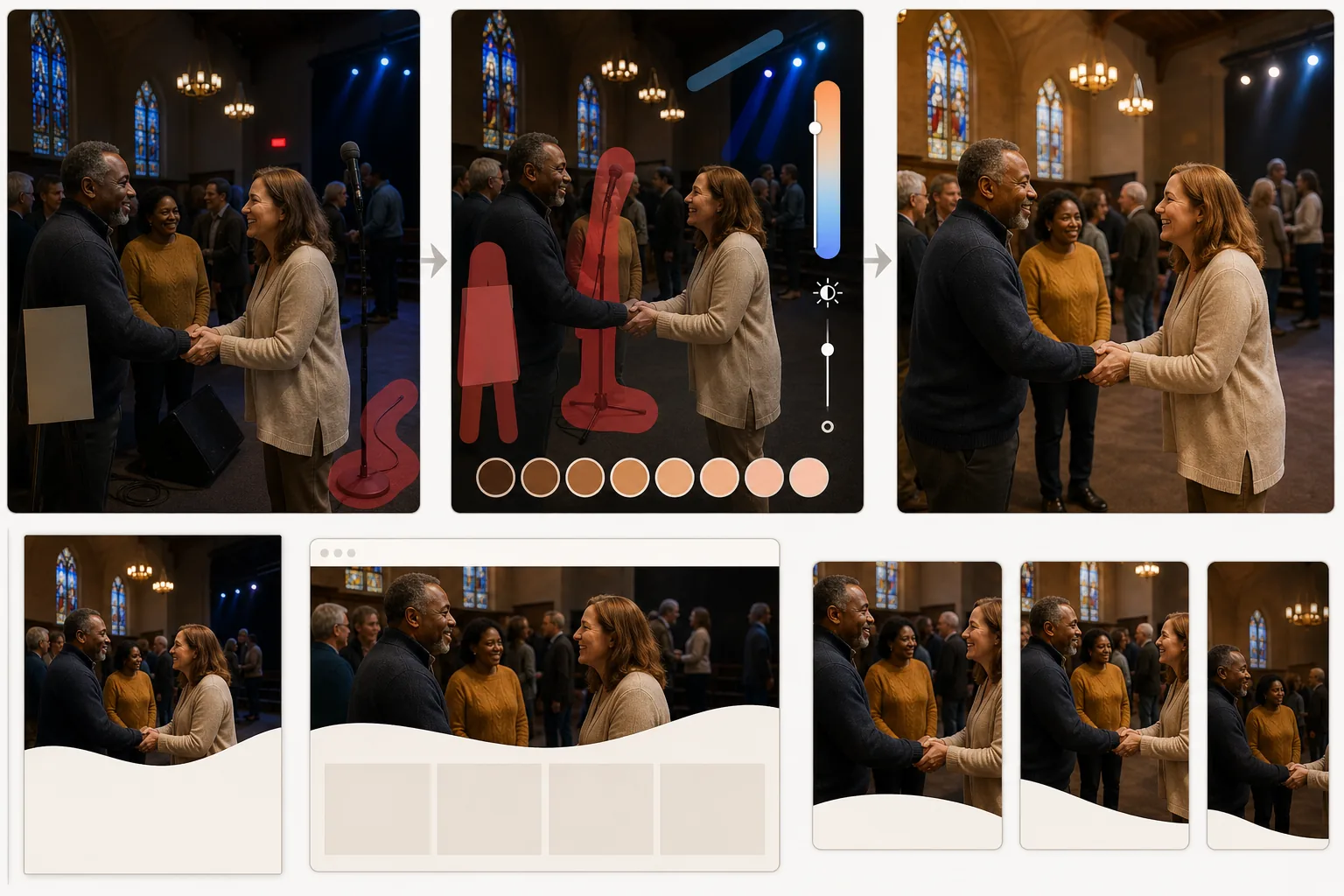
Trasforma le foto di eventi in chiesa e comunitari poco illuminate in immagini calde e accoglienti per bollettini, siti Web e social media. Questo modello corregge la difficile illuminazione interna dei luoghi di culto — temperature di colore miste da vetrate, luci da palco e plafoniere — mentre Magic Eraser rimuove le distrazioni visive come aste per microfono, cavi e segnaletica temporanea che sminuiscono il momento.
Prova questo modello gratisPersonal template preview
Cosa fa questo modello
Risolve le sfide fotografiche tipiche degli spazi di chiese e comunità religiose. Le aree di culto combinano lampadari a incandescenza caldi, luci da palco LED fredde e luce colorata delle vetrate, creando dominanti di colore miste che fanno apparire innaturale la pelle delle persone nelle foto. AI Enhance normalizza queste fonti di luce miste per produrre tonalità della pelle calde e lusinghiere, preservando al contempo la qualità atmosferica dello spazio. Magic Eraser rimuove gli elementi che distraggono — aste per microfono, monitor da palco, prolunghe che attraversano le navate, striscioni temporanei e segnali di uscita — che sottraggono attenzione alle persone e al momento. La gradazione cromatica generale è calda e accogliente, riflettendo lo spirito comunitario degli eventi.
Impostazioni del modello
| Correzione dell'illuminazione | Normalizzazione delle fonti interne miste con priorità alle tonalità calde della pelle |
| Temperatura di colore | Comunità calda (3800K–4200K bilanciata per una pelle lusinghiera) |
| Rimozione delle distrazioni | Aste per microfono, cavi, segnali di uscita e segnaletica temporanea |
| Recupero delle ombre | Schiarire le zone scure preservando l'illuminazione d'atmosfera |
| Risoluzione di output | 3000×2000px (3:2 per bollettini, siti Web e social media) |
Come usare questo modello
Carica la foto del tuo evento
Carica foto di funzioni religiose, eventi di gruppi giovanili, cene comunitarie, celebrazioni festive, battesimi o qualsiasi raduno della comunità ecclesiale. Il modello gestisce l'ampia gamma di condizioni di illuminazione interna che si trovano nei luoghi di culto, nelle sale parrocchiali e negli spazi esterni della chiesa.
Correggi illuminazione e colore
AI Enhance analizza le fonti di luce miste nell'immagine e le normalizza. Le dominanti di colore dell'illuminazione da palco vengono corrette, le aree dell'assemblea sottoesposte vengono schiarite e le tonalità della pelle vengono riscaldate a un tono naturale e lusinghiero. La qualità atmosferica della luce delle candele e delle vetrate viene preservata, rimuovendo al contempo gli sgradevoli spostamenti di colore che provocano sui volti.
Rimuovi le distrazioni
Magic Eraser rimuove aste per microfono, monitor da palco, cavi e prolunghe, striscioni temporanei per eventi, segnali di uscita e altri elementi utilitaristici che ingombrano l'inquadratura. L'IA ricostruisce la parete, il pavimento o la panca dietro gli oggetti rimossi per un risultato pulito.
Esporta per le comunicazioni della chiesa
Scarica a 3000×2000px per bollettini parrocchiali, intestazioni di siti Web e articoli per newsletter. Sono disponibili esportazioni ottimizzate per il web in formati più piccoli per campagne e-mail e post sui social media. La gradazione cromatica calda garantisce che le immagini risultino accoglienti su tutte le piattaforme.
Consigli professionali per risultati ottimali
- ✓Fotografa da una posizione in cui la fonte di luce principale sia dietro di te o di lato. Scattare verso finestre luminose o luci da palco mette i volti in controluce e, sebbene l'IA possa recuperare alcuni dettagli nelle ombre, i volti illuminati frontalmente o lateralmente producono sempre risultati migliori.
- ✓Cattura momenti spontanei di connessione — strette di mano, risate di gruppo, bambini assorti nelle attività. Queste interazioni autentiche comunicano il calore della comunità in modo molto più efficace delle foto di gruppo in posa per il marketing della chiesa.
- ✓Per le foto di grandi gruppi nelle sale parrocchiali, accendi ogni luce disponibile prima di scattare. L'IA gestisce bene le temperature di colore miste, ma gli ambienti molto bui producono rumore nell'immagine che limita il margine di miglioramento possibile.
Strumenti
Domande frequenti
I colori delle vetrate verranno preservati?
+
Sì. Il modello distingue tra la luce colorata intenzionale delle vetrate (che preserva come elemento d'atmosfera) e la sgradevole dominante di colore che quella luce crea su volti e superfici vicine (che corregge). Ottieni la bellezza delle vetrate senza le tonalità della pelle verdi o blu che possono causare.
Posso rimuovere persone che non dovrebbero essere nella foto?
+
Sì. Magic Eraser può rimuovere persone specifiche dalle foto di gruppo se necessario. L'IA ricostruisce la panca, la sedia o lo sfondo dietro la persona rimossa. Questo è utile per le foto in cui qualcuno ha lasciato la congregazione o per motivi di privacy.
Funziona per gli eventi all'aperto della chiesa?
+
Sì. Gli eventi all'aperto come picnic, feste e funzioni all'aperto hanno le proprie sfide — sole intenso, ombra irregolare e cielo luminoso dietro il gruppo. Il modello corregge questi problemi di esposizione all'aperto con la stessa efficacia dei problemi di illuminazione interna.
Condividi i momenti della tua comunità nella loro luce più calda
Carica le foto degli eventi in chiesa e ottieni immagini splendidamente illuminate e prive di distrazioni per bollettini, siti Web e social media.
Provalo gratisRelated templates
More personal templates for your workflow.
Crea foto identificative conformi per visti, patenti di guida e documenti d'identità nazionali con colori di sfondo, dimensioni della testa e requisiti di espressione facciale adeguati.
Migliora le foto di laurea con la pulizia dello sfondo, il berretto e l'abito Color correction, la rimozione delle imperfezioni e la nitidezza pronta per la stampa per cornici e annunci.
Migliora le foto di concerti ed eventi con la riduzione del rumore in condizioni di scarsa illuminazione, l'illuminazione del palco correzione del colore, la rimozione delle distrazioni della folla e il recupero dei dettagli dagli scatti in luoghi bui.
Crea bellissime foto per cartoline di nascita con sfondi tenui, gradazione del colore delicata, rimozione del disordine ospedaliero e dimensioni pronte per la stampa per la spedizione.
Prepara foto di famiglia e ritratti per biglietti di auguri natalizi con sfondi festivi, gradazione di colori caldi, effetti neve e dimensioni standard dei biglietti per la stampa.
Ripristina e migliora le foto dei tributi commemorativi con ritocchi delicati, semplificazione dello sfondo, gradazione dei colori calda e rispettosa e dimensioni pronte per la stampa per i servizi.