
Rimuovere i numeri di telefono dalle foto
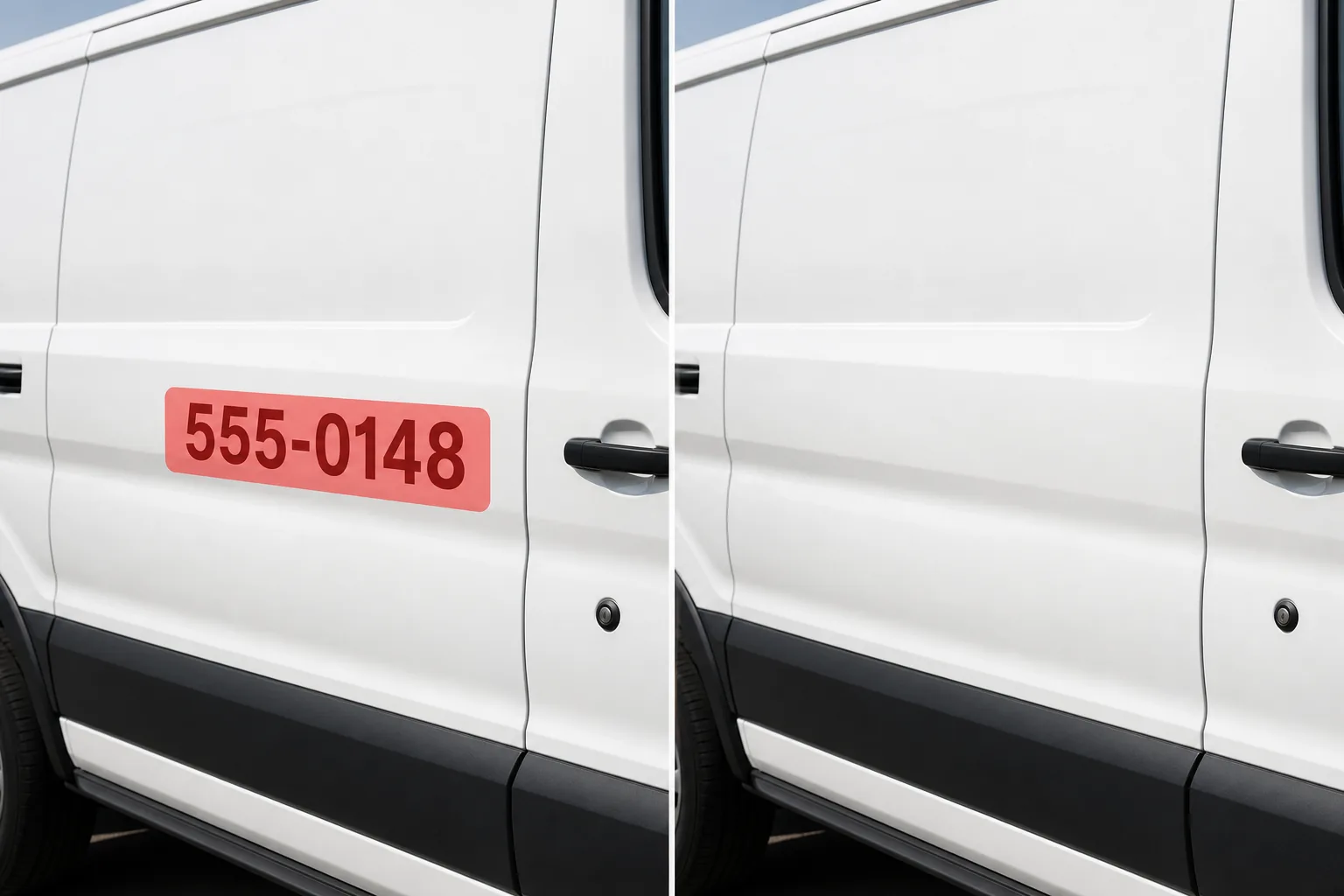
Cancella i numeri di telefono visibili su cartelli aziendali, decalcomanie di veicoli, cartelli di cortili immobiliari, vetrine di negozi, camion per le consegne e acquisizioni di screenshot accidentali. Magic Eraser rimuove le cifre e ricostruisce la superficie del cartello, la vernice del veicolo, il vetro o lo sfondo, proteggendo la privacy e ripulendo le composizioni.
Ultimo aggiornamento
Perché i numeri di telefono visibili creano problemi di privacy e composizione
I numeri di telefono appaiono nelle foto più spesso di quanto la maggior parte delle persone creda. La fotografia di strada cattura segnali aziendali con numeri di telefono. Le foto dell'elenco immobiliare includono il cartello del cortile dell'agente con un numero di telefono nel cortile. Le foto di viaggio di vetrine, camion di cibo e bancarelle del mercato mostrano i numeri di telefono dei venditori. La fotografia del veicolo mostra i numeri di telefono della flotta sulle portiere e sui portelloni posteriori. Gli screenshot condivisi sui social media rivelano accidentalmente numeri di telefono personali nelle barre delle notifiche, negli elenchi dei contatti o nei thread di messaggi. In ogni caso, il numero di telefono visibile è un problema di privacy (numeri personali esposti involontariamente) o un problema di composizione (numeri commerciali che ingombrano un'immagine altrimenti pulita). Per quanto riguarda specificamente il settore immobiliare, i cartelli stradali degli agenti concorrenti con i numeri di telefono nelle foto degli annunci sono un problema comune: l'agente di vendita ha bisogno di riprese esterne pulite senza pubblicizzare un concorrente. Magic Eraser gestisce tutti questi aspetti rimuovendo le cifre e ricostruendo la superficie sottostante: materiale della segnaletica, vernice del veicolo, vetro della finestra o sfondo dello schermo. L'intelligenza artificiale tratta il numero di telefono come testo da cancellare, non come dati significativi, quindi rimuove i numeri e li riempie con la struttura della superficie corrispondente.
Rimuovi i numeri di telefono in tre passaggi
- 1
Carica la tua foto
Apri Magic Eraser sul Web, iOS o Android e carica la foto contenente il numero di telefono visibile, su un'insegna, un veicolo, una vetrina o uno screenshot. Sono accettati i formati JPEG, PNG, HEIC e WebP.
- 2
Spolvera il numero di telefono
Dipingi sopra le cifre del numero di telefono, inclusi prefisso, parentesi, trattini e qualsiasi prefisso come "Chiama" o "Tel". Se il numero di telefono fa parte di un cartello più grande e vuoi rimuovere solo il numero, sfiora con precisione solo le cifre. Per rimuovere l'intero segno, spazzolare l'intera area del segno.
- 3
Cancella e rivedi
Tocca Cancella e l'intelligenza artificiale rimuoverà le cifre del numero di telefono mentre ricostruisce la superficie: colore dello sfondo del cartello, vernice della portiera del veicolo, vetro della finestra o sfondo digitale. Controllare che sui bordi non rimangano cifre parziali. Se il testo "Chiamaci" senza numero sembra strano, rimuovi l'intera riga di testo in un secondo passaggio. Esporta l'immagine protetta dalla privacy.
Meglio per
- Foto di elenchi immobiliari in cui i cartelli stradali degli agenti concorrenti mostrano i numeri di telefono nella cornice
- Fotografia di strada e di viaggio in cui cartelli aziendali con numeri di telefono ingombrano la composizione
- Fotografia di veicoli in cui i numeri di telefono della flotta su portiere e portelloni posteriori devono essere rimossi per gli elenchi di rivendita
- Condivisione di screenshot sui social media in cui i numeri di telefono personali sono accidentalmente visibili
- Fotografie di vetrine e ristoranti in cui i vecchi numeri di telefono su finestre o tende da sole sono obsoleti
Suggerimenti per la rimozione dei numeri di telefono dall'aspetto naturale
I numeri di telefono sono piccoli elementi di testo ad alto contrasto su sfondi relativamente uniformi, che li rendono facili obiettivi di rimozione. La considerazione chiave è ciò che rimane dopo la rimozione. Se il numero di telefono è l'unico testo su un cartello, rimuovendolo si lascia un segno vuoto, che può sembrare intenzionale o strano a seconda del contesto. Se il numero fa parte di un cartello più grande con il nome dell'azienda, l'indirizzo e il logo, rimuovendo solo il numero di telefono si lascia intatto il resto del cartello, che di solito appare naturale. Per gli adesivi per veicoli, i numeri di telefono fanno spesso parte di una grafica aziendale più ampia: rimuovi solo le cifre e gli elementi di design rimanenti (logo, nome dell'azienda, sito web) rimangono al loro posto. Per gli screenshot, l'intelligenza artificiale ricostruisce lo sfondo digitale (interfaccia dell'app, barra di notifica, fumetto del messaggio) dopo aver rimosso il numero. Due suggerimenti di precisione: in primo luogo, ingrandisci prima di spazzolare per assicurarti di acquisire tutte le cifre, inclusi i prefissi che potrebbero essere in caratteri più piccoli. In secondo luogo, per i numeri di telefono dipinti direttamente su superfici (muri di mattoni, cartelli in legno), l’intelligenza artificiale deve ricostruire la trama della superficie sotto la vernice, cosa che funziona bene quando la trama circostante è visibile. I numeri di telefono su superfici uniformi (cartelli bianchi, pannelli di veicoli in tinta unita) producono i risultati più puliti.
Domande frequenti
- È gratuito rimuovere un numero di telefono da una foto?
- SÌ. Il livello gratuito di Magic Eraser gestisce la rimozione dei numeri di telefono con limiti di utilizzo giornaliero. Premium ($ 29,99/anno) rimuove i limiti e sblocca esportazioni ad alta risoluzione.
- Posso rimuovere solo il numero di telefono ma mantenere il resto del segno?
- SÌ. Passa con precisione solo le cifre del numero di telefono e l'intelligenza artificiale le rimuove lasciando intatti il nome dell'azienda, il logo, l'indirizzo e gli altri elementi del segno. L'area in cui si trovava il numero di telefono viene riempita con il colore o la trama dello sfondo del cartello.
- Funziona con i numeri di telefono dipinti sui veicoli?
- SÌ. I veicoli della flotta, i camion per le consegne e i furgoni di servizio con numeri di telefono su portiere, portelloni posteriori o pannelli laterali sono obiettivi di rimozione comuni. L'intelligenza artificiale rimuove le cifre del numero e ricostruisce il colore e la finitura della vernice del veicolo.
- Può rimuovere i numeri di telefono dagli screenshot per motivi di privacy?
- SÌ. I numeri di telefono visibili negli screenshot (barre di notifica, elenchi di contatti, thread di messaggi, registri delle chiamate) possono essere eliminati e rimossi. L'intelligenza artificiale ricostruisce l'interfaccia dell'app o lo sfondo dietro le cifre. Ciò è utile per condividere screenshot sui social media o nelle presentazioni senza esporre le informazioni di contatto personali.