
Rimuovi una persona da una foto
Sbarazzati di photobomber, ex partner, sconosciuti sullo sfondo o passanti che distraggono. L'intelligenza artificiale di Magic Eraser rimuove la persona e ricostruisce la scena dietro di lei in pochi secondi: senza mascheramenti manuali, senza Photoshop.
Ultimo aggiornamento
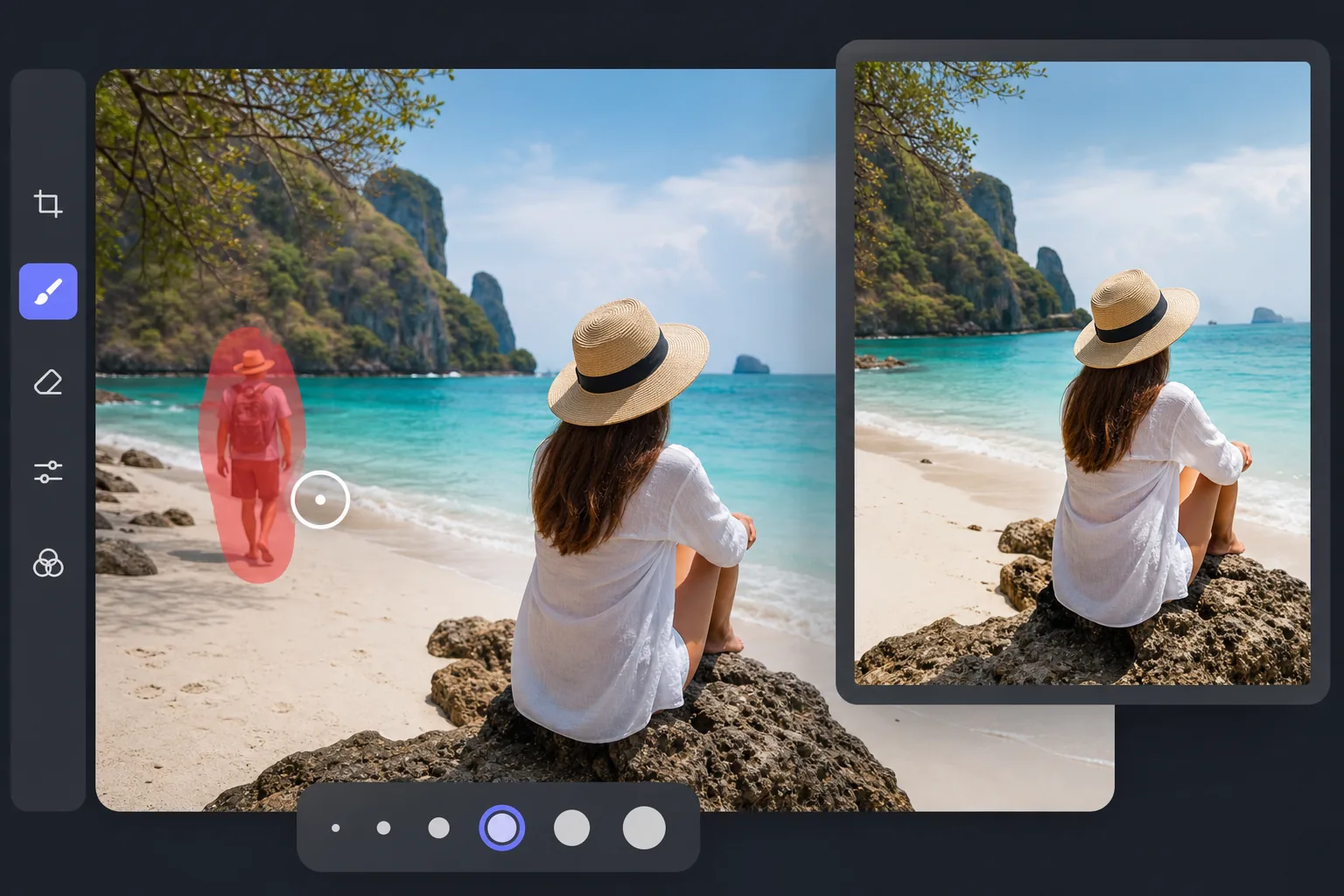
Come rimuovere una persona da una foto
Per rimuovere una persona da una foto, apri Magic Eraser sul web, su iOS o su Android, carica l'immagine, passa il pennello sulla persona che vuoi eliminare e tocca Cancella: l'AI prevede come dovrebbe apparire lo sfondo dietro di lei e lo ricostruisce, lasciandoti una foto pulita in cui non è mai comparsa. È gratis, senza registrazione né filigrana. Puoi rimuovere una persona, diverse persone o tutti tranne chi vuoi tenere, il tutto in un solo passaggio. Sfiora la persona che desideri rimuovere e l'intelligenza artificiale prevede come dovrebbe apparire lo sfondo dietro di lei, quindi lo ridipinge. Il risultato è una foto pulita in cui la persona non è mai apparsa. Funziona su scatti di viaggio, foto di famiglia, esterni di immobili, flat-lay di prodotti e copertura di eventi. Lo stesso strumento gestisce anche le rimozioni parziali, come la cancellazione del braccio o della gamba di qualcuno dal bordo della cornice, e le foto di gruppo in cui desideri mantenere alcune persone e cancellare il resto.
Rimuovere una persona in tre passaggi
- 1
Carica la tua foto
Apri Magic Eraser sul Web, iOS o Android e inserisci la foto con la persona che vuoi che se ne vada. Sono supportati JPEG, PNG e WebP.
- 2
Sfiora la persona
Dipingi sopra la persona che vuoi rimuovere. Sii generoso: un pennello leggermente più grande della silhouette offre all'IA bordi più puliti con cui lavorare rispetto a un contorno stretto.
- 3
Tocca Cancella e scarica
L'intelligenza artificiale ricostruisce lo sfondo sottostante in pochi secondi. Esamina il risultato, perfeziona eventuali macchie rimanenti con il pennello da ritocco, quindi esporta alla massima risoluzione.
Meglio per
- Foto di viaggio con turisti o sconosciuti sullo sfondo
- Riprese esterne di immobili con auto, pedoni o vicini
- Foto di gruppo in cui desideri mantenere solo determinate persone
- Fotografia di matrimoni ed eventi con ospiti indesiderati nella cornice
- Il prodotto si appiattisce con le mani o le braccia sparse nell'inquadratura
Casi limite e punte
La rimozione delle persone tramite intelligenza artificiale funziona meglio quando lo sfondo dietro la persona è visibile altrove nell'inquadratura: cielo aperto, muri, terreno, fogliame. Sfondi disordinati o geometrici (segnaletica con testo, motivi ripetuti, volti in mezzo alla folla) a volte necessitano di un secondo passaggio con il pennello da ritocco. Per le foto di gruppo con corpi sovrapposti, rimuovi le persone una alla volta e rivaluta ogni risultato prima di continuare. Evita di utilizzare la rimozione dell'intelligenza artificiale per manipolare foto o prove di notizie: questi casi d'uso richiedono la modifica e la divulgazione manuale.
Domande frequenti
- È gratuito rimuovere una persona da una foto?
- SÌ. Il livello gratuito di Magic Eraser copre la rimozione delle persone con limiti di utilizzo giornaliero. L'aggiornamento a Premium ($ 29,99/anno) rimuove i limiti e sblocca esportazioni a risoluzione più elevata.
- Posso rimuovere più persone contemporaneamente?
- SÌ. Puoi sfiorare più persone in un unico passaggio o rimuoverle una alla volta. Rimuovendoli uno alla volta di solito si ottengono bordi più puliti quando le persone si sovrappongono.
- Funziona su foto di gruppo e folle?
- Funziona su piccoli gruppi e riprese con folla parziale. Per folle dense in cui ogni pixel è una persona, l'intelligenza artificiale ha meno contesto circostante con cui lavorare e potrebbe aver bisogno di ritocchi. Le foto con sfondo chiaro tra i corpi danno i risultati migliori.
- La modifica sembrerà ovvia?
- Sulla maggior parte delle foto no: l'intelligenza artificiale abbina l'illuminazione, il colore e la trama della scena circostante. Sfondi complessi con testo, motivi geometrici o punti di riferimento distintivi dietro la persona rimossa sono i punti in cui molto probabilmente vedrai i segni della modifica.
- Come rimuovo una persona da una foto dal telefono?
- Apri Magic Eraser in qualsiasi browser mobile oppure nell'app per iOS o Android, carica la foto dal rullino, passa il pennello sulla persona con il dito e tocca Cancella. Pizzica per fare zoom così puoi seguire con precisione il suo contorno, compresa l'eventuale ombra che proietta. La versione per telefono usa la stessa AI del desktop, quindi il risultato è identico: è solo più facile usare il pennello con precisione su uno schermo touch.
- Come rimuovo uno sconosciuto o un intruso dallo sfondo?
- Passa il pennello sulla persona sullo sfondo e tocca Cancella: è uno dei casi più semplici, perché gli sconosciuti di solito si trovano su superfici aperte (una strada, una spiaggia o una piazza) che l'AI può ricostruire a partire dall'area circostante. Includi tutta la sagoma e qualsiasi ombra o riflesso. Per un intruso lontano davanti a una folla affollata, passa il pennello solo su quella persona: l'AI riempie lo spazio basandosi sulle persone e sulla scena intorno.
- Posso rimuovere tutti tranne una persona da una foto di gruppo?
- Sì. Passa il pennello su ogni persona che vuoi eliminare e lascia intatta quella che vuoi tenere, poi tocca Cancella: l'AI rimuove tutte le persone selezionate in un solo passaggio e ricostruisce lo sfondo dietro di loro. È utile per trasformare uno scatto di gruppo affollato in un ritratto singolo pulito, a patto che le persone da rimuovere non si sovrappongano a quella che vuoi tenere.
- Funziona per rimuovere tutta la persona, non solo il viso?
- Sì, rimuovi l'intera persona, non solo il viso. Passa il pennello su tutto il corpo, dalla testa ai piedi, comprese braccia o gambe che si estendono verso il bordo dell'inquadratura e qualsiasi ombra sul terreno. La rimozione del corpo intero funziona meglio quando la persona si trova davanti a uno sfondo continuo; se è in parte nascosta dietro un mobile o un altro soggetto, l'AI ricostruisce la porzione visibile e tu mantieni ciò che sta in primo piano.