
Foto Produk Jam Tangan
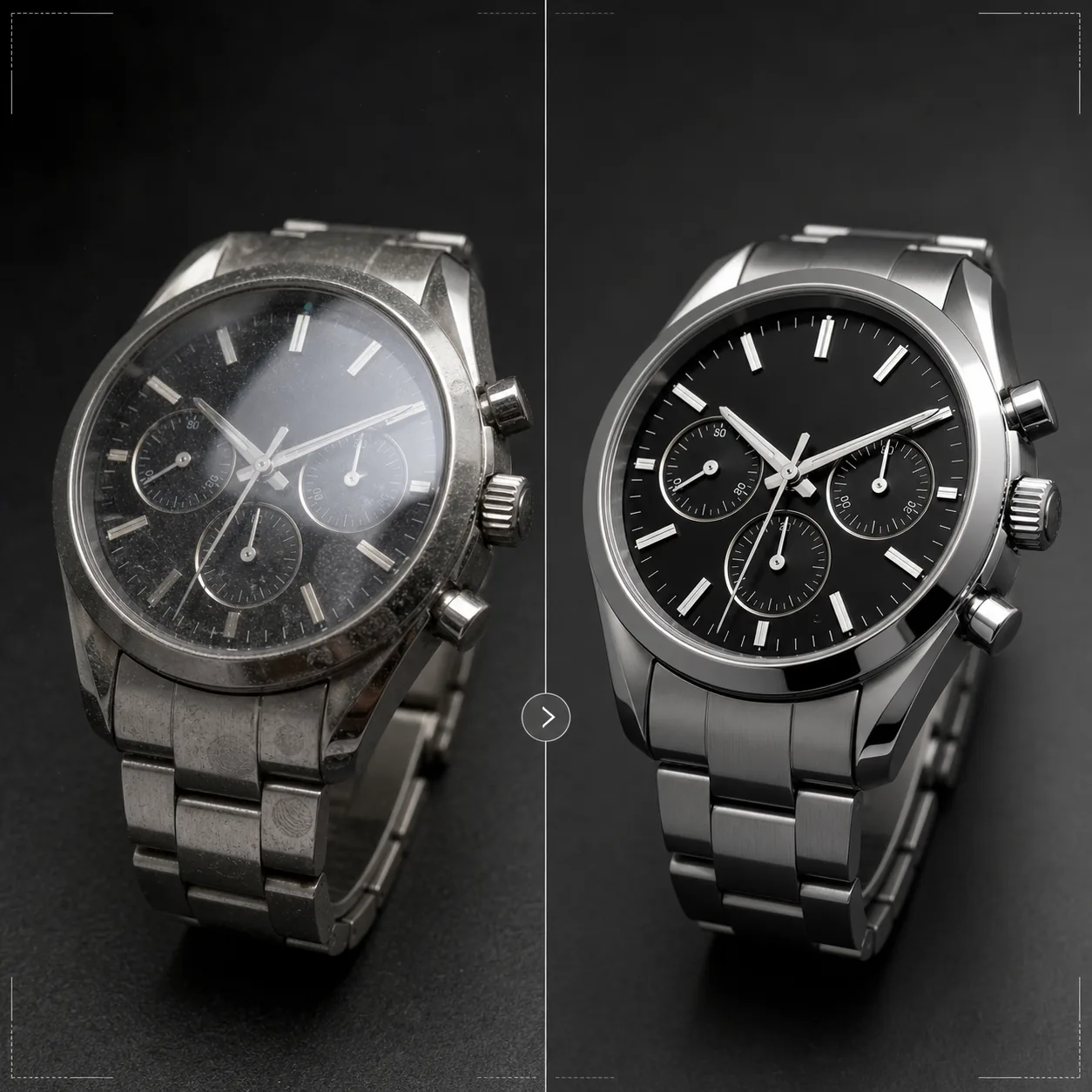
Tampilkan jam tangan dengan presisi yang layak dimilikinya. Templat ini menajamkan detail dial dan indeks, mengontrol pantulan kristal, menyempurnakan tekstur logam gelang dan casing, menghilangkan debu serta sidik jari dari permukaan poles, dan menyiapkan gambar untuk listing e-commerce mewah dan penggunaan katalog.
Coba templat ini gratisE-commerce template preview
Apa yang dilakukan templat ini
Menangani tantangan khusus fotografi jam tangan, di mana detail terkecil sangat berarti bagi pembeli. Dial jam tangan memiliki detail rumit — indeks, subdial, jendela tanggal, teks cetak — yang harus setajam silet agar gambar menyampaikan kualitas. Templat ini menggunakan AI Enhance untuk menajamkan elemen dial secara selektif sambil menjaga gambar tetap alami secara keseluruhan. Magic Eraser menghilangkan partikel debu, sidik jari pada casing poles, dan goresan kecil pada kristal yang muncul saat perbesaran tinggi. Pantulan kristal dikurangi agar dial di bawahnya terlihat jelas, dan tekstur logam pada casing serta gelang disempurnakan untuk menunjukkan perbedaan finishing brushed versus poles yang dievaluasi pembeli jam tangan dengan cermat.
Pengaturan templat
| Penajaman dial | Peningkatan mikro-detail selektif (indeks, jarum, teks) |
| Pantulan kristal | Kurangi silau dan pantulan pada kristal safir/mineral |
| Tekstur logam | Tingkatkan pembedaan permukaan brushed dan poles |
| Pembersihan permukaan | Hilangkan debu, sidik jari, dan goresan kecil |
| Resolusi keluaran | 4000 × 4000 px (detail makro untuk tampilan perbesaran) |
| Latar belakang | Putih murni, gelap solid, atau gradien (standar produk mewah) |
Cara menggunakan templat ini
Unggah foto jam tangan Anda
Unggah foto produk jam tangan — di pergelangan, flat lay, atau penataan studio di atas bantalan atau dudukan. Close-up makro permukaan dial dan tampilan samping casing juga didukung. Untuk hasil terbaik, foto jam tangan pada posisi jarum 10:10, standar industri yang membingkai logo dan menciptakan komposisi seimbang dan simetris.
Penyempurnaan dial dan detail
AI Enhance menajamkan dial secara selektif — penanda jam, jarum, subdial, jendela tanggal, dan teks cetak menjadi tajam dan mudah dibaca. Titik lume pada indeks sedikit dicerahkan untuk menunjukkan keberadaannya. Penyempurnaan ini menghormati kedalaman bidang pada bidikan asli Anda, menjaga area yang sengaja diburamkan tetap lembut.
Pembersihan permukaan dan kontrol pantulan
Magic Eraser menghilangkan partikel debu pada dial, sidik jari pada casing dan gelang, serta goresan permukaan kecil pada kristal. Pantulan kristal dikurangi untuk menampakkan seluruh dial di bawahnya sambil mempertahankan pantulan secukupnya untuk menyampaikan keberadaan kaca — menghilangkan pantulan sepenuhnya membuat jam tangan tampak datar secara tidak realistis.
Ekspor untuk listing atau katalog
Unduh pada 4000 × 4000 px untuk listing e-commerce yang dapat diperbesar, atau pada resolusi cetak untuk katalog dan iklan. Opsi latar belakang meliputi putih murni untuk listing marketplace, gelap solid untuk estetika merek mewah, dan gradien untuk penggunaan editorial.
Tips profesional untuk hasil terbaik
- ✓Foto jam tangan dengan jarum diatur ke 10:10 atau 10:08 — posisi ini membingkai logo merek di antara jarum, menampilkan jendela tanggal dan subdial dengan jelas, serta menciptakan komposisi yang seimbang secara visual yang digunakan di seluruh industri jam tangan.
- ✓Gunakan lensa makro atau mode close-up untuk menangkap detail dial maksimal. Templat dapat menajamkan detail yang ada tetapi tidak dapat menciptakan detail yang tidak terekam — gambar sumber beresolusi lebih tinggi dengan lebih banyak detail dial memberikan hasil yang jauh lebih baik.
- ✓Untuk jam tangan bergelang logam, atur sudut cahaya untuk menunjukkan perbedaan antara permukaan brushed dan poles. Templat menyempurnakan kontras ini, tetapi memulai dengan pembedaan permukaan yang terlihat menghasilkan hasil paling mencolok.
- ✓Bersihkan jam tangan dengan kain mikrofiber tepat sebelum pemotretan. Meskipun Magic Eraser menghilangkan debu dan sidik jari, memulai dengan kondisi bersih berarti lebih sedikit rekonstruksi AI dan pelestarian tekstur logam yang lebih akurat di area yang dibersihkan.
E-commerce workflow
Product photo hub
Use this template with the full ecommerce product photo workflow for marketplace backgrounds, cleanup, compression, resizing, and listing-ready exports.
View ecommerce product photo workflowPertanyaan umum
Bisakah ini memperbaiki foto di mana dial terhalang oleh pantulan?
+
Pantulan sedang dapat dikurangi untuk menampakkan detail dial di bawahnya. Namun, jika pantulan begitu kuat sehingga tidak ada detail dial yang terlihat di foto asli, AI tidak dapat menciptakan detail yang tidak pernah terekam. Untuk hasil terbaik, foto dengan sumber cahaya diposisikan untuk meminimalkan pantulan langsung pada kristal.
Apakah ini berfungsi untuk smartwatch?
+
Ya. Layar smartwatch disempurnakan dengan elemen antarmuka yang dipertajam dan sidik jari yang dikurangi pada kaca. Templat mengenali baik dial analog tradisional maupun tampilan digital dan menyesuaikan pendekatan penajamannya.
Bagaimana dengan ban dan tali jam tangan?
+
Tali kulit mendapat penyempurnaan tekstur yang menampilkan serat dan detail jahitan. Tali NATO dan kain mendapat penajaman tekstur yang halus. Gelang logam mendapat penyempurnaan permukaan brushed/poles. Seluruh jam tangan — casing, kristal, dial, dan tali — diperlakukan sebagai produk yang utuh.
Setiap detail penting saat menjual sebuah jam tangan
Unggah foto jam tangan dan dapatkan detail dial yang jernih, pantulan terkendali, serta kualitas gambar setingkat perhiasan untuk listing Anda.
Coba gratisRelated templates
More e-commerce templates for your workflow.
Templat latar belakang putih murni untuk foto produk. Pengaturan Amazon, Shopify, dan pasar siap untuk gambar produk yang bersih dan profesional yang berkonversi.
Templat foto daftar yang dioptimalkan Etsy. Mengonversi foto gaya hidup menjadi latar belakang putih bersih pada 2000 piksel, menyempurnakan detail produk buatan tangan, dan memenuhi pedoman gambar Etsy.
Templat foto daftar yang dioptimalkan eBay. Latar belakang putih untuk gambar galeri, peningkatan dokumentasi kondisi, dan tata letak multi-sudut yang memenuhi standar gambar eBay.
Templat fotografi perhiasan profesional untuk cincin, kalung, dan jam tangan. Mengontrol pantulan, meningkatkan kilauan batu permata, dan menghasilkan gambar siap pasar dengan latar belakang bersih.
Templat foto furnitur profesional untuk daftar pasar. Hapus kekacauan ruangan, tampilkan dimensi sebenarnya, dan sajikan potongan dengan latar belakang yang bersih atau dalam konteks ruangan yang ditata.
Bersihkan foto pakaian dengan tampilan datar dengan menghilangkan kerutan, membersihkan serat, latar belakang putih bersih, dan warna kain yang akurat. Siap untuk Shopify, Amazon, dan toko butik.