
eBay Daftar Foto
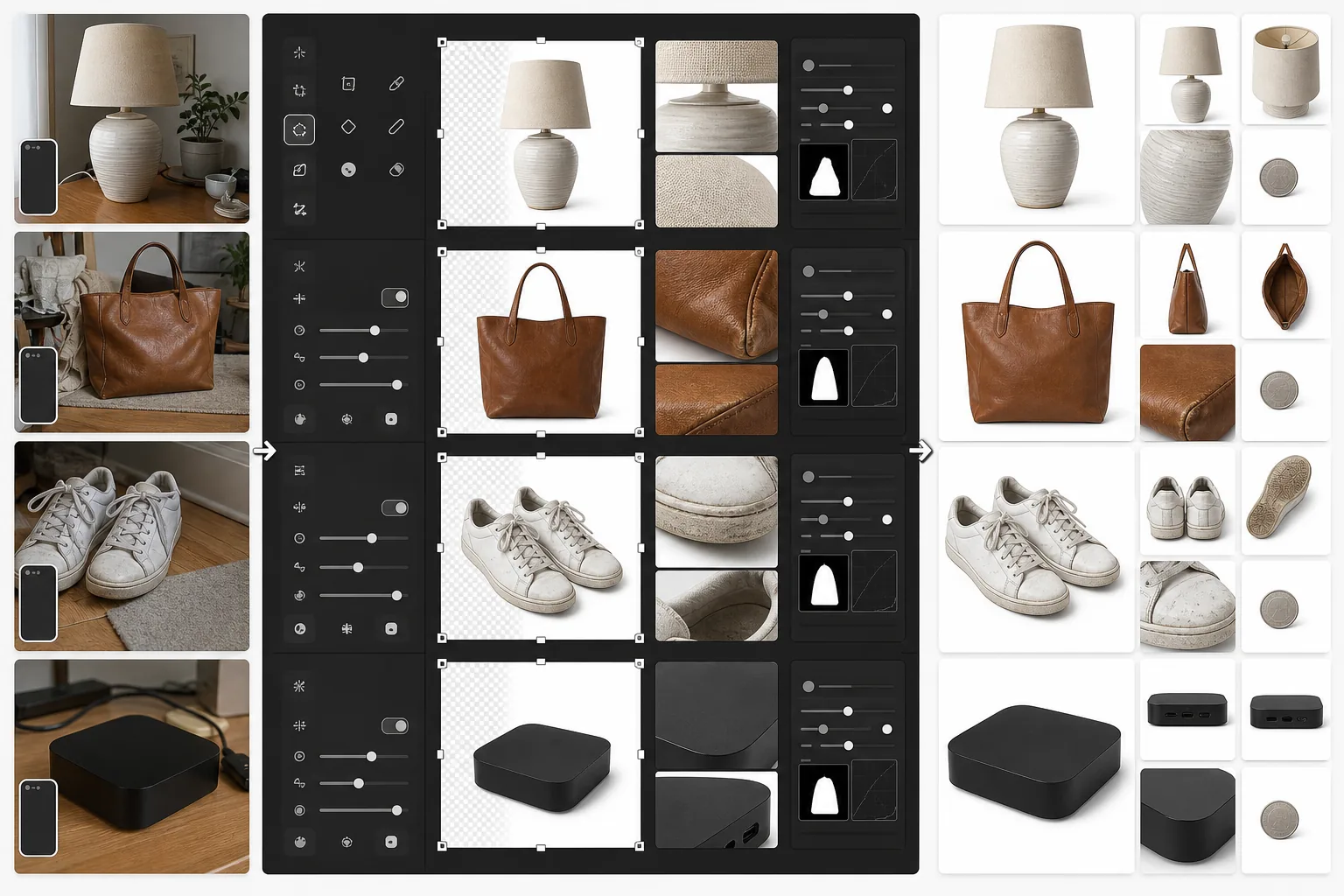
Buat daftar eBay yang menonjol di hasil pencarian dan memenangkan kepercayaan pembeli. Templat ini menghasilkan gambar galeri latar belakang putih yang bersih, menyempurnakan foto detail kondisi untuk barang bekas, dan memastikan setiap foto memenuhi minimum 500px eBay dengan ruang lebih untuk fitur zoom.
Coba templat ini gratisE-commerce template preview
Apa yang dilakukan templat ini
Menyiapkan foto produk khusus untuk daftar eBay. Gambar utama mendapatkan latar belakang putih bersih untuk tampil baik di hasil pencarian eBay dan penelusuran kategori. Gambar sekunder disempurnakan untuk menunjukkan kondisi barang dengan jelas — goresan, bekas keausan, label, dan nomor seri menjadi terlihat tajam. Magic Eraser menghapus kekacauan latar belakang dari foto kondisi tanpa memengaruhi barang itu sendiri.
Pengaturan templat
| Ukuran gambar utama | 1600×1600px (persegi, melebihi minimum 500px eBay) |
| Latar belakang (utama) | Putih murni (#FFFFFF) untuk thumbnail galeri |
| Mode detail kondisi | Peningkatan mikro-kontras untuk goresan, label, dan keausan |
| Format file | JPEG kualitas 90% (di bawah batas 12MB eBay) |
| Profil warna | sRGB (standar web) |
| Tanda air | Tidak ada (eBay melarang tanda air pada gambar daftar) |
Cara menggunakan templat ini
Unggah foto barang Anda
Ambil foto barang Anda dari depan, belakang, samping, dan close-up dari setiap detail kondisi seperti goresan, tag, atau nomor seri. Gunakan cahaya alami dan hindari flash, yang dapat memudarkan detail dan menciptakan silau pada permukaan reflektif.
Buat gambar galeri
Background Eraser mengisolasi barang dan menempatkannya pada putih murni untuk foto daftar utama. Algoritma pencarian eBay menyukai gambar latar belakang putih, dan gambar tersebut tampil jauh lebih baik di hasil pencarian 'Buy It Now' dan lelang.
Sempurnakan dokumentasi kondisi
Untuk barang bekas, rekondisi, atau vintage, AI Enhance menerapkan penajaman mikro-kontras yang membuat detail kondisi terlihat jelas — goresan, patina, bulu kain, dan tanda autentikasi. Magic Eraser menghapus kekacauan latar belakang dari foto detail tanpa menyentuh barang.
Ekspor set foto daftar Anda
Unduh semua gambar pada 1600×1600px. eBay mengizinkan hingga 24 foto per daftar — gunakan set lengkap untuk kepercayaan pembeli terbaik dan tingkat pengembalian terendah.
Kiat profesional untuk hasil terbaik
- ✓Untuk gambar galeri utama, foto barang dengan latar belakang kontras apa pun. Background Eraser menangani sisanya. Barang gelap di permukaan terang (atau sebaliknya) memberikan deteksi tepi yang paling bersih.
- ✓Dokumentasikan setiap cacat pada barang bekas dengan foto close-up. Gambar kondisi yang disempurnakan mengurangi pengembalian 'barang tidak sesuai deskripsi', yang melindungi peringkat penjual Anda dan menjaga daftar Anda tetap terlihat.
- ✓Sertakan foto dengan benda umum sebagai skala — koin di samping elektronik kecil, atau pena di samping pakaian. Pembeli eBay sering salah menilai ukuran dari foto produk saja.
- ✓Foto elektronik dan barang koleksi dengan nomor seri dan tanda autentikasi terlihat jelas. Penajaman detail AI Enhance membuatnya terbaca bahkan dari foto smartphone yang diambil dengan sudut sedikit miring.
E-commerce workflow
Product photo hub
Use this template with the full ecommerce product photo workflow for marketplace backgrounds, cleanup, compression, resizing, and listing-ready exports.
View ecommerce product photo workflowPertanyaan umum
Apakah eBay mengharuskan latar belakang putih?
+
eBay tidak secara ketat mengharuskan latar belakang putih, tetapi algoritma pencarian dan peringkat Best Match-nya menyukai gambar utama yang bersih dengan latar belakang putih. Daftar dengan foto galeri latar belakang putih secara konsisten menerima lebih banyak tayangan dan rasio klik-tayang yang lebih tinggi di hasil pencarian eBay.
Bisakah saya menghapus tanda air atau logo dari foto saya?
+
eBay melarang tanda air, batas, dan hamparan teks pada gambar daftar. Templat ini menghasilkan gambar bersih tanpa elemen tambahan apa pun. Jika kamera Anda menambahkan cap tanggal, Magic Eraser dapat menghapusnya.
Berapa banyak foto yang harus saya sertakan per daftar?
+
Gunakan sebanyak yang dibutuhkan kondisi — eBay mengizinkan hingga 24 foto gratis. Untuk barang baru, biasanya 4-6 sudut sudah cukup. Untuk barang bekas, sertakan setiap sudut ditambah close-up dari setiap keausan, label, dan aksesori. Lebih banyak foto berkorelasi dengan tingkat penjualan yang lebih tinggi dan lebih sedikit perselisihan pembeli.
Buat daftar eBay yang terjual lebih cepat
Unggah foto barang Anda dan dapatkan gambar galeri yang dioptimalkan untuk pencarian ditambah dokumentasi kondisi yang disempurnakan dalam hitungan detik.
Coba gratisRelated templates
More e-commerce templates for your workflow.
Templat latar belakang putih murni untuk foto produk. Pengaturan Amazon, Shopify, dan pasar siap untuk gambar produk yang bersih dan profesional yang berkonversi.
Templat foto daftar yang dioptimalkan Etsy. Mengonversi foto gaya hidup menjadi latar belakang putih bersih pada 2000 piksel, menyempurnakan detail produk buatan tangan, dan memenuhi pedoman gambar Etsy.
Templat fotografi perhiasan profesional untuk cincin, kalung, dan jam tangan. Mengontrol pantulan, meningkatkan kilauan batu permata, dan menghasilkan gambar siap pasar dengan latar belakang bersih.
Templat foto furnitur profesional untuk daftar pasar. Hapus kekacauan ruangan, tampilkan dimensi sebenarnya, dan sajikan potongan dengan latar belakang yang bersih atau dalam konteks ruangan yang ditata.
Bersihkan foto pakaian dengan tampilan datar dengan menghilangkan kerutan, membersihkan serat, latar belakang putih bersih, dan warna kain yang akurat. Siap untuk Shopify, Amazon, dan toko butik.
Buat foto produk yang sesuai dengan Amazon dengan latar belakang putih bersih, koreksi pencahayaan yang tepat, dan dimensi yang dioptimalkan untuk gambar listingan utama dan sekunder.