
Pembersihan Pakaian Flat Lay
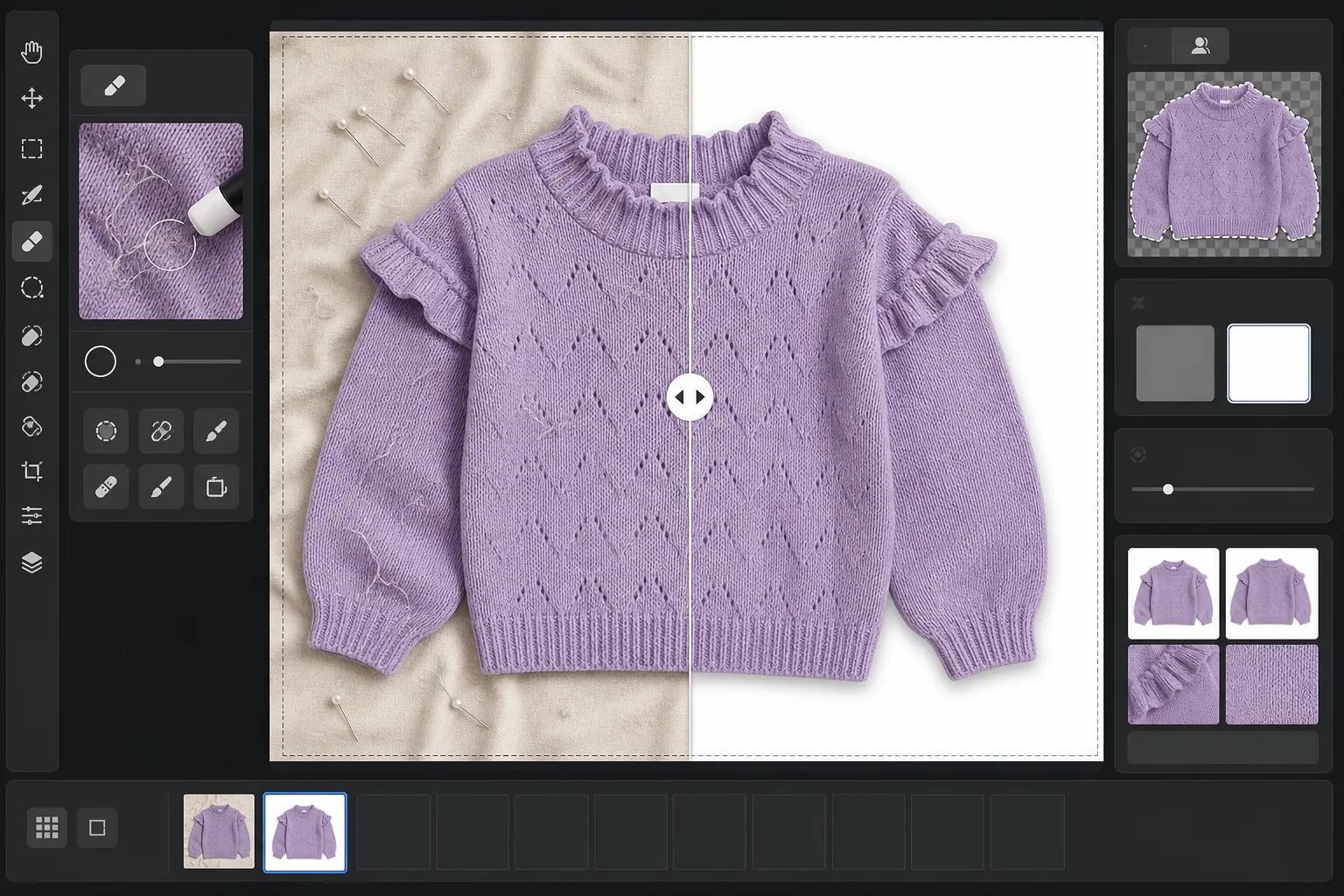
Ubah foto pakaian flat lay mentah menjadi gambar produk yang siap untuk marketplace. Templat ini menghilangkan kerutan, serat, bulu hewan peliharaan, dan benang yang menjuntai, mengganti latar belakang berantakan dengan putih bersih, serta mengoreksi warna kain agar yang dilihat pelanggan di layar sesuai dengan yang tiba di dalam paket.
Coba templat ini gratisE-commerce template preview
Apa yang dilakukan templat ini
Mengatasi masalah paling umum dalam fotografi pakaian flat lay: kerutan kain akibat pelipatan dan pengiriman, serat dan bulu hewan peliharaan yang ditangkap kamera tetapi terlewat oleh mata, latar belakang tidak rata akibat seprai atau sambungan papan poster, serta warna kain yang tidak akurat akibat pencahayaan campuran. Magic Eraser menghilangkan kotoran di permukaan, benang yang menjuntai, dan label perawatan yang mencuat dari garis leher. Background Eraser memisahkan pakaian dan menempatkannya di atas latar putih bersih. AI Enhance mengoreksi suhu warna agar pewarna kain tampak akurat di berbagai monitor dan katalog cetak.
Pengaturan templat
| Latar belakang | Putih murni (#FFFFFF) dengan tepi lembut 2px |
| Pengurangan kerutan | Sedang (menghaluskan lipatan pengiriman, mempertahankan lipatan yang disengaja) |
| Akurasi warna | sRGB dengan kalibrasi titik putih otomatis ke kartu abu-abu netral |
| Penghilangan serat | Deteksi otomatis serat, rambut, dan debu di atas 3px |
| Bayangan | Bayangan halus (offset 4px, opasitas 15%) untuk kedalaman |
| Dimensi keluaran | Pangkasan persegi 2000×2000px dengan padding 10% |
Cara menggunakan templat ini
Unggah foto flat lay Anda
Foto pakaian yang dibentangkan rata di permukaan bersih mana pun — tempat tidur, meja, atau papan poster. Latar belakang tidak perlu putih sempurna atau bebas kerutan karena akan diganti. Cahaya matahari alami di dekat jendela menghasilkan warna kain yang paling akurat.
Hilangkan serat, benang, dan label
Magic Eraser secara otomatis mendeteksi dan menghilangkan serat, bulu hewan peliharaan, benang yang menjuntai, dan label perawatan yang terlihat di atas garis leher atau pinggang. Anda juga dapat memilih dan menghapus secara manual gantungan, jepitan, atau peniti penataan yang tertinggal dalam foto.
Ganti latar belakang
Background Eraser memisahkan pakaian dari permukaan apa pun tempatnya difoto dan menempatkannya di atas latar putih murni. Deteksi tepi mengikuti garis luar pakaian yang sebenarnya termasuk renda kerut, rumbai, dan detail renda tanpa memotong fitur halus.
Koreksi warna dan ekspor
AI Enhance menyesuaikan white balance agar warna kain di layar sedekat mungkin dengan pakaian fisik. Unduh gambar akhir sebagai JPEG persegi 2000x2000px yang siap untuk Shopify, Amazon, Etsy, atau toko Anda sendiri — berukuran sesuai untuk memenuhi persyaratan gambar sebagian besar marketplace.
Tips pro untuk hasil terbaik
- ✓Uap atau setrika pakaian sebelum pemotretan jika memungkinkan. Pengurangan kerutan menangani lipatan pengiriman ringan dengan baik, tetapi garis lipatan dalam akibat penyimpanan jangka panjang lebih sulit dihaluskan tanpa memengaruhi jatuhnya dan tekstur alami kain.
- ✓Sertakan kartu abu-abu kecil atau kartu referensi white balance di tepi bingkai Anda (di luar area pangkasan akhir). Algoritme akurasi warna menggunakannya untuk mengalibrasi titik putih, menghasilkan warna kain yang jelas lebih akurat dibanding hanya white balance otomatis.
- ✓Untuk kain gelap di latar putih, pastikan foto asli memiliki kontras yang cukup antara tepi pakaian dan permukaan. Pakaian hitam di atas kayu gelap lebih sulit dipisahkan dengan rapi dibanding pakaian hitam di atas seprai abu-abu muda atau putih.
- ✓Foto semua pakaian dalam satu batch yang sama di bawah pencahayaan yang sama untuk menjaga konsistensi warna di seluruh katalog Anda. Memprosesnya bersama melalui templat ini memastikan white balance yang seragam di seluruh lini produk.
E-commerce workflow
Product photo hub
Use this template with the full ecommerce product photo workflow for marketplace backgrounds, cleanup, compression, resizing, and listing-ready exports.
View ecommerce product photo workflowPertanyaan umum
Apakah penghilangan kerutan membuat kain tampak halus secara tidak alami?
+
Pengurangan kerutan dikalibrasi untuk menghilangkan lipatan akibat pelipatan dan pengiriman sambil mempertahankan tekstur alami kain — anyaman linen, twill denim, rib katun, dan pola rajut semuanya dipertahankan. Hasilnya tampak seperti pakaian yang baru diuap, bukan permukaan yang dilukis secara digital.
Apakah warnanya akan cocok antara foto dan pakaian aslinya?
+
Akurasi warna bergantung pada pencahayaan dalam foto asli Anda. Di bawah cahaya matahari alami atau lampu studio yang terkalibrasi, algoritme koreksi warna menghasilkan hasil dalam delta-E 3 dari pakaian fisik pada monitor yang terkalibrasi. Di bawah cahaya fluoresen atau tungsten yang kuat, peningkatannya signifikan tetapi pencocokan yang tepat memerlukan referensi kartu abu-abu.
Marketplace mana yang menerima dimensi ini?
+
Keluaran persegi 2000x2000px memenuhi persyaratan gambar untuk Amazon, Shopify, Etsy, eBay, Poshmark, dan sebagian besar platform e-commerce lainnya. Amazon merekomendasikan setidaknya 1000px pada sisi terpanjang untuk fungsi zoom, dan 2000px melampaui ini dengan margin yang nyaman.
Jual pakaian yang tampak sebagus di toko online seperti aslinya
Unggah foto flat lay dan dapatkan gambar produk bebas serat, kerutan yang dihaluskan, berlatar putih yang siap untuk platform e-commerce mana pun.
Coba gratisRelated templates
More e-commerce templates for your workflow.
Templat latar belakang putih murni untuk foto produk. Pengaturan Amazon, Shopify, dan pasar siap untuk gambar produk yang bersih dan profesional yang berkonversi.
Templat foto daftar yang dioptimalkan Etsy. Mengonversi foto gaya hidup menjadi latar belakang putih bersih pada 2000 piksel, menyempurnakan detail produk buatan tangan, dan memenuhi pedoman gambar Etsy.
Templat foto daftar yang dioptimalkan eBay. Latar belakang putih untuk gambar galeri, peningkatan dokumentasi kondisi, dan tata letak multi-sudut yang memenuhi standar gambar eBay.
Templat fotografi perhiasan profesional untuk cincin, kalung, dan jam tangan. Mengontrol pantulan, meningkatkan kilauan batu permata, dan menghasilkan gambar siap pasar dengan latar belakang bersih.
Templat foto furnitur profesional untuk daftar pasar. Hapus kekacauan ruangan, tampilkan dimensi sebenarnya, dan sajikan potongan dengan latar belakang yang bersih atau dalam konteks ruangan yang ditata.
Buat foto produk yang sesuai dengan Amazon dengan latar belakang putih bersih, koreksi pencahayaan yang tepat, dan dimensi yang dioptimalkan untuk gambar listingan utama dan sekunder.