
Foto Inventaris Kendaraan
Ubah foto dari lot menjadi gambar kendaraan berkualitas ruang pamer untuk daftar inventaris online. Templat ini menghapus latar belakang dealer yang berantakan — mobil lain, papan tanda, bangunan — dan menggantinya dengan latar belakang putih, abu-abu, atau bergaya studio yang bersih. Magic Eraser membersihkan pantulan kaca depan, detail pelat nomor, dan stiker lot, sementara koreksi warna memastikan cat tampak sesuai aslinya di bawah pencahayaan apa pun.
Coba templat ini gratisE-commerce template preview
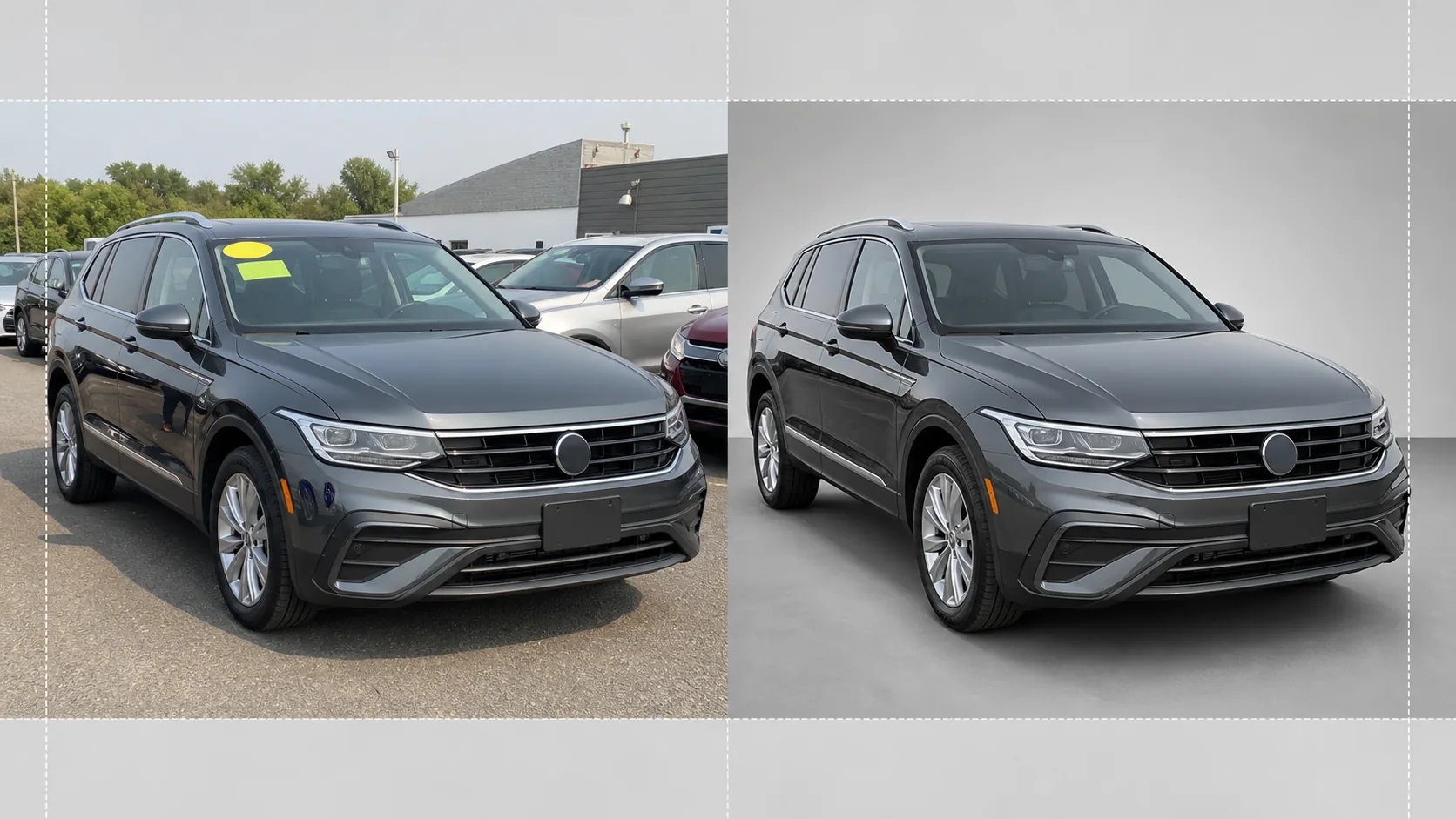
Apa yang dilakukan templat ini
Menangani seluruh alur kerja fotografi inventaris dealer. Background Eraser mengisolasi kendaraan dari lingkungan lot dan mengganti latar belakang dengan latar bergaya studio yang bersih sehingga semua perhatian tertuju pada mobil, truk, atau SUV. Magic Eraser menghapus stiker harga kaca depan, label lot, pelat nomor (untuk privasi), dan pantulan fotografer atau kendaraan di sekitar pada cat mengkilap dan kaca. Koreksi warna menormalkan warna cat sehingga foto yang diambil di bawah langit mendung, lampu sodium tempat parkir, atau sinar matahari tengah hari yang keras semuanya menampilkan tone cat yang akurat dan sama. Gambar akhir dipangkas dan diratakan sehingga kendaraan berada di tengah dan horizontal di seluruh inventaris Anda.
Pengaturan templat
| Latar belakang | Putih studio, abu-abu netral, atau lantai ruang pamer gradien |
| Pembersihan refleksi | Menghapus fotografer, kekacauan lot, dan mobil di sekitar dari pantulan pada cat dan kaca |
| Koreksi warna cat | Normalisasi ke tampilan kode cat pabrikan di bawah cahaya siang netral |
| Penyensoran privasi | Otomatis mengaburkan atau menghapus pelat nomor |
| Pangkas dan ratakan | Otomatis memusatkan kendaraan, meratakan horizon, rasio aspek 16:9 |
| Resolusi output | 3000×1688px (dioptimalkan untuk AutoTrader, Cars.com, dan situs web dealer) |
Cara menggunakan templat ini
Unggah foto lot
Unggah foto kendaraan yang diambil di lot dealer. Sudut depan tiga perempat ideal, tetapi profil samping dan sudut belakang juga berfungsi. Templat ini menangani ponsel pintar, kamera saku, dan perlengkapan profesional dengan sama baiknya.
Hapus latar belakang dan gangguan
Background Eraser memotong lingkungan lot dan menggantinya dengan latar belakang yang bersih. Magic Eraser menghapus stiker kaca depan, label nomor lot, decal harga, dan teks pelat nomor. Pantulan mobil di sekitar dan fotografer pada cat dan jendela dibersihkan secara otomatis.
Koreksi warna dan eksposur
Warna cat dinormalkan agar sesuai dengan tone yang dimaksudkan pabrikan di bawah cahaya siang netral. Sorotan yang terlalu terang pada krom dan kaca dipulihkan, dan detail bayangan di bawah lengkungan roda dan bemper diangkat untuk tampilan yang merata dan berkualitas ruang pamer.
Ekspor untuk daftar inventaris
Unduh gambar jadi dalam 3000×1688px dengan rasio aspek 16:9. Format ini dioptimalkan untuk AutoTrader, Cars.com, CarGurus, Facebook Marketplace, dan sistem manajemen dealer Anda. Pemrosesan batch tersedia untuk pemotretan inventaris seluruh lot.
Tips profesional untuk hasil terbaik
- ✓Foto kendaraan dari sudut depan tiga perempat pada ketinggian bemper. Ini menangkap bagian fasia depan dan profil samping dalam satu bingkai dan merupakan sudut yang paling banyak diklik dalam daftar inventaris online.
- ✓Hindari memotret di bawah sinar matahari langsung dari atas — ini menciptakan bayangan keras di bawah mobil dan sorotan yang terlalu terang di atap dan kap mesin. Hari mendung atau area teduh di lot menghasilkan pencahayaan paling merata untuk diolah AI.
- ✓Lepaskan stiker harga kaca depan sebelum memotret jika memungkinkan. Meskipun AI dapat menghapusnya secara digital, stiker besar yang menutupi detail dasbor terkadang meninggalkan garis tepi samar yang memerlukan sentuhan manual.
- ✓Jaga kendaraan tetap bersih sebelum difoto. Templat ini mengoreksi pencahayaan dan latar belakang, tetapi kotoran, bercak air, dan kotoran burung pada cat lebih baik ditangani dengan cucian cepat daripada dengan retouch AI.
E-commerce workflow
Product photo hub
Use this template with the full ecommerce product photo workflow for marketplace backgrounds, cleanup, compression, resizing, and listing-ready exports.
View ecommerce product photo workflowPertanyaan umum
Bisakah saya memproses seluruh inventaris sekaligus?
+
Ya. Unggah beberapa foto kendaraan dan templat akan menerapkan pengaturan latar belakang, koreksi warna, dan pembersihan yang sama pada setiap foto. Ini memastikan konsistensi visual di seluruh inventaris online Anda.
Apakah warna cat akan akurat?
+
Koreksi warna menormalkan cat agar sesuai dengan tampilannya di bawah cahaya siang netral (5500K). Jika Anda mengetahui kode cat pabrikan, AI menggunakannya sebagai referensi untuk memastikan warna di layar semirip mungkin dengan kendaraan fisik.
Apakah berfungsi untuk sepeda motor dan kapal?
+
Ya. Penghapusan latar belakang dan pembersihan refleksi berfungsi untuk semua jenis kendaraan termasuk sepeda motor, kapal, RV, dan truk berat. Pemusatan otomatis dan rasio pemangkasan mungkin memerlukan penyesuaian manual untuk proporsi kendaraan non-standar.
Buat setiap kendaraan di lot Anda tampak siap ruang pamer
Unggah foto lot dealer dan dapatkan gambar inventaris yang bersih, konsisten, dan profesional dalam hitungan detik.
Coba gratisRelated templates
More e-commerce templates for your workflow.
Templat latar belakang putih murni untuk foto produk. Pengaturan Amazon, Shopify, dan pasar siap untuk gambar produk yang bersih dan profesional yang berkonversi.
Templat foto daftar yang dioptimalkan Etsy. Mengonversi foto gaya hidup menjadi latar belakang putih bersih pada 2000 piksel, menyempurnakan detail produk buatan tangan, dan memenuhi pedoman gambar Etsy.
Templat foto daftar yang dioptimalkan eBay. Latar belakang putih untuk gambar galeri, peningkatan dokumentasi kondisi, dan tata letak multi-sudut yang memenuhi standar gambar eBay.
Templat fotografi perhiasan profesional untuk cincin, kalung, dan jam tangan. Mengontrol pantulan, meningkatkan kilauan batu permata, dan menghasilkan gambar siap pasar dengan latar belakang bersih.
Templat foto furnitur profesional untuk daftar pasar. Hapus kekacauan ruangan, tampilkan dimensi sebenarnya, dan sajikan potongan dengan latar belakang yang bersih atau dalam konteks ruangan yang ditata.
Bersihkan foto pakaian dengan tampilan datar dengan menghilangkan kerutan, membersihkan serat, latar belakang putih bersih, dan warna kain yang akurat. Siap untuk Shopify, Amazon, dan toko butik.