
Foto Spanduk Twitch
Rancang spanduk saluran Twitch profesional yang membuat stream Anda tampak mapan sejak kunjungan pertama. Templat ini mengisolasi potret Anda dari latar belakang mana pun, menempatkannya pada latar bertema game atau berwarna merek, dan menghasilkan output pada dimensi spanduk Twitch yang tepat dengan zona aman untuk hamparan foto profil dan elemen navigasi saluran.
Coba templat ini gratisSocial Media template preview
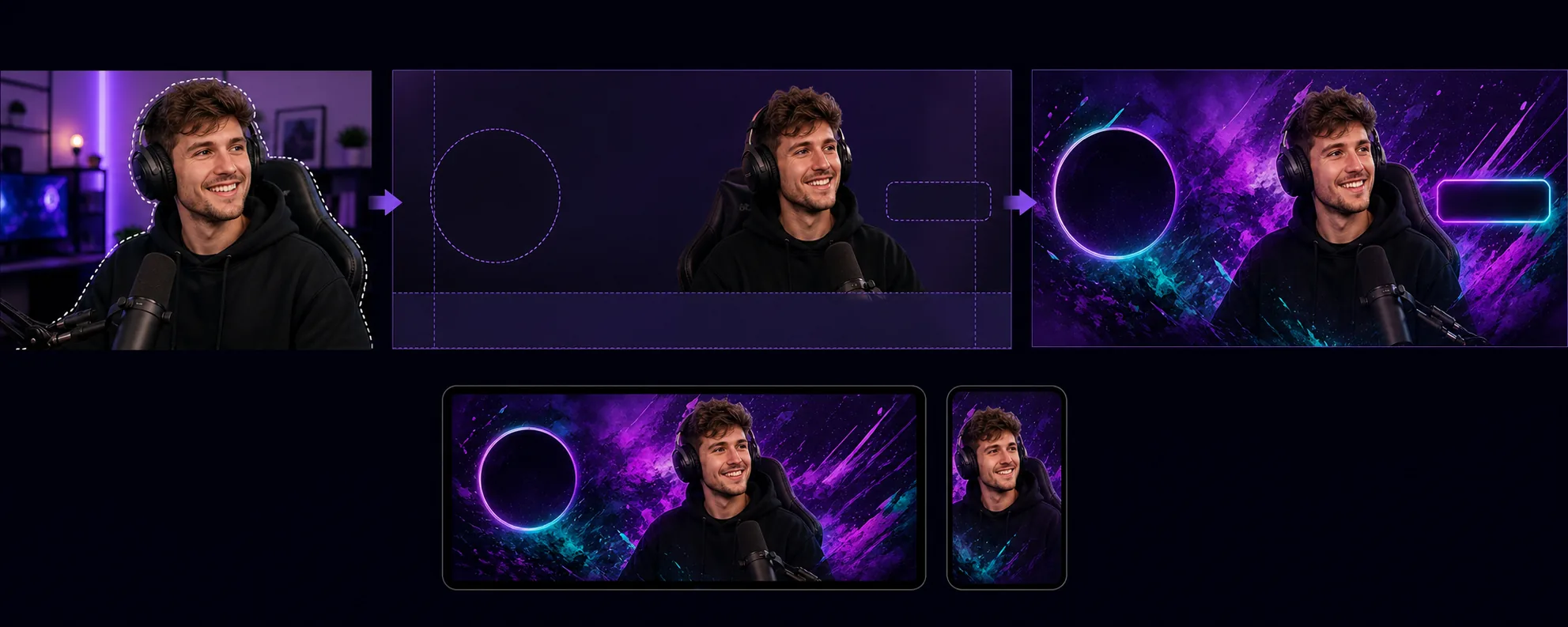
Apa yang dilakukan templat ini
Membuat spanduk saluran yang dioptimalkan untuk persyaratan tata letak unik Twitch, di mana foto profil, tombol ikuti, dan navigasi saluran menghampari area tertentu dari spanduk. Background Eraser mengisolasi potret streamer atau foto tim Anda dari lingkungan mana pun dan menempatkannya pada latar belakang yang sesuai dengan identitas visual saluran Anda — warna merek solid, gradasi, tema game abstrak, atau pola halus. Templat ini menghormati zona aman Twitch sehingga konten visual penting tidak pernah tersembunyi di balik lingkaran foto profil (sisi kiri) atau tombol poin saluran/langganan (sisi kanan). Output berukuran 1200×480px (dimensi spanduk yang direkomendasikan) dan disesuaikan agar terlihat jelas baik pada tampilan browser desktop maupun header aplikasi seluler, tempat spanduk dipotong secara berbeda.
Pengaturan templat
| Ukuran spanduk | 1200×480px (spanduk profil yang direkomendasikan Twitch) |
| Zona aman | Kiri 250px (hamparan profil), kanan 200px (tombol), bawah 80px (bilah navigasi) |
| Latar belakang | Warna solid, gradasi, pola game abstrak, atau gambar khusus |
| Penempatan potret | Kanan-tengah atau tengah, menghindari zona tumpang-tindih foto profil |
| Kecerahan warna | Ditingkatkan agar terlihat jelas pada antarmuka ungu gelap Twitch |
Cara menggunakan templat ini
Unggah foto streamer Anda
Unggah foto diri Anda, perangkat streaming Anda, atau tim Anda. Bidikan tubuh bagian atas dengan pose ekspresif paling cocok untuk spanduk. Templat ini menangani tangkapan webcam, swafoto ponsel, dan foto profesional.
Isolasi dan posisikan
Background Eraser menghapus latar belakang asli dan memosisikan potret Anda di dalam zona aman spanduk. 250 piksel kiri dibiarkan kosong untuk hamparan lingkaran foto profil, dan 80 piksel bawah menghindari bilah navigasi. Gambar Anda ditempatkan di tempat yang akan memberikan dampak visual maksimal baik di desktop maupun seluler.
Terapkan latar belakang dan branding
Pilih latar belakang yang sesuai dengan identitas saluran Anda. Gradasi yang berani dan pola bertema game terlihat bagus di tampilan ungu gelap Twitch. Jika saluran Anda memiliki warna merek yang sudah mapan, gunakan warna tersebut untuk memperkuat pengenalan saat pemirsa tiba di halaman saluran Anda.
Ekspor dan unggah
Unduh pada 1200×480px yang dioptimalkan untuk Twitch. Berkasnya di bawah 10MB (batas Twitch) dan dikompresi agar dimuat cepat bagi pemirsa dengan koneksi lebih lambat. Pratinjau tampilan spanduk dengan foto profil dan navigasi yang dihampar sebelum mengunggahnya ke saluran Anda.
Tips pro untuk hasil terbaik
- ✓Gunakan foto dengan pose ekspresif atau energik — menunjuk ke kamera, merayakan, atau condong ke depan. Pose statis lenyap dalam format spanduk yang sempit, sedangkan pose dinamis menciptakan energi visual yang membuat pemirsa ingin bertahan.
- ✓Uji spanduk Anda baik di desktop maupun seluler. Twitch memotong spanduk secara berbeda di seluler, menampilkan terutama bagian tengah. Tempatkan konten visual terpenting Anda di 700 piksel tengah untuk kompatibilitas lintas perangkat.
- ✓Cocokkan warna spanduk Anda dengan pengaturan warna aksen Twitch Anda. Ketika gradasi spanduk beralih ke warna aksen yang sama dengan yang digunakan untuk tombol langganan dan teks tersorot saluran Anda, seluruh halaman terasa kohesif dan ter-branding secara profesional.
Pertanyaan umum
Dimensi apa yang dibutuhkan Twitch untuk spanduk?
+
Twitch merekomendasikan 1200×480 piksel untuk spanduk profil. Ukuran berkas maksimum adalah 10MB. Templat ini menghasilkan output tepat pada dimensi ini dengan kompresi yang sesuai.
Bisakah saya menyertakan teks pada spanduk?
+
Templat ini menghasilkan tata letak visual tanpa hamparan teks. Anda dapat menambahkan nama saluran, jadwal, atau handel media sosial Anda menggunakan editor gambar apa pun setelahnya. Panduan zona aman menunjukkan dengan tepat di mana teks akan tetap terlihat dan tidak tertutup oleh elemen UI Twitch.
Apakah ini juga berfungsi untuk layar offline Twitch?
+
Templat ini berukuran untuk spanduk profil. Gambar layar offline Twitch menggunakan rasio aspek 16:9 (1920×1080). Anda dapat menggunakan alur kerja serupa — isolasi potret, terapkan latar belakang — tetapi sebaiknya memilih dimensi layar offline secara terpisah.
Buat saluran Twitch Anda tampak mapan sejak hari pertama
Unggah foto dan dapatkan spanduk saluran profesional yang menghormati tata letak Twitch dan membuat stream Anda menonjol.
Coba gratisRelated templates
More social media templates for your workflow.
Templat pangkas persegi yang dioptimalkan untuk Instagram pada 1080×1080 piksel. Latar belakang bersih, warna-warna cerah, dan detail tajam yang menonjol di feed.
Templat spanduk YouTube berukuran 2560×1440 piksel dengan panduan zona aman. Penghapusan latar belakang yang bersih untuk foto pembuat konten, tata letak yang sesuai dengan perangkat, dan sampul saluran yang konsisten dengan merek.
Templat foto sampul Facebook berukuran 820×312 piksel untuk desktop dan pemangkasan seluler 640×360 piksel. Bersihkan gambar merek dengan zona aman yang tepat untuk tumpang tindih gambar profil dan penempatan tombol CTA.
Buat gambar header Twitter/X profesional dengan dimensi tepat 1500×500 piksel. Akun untuk gambar profil tumpang tindih, berfungsi dalam mode gelap dan mode terang.
Sempurnakan foto profil kencan dengan penghalusan kulit alami, pembersihan latar belakang, koreksi pencahayaan, dan gradasi warna halus yang terlihat asli — tidak difilter.
Buat gambar pin Pinterest yang dapat menghentikan gulir dengan latar belakang bersih, dimensi vertikal 2:3 yang optimal, penyempurnaan warna cerah, dan komposisi siap pin.