
Facebook Kapak Fotoğrafı
Hem masaüstünde hem de mobilde özenli görünen Facebook kapak fotoğrafları oluşturun. Bu şablon, 820×312px masaüstü görünümü ile 640×360px mobil kırpma arasındaki zorlu farkı yönetir — marka mesajınızın, görsellerinizin ve harekete geçirici mesajınızın profil resmi veya işlem düğmelerinin arkasına gizlenmeden her cihazda görünür olmasını sağlar.
Bu şablonu ücretsiz deneyinSocial Media template preview
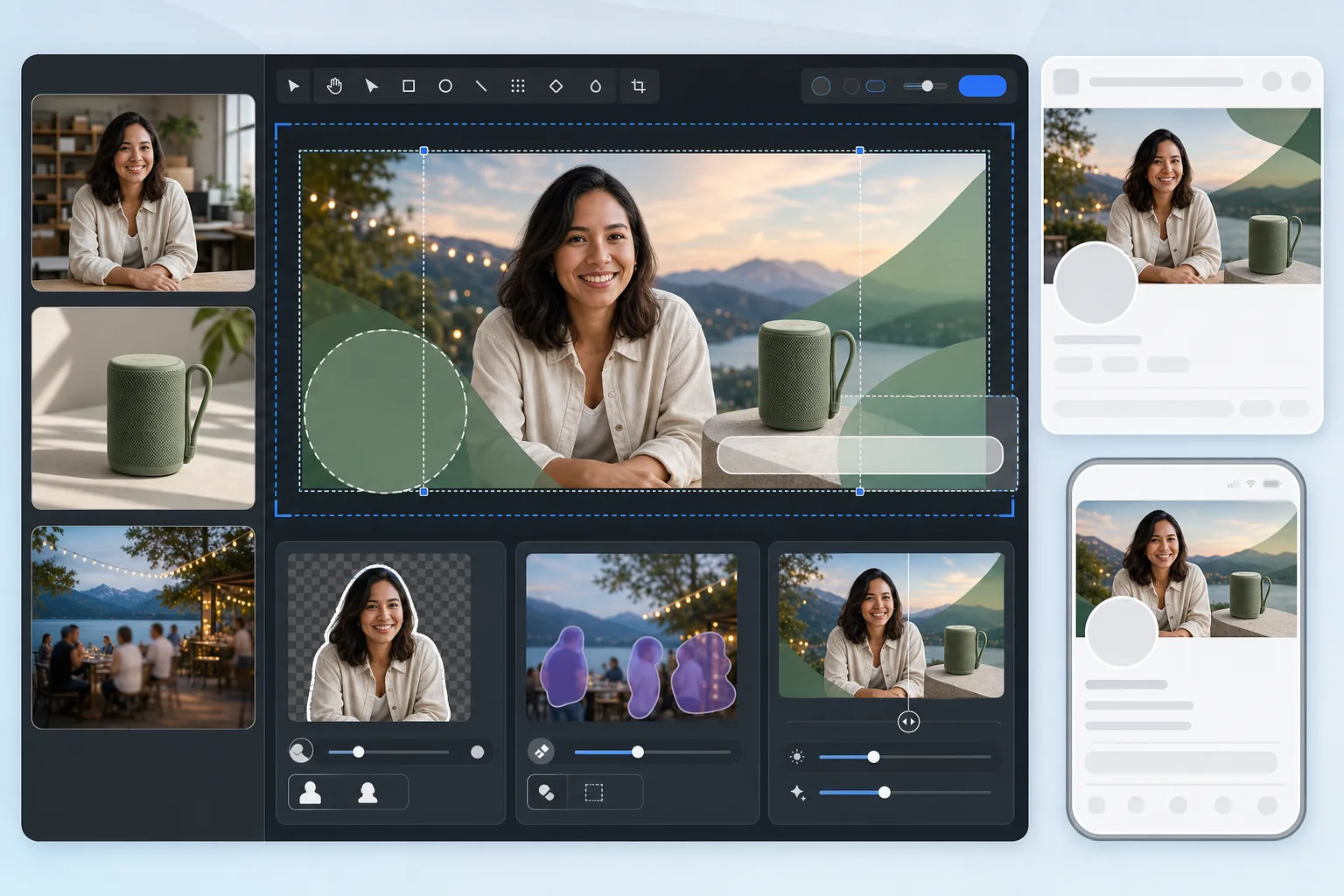
Bu şablon ne yapar
Hem masaüstü (820×312px) hem de mobil (640×360px) görünüm için optimize edilmiş bir Facebook kapak fotoğrafı üretir. Şablon, sol taraftaki profil resmi örtüşmesini, sağdaki işlem düğmelerini ve cihazlar arasındaki farklı en boy oranlarını hesaba katar. Background Eraser, birleştirme için kişileri veya ürünleri temiz bir şekilde ayıklar, Magic Eraser manzaralı arka planlardan dikkat dağıtan öğeleri kaldırır ve AI Enhance, Facebook'un sıkıştırmasının ardından görüntüyü net tutar.
Şablon ayarları
| Yükleme tuvali | 820×360px (hem masaüstü hem de mobil kırpmaları kapsar) |
| Masaüstünde görünen alan | 820×312px (daha geniş, daha kısa) |
| Mobilde görünen alan | 640×360px (daha dar, daha uzun — merkezi kırpma) |
| Profil resmi örtüşmesi | Sol alt köşede 170×170px daire (masaüstü) |
| Dosya biçimi | Grafikler için PNG, fotoğraflar için JPEG %85 (ön sıkıştırma) |
| Renk profili | sRGB (Facebook yükleme sırasında diğer profilleri kaldırır) |
Bu şablon nasıl kullanılır
Kapak görselinizi yükleyin
Birleştirmek istediğiniz bir fotoğraf, marka grafiği veya portre ile başlayın. En az 820px genişliğinde yatay yönelimli fotoğraflar en iyi sonucu verir. Şablon, içeriği nereye yerleştirmenin güvenli olduğu konusunda size yol gösterecektir.
Kompozisyonu temizleyin
Markalı bir arka planın üzerine yerleştirmek üzere kişileri veya ürünleri ayıklamak için Background Eraser kullanın. Magic Eraser, manzara veya etkinlik fotoğraflarından kareye giren kişiler, tabelalar veya dağınıklık gibi istenmeyen öğeleri kaldırır.
İçeriği güvenli bölgelere yerleştirin
Temel içeriği — metin, yüzler, logolar — hem masaüstünde hem de mobilde görünen merkezi alanda tutun. Sol alt köşeden (masaüstünde profil resmi örtüşmesi) ve sağ kenardan (işlem düğmeleri) kaçının.
Ön sıkıştırma ile dışa aktarın
Şablon, optimize edilmiş sıkıştırma ayarlarıyla 820×360px boyutunda dışa aktarır. Facebook tüm yüklemeleri yeniden sıkıştırdığından, dışa aktarma çift sıkıştırmaya bantlaşma veya bulanıklık olmadan dayanmak için hafif bir ön keskinleştirme ve özenli bir JPEG kalitesi uygular.
En iyi sonuçlar için profesyonel ipuçları
- ✓820×360px tuvale göre tasarlayın ancak tüm kritik içeriği 580×280px'lik bir merkez bölgesine yerleştirin. Bu, profil resimleri veya düğmeler tarafından hiçbir engel olmadan hem masaüstünde hem de mobilde görünen örtüşme alanıdır.
- ✓Kapak fotoğrafınıza 24px'den küçük metin yerleştirmekten kaçının. Facebook kapak görüntülerini yoğun şekilde sıkıştırır ve küçük metin yüklemeden sonra bulanık ve okunmaz hale gelir — özellikle mobil ekranlarda.
- ✓İşletme sayfaları için kapak fotoğrafınızı sağ tarafta görünen CTA düğmesiyle ('Şimdi Rezervasyon Yap', 'Şimdi Alışveriş Yap' vb.) uyumlu hale getirin. Düğmenin tasarımınızla örtüşmemesi için ona görsel bir alan bırakın.
- ✓Kapak fotoğrafınızı kampanyalar, mevsimler veya etkinlikler için güncelleyin. Facebook, kapak yüklemesini sayfanızın zaman tünelinde bir gönderi olarak gösterir; bu da güncellemeye yalnızca sayfa başlığının ötesinde ek organik erişim kazandırır.
Sık sorulan sorular
Kapak fotoğrafım mobilde neden farklı görünüyor?
+
Facebook kapak fotoğraflarını cihaza göre farklı şekilde kırpar. Masaüstü 820×312px (geniş ve kısa) gösterirken, mobil 640×360px'lik merkezi bir kırpma (daha dar ama daha uzun) gösterir. En soldaki ve en sağdaki kenarlardaki içerik masaüstünde görünür ancak mobilde kesilir. Şablonun güvenli bölge kılavuzu, önemli içeriğinizin her iki kırpmada da korunmasını sağlar.
Facebook kapak fotoğrafımı bulanıklaştıracak mı?
+
Facebook yüklenen her görüntüyü yeniden sıkıştırır. Şablon, hafif bir ön keskinleştirme uygulayarak ve çift sıkıştırmaya dayanan optimum bir JPEG kalite düzeyi kullanarak buna karşı koyar. JPEG yerine PNG olarak yüklemek de yardımcı olur; çünkü Facebook'un PNG'den sunucu tarafı dönüşümü, zaten sıkıştırılmış bir JPEG'i yeniden sıkıştırmaya kıyasla genellikle daha iyi sonuçlar verir.
Facebook kapak fotoğrafımda metin kullanabilir miyim?
+
Evet, Facebook kapak fotoğrafları için '%20 metin kuralını' kaldırdı. Ancak Facebook'un sıkıştırması nedeniyle metni büyük (en az 24px) ve yüksek kontrastlı tutun. Metninizin masaüstünde profil resminin arkasına gizlenmediğinden veya mobilde kırpılmadığından emin olmak için şablonun güvenli bölge katmanını kullanın.
Her cihazda çalışan bir Facebook kapağı oluşturun
Fotoğrafınızı veya marka varlıklarınızı yükleyin ve saniyeler içinde hem masaüstü hem de mobil görünüm için optimize edilmiş bir kapak görseli elde edin.
Ücretsiz deneyinRelated templates
More social media templates for your workflow.
Templat pangkas persegi yang dioptimalkan untuk Instagram pada 1080×1080 piksel. Latar belakang bersih, warna-warna cerah, dan detail tajam yang menonjol di feed.
Templat spanduk YouTube berukuran 2560×1440 piksel dengan panduan zona aman. Penghapusan latar belakang yang bersih untuk foto pembuat konten, tata letak yang sesuai dengan perangkat, dan sampul saluran yang konsisten dengan merek.
Buat gambar header Twitter/X profesional dengan dimensi tepat 1500×500 piksel. Akun untuk gambar profil tumpang tindih, berfungsi dalam mode gelap dan mode terang.
Sempurnakan foto profil kencan dengan penghalusan kulit alami, pembersihan latar belakang, koreksi pencahayaan, dan gradasi warna halus yang terlihat asli — tidak difilter.
Buat gambar pin Pinterest yang dapat menghentikan gulir dengan latar belakang bersih, dimensi vertikal 2:3 yang optimal, penyempurnaan warna cerah, dan komposisi siap pin.
Buat foto sampul video TikTok yang menarik dengan latar belakang bersih, bingkai subjek tebal, dan dimensi vertikal 9:16 yang dioptimalkan untuk konsistensi kisi profil.