
Gambar Pin Pinterest
Buat gambar pin yang menghentikan gulir dan mendorong penyimpanan. Templat ini memformat foto ke rasio vertikal 2:3 optimal Pinterest, menghapus latar belakang yang berantakan untuk komposisi bersih yang berfokus pada produk, meningkatkan kecerahan warna untuk feed Pinterest, dan menghasilkan gambar siap pin yang terlihat tajam baik di ponsel maupun desktop.
Coba templat ini gratisSocial Media template preview
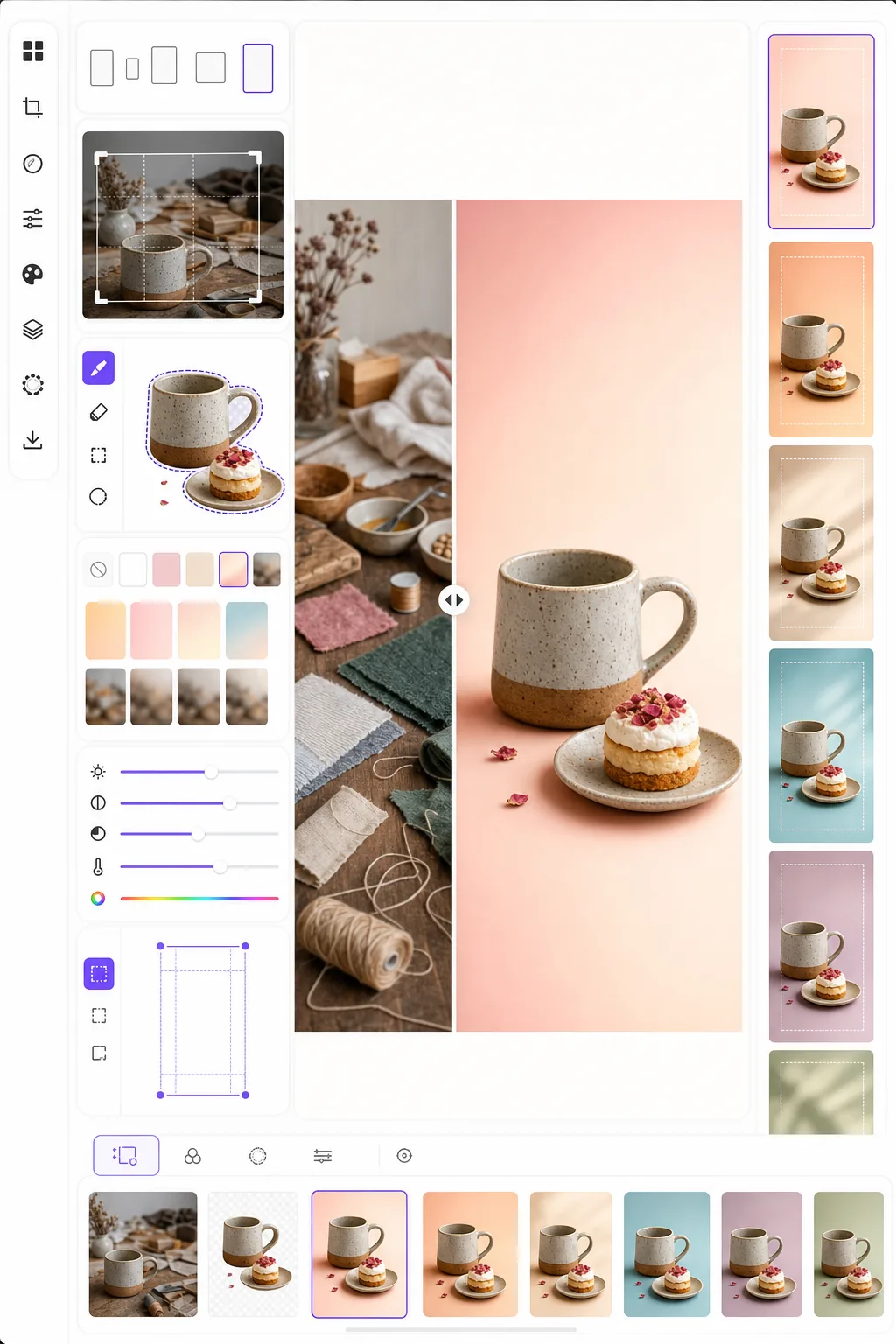
Apa yang dilakukan templat ini
Mengoptimalkan gambar untuk keterlibatan maksimal di Pinterest di mana pin yang tinggi dan mencolok secara visual mengungguli foto lanskap standar tiga hingga lima kali lipat dalam tingkat penyimpanan. Background Eraser mengisolasi subjek Anda — produk, hidangan resep, pakaian, atau kerajinan — dan menempatkannya pada latar belakang bersih, berwarna, atau gradien yang membuat subjek menonjol di feed yang padat. Kecerahan warna ditingkatkan agar sesuai dengan kecenderungan algoritme Pinterest yang menyukai konten yang cerah dan jenuh. Templat menghasilkan output pada 1000 × 1500 px, dimensi tepat yang direkomendasikan Pinterest untuk pin standar.
Pengaturan templat
| Rasio aspek | 2:3 vertikal (1000 × 1500 px — standar Pinterest) |
| Opsi latar belakang | Putih bersih, warna solid, gradien lembut, atau asli yang diburamkan |
| Peningkatan warna | +20% saturasi untuk visibilitas feed (dapat disesuaikan) |
| Pembingkaian subjek | Penengahan otomatis dengan padding 10% untuk ruang hamparan teks |
| Format output | PNG (untuk hamparan teks) atau JPEG (untuk unggah langsung) |
Cara menggunakan templat ini
Unggah gambar sumber Anda
Unggah foto produk, foto hidangan, foto pakaian, atau gambar apa pun yang ingin Anda ubah menjadi pin Pinterest. Templat menerima gambar lanskap, persegi, atau potret dan akan membingkainya ulang ke rasio vertikal 2:3 optimal dengan pemotongan cerdas yang menjaga subjek tetap di tengah.
Latar belakang dan komposisi
Background Eraser mengisolasi subjek Anda dan menempatkannya pada latar belakang bersih. Pilih dari putih murni, warna merek solid, gradien lembut, atau versi buram dari latar belakang asli. Subjek diposisikan secara otomatis untuk menyisakan ruang di bagian atas dan bawah untuk hamparan teks.
Optimalisasi warna dan ketajaman
Warna ditingkatkan sebesar 20% saturasi agar menonjol di feed Pinterest, di mana gambar yang pudar cenderung dilewati saat menggulir. Ketajaman ditingkatkan untuk subjek sementara latar belakang tetap lembut, menciptakan kedalaman visual yang menarik pandangan ke subjek utama.
Ekspor pin Anda
Unduh pada 1000 × 1500 px sebagai PNG (jika Anda berencana menambahkan hamparan teks di Canva atau editor lain) atau JPEG (untuk unggah langsung ke Pinterest). Profil warna diatur ke sRGB untuk tampilan yang akurat di semua perangkat dan peramban.
Tips profesional untuk hasil terbaik
- ✓Biarkan 20% bagian atas dan 15% bagian bawah pin relatif bersih untuk hamparan teks. Templat memposisikan subjek Anda untuk menyisakan ruang ini, tetapi memilih latar belakang solid atau gradien di area ini membuat teks lebih mudah dibaca daripada latar belakang fotografis yang berantakan.
- ✓Gunakan latar belakang bernada hangat (merah muda lembut, terakota, krem) untuk pin gaya hidup dan makanan, serta netral sejuk (putih, abu-abu muda, biru pucat) untuk pin produk dan teknologi. Data keterlibatan Pinterest secara konsisten menunjukkan bahwa pin dengan palet warna yang disengaja mengungguli pin dengan latar belakang acak.
- ✓Buat beberapa versi pin untuk konten yang sama — subjek yang sama dengan warna latar belakang dan pemotongan yang berbeda. Pinterest menghargai variasi konten, dan menguji dua hingga tiga desain pin per konten membantu mengidentifikasi gaya visual mana yang beresonansi dengan audiens Anda.
Pertanyaan umum
Bisakah saya menambahkan teks ke pin?
+
Templat menghasilkan gambar bersih yang dioptimalkan untuk hamparan teks tetapi tidak menambahkan teks secara langsung. Ekspor sebagai PNG dan tambahkan teks di Canva, Photoshop, atau alat desain apa pun. Subjek diposisikan untuk menyisakan ruang bagi judul di bagian atas dan ajakan bertindak di bagian bawah.
Bagaimana dengan Idea Pins (video)?
+
Templat ini untuk pin statis standar. Idea Pins (sebelumnya Story Pins) menggunakan format video dan multi-halaman yang memerlukan alat berbeda. Output templat bekerja dengan baik sebagai bingkai sampul untuk Idea Pins jika Anda memerlukan thumbnail statis.
Apakah ini berfungsi untuk pin bergaya infografik?
+
Untuk pin infografik, templat paling baik digunakan untuk menyiapkan gambar individu atau bidikan produk yang kemudian Anda susun dalam tata letak infografik yang lebih tinggi (1000 × 2100 px atau lebih tinggi). Setiap elemen dapat diproses secara terpisah lalu digabungkan dalam alat desain.
Buat pin Pinterest yang menghentikan gulir
Unggah gambar apa pun dan dapatkan komposisi vertikal siap pin dengan latar belakang bersih dan warna yang dioptimalkan untuk penyimpanan dan klik maksimal.
Coba gratisRelated templates
More social media templates for your workflow.
Templat pangkas persegi yang dioptimalkan untuk Instagram pada 1080×1080 piksel. Latar belakang bersih, warna-warna cerah, dan detail tajam yang menonjol di feed.
Templat spanduk YouTube berukuran 2560×1440 piksel dengan panduan zona aman. Penghapusan latar belakang yang bersih untuk foto pembuat konten, tata letak yang sesuai dengan perangkat, dan sampul saluran yang konsisten dengan merek.
Templat foto sampul Facebook berukuran 820×312 piksel untuk desktop dan pemangkasan seluler 640×360 piksel. Bersihkan gambar merek dengan zona aman yang tepat untuk tumpang tindih gambar profil dan penempatan tombol CTA.
Buat gambar header Twitter/X profesional dengan dimensi tepat 1500×500 piksel. Akun untuk gambar profil tumpang tindih, berfungsi dalam mode gelap dan mode terang.
Sempurnakan foto profil kencan dengan penghalusan kulit alami, pembersihan latar belakang, koreksi pencahayaan, dan gradasi warna halus yang terlihat asli — tidak difilter.
Buat foto sampul video TikTok yang menarik dengan latar belakang bersih, bingkai subjek tebal, dan dimensi vertikal 9:16 yang dioptimalkan untuk konsistensi kisi profil.