
Foto Blog Perjalanan
Ubah jepretan perjalanan yang ramai menjadi fotografi destinasi berkualitas publikasi. Templat ini menghapus wisatawan, penyusup foto, dan kekacauan visual dari foto tempat terkenal dan lanskap menggunakan Magic Eraser, lalu menerapkan AI Enhance untuk mengoreksi kondisi pencahayaan sulit yang umum dalam fotografi perjalanan — matahari siang yang menyengat, interior kuil yang gelap, matahari terbenam dengan cahaya latar — dan meningkatkan warna alami untuk gambar yang membuat pembaca ingin memesan perjalanan.
Coba templat ini gratisPersonal template preview
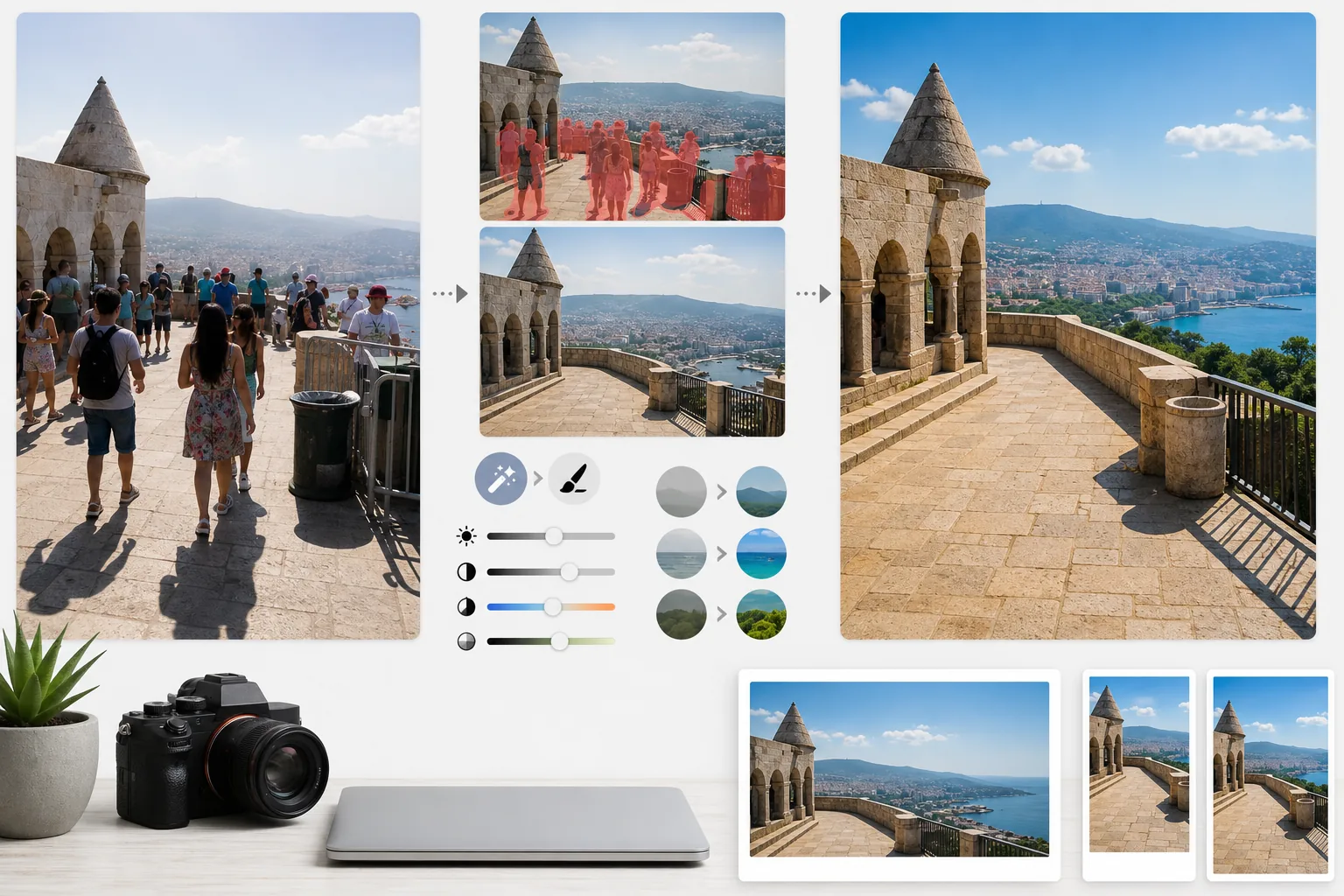
Apa yang dilakukan templat ini
Mengatasi dua masalah terbesar dalam fotografi perjalanan: keramaian dan cahaya buruk. Magic Eraser menghapus wisatawan yang berdiri di depan monumen, penyusup yang berjalan melintasi bingkai Anda, dan kekacauan visual seperti tempat sampah, pembatas konstruksi, dan papan tanda sementara yang merusak suasana tempat. AI merekonstruksi arsitektur, trotoar, dan lanskap di belakang orang dan objek yang dihapus menggunakan konteks di sekitarnya. AI Enhance kemudian mengatasi tantangan pencahayaan khas perjalanan — foto interior katedral dan kuil tempat jendela terlalu terang dan bayangan menjadi hitam, matahari siang menyengat yang membuat warna datar di destinasi tropis, dan adegan matahari terbenam dengan cahaya latar tempat latar depan menjadi siluet. Warna ditingkatkan untuk mencerminkan tampilan destinasi yang sebenarnya bagi mata manusia, yang secara konsisten kurang terwakili oleh kamera dalam rentang dinamis.
Pengaturan templat
| Penghapusan wisatawan | Deteksi otomatis dan hapus orang dari foto tempat terkenal dan lanskap |
| Koreksi pencahayaan | Pemulihan gaya HDR untuk sorotan dan bayangan pada cahaya sulit |
| Peningkatan warna | Tingkatkan saturasi alami (langit, air, dedaunan) tanpa tampilan artifisial |
| Penghapusan kabut | Tembus kabut atmosfer untuk lanskap jauh yang lebih jernih |
| Resolusi keluaran | Sisi panjang 4000px (gambar utama blog dengan kualitas retina) |
Cara menggunakan templat ini
Unggah foto perjalanan Anda
Unggah foto perjalanan apa pun — tempat terkenal yang ramai, panorama lanskap, pemandangan jalan, arsitektur interior. Templat ini menangani JPEG dari ponsel pintar, kamera mirrorless, dan kamera aksi. File RAW juga diterima untuk fleksibilitas pengeditan maksimal.
Hapus keramaian dan kekacauan
Magic Eraser mendeteksi orang dalam bingkai dan menghapusnya. Anda dapat memilih untuk menghapus semua orang, mempertahankan individu tertentu (diri Anda sendiri atau teman perjalanan), atau menghapus secara selektif hanya mereka yang menghalangi fitur arsitektur atau lanskap utama. AI mengisi area yang hilang dengan tanah, dinding, dan pemandangan yang direkonstruksi.
Tingkatkan cahaya dan warna
AI Enhance menerapkan pemrosesan gaya HDR yang memulihkan langit yang terlalu terang dan mengangkat bayangan dalam — umum di interior kuil dan jalan-jalan sempit Eropa. Warna ditingkatkan agar sesuai dengan apa yang dilihat mata Anda di destinasi, terutama biru langit, hijau toska laut, dan hijau dedaunan. Kabut atmosfer dikurangi untuk panorama gunung dan kota yang lebih jernih.
Ekspor untuk blog dan media sosial
Unduh dengan sisi panjang 4000px untuk gambar utama blog berkualitas retina, atau dalam ukuran khusus platform untuk Instagram, Pinterest, dan Facebook. File ini mencakup retensi data EXIF yang dioptimalkan untuk fotografer yang menandai geolokasi karya mereka.
Tips ahli untuk hasil terbaik
- ✓Ambil beberapa foto pada adegan yang sama dengan jeda beberapa detik. Ketika wisatawan bergerak di antara bingkai, AI memiliki informasi referensi tentang tanah dan dinding di belakang mereka, menghasilkan rekonstruksi yang lebih bersih daripada satu bingkai saja.
- ✓Untuk foto interior gereja, kuil, dan museum, beri sedikit pencahayaan berlebih saat memotret. Lebih mudah bagi AI untuk memulihkan sorotan terang daripada mengangkat bayangan yang sangat gelap, dan foto interior cenderung kurang pencahayaan secara default.
- ✓Foto lanskap selama golden hour atau blue hour jika memungkinkan. AI Enhance dapat meningkatkan warna dalam cahaya datar siang hari, tetapi cahaya hangat terarah dari golden hour menciptakan bayangan dan dimensi pada lanskap yang tidak dapat ditiru oleh penilaian warna sehebat apa pun.
Pertanyaan umum
Bisakah saya tetap berada dalam foto tetapi menghapus wisatawan lain?
+
Ya. Anda dapat menandai diri sendiri atau teman perjalanan Anda sebagai subjek yang dilindungi. AI menghapus semua orang lain dari adegan sambil mempertahankan individu yang dilindungi di tempatnya dengan posisi, pencahayaan, dan bayangan aslinya tetap utuh.
Seberapa baik ini bekerja dengan adegan yang sangat ramai?
+
Bekerja paling baik ketika keramaian menutupi kurang dari sekitar 40% bingkai. Adegan yang sangat ramai — seperti alun-alun yang penuh sesak di mana Anda tidak dapat melihat tanah di antara orang-orang — memberikan terlalu sedikit referensi latar belakang untuk rekonstruksi yang bersih. Dalam kasus tersebut, penghapusan sebagian baris depan sering kali menghasilkan hasil yang meyakinkan.
Apakah penghapusan kabut akan membuat foto terlihat tidak alami?
+
Pengurangan kabut dikalibrasi untuk hasil yang terlihat alami. Ini menghilangkan hamburan atmosfer abu-abu kebiruan yang mengaburkan gunung dan bangunan jauh, tetapi mempertahankan perspektif udara halus yang memberi kedalaman pada foto lanskap. Hasilnya terlihat seperti memotret di hari yang cerah dan jernih, bukan gambar yang difilter atau diproses berlebihan.
Tampilkan setiap destinasi dalam keadaan terbaiknya tanpa keramaian
Unggah foto perjalanan dan dapatkan gambar bebas wisatawan dengan warna yang ditingkatkan yang membuat pembaca Anda ingin berkemas.
Coba gratisRelated templates
More personal templates for your workflow.
Buat foto tanda pengenal yang sesuai untuk visa, SIM, dan tanda pengenal nasional dengan warna latar belakang, ukuran kepala, dan persyaratan ekspresi wajah yang sesuai.
Sempurnakan foto wisuda dengan pembersihan latar belakang, topi dan gaun Color correction, penghilangan noda, dan penajaman siap cetak untuk bingkai dan pengumuman.
Sempurnakan foto konser dan acara dengan pengurangan noise pada cahaya redup, pencahayaan panggung koreksi warna, penghilangan gangguan penonton, dan pemulihan detail dari pengambilan gambar di tempat gelap.
Buat foto kartu pengumuman bayi baru lahir yang indah dengan latar belakang lembut, penilaian warna lembut, penghapusan kekacauan di rumah sakit, dan dimensi siap cetak untuk pengiriman.
Siapkan foto keluarga dan potret untuk kartu ucapan liburan dengan latar belakang meriah, gradasi warna hangat, efek salju, dan dimensi kartu standar untuk dicetak.
Pulihkan dan sempurnakan foto penghormatan peringatan dengan sentuhan lembut, penyederhanaan latar belakang, gradasi warna yang hangat dan penuh hormat, serta dimensi siap cetak untuk layanan.