
Foto Wisuda Penyempurnaan
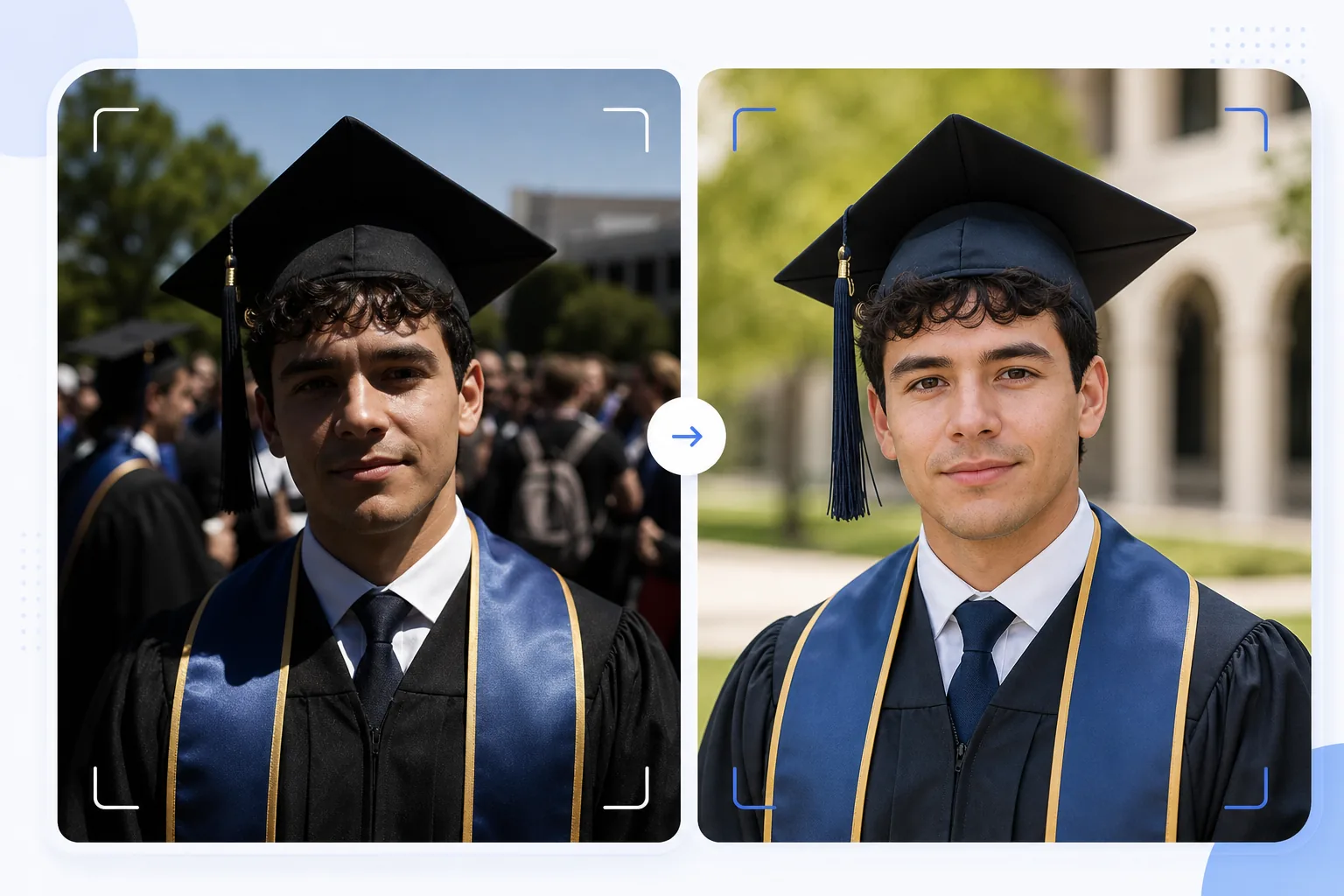
Ubah jepretan wisuda yang spontan menjadi potret yang layak dibingkai. Templat ini mengoreksi cahaya luar ruangan yang keras dan umum terjadi pada acara wisuda, menghapus orang yang nyelonong ke dalam bingkai dan keramaian yang berantakan di belakang wisudawan, menyempurnakan warna toga dan topi wisuda, serta menajamkan gambar untuk dicetak dalam ukuran besar guna dipajang di dinding dan rak perapian.
Coba templat ini gratisPersonal template preview
Apa yang dilakukan templat ini
Mengubah jepretan cepat di hari wisuda menjadi potret yang rapi, cocok untuk dibingkai, dijadikan kartu pengumuman, dan dibagikan di media sosial. Acara wisuda diambil dalam kondisi yang menantang — matahari siang yang terik menciptakan bayangan seperti lingkaran hitam di bawah pinggiran topi wisuda, latar belakang yang ramai terlihat berantakan, dan warna toga tampak pudar di bawah sinar matahari langsung. AI Enhance mengoreksi pencahayaan untuk mengisi bayangan di bawah topi, mengembalikan warna kaya pada toga dan selempang, serta menajamkan detail wajah yang menjadi lembut pada jepretan tergesa-gesa di tengah keramaian. Magic Eraser menghapus orang yang nyelonong ke dalam bingkai, anggota kerumunan yang terlihat di belakang wisudawan, papan tanda yang mengganggu, dan kekacauan acara lainnya untuk menonjolkan wisudawan di latar belakang yang lebih bersih.
Pengaturan templat
| Pemulihan bayangan | Pengisian bayangan di bawah topi (mencerahkan wajah tanpa membakar sorotan) |
| Penyempurnaan warna toga | Pemulihan warna kain untuk toga hitam, biru tua, merah marun, dan emas |
| Penghalusan kulit | Pengurangan noda ringan sambil mempertahankan tekstur kulit alami |
| Pembersihan latar belakang | Hapus orang yang nyelonong ke dalam bingkai dan anggota kerumunan di belakang wisudawan |
| Resolusi keluaran | Sisi panjang 5000px (siap cetak pada 300 DPI hingga 16×12 inci) |
| Penajaman | Penajaman yang dioptimalkan untuk potret (detail wajah + tekstur kain toga) |
Cara menggunakan templat ini
Unggah foto wisuda Anda
Unggah foto acara wisuda apa pun — potret berpose, jepretan saat berjalan menyeberangi panggung, lemparan topi, atau momen perayaan spontan. Templat ini menangani foto dari ponsel pintar dan kamera DSLR yang diambil dalam kondisi pencahayaan apa pun, dari sinar matahari luar ruangan yang terang hingga auditorium dalam ruangan yang remang-remang.
Perbaiki pencahayaan dan warna
AI Enhance mengoreksi bayangan keras yang dibentuk oleh topi wisuda persegi, yang biasanya menggelapkan mata dan bagian atas wajah wisudawan. Warna toga dan selempang dipulihkan ke nada kaya aslinya — toga hitam memperoleh kembali kedalamannya alih-alih tampak abu-abu gelap, dan selempang kehormatan menampilkan saturasi warnanya secara penuh.
Hapus gangguan
Magic Eraser menghapus anggota kerumunan, wisudawan lain, kursi lipat, dan papan tanda yang terlihat di belakang subjek. AI merekonstruksi latar belakang dengan versi bersih dari lokasi acara — rumput, fasad bangunan, atau tirai — menciptakan komposisi seperti potret dari sebuah pemandangan yang ramai.
Ekspor untuk dicetak dan dibagikan
Unduh pada sisi panjang 5000px untuk cetakan berbingkai hingga 16×12 inci pada 300 DPI, atau pada 2000px untuk media sosial dan pengumuman digital. Profil warna diatur ke sRGB untuk tampilan layar atau Adobe RGB untuk pencetakan profesional.
Kiat profesional untuk hasil terbaik
- ✓Jika Anda bisa merencanakan lebih awal, ambil potret formal tepat setelah acara di area teduh alih-alih di bawah sinar matahari langsung. Tempat teduh menghilangkan bayangan keras dari topi yang merupakan masalah paling sulit untuk dikoreksi. Templat dapat memperbaiki bayangan matahari, tetapi tempat teduh menghasilkan hasil yang paling alami.
- ✓Ambil baik potret berpose tradisional maupun momen perayaan spontan (memeluk keluarga, melempar topi). Templat menyempurnakan kedua gaya tersebut, dan memiliki versi rapi dari masing-masing memberi Anda pilihan antara cetakan berbingkai dan unggahan media sosial.
- ✓Untuk foto kelompok bersama keluarga, posisikan wisudawan sedikit di depan kelompok. Ini menciptakan pemisahan kedalaman alami yang membantu Magic Eraser mengisolasi dan menghapus gangguan latar belakang tanpa memengaruhi anggota keluarga.
Pertanyaan umum
Apakah ini bisa memperbaiki foto wisuda yang buram?
+
AI Enhance dapat menajamkan foto dengan kelembutan ringan akibat sedikit goyangan tangan atau fokus otomatis yang sedikit meleset. Namun, foto yang sangat buram akibat blur gerakan yang berat (seperti jepretan saat berjalan menyeberangi panggung yang diambil dari jarak jauh) tidak dapat dipulihkan sepenuhnya — templat menyempurnakan detail tetapi tidak dapat menciptakan ketajaman yang tidak pernah terekam.
Bagaimana dengan foto acara dalam ruangan?
+
Foto wisuda dalam ruangan dengan pencahayaan auditorium (kuning hangat atau fluoresen campuran) dikoreksi suhu warnanya. Templat menyesuaikan keseimbangan putih agar warna kulit tampak alami dan warna toga terlihat sesuai aslinya. Noise cahaya rendah akibat pengaturan ISO tinggi dikurangi sambil mempertahankan detail wajah.
Dapatkah saya menghapus latar belakang sepenuhnya?
+
Ya. Anda dapat menggunakan pembersihan latar belakang untuk menghapus semua elemen latar belakang dan menggantinya dengan warna solid atau gradien untuk tampilan potret studio. Ini bekerja dengan baik ketika latar belakang acara asli terlalu berantakan untuk dihapus secara selektif.
Potret wisuda yang layak dibingkai dari jepretan acara
Unggah foto hari wisuda Anda dan dapatkan potret yang disempurnakan, siap cetak, dengan latar belakang bersih dan warna toga serta topi yang cerah.
Coba gratisRelated templates
More personal templates for your workflow.
Buat foto tanda pengenal yang sesuai untuk visa, SIM, dan tanda pengenal nasional dengan warna latar belakang, ukuran kepala, dan persyaratan ekspresi wajah yang sesuai.
Sempurnakan foto konser dan acara dengan pengurangan noise pada cahaya redup, pencahayaan panggung koreksi warna, penghilangan gangguan penonton, dan pemulihan detail dari pengambilan gambar di tempat gelap.
Buat foto kartu pengumuman bayi baru lahir yang indah dengan latar belakang lembut, penilaian warna lembut, penghapusan kekacauan di rumah sakit, dan dimensi siap cetak untuk pengiriman.
Siapkan foto keluarga dan potret untuk kartu ucapan liburan dengan latar belakang meriah, gradasi warna hangat, efek salju, dan dimensi kartu standar untuk dicetak.
Pulihkan dan sempurnakan foto penghormatan peringatan dengan sentuhan lembut, penyederhanaan latar belakang, gradasi warna yang hangat dan penuh hormat, serta dimensi siap cetak untuk layanan.
Ubah foto tempat berlindung dan selamatkan hewan peliharaan dengan penggantian latar belakang, koreksi pencahayaan, dan peningkatan detail bulu untuk membantu hewan menemukan rumah lebih cepat.