
Foto Penghormatan Peringatan
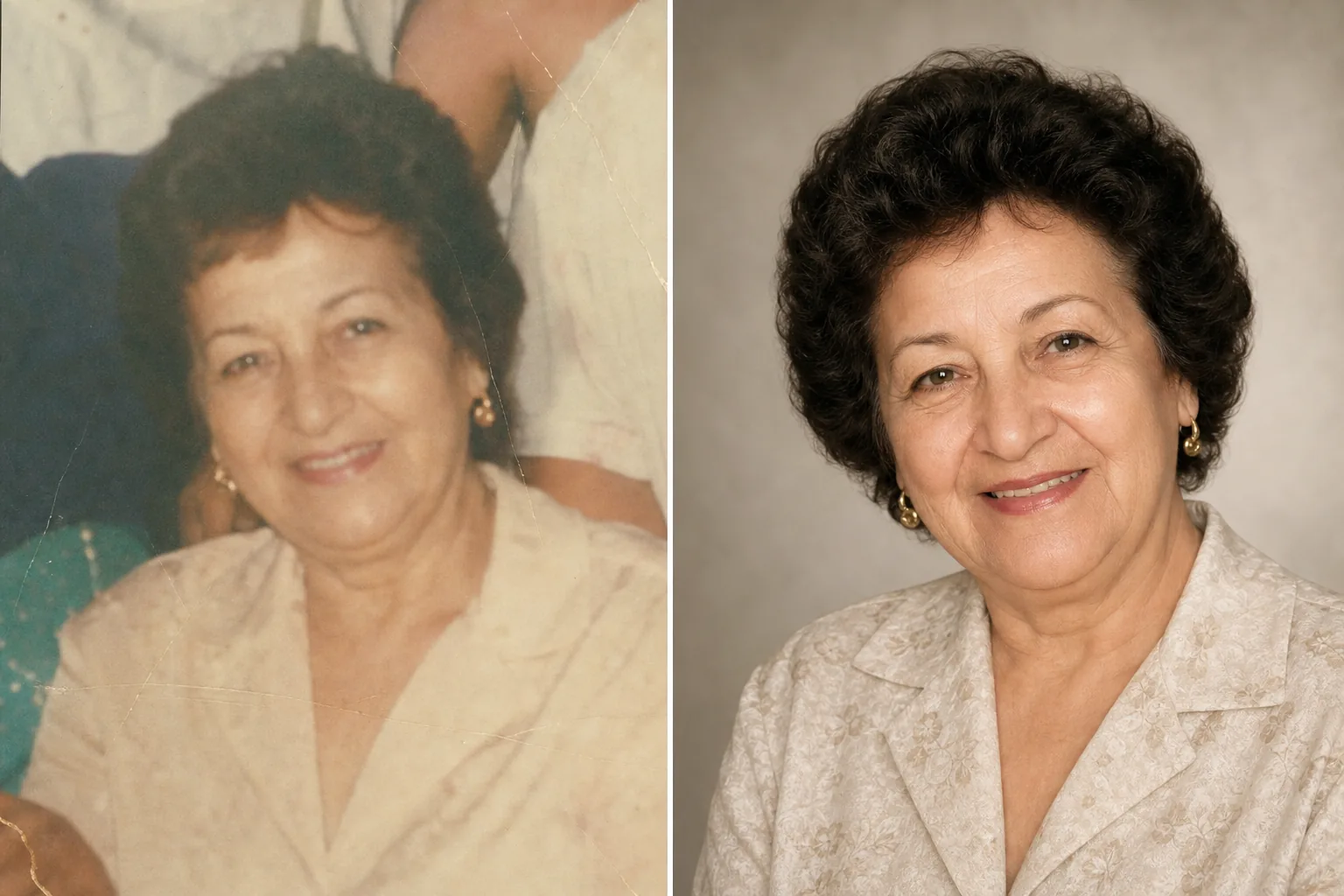
Hormati orang terkasih dengan foto penghormatan yang disempurnakan secara indah. Templat ini memulihkan foto-foto lama dengan lembut, meningkatkan kejernihan dan warna dari aslinya yang telah pudar, menghilangkan latar belakang yang mengganggu, dan menghasilkan potret yang bermartabat dan siap cetak, cocok untuk upacara peringatan, berita duka, serta tampilan kenangan yang abadi.
Coba templat ini gratisPersonal template preview
Apa yang dilakukan templat ini
Menyiapkan foto potret untuk upacara peringatan, berita duka, program pemakaman, tampilan kenangan, dan montase penghormatan dengan kepedulian dan rasa hormat yang dituntut oleh momen tersebut. Sering kali foto terbaik yang tersedia dari orang terkasih diambil bertahun-tahun lalu — bisa berupa jepretan santai, foto kelompok yang perlu memisahkan sosoknya, atau cetakan pudar yang telah dipindai. AI Enhance memulihkan warna dan ketajaman foto lama atau pudar, mencerahkan gambar yang kurang cahaya, serta memperhalus ketidaksempurnaan kecil dengan lembut sambil mempertahankan kemiripan asli sosok tersebut. Magic Eraser menghilangkan gangguan latar belakang dan dapat memisahkan satu individu dari foto kelompok. Nuansa keseluruhannya hangat, bermartabat, dan penuh hormat — tidak pernah diproses berlebihan.
Pengaturan templat
| Pemulihan foto | Mengembalikan warna dan detail dari foto yang pudar atau menua |
| Latar belakang | Gradien netral lembut, warna solid, atau aslinya yang disederhanakan |
| Gradasi warna | Hangat, bermartabat (rona kulit alami, kehangatan lembut) |
| Tingkat penyempurnaan | Halus dan penuh hormat (mempertahankan kemiripan asli) |
| Dimensi keluaran | 8×10 inci pada 300 DPI (potret peringatan standar) atau khusus |
Cara menggunakan templat ini
Unggah foto potret
Unggah foto terbaik yang tersedia dari sosok tersebut — potret khusus, potongan dari foto kelompok, atau hasil pindai foto cetak. Templat ini menangani foto dari era dan kondisi apa pun, termasuk cetakan lama dengan warna yang pudar, lipatan, dan kerusakan ringan.
Pulihkan dan sempurnakan
AI Enhance mengembalikan warna yang pudar, menajamkan detail yang melembut, dan mengoreksi semburat warna kuning atau biru yang muncul pada foto yang menua. Untuk foto yang dipindai dari cetakan, artefak pindai dan tekstur kertas dikurangi. Penyempurnaan sengaja dibuat halus — tujuannya adalah menampilkan sosok tersebut sebagaimana adanya, dengan kejernihan dan kehangatan, bukan mengubah penampilannya.
Latar belakang dan pembingkaian
Latar belakang diganti dengan pilihan yang lembut dan netral — gradien halus, warna solid yang teredam, atau versi yang dilembutkan dari latar aslinya. Jika foto berasal dari kelompok, individu tersebut dipisahkan dan dibingkai sebagai potret mandiri. Komposisi disesuaikan dengan proporsi potret peringatan standar.
Ekspor untuk layanan dan tampilan
Unduh dalam ukuran 8×10 inci pada 300 DPI untuk pencetakan di rumah duka dan upacara peringatan, atau dalam dimensi khusus untuk publikasi berita duka, kartu kenangan, dan tampilan penghormatan digital. Hasilnya cocok untuk pencetakan berwarna maupun hitam-putih.
Tips profesional untuk hasil terbaik
- ✓Pilih foto yang memancarkan ekspresi dan kepribadian sosok tersebut, meski kualitas teknisnya tidak sempurna. Templat dapat meningkatkan kualitas gambar secara signifikan, tetapi keterikatan emosional pada foto lebih penting daripada resolusi.
- ✓Saat memindai foto cetak, gunakan DPI tertinggi yang didukung pemindai Anda (minimal 600 DPI) dan pindai di permukaan yang bersih dan rata. Hasil pindai resolusi tinggi memberi templat lebih banyak data untuk diolah saat memulihkan detail dan mengoreksi pudar.
- ✓Jika tidak ada potret tunggal, templat dapat memisahkan satu individu dari foto kelompok. Pilih foto kelompok yang wajah sosoknya terlihat jelas, tidak terhalang, dan menghadap kamera untuk hasil pemisahan terbaik.
- ✓Pertimbangkan membuat versi berwarna sekaligus versi hitam-putih. Potret peringatan hitam-putih memiliki kualitas yang abadi dan bermartabat serta cocok ketika foto berwarna aslinya mengalami pudar yang signifikan atau kerusakan warna yang tidak dapat dipulihkan sepenuhnya.
Pertanyaan umum
Bisakah ini memulihkan foto yang rusak berat?
+
Templat menangani kerusakan sedang — pudar, pergeseran warna, lipatan ringan, dan kelembutan akibat usia. Kerusakan parah seperti sobekan besar, noda air yang berat, atau bagian yang hilang dalam jumlah besar memerlukan pemulihan manual oleh peretus profesional. Templat paling efektif ketika wajah dan ciri utama terlihat dan utuh pada aslinya.
Apakah foto yang disempurnakan akan terlihat alami?
+
Ya. Penyempurnaan dikalibrasi agar halus dan penuh hormat. Sosok tersebut akan terlihat seperti dirinya sendiri — tidak lebih muda, tidak lebih tua, tidak berbeda. Tujuannya adalah menampilkan foto seolah-olah diambil dengan pencahayaan yang lebih baik, kamera yang lebih baik, dan pada hari yang lebih baik, sambil mempertahankan setiap aspek dari siapa sosok tersebut.
Bisakah saya menggunakan ini untuk salindia video penghormatan?
+
Ya. Proses setiap foto melalui templat dengan pengaturan latar belakang dan warna yang konsisten untuk salindia yang menyatu. Perlakuan yang konsisten menyatukan foto-foto dari berbagai era dan sumber menjadi sebuah penghormatan visual yang utuh.
Foto penghormatan seindah kenangannya
Unggah foto apa pun dari orang terkasih dan dapatkan potret yang dipulihkan dengan lembut serta disempurnakan dengan hangat, siap untuk upacara peringatan dan kenangan yang abadi.
Coba gratisRelated templates
More personal templates for your workflow.
Buat foto tanda pengenal yang sesuai untuk visa, SIM, dan tanda pengenal nasional dengan warna latar belakang, ukuran kepala, dan persyaratan ekspresi wajah yang sesuai.
Sempurnakan foto wisuda dengan pembersihan latar belakang, topi dan gaun Color correction, penghilangan noda, dan penajaman siap cetak untuk bingkai dan pengumuman.
Sempurnakan foto konser dan acara dengan pengurangan noise pada cahaya redup, pencahayaan panggung koreksi warna, penghilangan gangguan penonton, dan pemulihan detail dari pengambilan gambar di tempat gelap.
Buat foto kartu pengumuman bayi baru lahir yang indah dengan latar belakang lembut, penilaian warna lembut, penghapusan kekacauan di rumah sakit, dan dimensi siap cetak untuk pengiriman.
Siapkan foto keluarga dan potret untuk kartu ucapan liburan dengan latar belakang meriah, gradasi warna hangat, efek salju, dan dimensi kartu standar untuk dicetak.
Ubah foto tempat berlindung dan selamatkan hewan peliharaan dengan penggantian latar belakang, koreksi pencahayaan, dan peningkatan detail bulu untuk membantu hewan menemukan rumah lebih cepat.