
Produk 360 Spinner
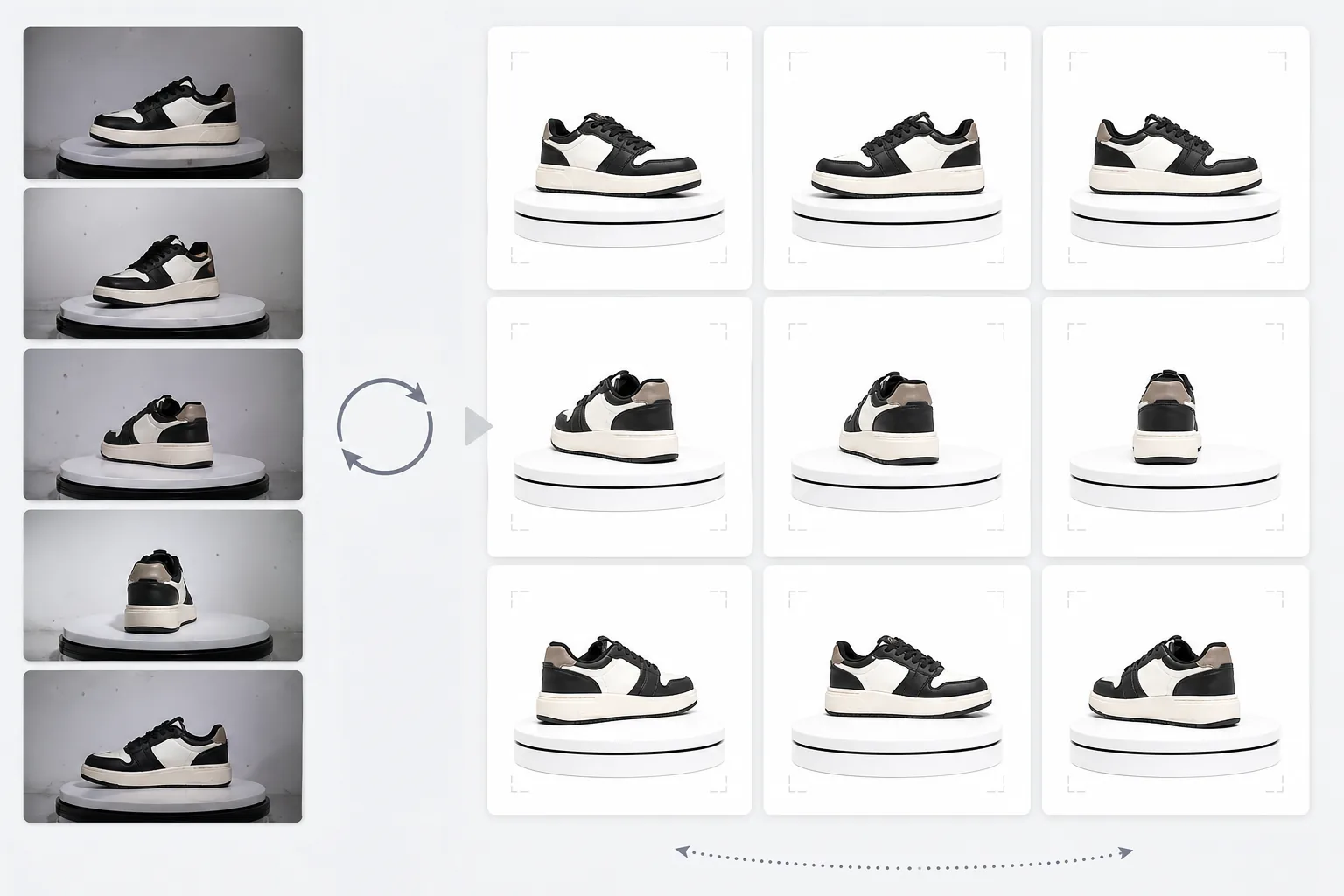
Foto meja putar dari foto meja putar menjadi tampilan putaran produk 360 derajat profesional. Templat ini menghapus latar belakang dari setiap sudut rotasi, memastikan pencahayaan dan warna yang konsisten di semua bingkai, menghilangkan debu dan ketidaksempurnaan permukaan, serta menghasilkan kumpulan gambar seragam yang siap untuk penampil 360 interaktif di halaman produk Anda.
Coba templat ini gratisE-commerce template preview
Apa yang dilakukan templat ini
Memproses foto produk multi-sudut menjadi kumpulan yang konsisten dan cocok untuk penampil putaran interaktif 360 derajat di situs e-niaga. Saat Anda memotret produk di atas meja putar dari 24 atau 36 sudut, ketidakkonsistenan kecil pada latar belakang, pencahayaan, dan bayangan menumpuk dan menciptakan pengalaman putaran yang tersendat dan tidak profesional. Templat ini menggunakan Background Eraser untuk mengisolasi produk dari setiap sudut dengan perlakuan tepi yang konsisten, menormalkan pencahayaan dan suhu warna di semua bingkai sehingga produk tidak berkedip antara nada hangat dan dingin saat berputar, serta menggunakan Magic Eraser untuk menghilangkan debu, sidik jari, dan ketidaksempurnaan permukaan yang menjadi mengganggu ketika muncul di satu bingkai tetapi tidak di bingkai berikutnya.
Pengaturan templat
| Latar belakang | Putih murni (#FFFFFF) — konsisten di semua bingkai rotasi |
| Normalisasi pencahayaan | Konsistensi antar-bingkai (menghilangkan kedipan antar sudut) |
| Pembersihan permukaan | Menghilangkan debu, sidik jari, dan pantulan per bingkai |
| Pemusatan produk | Memusatkan produk secara otomatis di setiap bingkai untuk poros rotasi yang mulus |
| Dimensi keluaran | 1500 × 1500 px per bingkai (dioptimalkan untuk penampil 360 web) |
| Jumlah bingkai | Mendukung urutan 12, 24, atau 36 bingkai |
Cara menggunakan templat ini
Unggah foto meja putar Anda
Unggah kumpulan lengkap foto rotasi (12, 24, atau 36 bingkai) yang diambil di atas meja putar dengan interval yang konsisten. Beri nama berkas secara berurutan (001.jpg hingga 036.jpg) agar templat memprosesnya dalam urutan rotasi yang benar. Templat ini menangani foto dari latar belakang apa pun — sapuan putih, abu-abu, atau berwarna.
Penghapusan latar belakang dan konsistensi
Background Eraser menghapus latar belakang dari setiap bingkai menggunakan pengaturan deteksi tepi yang sama, memastikan garis luar produk konsisten di semua sudut. Produk dipusatkan secara otomatis di setiap bingkai sehingga poros rotasi tetap stabil dan putaran tidak goyah.
Normalisasi antar-bingkai
Pencahayaan, suhu warna, dan eksposur dinormalkan di semua bingkai. Ini menghilangkan fluktuasi kecerahan dan warna halus yang terjadi ketika pencahayaan meja putar tidak sepenuhnya merata dari setiap sudut. Ketidaksempurnaan permukaan yang terlihat di beberapa sudut dibersihkan demi konsistensi.
Ekspor urutan bingkai
Unduh urutan bingkai lengkap pada 1500 × 1500 px per bingkai dalam format JPEG. Berkas diberi nomor secara berurutan dan siap untuk diimpor langsung ke plugin penampil 360 seperti Magic 360, Sirv, atau Webrotate 360. Ukuran berkas total dioptimalkan untuk pemuatan web yang cepat.
Kiat profesional untuk hasil terbaik
- ✓Gunakan meja putar manual dengan tanda derajat daripada rotasi bebas tangan. Interval 10 derajat yang konsisten (36 bingkai) menghasilkan putaran yang paling mulus. Templat dapat menangani sedikit ketidakkonsistenan rotasi, tetapi jarak yang merata menghasilkan hasil yang jauh lebih mulus.
- ✓Kunci kamera Anda di atas tripod dan gunakan pengaturan eksposur manual untuk semua bingkai. Eksposur otomatis menyebabkan kamera menyesuaikan kecerahan secara berbeda di setiap sudut, menciptakan efek kedipan yang kemudian harus diperbaiki oleh templat. Pengaturan manual memberi templat titik awal yang lebih bersih.
- ✓Bersihkan produk Anda secara menyeluruh sebelum memotret — debu dan sidik jari lebih terlihat dan mengganggu dalam putaran 360 daripada dalam satu foto statis karena muncul dan menghilang saat produk berputar. Templat menghilangkannya, tetapi memulai dengan permukaan bersih menghasilkan hasil yang lebih baik.
E-commerce workflow
Product photo hub
Use this template with the full ecommerce product photo workflow for marketplace backgrounds, cleanup, compression, resizing, and listing-ready exports.
View ecommerce product photo workflowPertanyaan umum
Berapa banyak bingkai yang saya butuhkan?
+
36 bingkai (interval 10 derajat) menghasilkan putaran paling mulus untuk sebagian besar produk. 24 bingkai (interval 15 derajat) dapat diterima untuk produk tanpa detail halus. 12 bingkai (interval 30 derajat) adalah minimum untuk putaran yang dapat dikenali tetapi akan terasa tersendat untuk produk yang detail seperti jam tangan atau elektronik.
Bisakah saya memproses bingkai dari video?
+
Ya, jika Anda mengekstrak bingkai dari video meja putar pada interval yang merata. Ekspor bingkai pada resolusi tertinggi yang tersedia dan pastikan distribusi sudut yang merata di seluruh 360 derajat. Bingkai video mungkin berkualitas lebih rendah daripada foto diam khusus karena keburaman gerakan dan kompresi video.
Plugin penampil 360 mana yang kompatibel?
+
Keluaran JPEG berurutan kompatibel dengan semua solusi penampil 360 utama termasuk Magic 360, Sirv 360, Webrotate 360, jQuery Reel, dan implementasi khusus. Dimensi yang konsisten dan konvensi penamaan membuat impor menjadi mudah.
Berikan kepada pembeli tampilan produk 360 yang mereka harapkan
Unggah foto meja putar dan dapatkan urutan bingkai yang konsisten dan bersih, siap untuk penampil putaran 360 interaktif di halaman produk Anda.
Coba gratisRelated templates
More e-commerce templates for your workflow.
Templat latar belakang putih murni untuk foto produk. Pengaturan Amazon, Shopify, dan pasar siap untuk gambar produk yang bersih dan profesional yang berkonversi.
Templat foto daftar yang dioptimalkan Etsy. Mengonversi foto gaya hidup menjadi latar belakang putih bersih pada 2000 piksel, menyempurnakan detail produk buatan tangan, dan memenuhi pedoman gambar Etsy.
Templat foto daftar yang dioptimalkan eBay. Latar belakang putih untuk gambar galeri, peningkatan dokumentasi kondisi, dan tata letak multi-sudut yang memenuhi standar gambar eBay.
Templat fotografi perhiasan profesional untuk cincin, kalung, dan jam tangan. Mengontrol pantulan, meningkatkan kilauan batu permata, dan menghasilkan gambar siap pasar dengan latar belakang bersih.
Templat foto furnitur profesional untuk daftar pasar. Hapus kekacauan ruangan, tampilkan dimensi sebenarnya, dan sajikan potongan dengan latar belakang yang bersih atau dalam konteks ruangan yang ditata.
Bersihkan foto pakaian dengan tampilan datar dengan menghilangkan kerutan, membersihkan serat, latar belakang putih bersih, dan warna kain yang akurat. Siap untuk Shopify, Amazon, dan toko butik.