
Medis Sebelum & Sesudah
Hasilkan foto sebelum dan sesudah yang terstandar secara klinis untuk praktik dermatologi, bedah plastik, gigi, dan kedokteran estetika. Templat ini menormalkan pencahayaan dan warna di seluruh pasang perbandingan, mengganti latar belakang ruang periksa yang tidak konsisten dengan latar belakang klinis yang bersih, dan menyediakan alat pemotongan serta penyamaran yang sadar privasi — memberikan gambar pemasaran praktik Anda konsistensi dan profesionalisme yang membangun kepercayaan pasien.
Coba templat ini gratisBusiness template preview
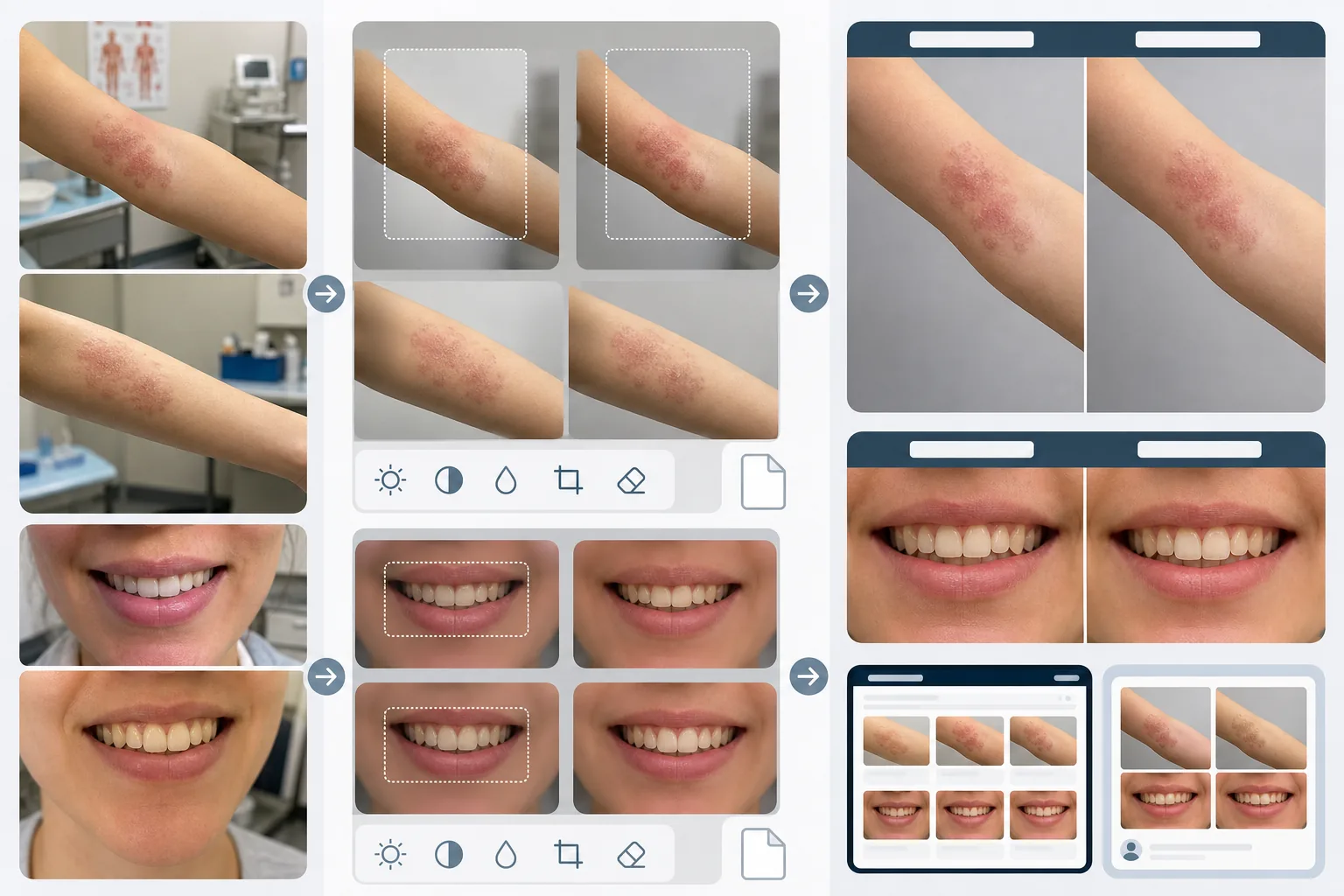
Apa yang dilakukan templat ini
Menciptakan konsistensi visual yang membuat perbandingan medis sebelum dan sesudah kredibel serta meyakinkan. Masalah terbesar fotografi klinis adalah gambar sebelum dan sesudah diambil dengan jeda berminggu-minggu atau berbulan-bulan dalam kondisi pencahayaan berbeda, dengan kamera berbeda, dan terkadang di ruangan berbeda. AI Enhance menormalkan pencahayaan, suhu warna, dan keseimbangan putih di kedua gambar sehingga setiap perbedaan yang terlihat disebabkan oleh prosedur, bukan oleh fotografi. Magic Eraser menghilangkan kekacauan ruang periksa — instrumen medis di meja, bagan di dinding, troli peralatan di latar belakang — dan menggantinya dengan latar belakang klinis netral. Fitur privasi mencakup deteksi dan penyamaran otomatis tanda pengenal, kemampuan memotong ke area tubuh tertentu, dan penghapusan metadata untuk perlindungan data pasien.
Pengaturan templat
| Normalisasi pencahayaan | Cocokkan pencahayaan, suhu warna, dan keseimbangan putih di seluruh pasang sebelum/sesudah |
| Latar belakang | Abu-abu netral klinis, putih bersih, atau kain bedah biru |
| Penyamaran privasi | Buramkan secara otomatis ciri pengenal di luar area perawatan |
| Konsistensi skala | Cocokkan pembingkaian dan pembesaran antara gambar sebelum dan sesudah |
| Penghapusan metadata | Hapus data lokasi, perangkat, dan stempel waktu EXIF demi kesadaran HIPAA |
| Resolusi keluaran | 2400×1600px per gambar (komposit berdampingan pada 4800×1600px) |
Cara menggunakan templat ini
Unggah foto sebelum dan sesudah
Unggah gambar sebelum dan gambar sesudah yang sesuai. Templat menangani foto yang diambil dengan pengaturan kamera klinis, ponsel pintar, dan kamera saku. Unggah berpasangan agar AI dapat mencocokkan pengaturan normalisasi antara kedua gambar.
Normalkan pencahayaan dan pembingkaian
AI Enhance mencocokkan pencahayaan, suhu warna, dan keseimbangan putih antara kedua gambar. Jika pembingkaian berbeda — lebih dekat pada satu bidikan, lebih lebar pada yang lain — templat menyesuaikan pemotongan sehingga area perawatan berada pada skala dan posisi yang sama di kedua gambar untuk perbandingan visual yang adil.
Bersihkan latar belakang dan terapkan privasi
Magic Eraser menghilangkan kekacauan ruang periksa dan mengganti latar belakang dengan latar belakang klinis netral. Penyamaran privasi memburamkan atau memotong ciri pengenal di luar area perawatan. Metadata EXIF yang berisi lokasi, informasi perangkat, dan stempel waktu dihapus.
Ekspor untuk pemasaran praktik
Unduh gambar individual atau komposit berdampingan dengan header berlabel 'Before' dan 'After'. Keluaran berukuran untuk galeri situs web, layar ruang konsultasi, dan media sosial. Penyajian klinis yang konsisten membangun kredibilitas di mata calon pasien yang menjelajahi galeri hasil Anda.
Tips pro untuk hasil terbaik
- ✓Bangun stasiun foto yang konsisten di praktik Anda dengan pencahayaan tetap dan latar belakang netral. Meskipun templat dapat menormalkan kondisi pencahayaan yang berbeda, memulai dari pengaturan yang konsisten menghasilkan perbandingan paling presisi dan mengurangi risiko artefak normalisasi.
- ✓Gunakan panjang fokus dan jarak kamera yang sama untuk bidikan sebelum dan sesudah. Templat menyesuaikan perbedaan pembingkaian, tetapi distorsi perspektif akibat jarak lensa-ke-subjek yang berbeda dapat secara halus mengubah tampilan fitur wajah atau kontur tubuh, yang dapat merusak kredibilitas perbandingan.
- ✓Selalu dapatkan persetujuan tertulis pasien untuk fotografi sebelum dan sesudah serta penggunaannya yang dimaksudkan sebelum memproses gambar. Templat menyediakan fitur privasi tetapi tidak menggantikan persyaratan hukum untuk persetujuan berdasarkan informasi.
Pertanyaan umum
Apakah ini mematuhi HIPAA?
+
Templat menyediakan fitur yang sadar privasi — penghapusan metadata, penyamaran ciri pengenal, dan pemotongan area perawatan — yang mendukung kepatuhan HIPAA. Namun, kepatuhan HIPAA adalah tanggung jawab organisasi. Templat adalah alat, bukan program kepatuhan. Konsultasikan dengan petugas kepatuhan Anda mengenai persyaratan spesifik praktik Anda.
Bisakah saya memproses foto gigi sebelum dan sesudah?
+
Ya. Templat menangani foto intraoral, close-up senyum, dan fotografi gigi seluruh wajah. Normalisasi pencahayaan sangat berharga untuk foto gigi di mana gambar sebelum sering diambil di bawah cahaya ruang periksa sementara gambar sesudah diambil dengan lampu kilat cincin.
Apakah perbedaan tekstur kulit akan dipertahankan secara akurat?
+
Ya. Normalisasi menyesuaikan pencahayaan dan warna tanpa menghaluskan tekstur kulit. Ini sangat penting — peningkatan tekstur kulit dari prosedur dermatologis harus terlihat dalam perbandingan. Templat sengaja tidak menerapkan retouch kulit pada gambar medis sebelum dan sesudah.
Bangun kepercayaan pasien dengan fotografi klinis yang konsisten
Unggah foto sebelum dan sesudah serta dapatkan gambar perbandingan yang terstandar dan sadar privasi untuk pemasaran praktik Anda.
Coba gratisRelated templates
More business templates for your workflow.
Foto tim perusahaan Polandia dengan latar belakang yang konsisten, koreksi pencahayaan profesional, penilaian warna yang sesuai merek, dan kualitas gambar yang seragam di seluruh tim.
Sempurnakan foto gym dan kebugaran dengan peningkatan definisi otot, koreksi pencahayaan dinamis, pembersihan latar belakang, dan gradasi warna atletik kontras tinggi.
Sempurnakan foto portofolio tato dengan kecerahan warna tinta, penajaman detail garis, pengurangan kemerahan kulit, dan latar belakang bersih untuk portofolio artis dan Instagram.
Buat foto resume yang sempurna dengan penggantian latar belakang, penghalusan kulit, dan koreksi pencahayaan. Ideal untuk CV, portal pekerjaan, dan direktori perusahaan.
Buat foto tim profesional dan pemain individu dengan penggantian latar belakang, penyempurnaan warna jersey, dan latar belakang stadion atau studio untuk daftar nama dan program.
Buat foto promo band dan musisi profesional dengan penggantian latar belakang, peningkatan pencahayaan dramatis, dan keluaran siap cetak untuk press kit dan pengiriman venue.