
Foto Tim Perusahaan
Berikan tampilan profesional dan konsisten pada halaman tim Anda tanpa fotografer mahal. Templat ini menstandarkan latar belakang di seluruh foto profil individu, mengoreksi pencahayaan kantor yang campur aduk menjadi nada profesional yang netral, menerapkan penghalusan kulit yang halus, dan memastikan foto setiap anggota tim memiliki gaya dan kualitas yang sama.
Coba templat ini gratisBusiness template preview
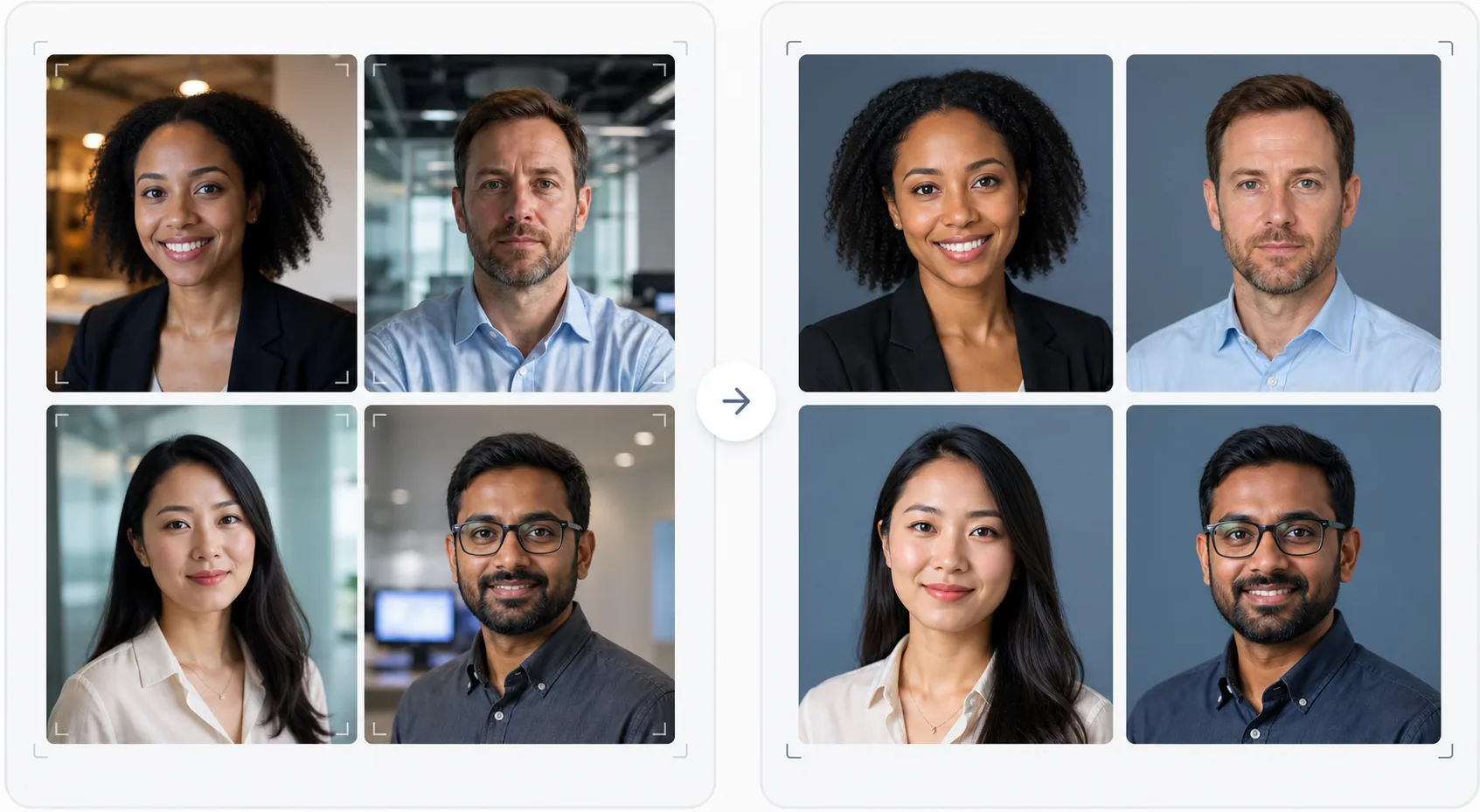
Apa yang dilakukan templat ini
Membuat foto tim yang konsisten secara visual untuk situs web perusahaan, halaman perusahaan LinkedIn, dan materi pemasaran. Ketika foto profil tim diambil pada waktu yang berbeda, oleh orang yang berbeda, dengan kamera yang berbeda, hasilnya adalah halaman tim yang tidak serasi dan terlihat tidak profesional. Templat ini mengatasinya dengan menstandarkan latar belakang, suhu warna, gaya pencahayaan, dan pembingkaian pemotongan di seluruh foto profil. Background Eraser menghapus berbagai latar belakang kantor dan menggantinya dengan latar belakang polos atau gradien yang konsisten dalam warna merek Anda. AI Enhance menormalkan pencahayaan, mengoreksi rona hijau dari lampu neon kantor, dan menerapkan penghalusan kulit yang halus sehingga setiap anggota tim terlihat rapi dan profesional.
Pengaturan templat
| Latar belakang | Warna polos, gradien, atau buram kantor yang konsisten (dapat dikonfigurasi sesuai merek) |
| Pembingkaian pemotongan | Kepala dan bahu, di tengah, konsisten di semua foto tim |
| Normalisasi pencahayaan | Profesional netral (mengoreksi campuran neon, LED, dan cahaya jendela) |
| Peningkatan kulit | Pengurangan noda yang halus dan koreksi lingkaran bawah mata |
| Dimensi keluaran | 800 × 800 px (halaman tim web) dan 400 × 400 px (direktori) |
Cara menggunakan templat ini
Unggah foto anggota tim
Unggah foto profil anggota tim — foto tersebut bisa berasal dari kamera, lokasi, dan periode waktu yang berbeda. Templat ini menangani segala hal, mulai dari potret profesional hingga swafoto ponsel pintar yang diambil di meja. Unggah seluruh tim secara massal untuk pemrosesan yang efisien.
Standarkan latar belakang
Background Eraser menghapus latar belakang asli setiap foto dan menggantinya dengan opsi yang konsisten untuk semua anggota tim. Pilih dari warna merek polos, gradien profesional, atau efek buram kantor yang distandarkan. Semua foto menerima perlakuan latar belakang yang sama untuk keseragaman visual.
Normalkan pencahayaan dan tingkatkan
AI Enhance mengoreksi pencahayaan setiap foto menjadi nada profesional netral yang konsisten. Rona hijau neon, rona hangat lampu pijar, dan pencahayaan campuran semuanya dikoreksi. Penghalusan kulit yang halus mengurangi noda dan lingkaran bawah mata. Mata dicerahkan dengan lembut untuk menciptakan tampilan yang menarik dan ramah.
Ekspor untuk web dan direktori
Unduh set lengkap pada 800 × 800 px untuk halaman tim situs web dan 400 × 400 px untuk direktori internal dan tanda tangan email. Semua gambar diekspor dengan profil warna, kompresi, dan konvensi penamaan file yang sama agar mudah diunggah secara massal ke CMS Anda.
Tips profesional untuk hasil terbaik
- ✓Kirimkan kepada anggota tim panduan foto sederhana: menghadap kamera secara langsung, mengenakan atasan berwarna polos yang kontras dengan latar belakang, memastikan pencahayaan yang baik pada wajah (menghadap jendela jika memungkinkan), dan menjaga ekspresi tetap alami dengan senyuman tipis. Foto sumber yang lebih baik membutuhkan lebih sedikit koreksi AI.
- ✓Pilih warna latar belakang yang muncul pada pedoman merek Anda — biasanya abu-abu netral, biru tua, atau warna sekunder merek Anda. Ini mengubah halaman tim menjadi aset merek alih-alih sekadar kumpulan foto.
- ✓Proses anggota tim baru melalui templat saat mereka bergabung, menggunakan pengaturan yang sama. Ini menjaga konsistensi visual dari waktu ke waktu bahkan saat tim tumbuh dan berubah.
- ✓Untuk jajaran eksekutif dan kepemimpinan, pertimbangkan pembingkaian yang sedikit berbeda (pemotongan lebih rapat, nada sedikit lebih hangat) untuk membedakan kepemimpinan secara visual dari tim yang lebih luas sambil mempertahankan latar belakang dan gaya yang sama.
Pertanyaan umum
Bisakah saya memproses seluruh tim sekaligus?
+
Ya. Unggah semua foto anggota tim dalam satu batch. Templat menerapkan latar belakang, koreksi pencahayaan, dan pembingkaian yang sama pada setiap gambar, memastikan konsistensi yang sempurna. Foto dikembalikan dengan dimensi, kompresi, dan profil warna yang cocok.
Bagaimana jika anggota tim memiliki kualitas foto yang sangat berbeda?
+
Templat menormalkan perbedaan kualitas antara swafoto ponsel pintar dan potret DSLR dengan menyesuaikan ketajaman, pengurangan noise, dan kompresi. Meskipun sumber DSLR akan selalu menghasilkan hasil yang sedikit lebih tajam, keluaran yang diproses cukup konsisten secara visual sehingga perbedaan kualitas tidak terlihat jelas pada grid situs web.
Apakah ini bisa digunakan untuk tim jarak jauh?
+
Ini adalah kasus penggunaan ideal untuk tim jarak jauh di mana pemotretan secara langsung tidak praktis. Setiap anggota tim mengambil swafoto atau meminta seseorang mengambil fotonya di rumah, dan templat menstandarkan semuanya agar terlihat seperti diambil dalam sesi studio yang sama.
Halaman tim profesional tanpa pemotretan
Unggah foto profil individu dari sumber apa pun dan dapatkan set foto tim yang konsisten secara visual dan selaras dengan merek, siap untuk situs web Anda.
Coba gratisRelated templates
More business templates for your workflow.
Sempurnakan foto gym dan kebugaran dengan peningkatan definisi otot, koreksi pencahayaan dinamis, pembersihan latar belakang, dan gradasi warna atletik kontras tinggi.
Sempurnakan foto portofolio tato dengan kecerahan warna tinta, penajaman detail garis, pengurangan kemerahan kulit, dan latar belakang bersih untuk portofolio artis dan Instagram.
Buat foto resume yang sempurna dengan penggantian latar belakang, penghalusan kulit, dan koreksi pencahayaan. Ideal untuk CV, portal pekerjaan, dan direktori perusahaan.
Buat foto tim profesional dan pemain individu dengan penggantian latar belakang, penyempurnaan warna jersey, dan latar belakang stadion atau studio untuk daftar nama dan program.
Buat foto promo band dan musisi profesional dengan penggantian latar belakang, peningkatan pencahayaan dramatis, dan keluaran siap cetak untuk press kit dan pengiriman venue.
Pamerkan seni kuku dengan peningkatan detail tingkat makro, akurasi warna gel dan cat kuku yang sesungguhnya, serta pemosisian tangan yang bersih untuk portofolio Instagram dan halaman pemesanan.