
Remove Sun Glare From a Photo
Pelajari cara Remove Sun Glare From a Photo dengan Magic Eraser. Panduan langkah demi langkah sederhana dengan alat AI gratis. Berfungsi di web, iOS, dan Android.
Last updated
Coba sekarang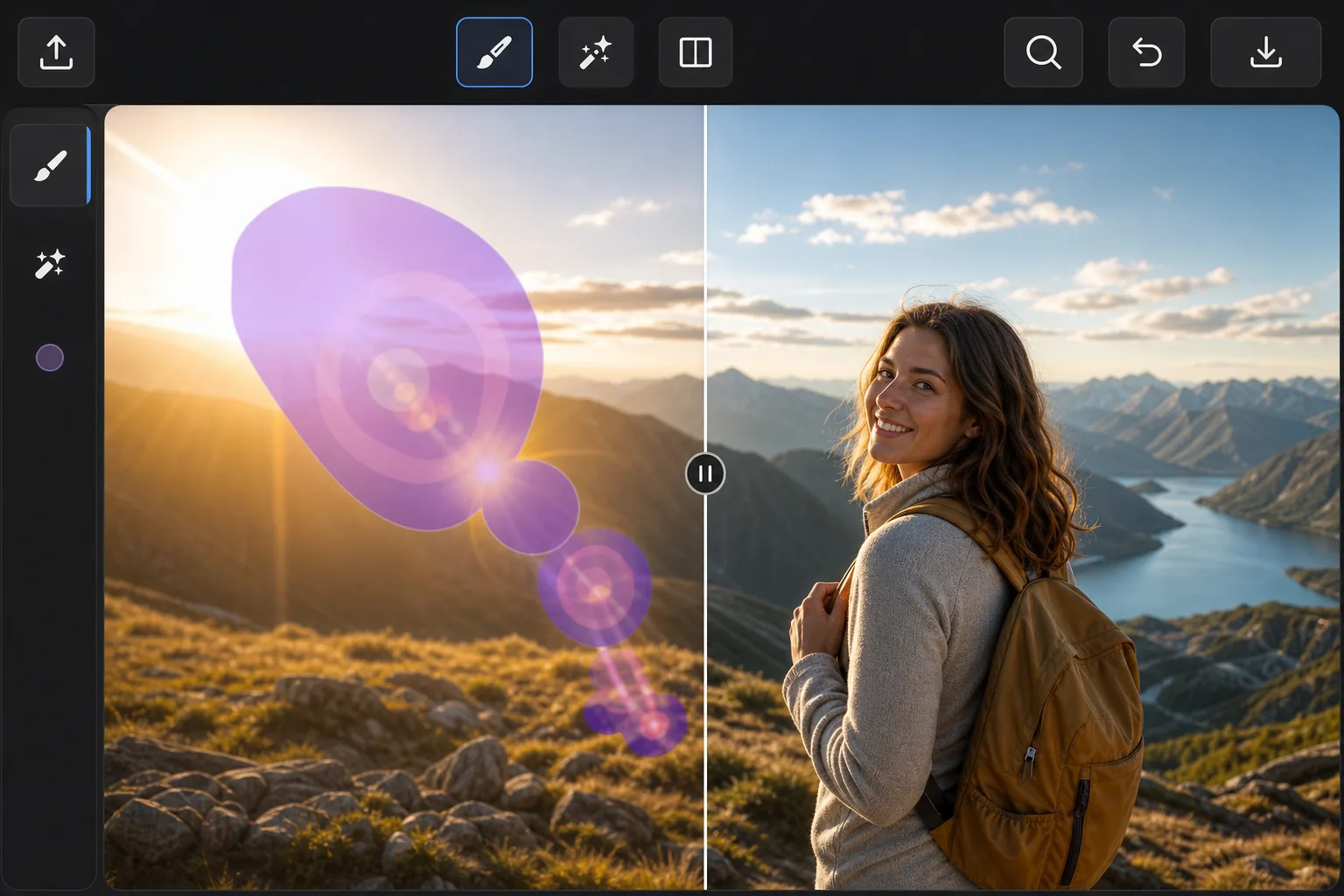
When the sun ruins an outdoor shot — Magic Eraser
Point a lens anywhere near the sun and the light fights back: hazy flare washing over a face, polygon-shaped lens-flare ghosts marching across the frame, and a searing hotspot that drowns out detail. These artifacts are different from a glossy reflection — they're scattered light baked into the exposure, so you can't just dim them down. Magic Eraser handles them by removing the affected pixels and inpainting a believable replacement. Instead of trying to recover blown-out detail that the sensor never captured, the AI studies the surrounding sky, foliage, or skin tones and synthesizes a plausible patch that blends in. It's a reconstruction, not hidden detail brought back — but for sky, gradients, and even backgrounds, the result usually looks like the flare was never there. It runs free in your browser or on the iOS and Android apps, with no watermark on the export.
Before you start
Instruksi langkah demi langkah
Start with upload foto. The result preview above and tips below use this guide's existing content; no separate before-and-after proof is assumed.
- 1
Upload foto
Buka Magic Eraser di web, iOS, atau Android. Seret dan lepas foto JPEG, PNG, HEIC, atau WebP Anda. Tidak perlu akun.
- 2
Pilih alat dan area
Pilih alat yang tepat dan tandai area yang akan diproses. AI akan menganalisis dan menerapkan perubahan secara otomatis dalam hitungan detik.
- 3
Download hasil
Pratinjau hasil dan download foto yang telah diedit. Ekspor dalam format PNG atau JPEG berkualitas tinggi.
Paling cocok untuk
- Sweeping sun-flare streaks and haze across landscape and beach photos
- Polygon-shaped lens-flare ghosts that march across the frame toward the sun
- Bright hotspots washing out faces in backlit portraits
- Rainbow flare arcs over skies, water, and open horizons
- Golden-hour shots where flare spills over an otherwise perfect scene
Tips untuk hasil terbaik
Tackle each flare element separately — one pass for the ghost rings, another for the haze, another for the hotspot — so the AI can sample the right neighbors for each. Glare sitting over smooth, predictable areas like open sky or water reconstructs almost invisibly; flare crossing detailed edges (tree lines, faces, architecture) is harder, so brush tightly around those and review the seams. If a hotspot has eaten fine detail that was never recorded, accept that the fill is a clean plausible substitute rather than the original texture. For stubborn spots, run a second light pass instead of one heavy brush stroke.
Pertanyaan yang sering diajukan
- Apakah fitur Remove Sun Glare From a Photo gratis?
- Ya, Magic Eraser memungkinkan Anda Remove Sun Glare From a Photo secara gratis dengan batas harian. Upgrade ke Pro untuk pemrosesan tanpa batas dan ekspor resolusi tinggi.
- Berapa lama waktu yang dibutuhkan untuk Remove Sun Glare From a Photo?
- Hanya beberapa detik. AI Magic Eraser memproses foto dengan cepat — sebagian besar hasil tersedia segera setelah upload.
- Bisa digunakan di HP?
- Ya, Magic Eraser berfungsi di iOS, Android, dan semua browser web. Anda bisa beralih antar perangkat dengan bebas.
- Apakah kualitas gambar berkurang?
- Tidak, Magic Eraser menjaga kualitas foto asli. AI memproses secara cerdas untuk mempertahankan detail dan ketajaman.