
How to remove a price sticker from a photo
Pelajari cara How to remove a price sticker from a photo dengan Magic Eraser. Panduan langkah demi langkah sederhana dengan alat AI gratis. Berfungsi di web, iOS, dan Android.
Last updated
Coba sekarang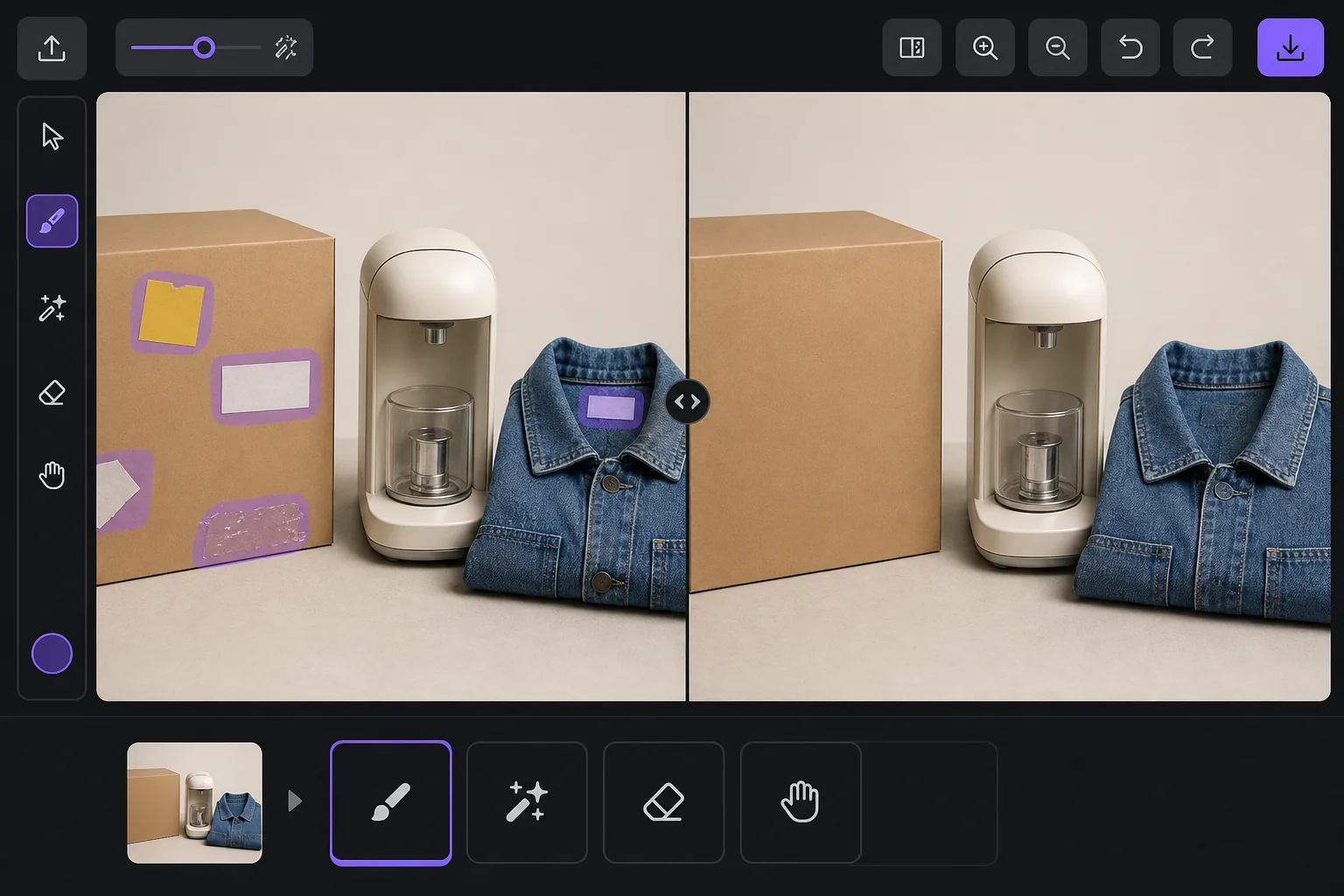
Why a visible price sticker hurts your resale listing — Magic Eraser
A price tag in a listing photo quietly works against you. Buyers see the original retail or clearance price and anchor their offer below it, so a leftover $4.99 yellow sticker can cost you more than five dollars in negotiation. It also signals the item came from a closeout bin or was already returned once, which lowers perceived condition even when the product is genuinely good. And some platforms care: marketplaces and their image guidelines generally want a clean product shot, and a barcode or store tag clutters the main image where buyers decide in a half-second whether to tap. Peeling a sticker off physically often leaves adhesive residue, a torn label, or a faded rectangle where the box was protected from light — so the photo problem survives the physical one. Removing it in the photo is the faster fix. A price sticker is rendered onto the image pixels just like any other object, so it replaces whatever box art, fabric, or surface sat behind it. Magic Eraser's AI brushes the sticker away and generates a plausible reconstruction of that hidden area from the surrounding pixels. Be clear on what that means: over a flat colored box or a plain surface the result is usually seamless, but the AI is synthesizing what was likely there, not recovering literal hidden detail — so printed text or a logo that sat entirely under the sticker is invented, not restored.
Before you start
Instruksi langkah demi langkah
Start with upload foto. The result preview above and tips below use this guide's existing content; no separate before-and-after proof is assumed.
- 1
Upload foto
Buka Magic Eraser di web, iOS, atau Android. Seret dan lepas foto JPEG, PNG, HEIC, atau WebP Anda. Tidak perlu akun.
- 2
Pilih alat dan area
Pilih alat yang tepat dan tandai area yang akan diproses. AI akan menganalisis dan menerapkan perubahan secara otomatis dalam hitungan detik.
- 3
Download hasil
Pratinjau hasil dan download foto yang telah diedit. Ekspor dalam format PNG atau JPEG berkualitas tinggi.
Paling cocok untuk
- eBay and Facebook Marketplace sellers cleaning price tags off secondhand items before listing
- Resellers and thrift flippers removing clearance and markdown stickers that anchor buyers low
- Hiding barcode and store-inventory labels stuck to product boxes and packaging
- Removing price gun tags and plastic fasteners from clothing and accessory photos
- Erasing adhesive residue or the faded outline left after a sticker was peeled off by hand
Tips untuk hasil terbaik
Whenever you can, peel the sticker off the real item and photograph the actual surface — a true photo always beats a reconstruction, and it spares you any question about whether the listing image is accurate. Use the eraser for what's left behind: adhesive gunk, a torn corner, or the sun-faded rectangle a long-stuck tag protected. Keep your edits honest about the product itself. Removing a price tag or barcode is fine, but don't erase genuine flaws a buyer needs to see — scratches, stains, or damage belong in the listing, and most marketplaces treat a doctored condition photo as grounds for a return or a policy strike. Reconstruction quality tracks the background: a sticker on a flat single-color box vanishes cleanly, while one sitting across detailed printed artwork, a logo, or a model number is the hardest case, because the AI has to guess at text it can't see. If part of the hidden label is still visible elsewhere on the item, photograph that angle instead. Finally, shoot a little wider than the sticker so there's plenty of surrounding surface for the AI to sample from — tightly cropped tags leave it less to work with.
Pertanyaan yang sering diajukan
- Apakah fitur How to remove a price sticker from a photo gratis?
- Ya, Magic Eraser memungkinkan Anda How to remove a price sticker from a photo secara gratis dengan batas harian. Upgrade ke Pro untuk pemrosesan tanpa batas dan ekspor resolusi tinggi.
- Berapa lama waktu yang dibutuhkan untuk How to remove a price sticker from a photo?
- Hanya beberapa detik. AI Magic Eraser memproses foto dengan cepat — sebagian besar hasil tersedia segera setelah upload.
- Bisa digunakan di HP?
- Ya, Magic Eraser berfungsi di iOS, Android, dan semua browser web. Anda bisa beralih antar perangkat dengan bebas.
- Apakah kualitas gambar berkurang?
- Tidak, Magic Eraser menjaga kualitas foto asli. AI memproses secara cerdas untuk mempertahankan detail dan ketajaman.