
Remove Multiple Emojis From a Photo in One Pass
Pelajari cara Hapus beberapa emoji dengan Magic Eraser. Panduan langkah demi langkah sederhana dengan alat AI gratis. Berfungsi di web, iOS, dan Android.
Last updated
Coba sekarang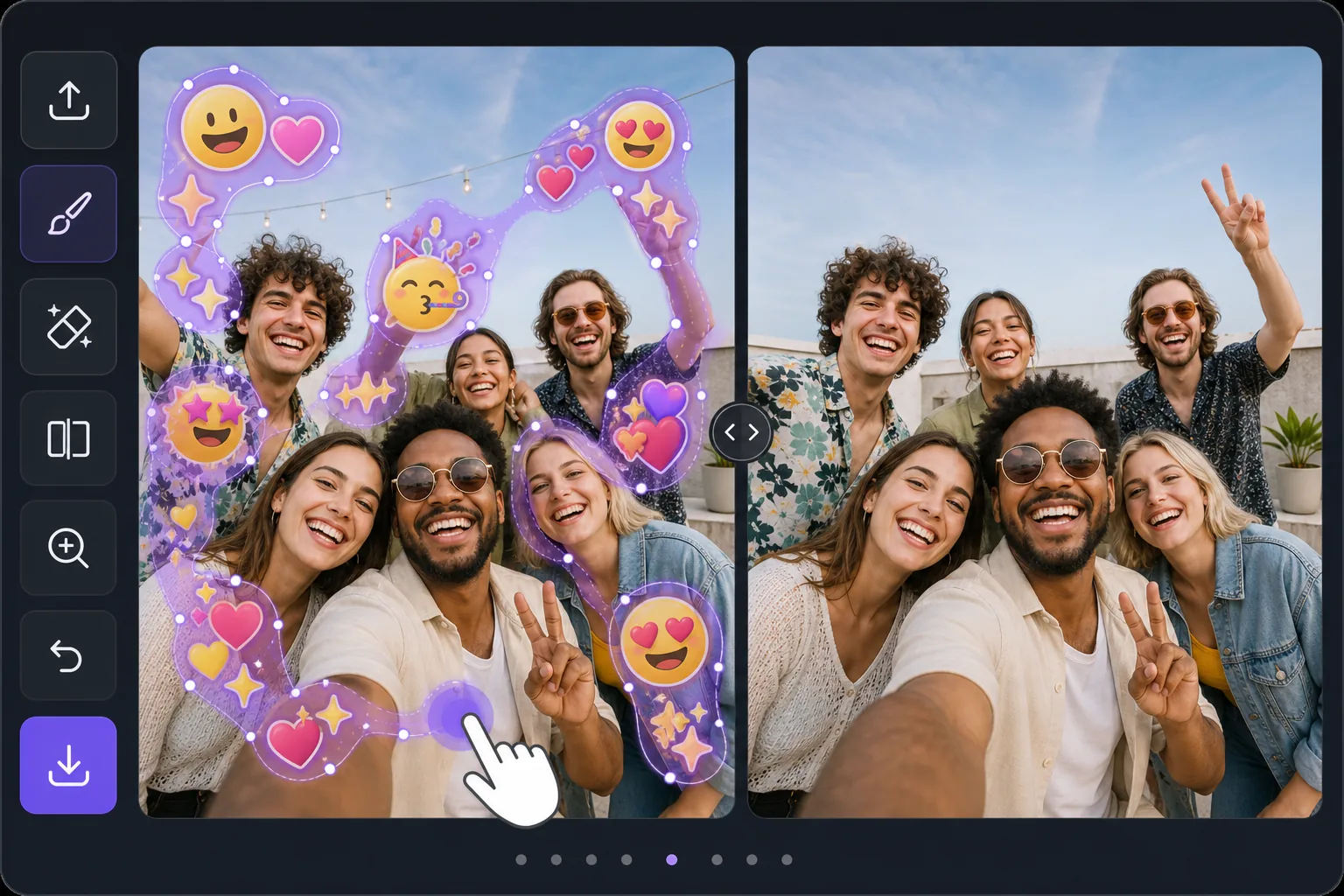
Batch-erase a photo covered in emojis — Magic Eraser
Some photos look like an emoji explosion: smiley faces, hearts, sparkles, and sticker packs piled across faces, backgrounds, and corners. Removing them individually means dozens of taps and re-renders. Magic Eraser is built for the opposite workflow — mark every emoji you want gone in one selection, then let the AI clear them together. Instead of treating each emoji as a separate job, you brush a continuous mask across the whole emoji-covered area, including overlapping stacks and scattered reactions, and process them in a single pass. The AI inpainting studies the surrounding pixels and synthesizes a believable fill for everything underneath at once, so textures like skin, sky, walls, and clothing flow naturally across the cleared zone. Be clear about what this does: it generates a plausible reconstruction of what was likely behind the emojis — it does not recover the literal original pixels or reveal any hidden face or identity. For a photo blanketed in emoji clutter, that one-pass batch approach is the fastest way from chaotic to clean.
Before you start
Instruksi langkah demi langkah
Start with upload foto. The result preview above and tips below use this guide's existing content; no separate before-and-after proof is assumed.
- 1
Upload foto
Buka Magic Eraser di web, iOS, atau Android. Seret dan lepas foto JPEG, PNG, HEIC, atau WebP Anda. Tidak perlu akun.
- 2
Pilih alat dan area
Pilih alat yang tepat dan tandai area yang akan diproses. AI akan menganalisis dan menerapkan perubahan secara otomatis dalam hitungan detik.
- 3
Download hasil
Pratinjau hasil dan download foto yang telah diedit. Ekspor dalam format PNG atau JPEG berkualitas tinggi.
Paling cocok untuk
- Group selfies or party photos plastered with friends' emoji and sticker reactions
- Screenshots where multiple emojis were stamped across faces and the background
- Memes or edits buried under sparkles, hearts, and laughing-face stacks
- Social posts covered in scattered emoji clutter you want cleared before reposting
- Cleaning up a single image with dozens of small emojis faster than erasing each one
Tips untuk hasil terbaik
Work in passes rather than chasing perfection in one go. First, mask the dense clusters and overlapping emoji stacks — these benefit most from being inpainted together so the AI keeps the background consistent across them. Then do a second pass for the small, scattered emojis in corners and edges. Zoom in for emojis that overlap a face or fine detail; a tighter brush leaves more real pixels for the AI to reference, which yields a more believable reconstruction. If a large emoji covered a busy area like a crowd or patterned fabric, expect the fill to be a plausible approximation, not the exact hidden detail — it never restores a true hidden face or identity. For photos that are almost entirely emoji, sometimes a generous single mask over the whole covered zone reconstructs more cohesively than many small separate edits.
Pertanyaan yang sering diajukan
- Apakah fitur Hapus beberapa emoji gratis?
- Ya, Magic Eraser memungkinkan Anda Hapus beberapa emoji secara gratis dengan batas harian. Upgrade ke Pro untuk pemrosesan tanpa batas dan ekspor resolusi tinggi.
- Berapa lama waktu yang dibutuhkan untuk Hapus beberapa emoji?
- Hanya beberapa detik. AI Magic Eraser memproses foto dengan cepat — sebagian besar hasil tersedia segera setelah upload.
- Bisa digunakan di HP?
- Ya, Magic Eraser berfungsi di iOS, Android, dan semua browser web. Anda bisa beralih antar perangkat dengan bebas.
- Apakah kualitas gambar berkurang?
- Tidak, Magic Eraser menjaga kualitas foto asli. AI memproses secara cerdas untuk mempertahankan detail dan ketajaman.