
Remove an Emoji Covering a Face
Pelajari cara Hapus emoji dari wajah dengan Magic Eraser. Panduan langkah demi langkah sederhana dengan alat AI gratis. Berfungsi di web, iOS, dan Android.
Last updated
Coba sekarang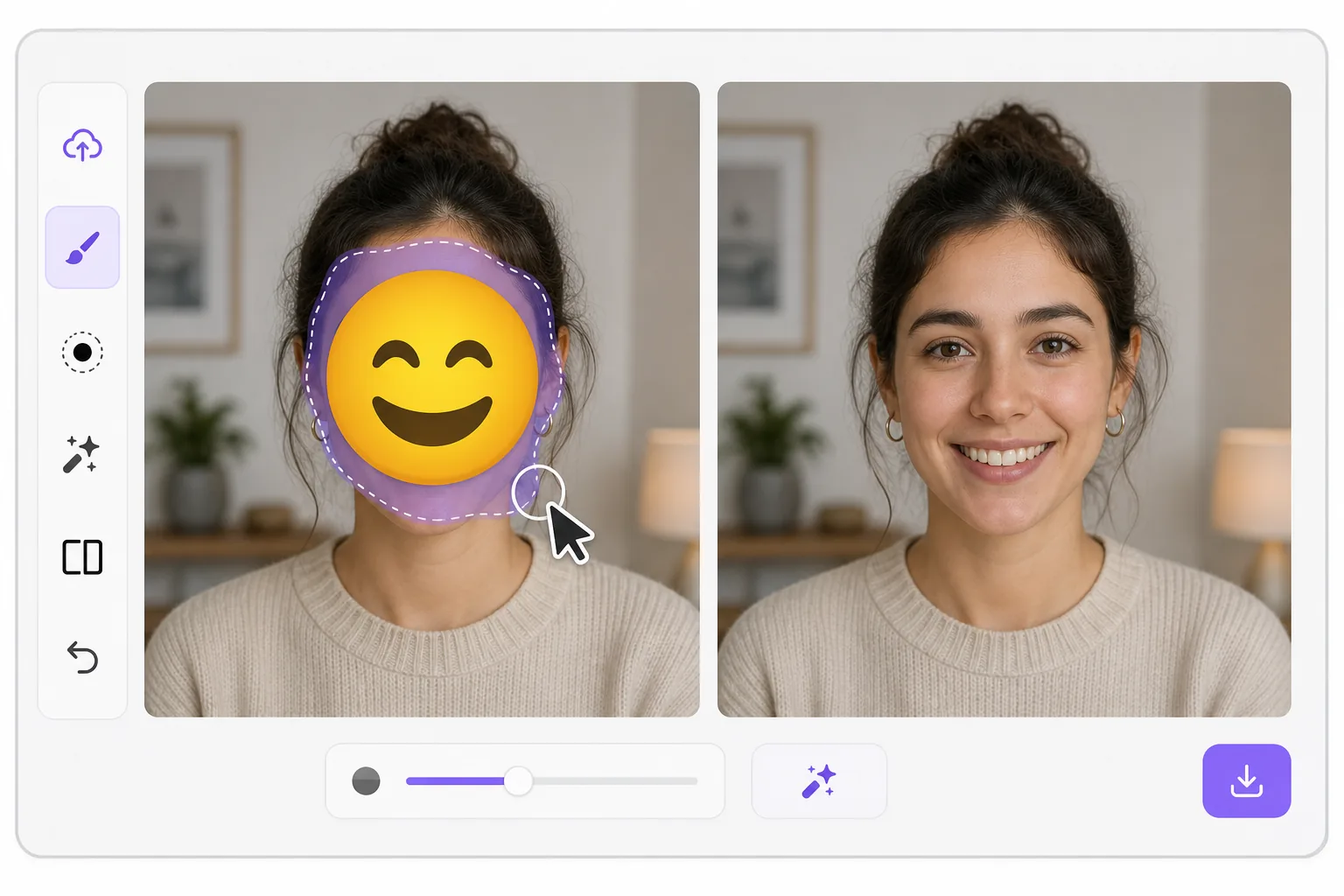
What "uncensoring" an emoji actually does — Magic Eraser
When a smiley, sunglasses, or blur-emoji is slapped over someone's face, those original pixels are gone — the emoji replaced them in the saved image. Magic Eraser's AI inpainting can remove that emoji and fill the gap with a natural-looking face that matches the lighting, skin tone, hairline, and angle around it. Here's the honest part most tools won't tell you: this is a reconstruction, not a recovery. The AI synthesizes a face that fits the scene; it does not and cannot reveal the true identity of whoever was censored. Treat the result as a plausible repair for a photo, not as forensic proof of who someone is. Use it to fix your own images or photos you have permission to edit — never to unmask someone who deliberately hid their face.
Before you start
Instruksi langkah demi langkah
Start with upload foto. The result preview above and tips below use this guide's existing content; no separate before-and-after proof is assumed.
- 1
Upload foto
Buka Magic Eraser di web, iOS, atau Android. Seret dan lepas foto JPEG, PNG, HEIC, atau WebP Anda. Tidak perlu akun.
- 2
Pilih alat dan area
Pilih alat yang tepat dan tandai area yang akan diproses. AI akan menganalisis dan menerapkan perubahan secara otomatis dalam hitungan detik.
- 3
Download hasil
Pratinjau hasil dan download foto yang telah diedit. Ekspor dalam format PNG atau JPEG berkualitas tinggi.
Paling cocok untuk
- Restoring an old group photo where you yourself added a privacy emoji and lost the original
- Cleaning up a meme or reaction image so the face area reads as a face again instead of a sticker
- Removing a smiley or sunglasses emoji a friend placed on your own picture before resharing
- Designers prototyping how a portrait looks without a placeholder emoji overlay
- Recovering the composition of a photo you edited, where you have the right to undo your own censorship
Tips untuk hasil terbaik
Smaller emojis over a clear, well-lit face reconstruct far better than a big sticker covering eyes, nose, and mouth at once — the more original face the AI can see around the edges, the more convincing its fill. If the emoji sits on a turned or partially shadowed face, expect a softer, more generic result. Run it two or three times and compare; each pass produces a different plausible face. Above all, stay honest with anyone you share it with: say the face was AI-reconstructed. Don't present the output as the real hidden person, and don't use it to identify or expose someone who covered their face on purpose.
Pertanyaan yang sering diajukan
- Apakah fitur Hapus emoji dari wajah gratis?
- Ya, Magic Eraser memungkinkan Anda Hapus emoji dari wajah secara gratis dengan batas harian. Upgrade ke Pro untuk pemrosesan tanpa batas dan ekspor resolusi tinggi.
- Berapa lama waktu yang dibutuhkan untuk Hapus emoji dari wajah?
- Hanya beberapa detik. AI Magic Eraser memproses foto dengan cepat — sebagian besar hasil tersedia segera setelah upload.
- Bisa digunakan di HP?
- Ya, Magic Eraser berfungsi di iOS, Android, dan semua browser web. Anda bisa beralih antar perangkat dengan bebas.
- Apakah kualitas gambar berkurang?
- Tidak, Magic Eraser menjaga kualitas foto asli. AI memproses secara cerdas untuk mempertahankan detail dan ketajaman.