
Cara menghilangkan double chin pada foto
Sudut yang tidak menarik dapat memperbesar dagu ganda yang hampir tidak terlihat secara langsung. Pembentukan ulang AI Magic Eraser secara halus memperhalus garis rahang untuk hasil alami yang terlihat seperti sudut yang lebih baik, bukan retouching yang terlihat jelas.
Last updated
Perbaiki garis rahang sekarang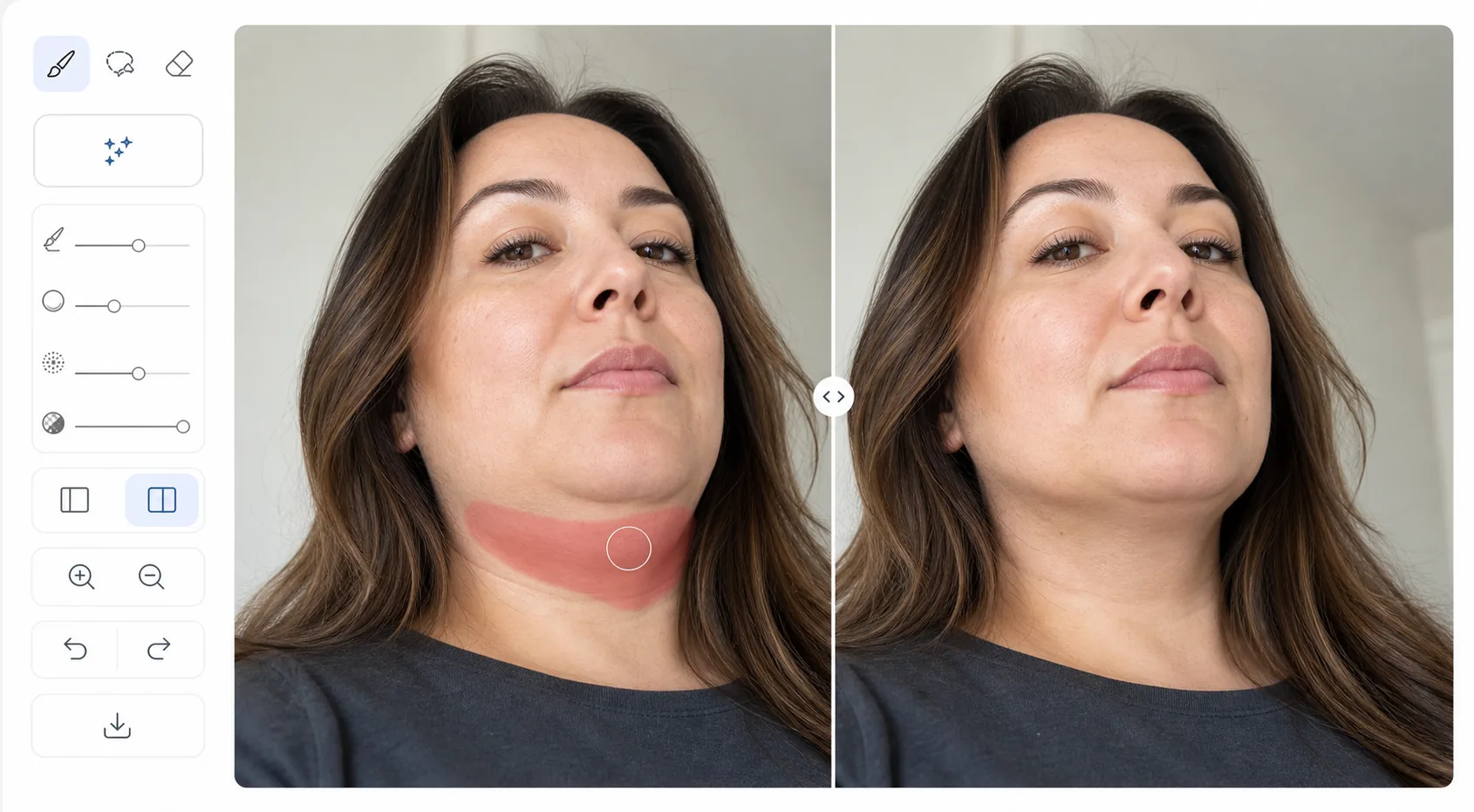
Mengapa sudut kamera membesar-besarkan tampilan dagu
Untuk menghilangkan dagu berlipat dari foto, buka Magic Eraser di web, iOS, atau Android, pilih AI Fill, unggah foto potret, sapukan brush ke area di bawah rahang, lalu jelaskan hasil yang diinginkan — "kurangi dagu berlipat secara alami" — dan AI akan menyempurnakan garis rahang dengan halus sambil menjaga tekstur kulit dan transisi bayangan tetap utuh. Gratis, tanpa perlu daftar. Tujuannya adalah sudut kamera yang menyanjung, bukan wajah yang berbeda, jadi buat penyesuaian seringan mungkin: pembentukan ulang yang halus terlihat seperti foto yang bagus, sedangkan pembentukan ulang yang berlebihan jelas terlihat hasil edit. Bandingkan tampilan sebelum dan sesudah pada ukuran tampilan normal sebelum mengekspor. Lensa kamera, terutama kamera depan sudut lebar pada ponsel, mendistorsi proporsi wajah. Sudut kamera yang sedikit ke bawah akan menekan garis rahang dan memperbesar jaringan di bawah dagu. Secara langsung, hal ini jarang terlihat karena orang melihat Anda dari berbagai sudut dan jarak. Namun foto membekukan satu momen yang tidak menyenangkan. Fotografer profesional menyelesaikan masalah ini dengan pose yang hati-hati (dagu ke depan dan sedikit ke bawah, memotret dari sedikit ke atas) dan pencahayaan (bayangan di bawah garis rahang menciptakan definisi). Pembentukan ulang AI mencapai hasil serupa dalam pasca-pemrosesan — secara halus menyesuaikan kontur garis rahang agar sesuai dengan penampilan sebenarnya, bukan sudut buruk yang diambil.
Before you start
Sempurnakan garis rahang dalam tiga langkah
Start with unggah potretnya. The result preview above and tips below use this guide's existing content; no separate before-and-after proof is assumed.
- 1
Unggah potretnya
Buka Magic Eraser di web, iOS, atau Android dan pilih AI Fill. Unggah potret di mana dagu ganda terlihat. Alat ini berfungsi paling baik dengan potret menghadap ke depan dan sudut tiga perempat.
- 2
Pilih area dagu
Sapukan pada area di bawah rahang yang ingin Anda haluskan. Sertakan transisi antara dagu dan leher. Jelaskan hasil yang diinginkan: 'garis rahang ramping' atau 'mengurangi dagu ganda secara alami' — AI menafsirkan instruksi dan menerapkan penyesuaian proporsional yang halus.
- 3
Tinjau dan ekspor
AI memperhalus garis rahang sambil mempertahankan tekstur alami kulit dan transisi bayangan. Hasilnya akan tampak seperti sudut foto yang bagus, bukan pengeditan yang terlihat jelas. Gunakan penggeser sebelum/sesudah untuk memverifikasi bahwa perubahannya tidak kentara. Ekspor jika puas.
Terbaik untuk
- Retouching foto kepala profesional yang membuat garis rahang terlihat lebih baik
- Pengguna media sosial ingin fotonya sesuai dengan penampilan aslinya
- Fotografer pernikahan dan acara menawarkan penyempurnaan potret yang halus kepada klien
- Siapa pun yang difoto dari sudut rendah yang tidak menarik
- Peningkatan tangkapan layar panggilan video yang sudut webcamnya biasanya tidak menarik
Kiat untuk hasil terbaik
Kehalusan adalah kuncinya — pembentukan ulang secara agresif terlihat jelas telah diedit dan dapat mengubah penampilan seseorang yang dapat dikenali. Bidik hasil yang terlihat seperti sudut kamera yang lebih baik, bukan orang yang berbeda. AI bekerja paling baik ketika ada transisi yang jelas untuk disempurnakan. Untuk foto yang dagunya menyatu dengan leher karena pencahayaan, menambahkan definisi bayangan garis rahang (melalui pemrosesan AI yang memperhatikan pencahayaan) lebih efektif daripada pembentukan ulang geometris. Bandingkan hasilnya pada ukuran tampilan normal, bukan diperbesar — ketidaksempurnaan kecil yang terlihat pada zoom 300% tidak terlihat pada jarak tampilan normal.
Pertanyaan yang sering diajukan
- Apakah akan terlihat jelas sudah diedit?
- Jika digunakan secara halus, tidak. AI mempertahankan tekstur kulit alami dan transisi bayangan. Tujuannya adalah hasil yang tampak seperti sudut yang lebih baik, bukan operasi digital. Pembentukan ulang yang berlebihan akan terlihat tidak wajar — moderasi akan memberikan hasil yang paling dapat dipercaya.
- Apakah ini berfungsi pada foto grup?
- Ya. Pilih hanya area dagu orang tertentu. AI memproses pilihan Anda tanpa memengaruhi orang lain di dalam foto.
- Apakah perbaikan garis rahang gratis?
- Ya. Fitur AI Fill tersedia di tingkat gratis dengan batas penggunaan harian. Premium menghilangkan batasan.
- Bagaimana cara menghilangkan dagu berlipat dari foto di ponsel saya?
- Buka Magic Eraser di browser ponsel mana pun atau aplikasi iOS maupun Android, muat foto potret dari galeri, pilih AI Fill, lalu sapukan brush ke area di bawah rahang dengan jari Anda — cubit untuk memperbesar agar lebih leluasa mengatur sekitar dagu dan leher. Ketik 'kurangi dagu berlipat secara alami', dan AI akan menyempurnakannya langsung di ponsel Anda, lalu menyimpan hasilnya kembali ke galeri. Cara kerjanya sama seperti versi desktop, tanpa perlu memasang aplikasi jika Anda menggunakan browser.
- Apakah saya akan tetap terlihat seperti diri saya setelah diedit?
- Ya, asalkan Anda membuatnya tetap halus — itulah inti dari mengejar sudut yang menyanjung alih-alih perubahan yang dramatis. Penyesuaian ringan akan menyempurnakan garis rahang seperti yang dilakukan pose atau pencahayaan yang lebih baik, sambil mempertahankan fitur-fitur yang membuat Anda mudah dikenali. Jika Anda berlebihan, hasilnya mulai terlihat seperti orang lain dan jelas hasil edit, jadi pilihlah perubahan paling ringan yang terlihat pas, dan foto asli selalu disimpan sehingga Anda bisa mengulanginya.