
यात्रा ब्लॉग फोटो
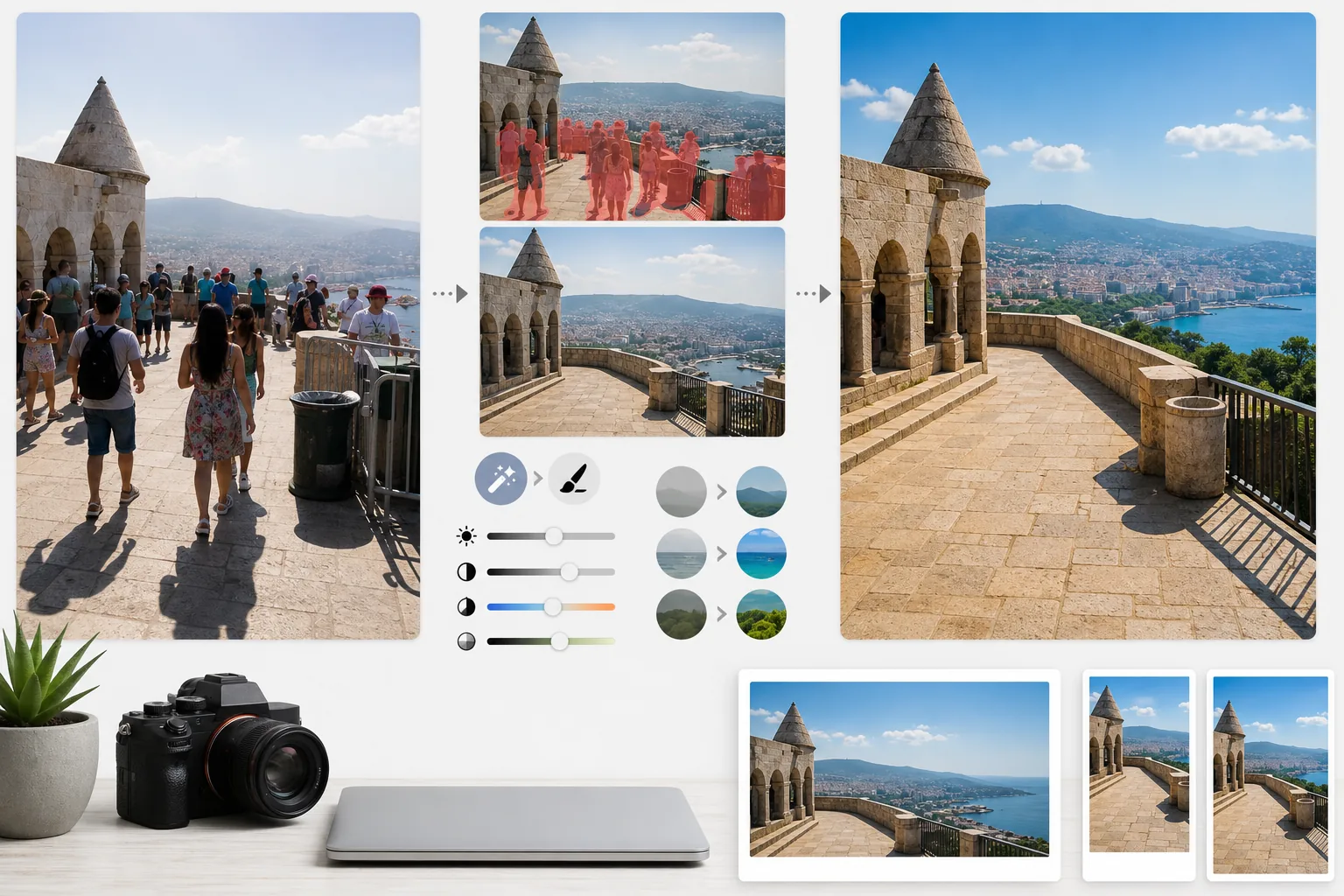
भीड़भाड़ वाले यात्रा स्नैपशॉट को प्रकाशन-गुणवत्ता वाली गंतव्य फोटोग्राफी में बदलें। यह टेम्पलेट Magic Eraser का उपयोग करके स्थलों और परिदृश्य की तस्वीरों से पर्यटकों, फ्रेम में घुसपैठ करने वालों और दृश्य अव्यवस्था को हटाता है, फिर AI Enhance लागू करके यात्रा फोटोग्राफी में आम मुश्किल एक्सपोज़र स्थितियों — दोपहर की तेज़ धूप, मंदिरों के गहरे अंदरूनी हिस्से, बैकलिट सूर्यास्त — को ठीक करता है और प्राकृतिक रंगों को निखारता है ताकि ऐसी तस्वीरें बनें जो पाठकों को यात्रा बुक करने के लिए प्रेरित करें।
यह टेम्पलेट मुफ़्त आज़माएंPersonal template preview
यह टेम्पलेट क्या करता है
यात्रा फोटोग्राफी की दो सबसे बड़ी समस्याओं को हल करता है: भीड़ और खराब रोशनी। Magic Eraser स्मारकों के सामने खड़े पर्यटकों, आपके फ्रेम से गुज़रते घुसपैठियों, और जगह के एहसास को बिगाड़ने वाली दृश्य अव्यवस्था जैसे कूड़ेदान, निर्माण अवरोधक और अस्थायी साइनबोर्ड को हटाता है। AI आसपास के संदर्भ का उपयोग करके हटाए गए लोगों और वस्तुओं के पीछे की वास्तुकला, फुटपाथ और परिदृश्य का पुनर्निर्माण करता है। फिर AI Enhance यात्रा की अनूठी एक्सपोज़र चुनौतियों से निपटता है — गिरजाघरों और मंदिरों के अंदरूनी शॉट जहाँ खिड़कियाँ अत्यधिक उजली हो जाती हैं और छायाएँ काली पड़ जाती हैं, दोपहर की तेज़ धूप जो उष्णकटिबंधीय स्थलों पर रंगों को सपाट कर देती है, और बैकलिट सूर्यास्त के दृश्य जहाँ अग्रभूमि छायाचित्र बन जाती है। रंगों को इस तरह निखारा जाता है कि वे दर्शाएँ कि गंतव्य वास्तव में मानव आँख को कैसा दिखता है, जिसे कैमरे डायनेमिक रेंज में लगातार कम दर्शाते हैं।
टेम्पलेट सेटिंग्स
| पर्यटक हटाना | स्थल और परिदृश्य की तस्वीरों से लोगों का स्वतः पता लगाकर हटाना |
| एक्सपोज़र सुधार | मुश्किल रोशनी के लिए हाइलाइट्स और छायाओं की HDR-शैली बहाली |
| रंग संवर्धन | कृत्रिम दिखे बिना प्राकृतिक संतृप्ति (आकाश, पानी, पत्ते) को निखारना |
| धुंध हटाना | दूर के परिदृश्यों को साफ़ दिखाने के लिए वायुमंडलीय धुंध को भेदना |
| आउटपुट रिज़ॉल्यूशन | 4000px लंबा किनारा (रेटिना गुणवत्ता पर ब्लॉग हीरो इमेज) |
इस टेम्पलेट का उपयोग कैसे करें
अपनी यात्रा फोटो अपलोड करें
कोई भी यात्रा फोटो अपलोड करें — भीड़भाड़ वाले स्थल, विशाल परिदृश्य, सड़क के दृश्य, अंदरूनी वास्तुकला। यह टेम्पलेट स्मार्टफोन, मिररलेस कैमरों और एक्शन कैमरों की JPEG फ़ाइलों को संभालता है। अधिकतम संपादन लचीलेपन के लिए RAW फ़ाइलें भी स्वीकार की जाती हैं।
भीड़ और अव्यवस्था हटाएं
Magic Eraser फ्रेम में लोगों का पता लगाता है और उन्हें हटाता है। आप सभी लोगों को हटाना चुन सकते हैं, विशिष्ट व्यक्तियों (स्वयं या यात्रा साथियों) को रख सकते हैं, या केवल उन्हें चुनकर हटा सकते हैं जो प्रमुख वास्तुशिल्प या परिदृश्य तत्वों को ढक रहे हैं। AI रिक्त क्षेत्रों को पुनर्निर्मित ज़मीन, दीवारों और दृश्यावली से भर देता है।
रोशनी और रंग निखारें
AI Enhance HDR-शैली प्रसंस्करण लागू करता है जो अत्यधिक उजले आकाश को बहाल करता है और गहरी छायाओं को उभारता है — जो मंदिरों के अंदरूनी हिस्सों और यूरोप की संकरी गलियों में आम है। रंगों को इस तरह निखारा जाता है कि वे गंतव्य पर आपकी आँखों ने जो देखा उससे मेल खाएँ, खासकर आकाश के नीलेपन, समुद्र के फ़िरोज़ी और पत्तों की हरियाली में। पहाड़ और शहरी परिदृश्य को साफ़ दिखाने के लिए वायुमंडलीय धुंध कम की जाती है।
ब्लॉग और सोशल के लिए निर्यात करें
रेटिना-गुणवत्ता वाली ब्लॉग हीरो इमेज के लिए 4000px लंबे किनारे पर डाउनलोड करें, या Instagram, Pinterest और Facebook के लिए प्लेटफ़ॉर्म-विशिष्ट आकारों में। फ़ाइल में उन फोटोग्राफरों के लिए अनुकूलित EXIF डेटा प्रतिधारण शामिल है जो अपने काम को जियोटैग करते हैं।
सर्वोत्तम परिणामों के लिए प्रो टिप्स
- ✓एक ही दृश्य के कुछ सेकंड के अंतराल पर कई शॉट लें। जब पर्यटक फ्रेमों के बीच घूमते हैं, तो AI के पास उनके पीछे की ज़मीन और दीवारों के बारे में संदर्भ जानकारी होती है, जिससे अकेले एक फ्रेम की तुलना में अधिक साफ़ पुनर्निर्माण मिलता है।
- ✓चर्चों, मंदिरों और संग्रहालयों के अंदरूनी शॉट के लिए, शूटिंग करते समय फोटो को थोड़ा ओवरएक्सपोज़ करें। AI के लिए चमकीले हाइलाइट्स को बहाल करना अत्यधिक गहरी छायाओं को उभारने की तुलना में आसान है, और अंदरूनी शॉट डिफ़ॉल्ट रूप से कम एक्सपोज़ होते हैं।
- ✓जब संभव हो परिदृश्यों को गोल्डन आवर या ब्लू आवर के दौरान शूट करें। AI Enhance दोपहर की सपाट रोशनी में रंग निखार सकता है, लेकिन गोल्डन आवर की दिशात्मक गर्म रोशनी परिदृश्यों में जो छायाएँ और गहराई बनाती है, उसे कोई भी रंग ग्रेडिंग दोहरा नहीं सकती।
सामान्य प्रश्न
क्या मैं फोटो में खुद को रख सकता हूँ लेकिन अन्य पर्यटकों को हटा सकता हूँ?
+
हाँ। आप स्वयं को या अपने यात्रा साथियों को संरक्षित विषयों के रूप में चिह्नित कर सकते हैं। AI दृश्य से बाकी सभी को हटा देता है जबकि संरक्षित व्यक्तियों को उनकी मूल स्थिति, रोशनी और छाया के साथ यथावत रखता है।
बहुत भीड़भाड़ वाले दृश्यों में यह कितना अच्छा काम करता है?
+
यह तब सबसे अच्छा काम करता है जब भीड़ फ्रेम के लगभग 40% से कम हिस्से को ढके। अत्यधिक भीड़भाड़ वाले दृश्य — जैसे खचाखच भरा चौक जहाँ लोगों के बीच ज़मीन नहीं दिखती — साफ़ पुनर्निर्माण के लिए बहुत कम पृष्ठभूमि संदर्भ देते हैं। ऐसी स्थितियों में, आगे की पंक्तियों को आंशिक रूप से हटाने से अक्सर विश्वसनीय परिणाम मिलता है।
क्या धुंध हटाने से फोटो अप्राकृतिक दिखेगी?
+
धुंध में कमी प्राकृतिक दिखने वाले परिणामों के लिए कैलिब्रेट की गई है। यह उस नीले-भूरे वायुमंडलीय प्रकीर्णन को हटाती है जो दूर के पहाड़ों और इमारतों को धुंधला करता है, लेकिन उस सूक्ष्म वायवीय परिप्रेक्ष्य को बनाए रखती है जो परिदृश्य तस्वीरों को गहराई देता है। परिणाम किसी फ़िल्टर्ड या अति-संसाधित छवि के बजाय एक साफ़, स्वच्छ दिन में शूटिंग जैसा दिखता है।
हर गंतव्य को उसके बिना भीड़ वाले सर्वश्रेष्ठ रूप में दिखाएं
यात्रा तस्वीरें अपलोड करें और पर्यटक-रहित, रंग-निखरी छवियाँ पाएं जो आपके पाठकों को अपना सामान बाँधने के लिए प्रेरित करें।
मुफ़्त आज़माएंRelated templates
More personal templates for your workflow.
उचित पृष्ठभूमि रंग, सिर के आकार और चेहरे की अभिव्यक्ति आवश्यकताओं के साथ वीज़ा, ड्राइवर लाइसेंस और राष्ट्रीय आईडी के लिए अनुरूप आईडी फ़ोटो बनाएं।
बैकग्राउंड क्लीनअप, कैप और गाउन Color correction, दोष हटाने और फ़्रेम और घोषणाओं के लिए प्रिंट-रेडी शार्पनिंग के साथ ग्रेजुएशन फ़ोटो को बेहतर बनाएं।
कम रोशनी में शोर में कमी, स्टेज लाइटिंग रंग सुधार, भीड़ का ध्यान हटाने और अंधेरे स्थल के शॉट्स से डिटेल रिकवरी के साथ कॉन्सर्ट और इवेंट की तस्वीरों को बेहतर बनाएं।
नरम पृष्ठभूमि, सौम्य रंग ग्रेडिंग, अस्पताल की अव्यवस्था हटाने और मेलिंग के लिए प्रिंट-तैयार आयामों के साथ सुंदर नवजात शिशु घोषणा कार्ड फ़ोटो बनाएं।
उत्सव की पृष्ठभूमि, गर्म रंग ग्रेडिंग, बर्फ प्रभाव और मुद्रण के लिए मानक कार्ड आयामों के साथ छुट्टियों के ग्रीटिंग कार्ड के लिए परिवार और पोर्ट्रेट तस्वीरें तैयार करें।
कोमल सुधार, पृष्ठभूमि सरलीकरण, गर्मजोशीपूर्ण सम्मानजनक रंग ग्रेडिंग और सेवाओं के लिए प्रिंट-तैयार आयामों के साथ स्मारक श्रद्धांजलि तस्वीरों को पुनर्स्थापित और बढ़ाएं।