
रेज़्युमे हेडशॉट
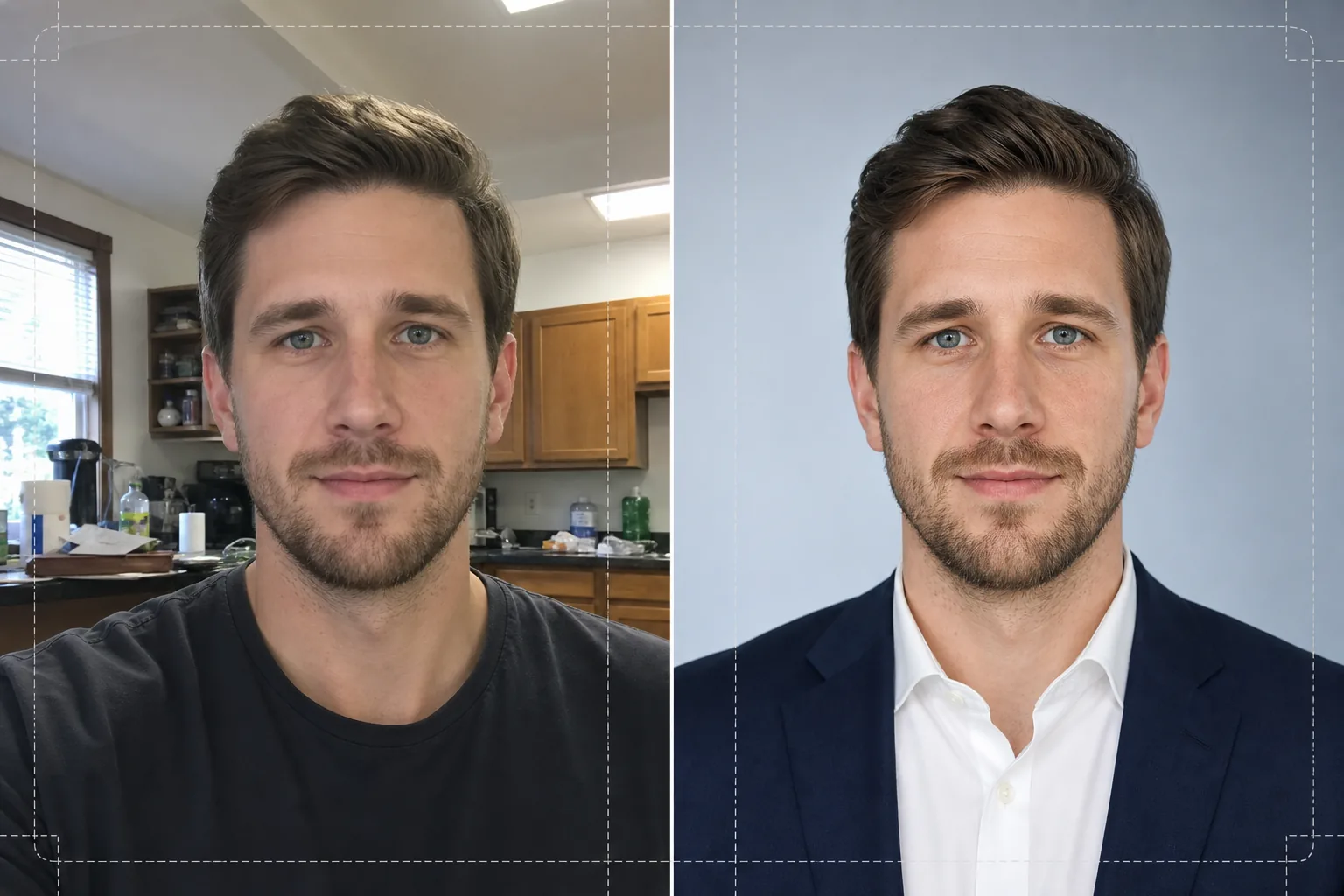
किसी भी आम तस्वीर को रेज़्युमे, LinkedIn प्रोफ़ाइल और नौकरी आवेदन पोर्टल के लिए भर्ती-तैयार हेडशॉट में बदलें। यह टेम्प्लेट ध्यान भटकाने वाली पृष्ठभूमि हटाता है, उसकी जगह साफ़-सुथरा ठोस या ग्रेडिएंट बैकड्रॉप लगाता है, त्वचा की प्राकृतिक रीटचिंग करता है और असमान रोशनी को ठीक करता है, ताकि आप हर आवेदन में आत्मविश्वासी और सहज दिखें।
यह टेम्प्लेट मुफ़्त आज़माएँBusiness template preview
यह टेम्प्लेट क्या करता है
सेल्फ़ी, फ़ोन से ली गई तस्वीरों और अनौपचारिक पोर्ट्रेट को रेज़्युमे और पेशेवर प्रोफ़ाइल के लिए उपयुक्त परिष्कृत हेडशॉट में बदल देता है। Background Eraser आपके सिर और कंधों को किसी भी माहौल — रसोई, पार्क, ऑफ़िस केबिन — से अलग कर देता है और उसकी जगह ठोस सफ़ेद, हल्के स्लेटी या नरम नीले ग्रेडिएंट वाली पृष्ठभूमि लगा देता है जो कॉर्पोरेट मानकों से मेल खाती है। इसके बाद AI Enhance छत की फ़्लोरोसेंट लाइटों या खिड़की की तीखी रोशनी से होने वाले एक्सपोज़र असंतुलन को ठीक करता है, प्राकृतिक रोमछिद्रों के विवरण को बनाए रखते हुए त्वचा की बनावट को मुलायम बनाता है, और आँखों को तीक्ष्ण करता है ताकि देखने वाले का ध्यान आपके चेहरे पर जाए। नतीजा एक समान रोशनी वाला, ध्यान न भटकाने वाला पोर्ट्रेट होता है, जो रेज़्युमे पर 2x2 इंच में साफ़ छपता है या नौकरी बोर्ड पर 400x400 अवतार के रूप में स्पष्ट दिखता है।
टेम्प्लेट सेटिंग्स
| पृष्ठभूमि | ठोस सफ़ेद, हल्का स्लेटी (#F0F0F0) या नरम नीला ग्रेडिएंट |
| त्वचा की रीटचिंग | प्राकृतिक रूप से मुलायम (दाग-धब्बे कम करता है, रोमछिद्रों की बनावट बनाए रखता है) |
| रोशनी सुधार | आँखों में हल्की चमक के साथ समान फ़्रंट फ़िल |
| क्रॉप अनुपात | 3:4 पोर्ट्रेट (मानक रेज़्युमे हेडशॉट अनुपात) |
| आउटपुट रिज़ॉल्यूशन | 1200x1600px (300 DPI पर 4x5.3 इंच तक छपता है) |
इस टेम्प्लेट का उपयोग कैसे करें
अपनी तस्वीर अपलोड करें
कोई भी ऐसी तस्वीर अपलोड करें जिसमें आपका चेहरा और कंधे साफ़ दिख रहे हों। सेल्फ़ी, वेबकैम शॉट और क्रॉप की हुई समूह तस्वीरें, सभी काम करती हैं। यह टेम्प्लेट किसी भी डिवाइस की तस्वीरों को संभालता है और फ़ोन के फ़्रंट कैमरे में आम लेंस विकृति की भरपाई करता है।
पृष्ठभूमि हटाएँ और बदलें
Background Eraser अपने आप आपके सिर और कंधों का पता लगाता है और आपके पीछे की हर चीज़ हटा देता है। ठोस सफ़ेद, तटस्थ स्लेटी या हल्के नीले ग्रेडिएंट वाली पृष्ठभूमि चुनें। किनारों की पहचान उड़ते बालों और कॉलर के विवरण को बनाए रखती है ताकि कटआउट प्राकृतिक लगे।
बेहतर बनाएँ और रीटच करें
AI Enhance आपके पूरे चेहरे की रोशनी को संतुलित करता है और ठुड्डी व नाक के नीचे की तीखी छायाएँ कम करता है। त्वचा की रीटचिंग अस्थायी दाग-धब्बे हटाती है और प्लास्टिक जैसा रूप दिए बिना त्वचा का रंग एक समान करती है। आँखों की तीक्ष्णता एक हल्की चमक जोड़ती है जिससे पोर्ट्रेट सजीव और सतर्क लगता है।
डाउनलोड करें और उपयोग करें
तैयार हेडशॉट को 1200x1600px पर एक्सपोर्ट करें। यह फ़ाइल प्रिंट (300 DPI पर रेज़्युमे में लगाने) और डिजिटल (LinkedIn, Indeed, Glassdoor प्रोफ़ाइल फ़ोटो) दोनों के लिए अनुकूलित है। JPEG और PNG फ़ॉर्मेट उपलब्ध हैं — यदि आपको कस्टम लेआउट के लिए पृष्ठभूमि पारदर्शी रखनी हो तो PNG का उपयोग करें।
बेहतरीन नतीजों के लिए पेशेवर सुझाव
- ✓ऐसी तस्वीर का उपयोग करें जिसमें आप कंधों को थोड़ा तिरछा करके कैमरे की ओर देख रहे हों। थोड़ा तीन-चौथाई मोड़ गहराई जोड़ता है और बिल्कुल सीधी मुद्रा की तुलना में अधिक स्वाभाविक लगता है।
- ✓तेज़ बैकलाइटिंग वाली तस्वीरों से बचें — किसी चमकीली खिड़की के सामने खड़े होने से आपका चेहरा सिल्हूट बन जाता है और AI द्वारा छाया वाले हिस्सों में विवरण वापस लाने की क्षमता सीमित हो जाती है।
- ✓ऐसा सादे रंग का ऊपरी कपड़ा पहनें जो आपकी इच्छित पृष्ठभूमि के विपरीत हो। सफ़ेद पृष्ठभूमि पर सफ़ेद शर्ट कंधों पर घुलमिल जाती है और आपके शरीर की रूपरेखा खो देती है।
सामान्य प्रश्न
क्या मैं अपने फ़ोन से ली गई सेल्फ़ी का उपयोग कर सकता हूँ?
+
हाँ। यह टेम्प्लेट फ़्रंट कैमरों की हल्की बैरल विकृति को ठीक करता है, जिसके कारण नाक वास्तविकता से अधिक चौड़ी दिखती है। यह फ़ोन कैमरों की विशिष्ट कम फ़ील्ड गहराई को भी संभालता है ताकि आपके कान और कंधे तीक्ष्ण बने रहें।
क्या रीटचिंग साफ़ नज़र आएगी?
+
नहीं। त्वचा की रीटचिंग प्राकृतिक रोमछिद्रों की बनावट को बनाए रखती है और केवल अस्थायी दाग-धब्बे जैसे मुहाँसे और लालिमा हटाती है। नतीजा अच्छी रोशनी में किसी अच्छे दिन के आप जैसा दिखता है, न कि एयरब्रश किया हुआ।
कॉर्पोरेट रेज़्युमे के लिए मुझे कौन-सा पृष्ठभूमि रंग चुनना चाहिए?
+
छपे हुए रेज़्युमे के लिए ठोस सफ़ेद सबसे सुरक्षित विकल्प है। स्क्रीन पर देखी जाने वाली प्रोफ़ाइल के लिए हल्का स्लेटी अच्छा रहता है क्योंकि यह बैकलिट डिस्प्ले पर शुद्ध सफ़ेद के तीखे विरोधाभास से बचाता है। नीला ग्रेडिएंट तकनीक और रचनात्मक उद्योगों के लिए उपयुक्त है।
पेशेवर हेडशॉट के साथ अपना अगला इंटरव्यू पाएँ
कोई भी तस्वीर अपलोड करें और कुछ ही सेकंड में अपने रेज़्युमे, LinkedIn और नौकरी पोर्टल के लिए एक परिष्कृत, भर्ती-तैयार हेडशॉट पाएँ।
मुफ़्त आज़माएँRelated templates
More business templates for your workflow.
लगातार पृष्ठभूमि, पेशेवर प्रकाश सुधार, ब्रांड-उपयुक्त रंग ग्रेडिंग और पूरी टीम में समान छवि गुणवत्ता के साथ पोलिश कॉर्पोरेट टीम की तस्वीरें।
मांसपेशियों की परिभाषा में वृद्धि, गतिशील प्रकाश सुधार, पृष्ठभूमि सफाई और उच्च-विपरीत एथलेटिक रंग ग्रेडिंग के साथ जिम और फिटनेस फ़ोटो को बेहतर बनाएं।
स्याही के रंग की जीवंतता, लाइन डिटेल शार्पनिंग, त्वचा की लालिमा में कमी और कलाकार पोर्टफोलियो और इंस्टाग्राम के लिए साफ पृष्ठभूमि के साथ टैटू पोर्टफोलियो फ़ोटो को बेहतर बनाएं।
रोस्टरों और कार्यक्रमों के लिए पृष्ठभूमि प्रतिस्थापन, जर्सी रंग वृद्धि और स्टेडियम या स्टूडियो पृष्ठभूमि के साथ पेशेवर टीम और व्यक्तिगत खिलाड़ी की तस्वीरें बनाएं।
पृष्ठभूमि प्रतिस्थापन, नाटकीय प्रकाश व्यवस्था में वृद्धि, और प्रेस किट और स्थल सबमिशन के लिए प्रिंट-तैयार आउटपुट के साथ पेशेवर बैंड और संगीतकार प्रोमो फ़ोटो बनाएं।
इंस्टाग्राम पोर्टफोलियो और बुकिंग पेजों के लिए मैक्रो-लेवल डिटेल एन्हांसमेंट, असली जेल और पॉलिश रंग सटीकता और साफ हाथ की स्थिति के साथ नेल आर्ट का प्रदर्शन करें।