
रेस्तरां मेनू फोटो
अपने व्यंजनों की फ़ोन से ली गई तस्वीरों को मेनू-बोर्ड और डिलीवरी-ऐप के लिए तैयार छवियों में बदलें। यह टेम्पलेट भोजन के रंगों की जीवंतता बढ़ाता है, अव्यवस्थित प्लेटिंग पृष्ठभूमि को साफ़ करता है, ऐप थंबनेल के लिए व्यंजनों को अलग करता है, और DoorDash, UberEats तथा Grubhub द्वारा आवश्यक सटीक आयामों में आउटपुट देता है — बिना किसी फ़ूड फ़ोटोग्राफ़र के।
यह टेम्पलेट मुफ़्त आज़माएँFood & Beverage template preview
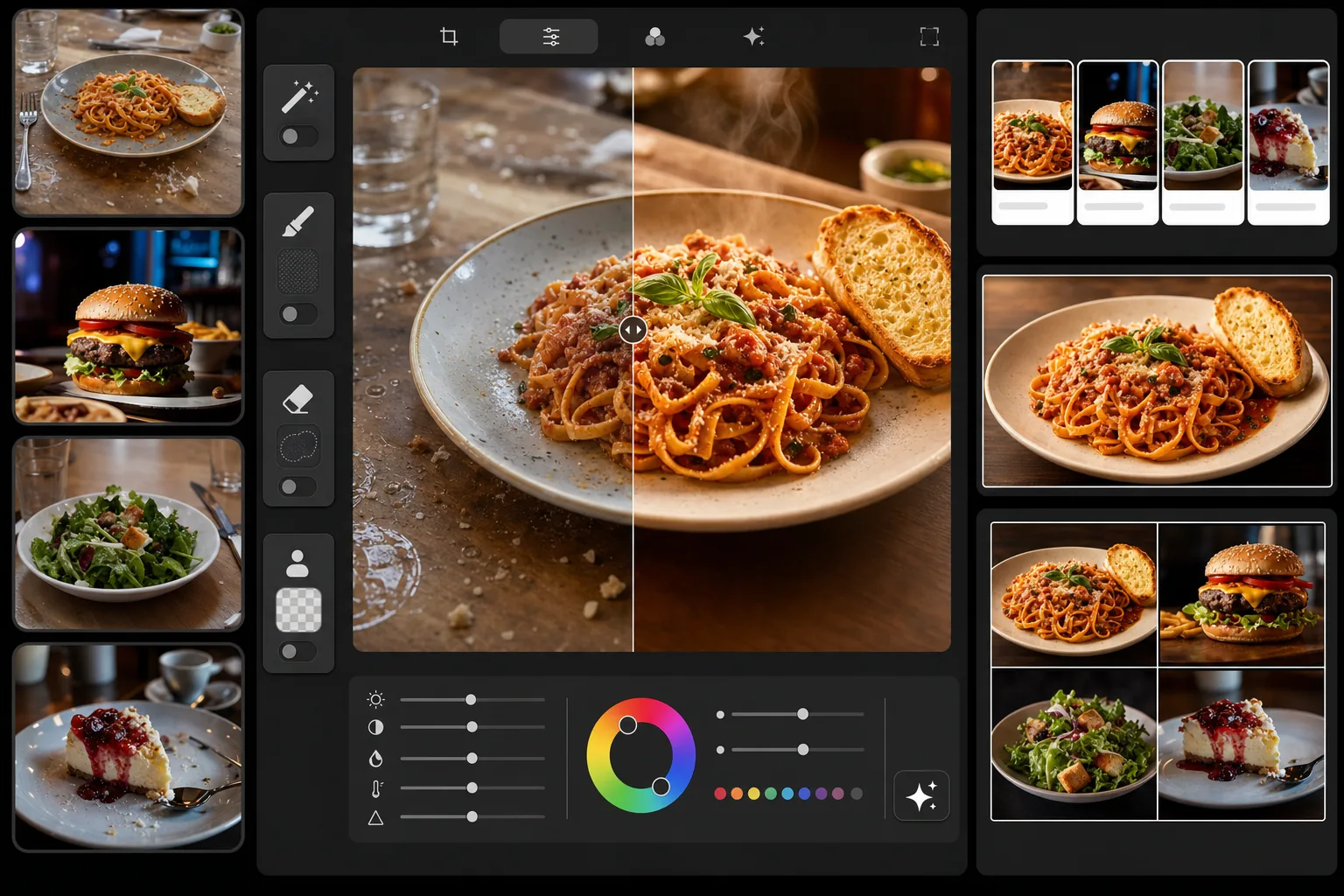
यह टेम्पलेट क्या करता है
सामान्य रूप से ली गई भोजन की तस्वीरों को व्यावसायिक मेनू-गुणवत्ता वाली छवियों में बदलता है। यह टेम्पलेट उन गर्म, स्वादिष्ट लगने वाले रंग टोन को बढ़ाता है जो फ़ूड फ़ोटोग्राफ़ी को प्रभावी बनाते हैं — सॉस में लाल रंग को गहरा करना, ब्रेड की पपड़ी को गर्म सुनहरा रंग देना, और हरी सब्ज़ियों को ताज़ा दिखाना। Magic Eraser मेज़ पर बिखरी चीज़ें, प्लेटों पर उंगलियों के निशान और छितरे हुए टुकड़े हटा देता है। Background Eraser साफ़ डिलीवरी-ऐप थंबनेल के लिए व्यंजनों को अलग करता है। आउटपुट डिजिटल मेनू बोर्ड, मुद्रित मेनू और हर बड़े फ़ूड-डिलीवरी प्लेटफ़ॉर्म के लिए उपयुक्त आकार में होता है।
टेम्पलेट सेटिंग्स
| रंग जीवंतता | भोजन के लिए अनुकूलित (+15% गर्म संतृप्ति, लाल/पीले/हरे) |
| आउटपुट आकार (डिलीवरी ऐप्स) | 1200×800px (3:2 लैंडस्केप, DoorDash/UberEats मानक) |
| आउटपुट आकार (मेनू बोर्ड) | 1920×1080px (16:9 डिजिटल मेनू डिस्प्ले) |
| श्वेत संतुलन | 5200K गर्म दिन का प्रकाश (रेस्तरां की ठंडी LED रोशनी की भरपाई करता है) |
| पृष्ठभूमि विकल्प | साफ़ अलगाव या नाटकीय प्लेटिंग के लिए गहरी सतह (#2C2C2C) |
| फ़ाइल प्रारूप | JPEG 88% गुणवत्ता (डिलीवरी ऐप्स पर तेज़ लोडिंग) |
इस टेम्पलेट का उपयोग कैसे करें
अपने व्यंजन की तस्वीर लें
45 डिग्री के कोण से या सीधे ऊपर से तस्वीर लें। उपलब्ध सबसे चमकदार रोशनी का उपयोग करें — दिन के समय खिड़की के पास आदर्श रहता है। हो सके तो रेस्तरां की गर्म छत वाली रोशनी बंद कर दें, क्योंकि वे तेज़ नारंगी आभा जोड़ती हैं जिसे प्राकृतिक रोशनी की तुलना में ठीक करना कठिन होता है।
दृश्य को साफ़ करें
Magic Eraser मेज़ की अव्यवस्था, छितरे हुए टुकड़े, प्लेटों पर उंगलियों के निशान, संघनन के छल्ले और पृष्ठभूमि में दिख रहे किसी भी रसोई उपकरण को हटा देता है। डिलीवरी-ऐप थंबनेल के लिए, Background Eraser व्यंजन को मेज़ की सतह से पूरी तरह अलग कर देता है।
भोजन के रंग निखारें
AI Enhance भोजन-विशिष्ट रंग ग्रेडिंग लागू करता है: सॉस अधिक समृद्ध दिखते हैं, ब्रेड और पेस्ट्री की पपड़ी को गर्म सुनहरा रंग मिलता है, हरी सब्ज़ियाँ ताज़ा और जीवंत दिखती हैं, और पनीर पर स्वादिष्ट पिघली हुई चमक आ जाती है। यह निखार इस तरह समायोजित किया गया है कि भोजन कृत्रिम रूप से अति-संतृप्त दिखे बिना स्वादिष्ट लगे।
अपने प्लेटफ़ॉर्म के लिए निर्यात करें
डिलीवरी-ऐप प्रीसेट (DoorDash, UberEats, Grubhub के लिए 1200×800px), डिजिटल मेनू बोर्ड प्रीसेट (1920×1080px), या अपने मुद्रित मेनू के लिए कोई कस्टम आकार चुनें। प्रत्येक निर्यात को लक्ष्य प्लेटफ़ॉर्म पर तेज़ लोडिंग के लिए संपीड़ित किया जाता है।
बेहतरीन परिणामों के लिए पेशेवर सुझाव
- ✓प्लेटिंग के 90 सेकंड के भीतर व्यंजनों की तस्वीर लें। भाप, सॉस की चमक और बर्फ़ की बनावट जल्दी ख़राब हो जाती है। टेम्पलेट रंग निखार सकता है, पर पिघली हुई बर्फ़ या सोख ली गई सॉस वापस नहीं ला सकता।
- ✓तस्वीर लेने से पहले प्लेट के किनारे को थोड़े गीले पेपर टॉवल से साफ़ करें। Magic Eraser सॉस के धब्बे हटा सकता है, पर मूल तस्वीर में साफ़ किनारा सबसे परिष्कृत परिणाम देता है।
- ✓डिलीवरी-ऐप थंबनेल के लिए ऊपर से (फ़्लैट-ले) कोण सबसे अच्छा रहता है क्योंकि वर्गाकार/लैंडस्केप क्रॉप पूरे व्यंजन को दिखाता है। 45 डिग्री का कोण मेनू बोर्ड और मुद्रित मेनू के लिए बेहतर है जहाँ आप ऊँचाई और परतें दिखाना चाहते हैं।
- ✓एक ही सतह पर एक ही रोशनी में कई मेनू आइटम की तस्वीरें लें ताकि आपके पूरे मेनू का स्वरूप एकसमान दिखे। डिलीवरी ऐप्स आपके सभी आइटम को ग्रिड में दिखाते हैं, और दृश्य एकरूपता ग्राहकों को व्यावसायिकता का संकेत देती है।
सामान्य प्रश्न
डिलीवरी ऐप्स को किन आयामों की आवश्यकता होती है?
+
DoorDash लैंडस्केप में न्यूनतम 1200×800px (3:2 अनुपात) की अनुशंसा करता है। UberEats को कम से कम 320×320px चाहिए, पर सर्वोत्तम प्रदर्शन गुणवत्ता के लिए 1200×800px की अनुशंसा करता है। Grubhub भी इसी तरह का लैंडस्केप प्रारूप उपयोग करता है। टेम्पलेट का डिलीवरी-ऐप प्रीसेट 1200×800px पर आउटपुट देता है, जो तीनों प्लेटफ़ॉर्म की आवश्यकताओं को पूरा करता है या उनसे आगे निकल जाता है।
क्या भोजन अवास्तविक रूप से निखरा हुआ दिखेगा?
+
रंग ग्रेडिंग विशेष रूप से फ़ूड फ़ोटोग्राफ़ी के लिए समायोजित की गई है — यह व्यंजनों की स्वाभाविक स्वादिष्ट विशेषताओं को निखारती है, बिना उन्हें कृत्रिम रूप से अति-संतृप्त या नियॉन जैसा दिखाए। परिणाम एक अच्छी रोशनी वाली भोजन की तस्वीर जैसा दिखता है, न कि फ़िल्टर लगी Instagram पोस्ट जैसा।
क्या मैं अपने मेनू बोर्ड और डिलीवरी ऐप्स के लिए एक ही तस्वीर उपयोग कर सकता हूँ?
+
टेम्पलेट एक ही अपलोड की गई छवि से कई निर्यात प्रीसेट का समर्थन करता है। अपने डिजिटल मेनू बोर्ड के लिए 1920×1080px पर और डिलीवरी ऐप्स के लिए 1200×800px पर निर्यात करें। क्रॉपिंग प्रत्येक प्रारूप के अनुसार समायोजित होती है, साथ ही व्यंजन को केंद्र में और सुगठित रखती है।
अपने मेनू के हर व्यंजन को सबसे बेहतरीन दिखाएँ
अपने भोजन की तस्वीरें अपलोड करें और कुछ ही सेकंड में डिलीवरी-ऐप और मेनू-बोर्ड के लिए तैयार छवियाँ पाएँ। किसी फ़ूड फ़ोटोग्राफ़र या स्टाइलिंग कौशल की आवश्यकता नहीं।
मुफ़्त आज़माएँRelated templates
More food & beverage templates for your workflow.