
रियल एस्टेट फ़्लोर प्लान
स्कैन किए गए या फ़ोटो खींचे गए फ़्लोर प्लान को साफ, पेशेवर आरेखों में बदलें जो MLS लिस्टिंग, प्रॉपर्टी ब्रोशर और वर्चुअल टूर एकीकरण के लिए उपयुक्त हैं। यह टेम्प्लेट कागज़ी योजनाओं से दाग, छाया और सिलवटें हटाता है, दीवार की रेखाओं और आयाम टिप्पणियों को तेज़ करता है, और दृश्य शैली को मानकीकृत करता है ताकि आपके लिस्टिंग पोर्टफोलियो में हर फ़्लोर प्लान एक जैसा दिखे।
इस टेम्प्लेट को मुफ़्त आज़माएंReal Estate template preview
यह टेम्प्लेट क्या करता है
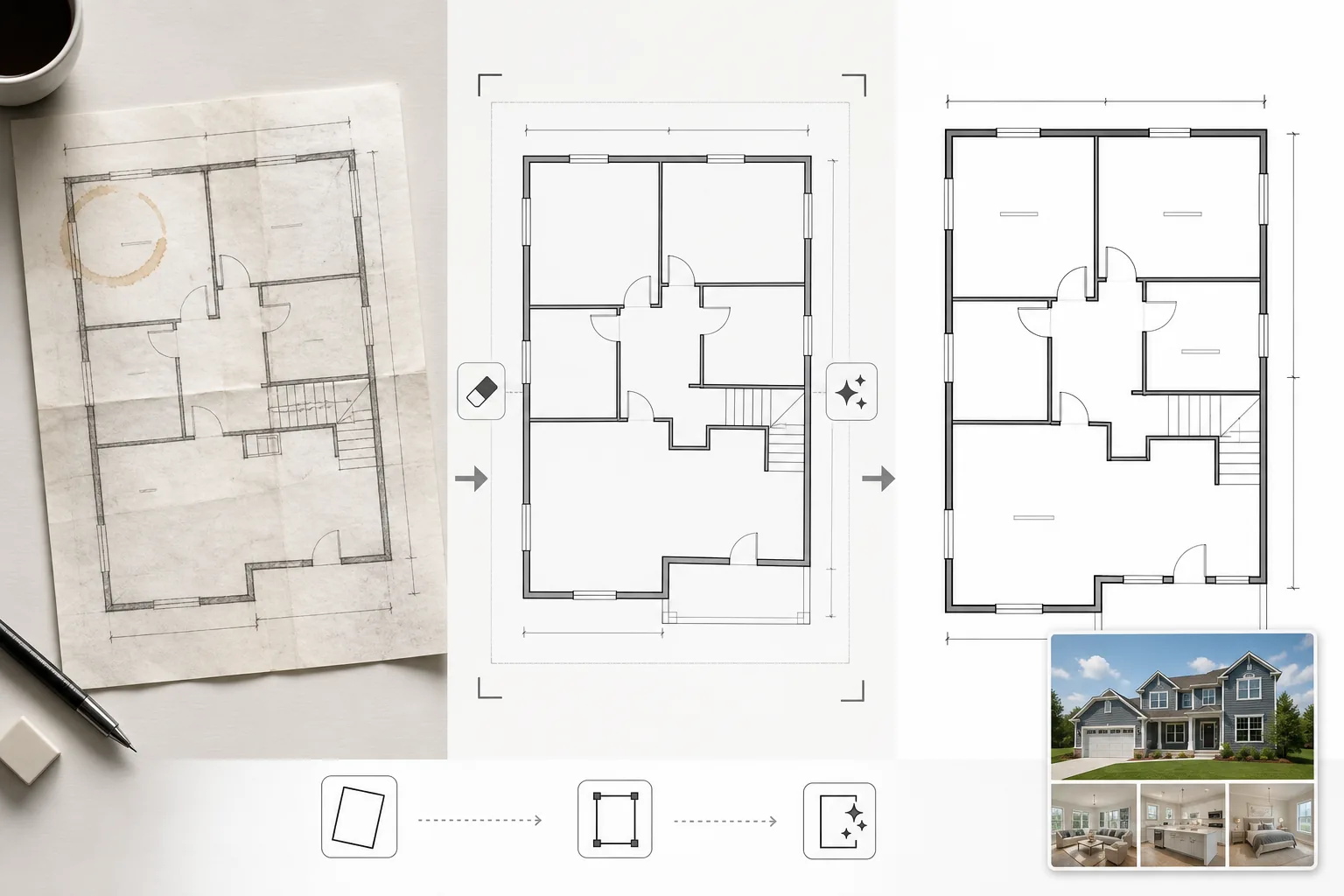
उन फ़्लोर प्लान छवियों को साफ करता है जिन्हें कागज़ी ब्लूप्रिंट से फ़ोटो खींचा गया, पुराने CAD सॉफ़्टवेयर से निर्यात किया गया, या कम गुणवत्ता में स्कैन किया गया। Magic Eraser कागज़ी योजनाओं की फ़ोन तस्वीरों से कॉफ़ी के दाग, पेंसिल टिप्पणियां, मोड़ की सिलवटें और छाया आर्टिफैक्ट हटाता है। AI Enhance दीवार की रेखाओं, दरवाज़े के खुलने की दिशा और आयाम पाठ को तेज़ करता है ताकि वे वेब प्रदर्शन के लिए छोटे करने या ब्रोशर में मुद्रित होने पर भी पठनीय रहें। समतल स्कैन करने के बजाय कोण पर फ़ोटो खींचे गए फ़्लोर प्लान के लिए परिप्रेक्ष्य ठीक किया जाता है। पृष्ठभूमि का रंग साफ सफेद में सामान्यीकृत किया जाता है, और दीवार की रेखाओं को एक समान मोटाई में गहरा किया जाता है ताकि लिस्टिंग की सभी योजनाओं में एक समान रूप मिले।
टेम्प्लेट सेटिंग्स
| पृष्ठभूमि सफ़ाई | दाग, सिलवटें, छाया हटाएं और साफ सफेद में सामान्यीकृत करें |
| रेखा संवर्धन | दीवार की रेखाओं को तेज़ और एक समान मोटाई में गहरा करें |
| पाठ स्पष्टता | आयाम लेबल, कमरे के नाम और माप टिप्पणियों को बेहतर बनाएं |
| परिप्रेक्ष्य सुधार | फ़ोटो खींची गई योजनाओं को सच्चे ऊपर-से-नीचे दृश्य में सीधा करें |
| आउटपुट रिज़ॉल्यूशन | 3000×2000px (लैंडस्केप) या मूल आस्पेक्ट अनुपात से मेल खाने के लिए कस्टम |
इस टेम्प्लेट का उपयोग कैसे करें
अपनी फ़्लोर प्लान छवि अपलोड करें
स्कैन किया गया, फ़ोटो खींचा गया, या डिजिटल फ़्लोर प्लान अपलोड करें। यह टेम्प्लेट फ़ोन कैमरे से फ़ोटो खींचे गए कागज़ी योजनाओं, फ़्लैटबेड स्कैन, PDF निर्यात और वास्तुशिल्प सॉफ़्टवेयर के स्क्रीनशॉट को संभालता है। कोण पर खींची गई फ़ोन तस्वीरों से परिप्रेक्ष्य विकृति स्वचालित रूप से ठीक की जाती है।
आर्टिफैक्ट और दाग हटाएं
Magic Eraser कॉफ़ी के दाग, पेंसिल के निशान, मोड़ की सिलवटें, स्कैनर की धारियां और असमान प्रकाश से छाया ग्रेडिएंट की पहचान करता है और हटाता है। सभी वास्तुशिल्प रेखाओं और टिप्पणियों को संरक्षित करते हुए पृष्ठभूमि को साफ सफेद में सामान्यीकृत किया जाता है।
रेखाओं और पाठ को बेहतर बनाएं
AI Enhance दीवार की रूपरेखा, दरवाज़े के चाप, खिड़की के प्रतीक और सीढ़ी संकेतकों को तेज़ करता है। आयाम पाठ और कमरे के लेबल को पठनीयता के लिए बेहतर बनाया जाता है। रेखा की मोटाई को सामान्यीकृत किया जाता है ताकि मोटी बाहरी दीवारों और पतली आंतरिक विभाजनों में एक समान दृश्य पदानुक्रम हो।
लिस्टिंग और प्रिंट के लिए निर्यात करें
साफ किए गए फ़्लोर प्लान को MLS अपलोड, प्रॉपर्टी ब्रोशर और वर्चुअल टूर ओवरले के लिए उच्च रिज़ॉल्यूशन में डाउनलोड करें। मानकीकृत दृश्य शैली सुनिश्चित करती है कि आपकी लिस्टिंग के सभी फ़्लोर प्लान पेशेवर और एक जैसे दिखें।
सर्वोत्तम परिणामों के लिए पेशेवर सुझाव
- ✓कागज़ी फ़्लोर प्लान की फ़ोटो खींचते समय, इसे समतल सतह पर रखें और समान प्रकाश के साथ सीधे ऊपर से शूट करें। परिप्रेक्ष्य सुधार मध्यम कोणों को संभालता है, लेकिन लगभग ऊपर-से-नीचे का प्रारंभिक बिंदु सबसे तेज़ परिणाम देता है।
- ✓फ़ोटो खींचने से पहले योजना से स्टिकी नोट्स और पेपर क्लिप हटा दें। AI इन्हें मिटा सकता है, लेकिन चिपकने वाले अवशेष और क्लिप की छाया कभी-कभी हल्के निशान छोड़ देती हैं जिनके लिए अतिरिक्त सफ़ाई की आवश्यकता होती है।
- ✓बहुमंजिला प्रॉपर्टी के लिए, प्रत्येक मंजिल को अलग से संसाधित करें और समान संवर्धन सेटिंग्स का उपयोग करें। यह सुनिश्चित करता है कि दीवार की रेखा की मोटाई, पाठ के आकार और पृष्ठभूमि के स्वर मंजिलों में मेल खाएं ताकि एक सुसंगत लिस्टिंग प्रस्तुति हो।
सामान्य प्रश्न
क्या यह एक मोटे रेखाचित्र को पेशेवर फ़्लोर प्लान में बदल सकता है?
+
यह टेम्प्लेट मौजूदा फ़्लोर प्लान चित्रों को साफ और बेहतर बनाता है — यह शुरू से वास्तुशिल्प योजनाएं उत्पन्न नहीं करता। स्पष्ट रूप से खींची गई दीवारों और कमरे के आकार वाले मोटे रेखाचित्र को साफ और तेज़ किया जा सकता है, लेकिन हाथ से खींची गई वक्र रेखाएं और असमान रेखाएं अपने हस्तलिखित स्वरूप में ही रहेंगी, बस साफ़।
क्या आयाम पाठ सटीक रूप से संरक्षित रहेगा?
+
हां। संवर्धन संख्याओं को बदले बिना मौजूदा आयाम लेबल को तेज़ करता है। यदि मूल पाठ पढ़ने के लिए बहुत धुंधला है, तो AI पठनीयता बहाल करने का प्रयास करता है लेकिन गंभीर रूप से क्षतिग्रस्त पाठ पर सटीकता की गारंटी नहीं दे सकता — हमेशा स्रोत दस्तावेज़ के विरुद्ध आयामों की पुष्टि करें।
क्या मैं प्रसंस्करण के बाद कमरे के लेबल जोड़ सकता हूं?
+
हां। साफ सफेद पृष्ठभूमि और तेज़ रेखाएं किसी भी छवि संपादक या लिस्टिंग सॉफ़्टवेयर का उपयोग करके कमरे के लेबल, फर्नीचर आइकन या रंग कोडिंग को ओवरले करना आसान बनाती हैं।
हर लिस्टिंग को एक साफ, पेशेवर फ़्लोर प्लान के साथ प्रस्तुत करें
स्कैन किए गए या फ़ोटो खींचे गए फ़्लोर प्लान अपलोड करें और सेकंडों में साफ, तेज़, लिस्टिंग-तैयार आरेख प्राप्त करें।
मुफ़्त आज़माएंRelated templates
More real estate templates for your workflow.
एमएलएस लिस्टिंग के लिए व्यावसायिक रियल एस्टेट फोटो टेम्पलेट। तेजी से बिकने वाली संपत्ति की तस्वीरों के लिए एचडीआर जैसी वृद्धि, स्काई रिप्लेसमेंट, अव्यवस्था हटाना और रंग सुधार।
लिस्टिंग और पोर्टफोलियो के लिए ऊर्ध्वाधर रेखा सुधार, आकाश प्रतिस्थापन, कार और पैदल यात्री हटाने और गोल्डन आवर कलर ग्रेडिंग के साथ आर्किटेक्चर एक्सटीरियर तस्वीरें बेहतर बनाएँ।
ऊंची बुकिंग दरों के लिए कमरे को चमकाने, अव्यवस्था हटाने, Color correction और वाइड-एंगल लेंस विरूपण फिक्स के साथ Airbnb और छुट्टियों के किराये की तस्वीरों को बदलें।
कमरे को चमकाने, अव्यवस्था हटाने, सामग्री की बनावट को तेज करने और फिनिश और कपड़ों के रंग-सटीक प्रतिपादन के साथ इंटीरियर डिज़ाइन पोर्टफोलियो फ़ोटो को बेहतर बनाएं।
आकाश प्रतिस्थापन, संपत्ति सीमा हाइलाइटिंग, रंग जीवंतता Boost, और रियल एस्टेट और भूमि सर्वेक्षण के लिए विकर्षण हटाने के साथ ड्रोन हवाई फोटोग्राफी को बढ़ाएं।
यथार्थवादी फर्नीचर, सजावट और प्रकाश व्यवस्था के साथ खाली कमरों को वर्चुअल रूप से सजाएँ। खरीदारों को भौतिक स्टेजिंग लागत के बिना रहने की जगह की कल्पना करने में मदद करें।