
लैंडस्केप प्रिंट के लिए तैयार
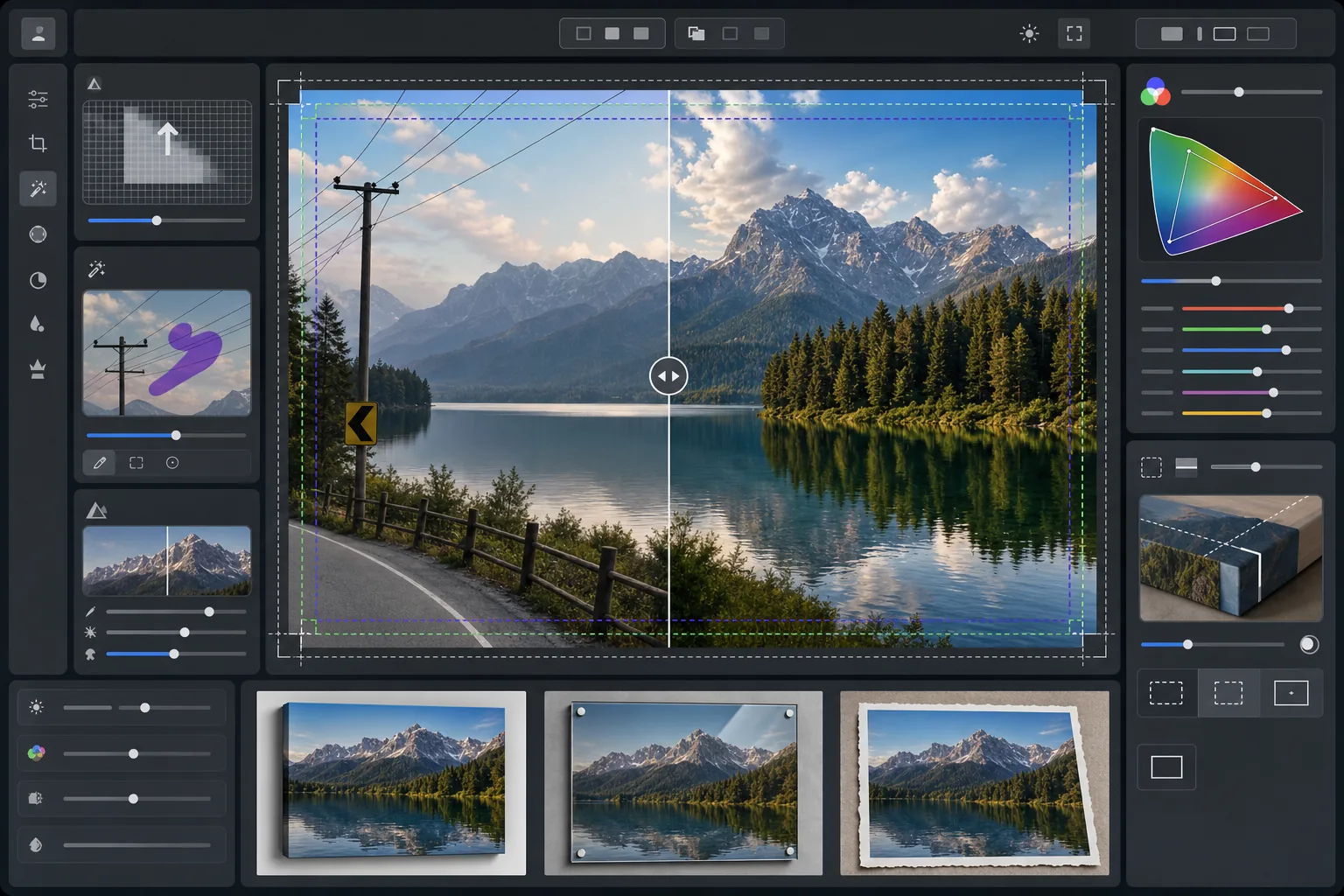
लैंडस्केप तस्वीरों को 300 DPI पर बड़े प्रारूप के प्रिंट-तैयार फ़ाइलों में बदलें। यह टेम्पलेट 16x20 इंच और उससे बड़े प्रिंट के लिए छवियों को अपस्केल करता है, साथ ही बिजली की लाइनें, सड़क संकेत और बाड़ जैसे दृश्य अव्यवस्था को हटाता है जो प्राकृतिक दृश्य से ध्यान भटकाते हैं। रंग ग्रेडिंग को कैनवास, धातु और फाइन आर्ट पेपर सब्सट्रेट के लिए अनुकूलित किया गया है।
यह टेम्पलेट मुफ़्त में आज़माएंPhotography template preview
यह टेम्पलेट क्या करता है
16x20 इंच और उससे आगे 300 DPI आवश्यकताओं को पूरा करने के लिए रिज़ॉल्यूशन को अपस्केल करके पेशेवर बड़े प्रारूप मुद्रण के लिए लैंडस्केप तस्वीरें तैयार करता है। AI Enhance बिना कोई आर्टिफैक्ट लाए पिक्सेल संख्या बढ़ाता है, पत्तियों, पानी की बनावट और बादल संरचनाओं में बारीक विवरण को बनाए रखता है। Magic Eraser बिजली की लाइनें, बिजली के खंभे, सड़क संकेत, बाड़ और मानव-निर्मित अन्य व्यवधानों को हटाता है जो प्राकृतिक संरचना को बाधित करते हैं। रंग को कैनवास रैप, एल्युमिनियम धातु प्रिंट और फाइन आर्ट कॉटन रैग पेपर के व्यापक गैमट और विभिन्न परावर्तक गुणों के लिए समायोजित किया जाता है।
टेम्पलेट सेटिंग्स
| अपस्केल लक्ष्य | न्यूनतम 6000×4000px (20×13 इंच पर 300 DPI) |
| शार्पनिंग | प्रिंट-अनुकूलित अनशार्प मास्क (त्रिज्या 1.2, मात्रा 80%) |
| कलर प्रोफ़ाइल | ProPhoto RGB (फाइन आर्ट मुद्रण के लिए अधिकतम गैमट) |
| डायनेमिक रेंज | छाया +0.8 EV, हाइलाइट रिकवरी -0.3 EV |
| शोर में कमी | ल्यूमिनेंस-जागरूक (आसमान में ग्रेन बनाए रखता है, पत्तियों को चिकना करता है) |
| आउटपुट प्रारूप | एम्बेडेड ICC प्रोफ़ाइल के साथ 16-बिट TIFF |
इस टेम्पलेट का उपयोग कैसे करें
अपनी लैंडस्केप फ़ोटो अपलोड करें
किसी भी कैमरे या स्मार्टफ़ोन से लैंडस्केप छवि अपलोड करें। AI स्रोत रिज़ॉल्यूशन का विश्लेषण करता है और आपके लक्षित प्रिंट आकार पर 300 DPI तक पहुंचने के लिए आवश्यक अपस्केल फ़ैक्टर की गणना करता है। यहां तक कि 12-मेगापिक्सेल स्मार्टफ़ोन फ़ोटो को भी 16x20 प्रिंट के लिए साफ़-सुथरे ढंग से अपस्केल किया जा सकता है।
दृश्य व्यवधानों को हटाएं
Magic Eraser बिजली की लाइनें, बिजली के खंभे, सड़क संकेत, बाड़, कूड़ा-करकट और प्राकृतिक दृश्य से ध्यान खींचने वाले अन्य मानव-निर्मित तत्वों की पहचान करता है और उन्हें हटाता है। AI हटाई गई वस्तुओं के पीछे आकाश के ग्रेडिएंट, पेड़ों की रेखा के किनारे और भूभाग की बनावट को फिर से बनाता है।
प्रिंट आउटपुट के लिए बेहतर बनाएं
AI Enhance छवि को आपके लक्षित रिज़ॉल्यूशन तक अपस्केल करता है, साथ ही प्रिंट देखने की दूरी के लिए शार्प करता है। रंग को ProPhoto RGB गैमट में स्थानांतरित किया जाता है ताकि हरे, नीले और सूर्यास्त के उन सभी रंगों को संरक्षित किया जा सके जिन्हें उपभोक्ता sRGB काट देता है।
अपने प्रिंट सब्सट्रेट के लिए निर्यात करें
अपने आउटपुट से मेल खाते एम्बेडेड ICC प्रोफ़ाइल के साथ 16-बिट TIFF के रूप में डाउनलोड करें — कैनवास रैप, धातु प्रिंट, या फाइन आर्ट पेपर। फ़ाइल में अधिकांश पेशेवर प्रिंट लैब के लिए आवश्यक ब्लीड मार्जिन और क्रॉप मार्क शामिल हैं।
सर्वोत्तम परिणामों के लिए प्रो टिप्स
- ✓कैनवास रैप के लिए, प्रत्येक तरफ 1.5 इंच ब्लीड जोड़ें ताकि छवि मुख्य संरचना में कटे बिना स्ट्रेचर बार के चारों ओर लिपट जाए। टेम्पलेट में आउटपुट में एक गैलरी-रैप सुरक्षित-क्षेत्र गाइड शामिल है।
- ✓धातु प्रिंट प्रकाश को परावर्तित करते हैं और कंट्रास्ट बढ़ाते हैं, इसलिए स्क्रीन पर जो अच्छा दिखता है उसकी तुलना में कंट्रास्ट स्लाइडर को 10-15% कम करें। आपके मॉनिटर पर विस्तृत दिखने वाली छायाएं एल्युमिनियम सब्सट्रेट पर पूरी तरह से काली पड़ सकती हैं।
- ✓पूरे फ्रेम में फैली लंबी बिजली लाइनों को हटाते समय, AI उन्हें खंडों में संभालता है। सबसे साफ़ परिणाम के लिए, ऐसी स्रोत फ़ोटो का उपयोग करें जहां लाइनों के पीछे का आकाश जटिल बादल पैटर्न के बजाय एक चिकना ग्रेडिएंट हो।
- ✓जिस सबसे बड़े आकार में आप कभी प्रिंट कर सकते हैं उसी पर प्रोसेस करें, भले ही आपका वर्तमान ऑर्डर छोटा हो। 24x36 फ़ाइल को 16x20 में डाउनसैंपल करना लॉसलेस है, लेकिन आप बाद में गुणवत्ता हानि के बिना 16x20 फ़ाइल को 24x36 तक अपस्केल नहीं कर सकते।
सामान्य प्रश्न
मैं स्मार्टफ़ोन फ़ोटो से कितना बड़ा प्रिंट कर सकता हूं?
+
एक 12-मेगापिक्सेल स्मार्टफ़ोन फ़ोटो (4032x3024) को साफ़-सुथरे ढंग से 8000x6000 पिक्सेल तक अपस्केल किया जा सकता है, जो 26x20 इंच पर 300 DPI मुद्रण का समर्थन करता है। बड़े प्रिंट के लिए मानक देखने की दूरी (1 से 1.2 मीटर) पर, AI-अपस्केल किए गए स्मार्टफ़ोन मूल से 24x36 इंच के प्रिंट भी तीखे दिखते हैं।
क्या बिजली लाइनों को हटाने से दिखने वाले निशान रह जाएंगे?
+
AI आसपास के पिक्सेल डेटा का उपयोग करके हटाई गई बिजली लाइनों के पीछे आकाश के ग्रेडिएंट, बादल के किनारे और पेड़ों की रेखा को फिर से बनाता है। चिकने-आकाश की स्थितियों में, हटाना लगभग अज्ञात रहता है। नाटकीय बादलों वाले जटिल आकाश बहुत करीब से निरीक्षण की दूरी पर सूक्ष्म मिश्रण दिखा सकते हैं, लेकिन सामान्य प्रिंट देखने की दूरी पर परिणाम साफ़ होता है।
मुझे प्रिंट लैब को कौन सा फ़ाइल प्रारूप भेजना चाहिए?
+
अधिकांश पेशेवर लैब एम्बेडेड ICC प्रोफ़ाइल के साथ 16-बिट TIFF फ़ाइलें स्वीकार करते हैं, जो इस टेम्पलेट का डिफ़ॉल्ट आउटपुट है। यदि आपकी लैब JPEG का अनुरोध करती है, तो Adobe RGB कलर स्पेस में गुणवत्ता 100 पर निर्यात करें। बड़े प्रारूप के प्रिंट के लिए sRGB से बचें क्योंकि यह लैंडस्केप फ़ोटोग्राफी में आम चमकीले हरे और गहरे नीले रंगों को काट देता है।
किसी भी आकार में आत्मविश्वास के साथ अपने लैंडस्केप प्रिंट करें
एक लैंडस्केप फ़ोटो अपलोड करें और बिजली लाइनें हटाई गई, रिज़ॉल्यूशन अपस्केल किया गया, और कैनवास, धातु या फाइन आर्ट पेपर के लिए रंग अनुकूलित की गई प्रिंट-तैयार फ़ाइल प्राप्त करें।
इसे मुफ़्त में आज़माएं