
आभूषण उत्पाद फोटो
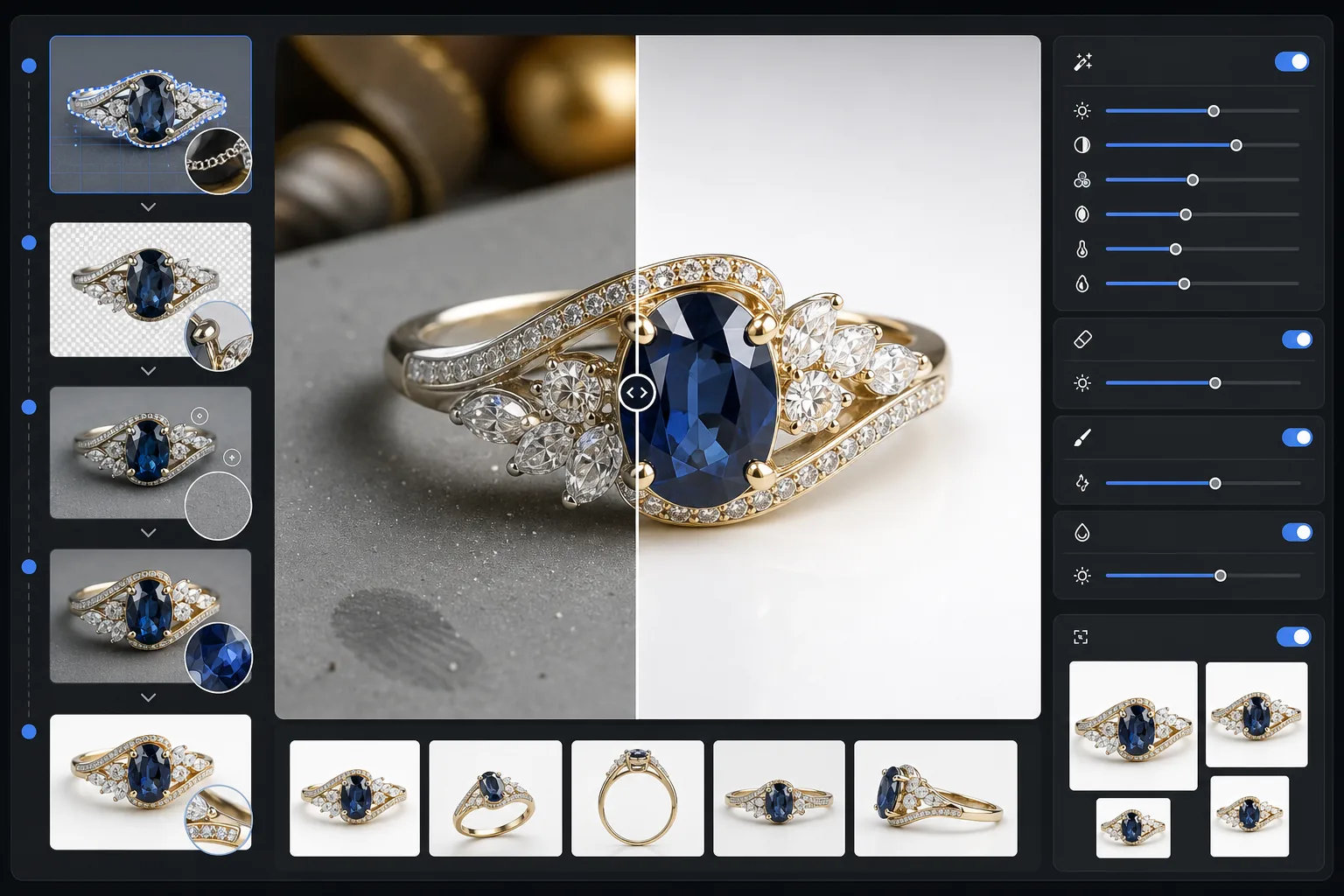
किसी भी आभूषण के स्नैपशॉट को एक पेशेवर उत्पाद छवि में बदलें जो किसी विलासितापूर्ण कैटलॉग के योग्य हो। यह टेम्पलेट परावर्तक धातुओं और पारभासी रत्नों की फोटोग्राफी की अनूठी चुनौतियों को संभालता है — अवांछित प्रतिबिंबों को नियंत्रित करता है, चमक बढ़ाता है, और पत्थर के रंग का सटीक पुनरुत्पादन सुनिश्चित करता है।
यह टेम्पलेट मुफ़्त आज़माएँE-commerce template preview
यह टेम्पलेट क्या करता है
आभूषण फ़ोटो से अव्यवस्थित पृष्ठभूमि हटाता है और उन्हें एक साफ़, ध्यान न भटकाने वाली सतह से बदल देता है। फिर AI संवर्धन पहलू के विवरणों को तेज़ करता है, धातु के हाइलाइट्स को बिना अधिक उजागर किए संतुलित करता है, और रत्न के असली रंग को बहाल करता है जिसे इनडोर रोशनी अक्सर बदल देती है। Magic Eraser धूल के कणों, धातु पर उंगलियों के निशानों, और उन भटके हुए प्रतिबिंबों को साफ़ कर देता है जिन्हें छोटी परावर्तक वस्तुओं की शूटिंग करते समय टालना लगभग असंभव होता है।
टेम्पलेट सेटिंग्स
| पृष्ठभूमि | शुद्ध सफ़ेद या ग्रेडिएंट ग्रे (चयन योग्य) |
| आउटपुट आकार | 2400×2400px (बारीक विवरण के लिए उच्च-रिज़ॉल्यूशन ज़ूम) |
| चमक संवर्धन | मध्यम (कृत्रिम चकाचौंध के बिना प्राकृतिक चमक बनाए रखता है) |
| प्रतिबिंब नियंत्रण | नरम — पॉलिश की गई धातु पर कठोर दर्पण प्रतिबिंबों को कम करता है |
| रंग सटीकता | रत्न-कैलिब्रेटेड sRGB (पन्ना, माणिक, नीलम, हीरे के लिए अनुकूलित) |
| विवरण तीक्ष्णता | मैक्रो-स्तर — पहलुओं, प्रांग और नक्काशी को बढ़ाता है |
इस टेम्पलेट का उपयोग कैसे करें
अपने आभूषण को फ़ोटो में लें
टुकड़े को एक गैर-परावर्तक मैट सतह पर रखें। धातु पर कठोर प्रतिबिंबों को कम करने के लिए विसरित प्राकृतिक रोशनी या लाइटबॉक्स का उपयोग करें। रत्नों के अग्रभाग को कैद करने के लिए थोड़ा ऊपर से 30-45 डिग्री के कोण पर शूट करें।
पृष्ठभूमि हटाएँ
Background Eraser आभूषण को किसी भी सतह से अलग कर देता है, उन पेचीदा किनारों को संभालता है जहाँ पतले प्रांग, नाज़ुक ज़ंजीरें और बारीक क्लैस्प पृष्ठभूमि से मिलते हैं — यहाँ तक कि अत्यधिक परावर्तक टुकड़ों पर भी।
विवरण और रंग बढ़ाएँ
AI Enhance ज़ूम पर दिखने वाले पहलू किनारों और नक्काशी को तेज़ करता है, कृत्रिम रोशनी से बदले हुए रत्न के रंग को सही करता है, और धातु के हाइलाइट्स को संतुलित करता है ताकि सोना गर्म और चांदी ठंडी दिखे, बिना किसी अधिक-उजागर धब्बे के।
साफ़ करें और निर्यात करें
धातु की सतह पर धूल के कण, उंगलियों के निशान के दाग़, या अवांछित प्रतिबिंबों को हटाने के लिए Magic Eraser का उपयोग करें। मार्केटप्लेस ज़ूम संगतता और सटीक विवरण रेंडरिंग के लिए 2400px पर निर्यात करें।
बेहतरीन परिणामों के लिए पेशेवर सुझाव
- ✓सफ़ेद के बजाय मध्यम ग्रे कार्ड पर शूट करें — इससे AI को चांदी और सफ़ेद-सोने के टुकड़ों पर साफ़ किनारा पृथक्करण मिलता है।
- ✓हीरे और पारदर्शी रत्नों के टुकड़ों के लिए, प्रकाश के संचरण और आभा को कैद करने के लिए पत्थर के नीचे सफ़ेद कागज़ का एक छोटा टुकड़ा रखें।
- ✓म्यूज़ियम वैक्स या रिंग होल्डर का उपयोग करके अंगूठियों को सीधा खड़ा करके फ़ोटो लें, फिर तैरती हुई प्रस्तुति के लिए Magic Eraser से होल्डर मिटा दें।
- ✓प्रत्येक टुकड़े के कई कोणों को कैद करें और एक सुसंगत कैटलॉग रूप के लिए उन्हें समान टेम्पलेट सेटिंग्स के साथ बैच-प्रोसेस करें।
E-commerce workflow
Product photo hub
Use this template with the full ecommerce product photo workflow for marketplace backgrounds, cleanup, compression, resizing, and listing-ready exports.
View ecommerce product photo workflowसामान्य प्रश्न
क्या मेरे हीरों की चमक प्राकृतिक दिखेगी?
+
हाँ। चमक संवर्धन कृत्रिम चकाचौंध जोड़ने के बजाय आपकी फ़ोटो में कैद मौजूदा प्रकाश प्रतिबिंबों को बढ़ाता है। परिणाम पेशेवर रूप से प्रकाशित स्टूडियो शॉट जैसा दिखता है, जो प्रत्येक पत्थर की प्राकृतिक आभा पैटर्न को बनाए रखता है।
क्या यह अत्यधिक परावर्तक पॉलिश किए सोने और प्लैटिनम को संभाल सकता है?
+
बिल्कुल। प्रतिबिंब नियंत्रण सेटिंग प्रत्येक धातु की विशिष्ट चमक को बनाए रखते हुए कठोर दर्पण जैसे प्रतिबिंबों को कम करती है। सोना अपनी गर्म आभा बनाए रखता है और प्लैटिनम बिना किसी अधिक-उजागर सफ़ेद धब्बे के अपनी ठंडी चमक बनाए रखता है।
विलासिता आभूषण लिस्टिंग के लिए कौन-सी पृष्ठभूमि सबसे अच्छी है?
+
शुद्ध सफ़ेद Amazon और Etsy की मार्केटप्लेस आवश्यकताओं को पूरा करता है। आपकी अपनी वेबसाइट या उच्च-स्तरीय ब्रांडिंग के लिए, ग्रेडिएंट ग्रे विकल्प गहराई और प्रीमियम एहसास जोड़ता है। दोनों विकल्प इस टेम्पलेट में शामिल हैं।
अपनी आभूषण फ़ोटो को बिकने लायक बनाएँ
किसी भी अंगूठी, हार, कंगन या घड़ी की फ़ोटो अपलोड करें और सेकंडों में कैटलॉग-गुणवत्ता वाली उत्पाद छवि पाएँ। हर पहलू, हर विवरण, पूरी तरह से प्रस्तुत।
मुफ़्त आज़माएँRelated templates
More e-commerce templates for your workflow.
उत्पाद फ़ोटो के लिए शुद्ध सफ़ेद पृष्ठभूमि टेम्पलेट। अमेज़ॅन, शॉपिफाई, और साफ़, पेशेवर उत्पाद छवियों के लिए बाज़ार-तैयार सेटिंग्स जो रूपांतरित होती हैं।
Etsy-अनुकूलित लिस्टिंग फोटो टेम्पलेट। 2000px पर लाइफस्टाइल शॉट्स को साफ सफेद पृष्ठभूमि में परिवर्तित करता है, हस्तनिर्मित उत्पाद विवरण को बढ़ाता है, और Etsy के छवि दिशानिर्देशों को पूरा करता है।
ईबे-अनुकूलित लिस्टिंग फोटो टेम्पलेट। गैलरी छवियों के लिए सफेद पृष्ठभूमि, स्थिति दस्तावेज़ीकरण संवर्द्धन, और बहु-कोण लेआउट जो ईबे के छवि मानकों को पूरा करते हैं।
बाज़ार सूची के लिए व्यावसायिक फ़र्निचर फ़ोटो टेम्पलेट। कमरे की अव्यवस्था को दूर करें, सही आयाम दिखाएं, और साफ पृष्ठभूमि पर या स्टाइल वाले कमरे के संदर्भ में टुकड़े प्रस्तुत करें।
झुर्रियों को हटाने, लिंट क्लीनअप, शुद्ध सफेद पृष्ठभूमि और सटीक कपड़े के रंग के साथ कपड़ों को साफ करने वाली सपाट तस्वीरें। Shopify, Amazon और बुटीक स्टोर के लिए तैयार।
शुद्ध सफेद पृष्ठभूमि, उचित प्रकाश सुधार और मुख्य और द्वितीयक लिस्टिंग छवियों के लिए अनुकूलित आयामों के साथ अमेज़ॅन-अनुपालक उत्पाद फ़ोटो बनाएं।