
इवेंट फ़ोटो ब्राइटनिंग
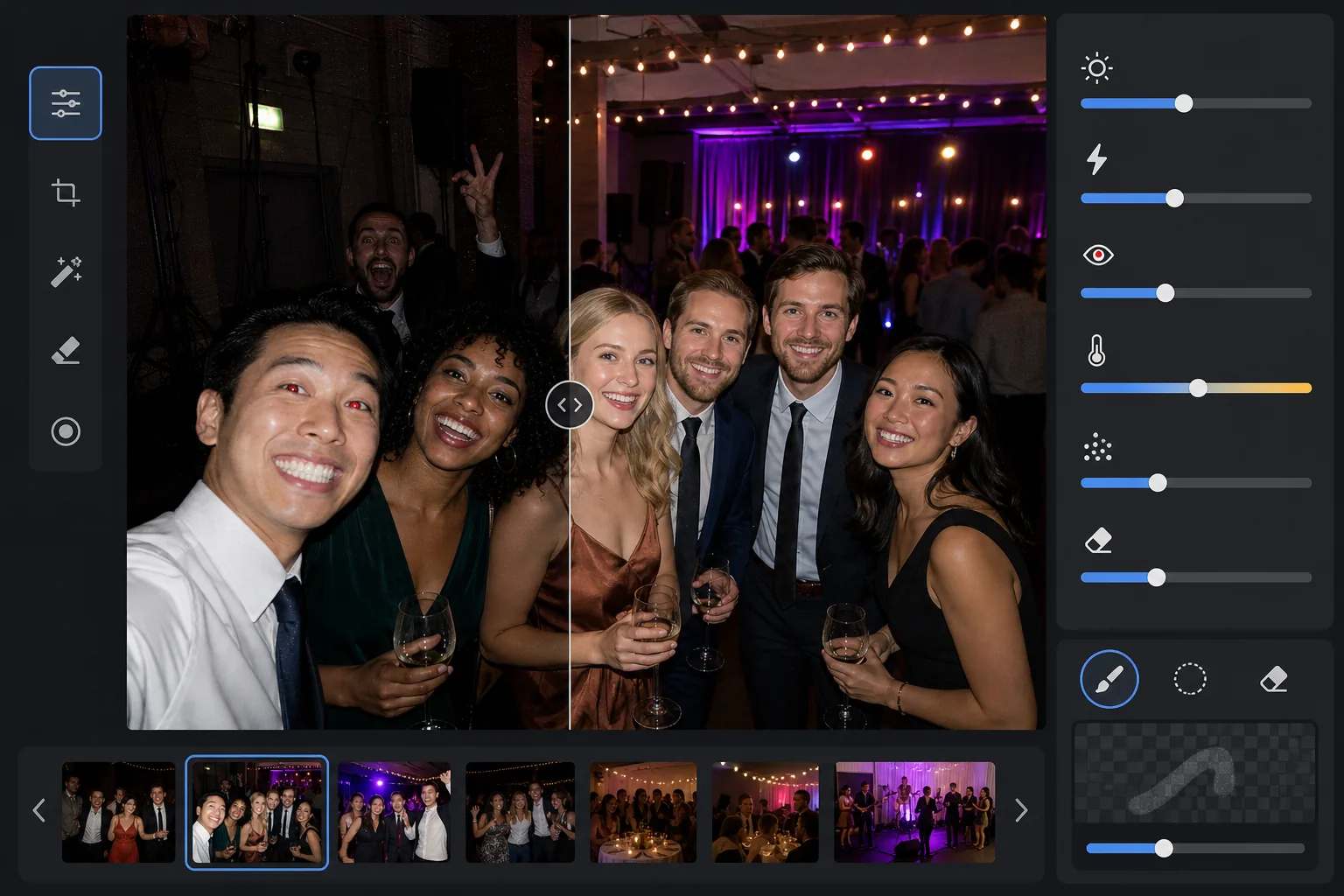
कॉन्सर्ट, गाला, जन्मदिन की पार्टियों और कॉर्पोरेट कार्यक्रमों में अंधेरी जगहों पर ली गई तस्वीरों से विवरण पुनर्प्राप्त करें। यह टेम्प्लेट एक्सपोज़र को +2 EV तक बढ़ाता है, तीखी फ़्लैश छायाओं को ठीक करता है, लाल-आँख हटाता है, और मूल दृश्य के वातावरण को निखारता है ताकि आपकी इवेंट तस्वीरें उस पल जितनी जीवंत दिखें।
इस टेम्प्लेट को मुफ़्त आज़माएँEvents template preview
यह टेम्प्लेट क्या करता है
चुनौतीपूर्ण कम-रोशनी वाले माहौल में ली गई इवेंट तस्वीरों को बचाता है — मंद रोशनी वाले बैंक्वेट हॉल, रंगीन मंच रोशनी वाले कॉन्सर्ट स्थल, बाहरी शाम की पार्टियाँ, और बेसमेंट के मनोरंजन कक्ष। AI Enhance रंगीन रोशनी और सजावट के वातावरण को बनाए रखते हुए छाया विवरण के दो स्टॉप तक पुनर्प्राप्त करता है। फ़्लैश से होने वाली खामियाँ, जिनमें तीखी अग्रभूमि छायाएँ, लाल-आँख, और अधिक-प्रकाशित चेहरे शामिल हैं, स्वचालित रूप से ठीक की जाती हैं। Magic Eraser फ़ोटो में घुस आने वालों, निकास संकेतों, ढेर किए गए उपकरणों, और इवेंट सेटिंग में आम अन्य ध्यान भटकाने वाली चीज़ों को हटा देता है।
टेम्प्लेट सेटिंग्स
| एक्सपोज़र वृद्धि | वातावरण को बनाए रखते हुए +2.0 EV अनुकूली छाया पुनर्प्राप्ति |
| फ़्लैश सुधार | अग्रभूमि छाया को मुलायम करना, फ़्लैश-प्रकाशित त्वचा पर हाइलाइट कम करना |
| लाल-आँख हटाना | स्वचालित पहचान और आइरिस रंग का पुनर्निर्माण |
| श्वेत संतुलन | मिश्रित-स्रोत अनुकूली (DJ लाइट, टंगस्टन, फ़्लोरोसेंट, मोमबत्तियाँ) |
| वातावरण मोड | गर्म वातावरण वृद्धि (पृष्ठभूमि पर +8 गर्माहट, +5 जीवंतता) |
इस टेम्प्लेट का उपयोग कैसे करें
इवेंट तस्वीरें अपलोड करें
किसी भी इवेंट की तस्वीरें अपलोड करें — कॉन्सर्ट, शादियाँ, जन्मदिन की पार्टियाँ, कॉर्पोरेट गाला, या पिछवाड़े की सभाएँ। टेम्प्लेट रोशनी के माहौल का स्वचालित रूप से पता लगाता है और मूल तस्वीर कितनी कम-प्रकाशित है, उसके आधार पर अपनी सुधार तीव्रता समायोजित करता है।
एक्सपोज़र पुनर्प्राप्त करें और फ़्लैश ठीक करें
AI Enhance छाया क्षेत्रों को +2 EV तक बढ़ाता है, अंधेरे में खो गए चेहरों और विवरणों को उजागर करता है। अग्रभूमि के विषयों पर फ़्लैश से अधिक-प्रकाशित हाइलाइट्स को त्वचा की बनावट पुनर्प्राप्त करने के लिए कम किया जाता है, और फ़्लैश-प्रकाशित विषयों के पीछे की तीखी छायाओं को स्वाभाविक रूप से घुलने के लिए मुलायम किया जाता है।
लाल-आँख और ध्यान भटकाने वाली चीज़ें हटाएँ
सीधे फ़्लैश से होने वाली लाल-आँख का स्वचालित रूप से पता लगाया जाता है और उसे प्राकृतिक आइरिस रंग से बदल दिया जाता है। Magic Eraser फ़ोटो में घुस आए अजनबियों, स्पीकर के ढेर और केबल जैसे दिखने वाले उपकरण, निकास संकेतों, और उस पल का मूल्य घटाने वाली अन्य अव्यवस्था को हटा देता है।
बेहतर की गई तस्वीरें निर्यात करें
सोशल साझाकरण, प्रिंटिंग, या संग्रह के लिए मूल रिज़ॉल्यूशन पर उज्ज्वल की गई इवेंट तस्वीरें डाउनलोड करें। आउटपुट मूल दृश्य के वातावरण को बनाए रखता है — गर्म मोमबत्ती की चमक, रंगीन मंच रोशनी, या टिमटिमाती लड़ियाँ — साथ ही चेहरों और विवरणों को स्पष्ट रूप से दृश्यमान बनाता है।
सर्वोत्तम परिणामों के लिए प्रो सुझाव
- ✓+2 EV पुनर्प्राप्ति उन तस्वीरों पर सबसे अच्छा काम करती है जहाँ विषय मूल में कम से कम धुंधले रूप से दिखाई देते हों। यदि कुछ प्रकाश स्रोतों को छोड़कर तस्वीर पूरी तरह काली है, तो पुनर्प्राप्त छायाओं में काफ़ी शोर होगा। उन तस्वीरों से शुरुआत करें जहाँ आप आकृतियाँ पहचान सकें।
- ✓नाटकीय रंगीन मंच रोशनी वाली कॉन्सर्ट तस्वीरों के लिए, श्वेत संतुलन सुधार रंग के कलात्मक आभास को निष्प्रभावी करने के बजाय बनाए रखता है। नीले और मैजेंटा मंच प्रकाश को बनाए रखा जाता है जबकि मंच के पास के विषयों की त्वचा के रंग को फिर भी ठीक किया जाता है।
- ✓एक ही इवेंट की तस्वीरों के समूह को संसाधित करते समय, पहले एक प्रतिनिधि अंधेरी तस्वीर और एक फ़्लैश तस्वीर पर परीक्षण करें। इससे आप पूरे समूह पर लागू करने से पहले यह सत्यापित कर सकते हैं कि चमक का स्तर और गर्माहट सही लगती है।
- ✓लाल-आँख सुधार मनुष्यों और पालतू जानवरों दोनों की आँखों पर काम करता है। इवेंट में पालतू जानवरों की तस्वीरों के लिए, AI उस हरी या पीली आँख-चमक को संभालता है जो जानवर कैमरा फ़्लैश से उत्पन्न करते हैं, और उसे प्राकृतिक गहरी पुतली से बदल देता है।
सामान्य प्रश्न
क्या यह पूरी तरह काली तस्वीरों को ठीक कर सकता है?
+
टेम्प्लेट +2 EV तक छाया विवरण पुनर्प्राप्त करता है, जो मोटे तौर पर किसी तस्वीर को चार गुना उज्ज्वल बनाने के बराबर है। यदि मूल तस्वीर आपके विषयों की कम से कम धुंधली रूपरेखा दिखाती है, तो पुनर्प्राप्ति उपयोग योग्य परिणाम देगी। केवल बिंदु-प्रकाश स्रोत दिखने वाले पूरी तरह काले फ़्रेम में आमतौर पर सार्थक विवरण पुनर्प्राप्त करने के लिए पर्याप्त सेंसर डेटा नहीं होता।
क्या उज्ज्वल करने से तस्वीरें दानेदार दिखेंगी?
+
गहरी छायाओं को बढ़ाते समय कुछ शोर अपरिहार्य है, लेकिन अनुकूली शोर न्यूनीकरण विशेष रूप से बढ़ाए गए क्षेत्रों को लक्षित करता है। फ़्रेम के अच्छी तरह प्रकाशित हिस्सों में बारीक विवरण बने रहते हैं जबकि पुनर्प्राप्त छायाओं में शोर को चिकना किया जाता है। परिणाम किसी बुनियादी फ़ोटो संपादक में केवल चमक बढ़ाने की तुलना में काफ़ी बेहतर होता है।
क्या यह मंच रोशनी वाली कॉन्सर्ट तस्वीरों पर काम करता है?
+
हाँ। टेम्प्लेट को मिश्रित और रंगीन रोशनी संभालने के लिए डिज़ाइन किया गया है। नीले, लाल, मैजेंटा, और हरे रंग के मंच प्रकाश को ठीक किए जाने वाले रंग आभास के रूप में मानने के बजाय दृश्य के कलात्मक तत्वों के रूप में बनाए रखा जाता है। मंच के पास के विषयों के चेहरों को चयनात्मक श्वेत संतुलन समायोजन मिलता है जबकि पृष्ठभूमि रोशनी का वातावरण बनाए रखा जाता है।
हर इवेंट तस्वीर को साझा करने लायक बनाएँ
अंधेरी, फ़्लैश से अधिक-प्रकाशित, या लाल-आँख से प्रभावित इवेंट तस्वीरें अपलोड करें और उज्ज्वल, प्राकृतिक दिखने वाले परिणाम पाएँ जो उस पल की ऊर्जा को क़ैद करते हैं।
इसे मुफ़्त आज़माएँRelated templates
More events templates for your workflow.