
पहले और बाद का स्लाइडर
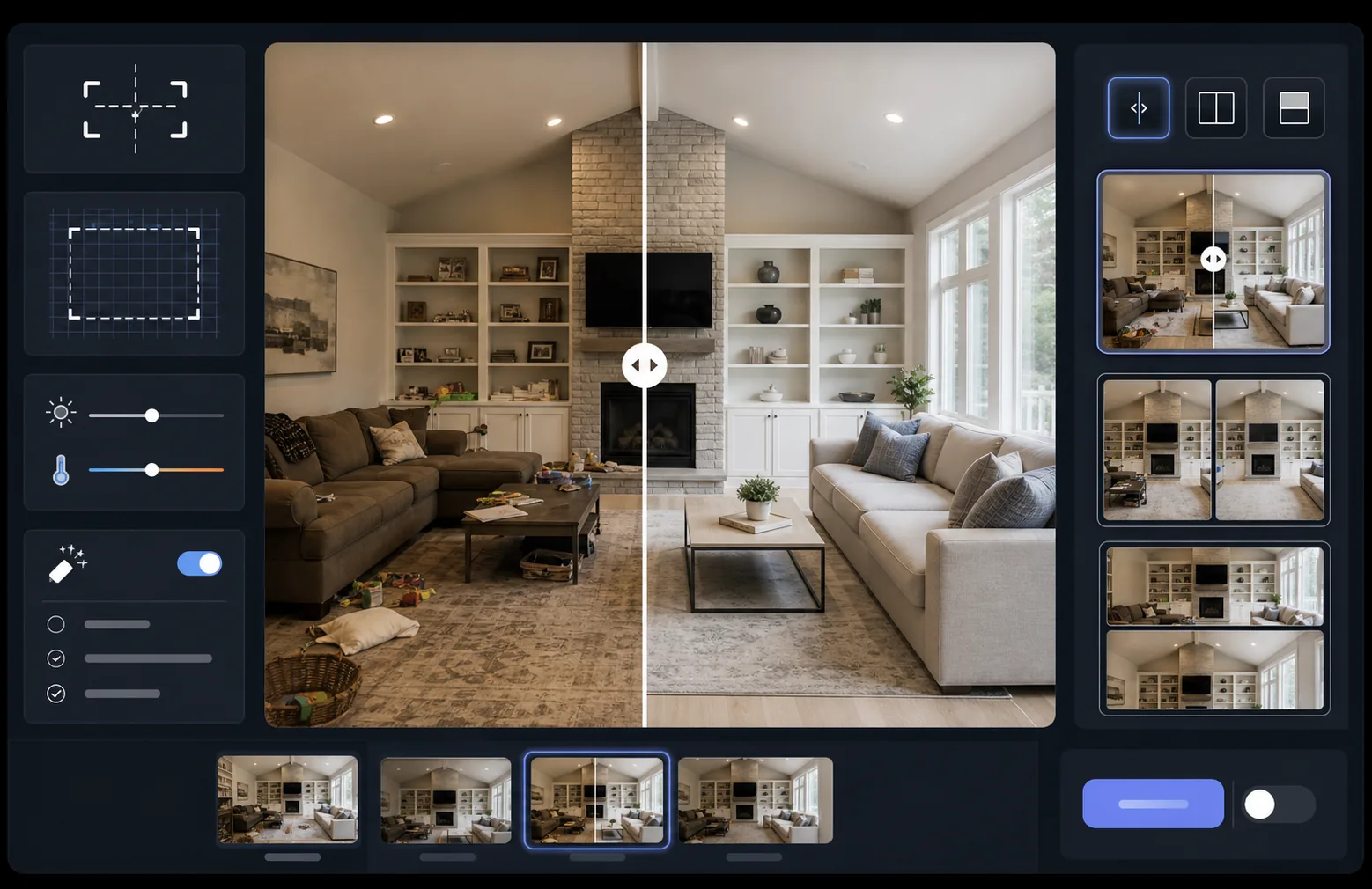
पूरी तरह से संरेखित पहले और बाद की तुलनात्मक छवियों के साथ अपने काम का प्रभाव दिखाएं। यह टेम्पलेट प्रदर्शन-तैयार जोड़े बनाता है जो सुसंगत फ़्रेमिंग, प्रकाश संतुलन और आयामों को बनाए रखते हैं — पोर्टफोलियो, केस स्टडी, सोशल प्रूफ और उत्पाद मार्केटिंग के लिए आदर्श, जहां दृश्य परिवर्तन कहानी बयां करता है।
यह टेम्पलेट मुफ़्त आज़माएंMarketing template preview
यह टेम्पलेट क्या करता है
दो छवियों — एक पहले और एक बाद — को संसाधित करके पूरी तरह से संरेखित तुलनात्मक जोड़ी में बदलता है, जो स्लाइडर विजेट, साथ-साथ लेआउट या एनिमेटेड रिवील के लिए तैयार होती है। AI Enhance दोनों फ़्रेमों के बीच एक्सपोज़र और श्वेत संतुलन को सामान्य करता है ताकि परिवर्तन स्पष्ट रूप से दिखाई दे और प्रकाश के अंतर तुलना को धुंधला न करें। Magic Eraser किसी भी फ़्रेम में उन आकस्मिक विकर्षणों को साफ़ कर सकता है जो इच्छित परिवर्तन का हिस्सा नहीं हैं।
टेम्पलेट सेटिंग्स
| लेआउट | स्लाइडर-तैयार जोड़ी, साथ-साथ, या लंबवत रूप से ढेरबद्ध (चयन योग्य) |
| आउटपुट आकार | प्रति फ़्रेम 1600×1200px (मिलते-जुलते आयाम) |
| संरेखण | स्वचालित पंजीकरण — शॉट्स के बीच परिप्रेक्ष्य और फ़्रेमिंग का मिलान करता है |
| प्रकाश सामान्यीकरण | पूरी जोड़ी में एक्सपोज़र और श्वेत संतुलन को संतुलित करता है |
| लेबल ओवरले | अनुकूलन योग्य स्थिति के साथ वैकल्पिक 'Before' / 'After' लेबल |
| बॉर्डर | 1px तटस्थ ग्रे विभाजक या निर्बाध किनारा (चयन योग्य) |
इस टेम्पलेट का उपयोग कैसे करें
अपनी पहले की छवि अपलोड करें
मूल, असंशोधित फ़ोटो अपलोड करें जो प्रारंभिक स्थिति दिखाती है। यह नवीनीकरण से पहले का कमरा, सुधार से पहले का उत्पाद, उपचार से पहले की त्वचा, या कोई भी दृश्य परिवर्तन हो सकता है जिसे आप प्रदर्शित करना चाहते हैं।
अपनी बाद की छवि अपलोड करें
पूर्ण किए गए परिवर्तन को दर्शाने वाली परिणाम फ़ोटो अपलोड करें। पहले वाले शॉट के समान कोण और दूरी से फ़ोटो लेने का प्रयास करें। टेम्पलेट फ़्रेमिंग और परिप्रेक्ष्य में छोटे अंतरों को स्वतः संरेखित कर देगा।
सामान्य करें और संरेखित करें
टेम्पलेट दोनों छवियों को स्वचालित रूप से पंजीकृत करता है ताकि संगत तत्व पिक्सेल-दर-पिक्सेल संरेखित हों। एक्सपोज़र और श्वेत संतुलन को सामान्य किया जाता है ताकि शूटिंग सत्रों के बीच प्रकाश के अंतर वास्तविक परिवर्तन से ध्यान न भटकाएं।
तुलना निर्यात करें
अपना आउटपुट प्रारूप चुनें — स्लाइडर विजेट के लिए मिलती-जुलती जोड़ी, सोशल मीडिया के लिए साथ-साथ संयोजन, या ईमेल मार्केटिंग के लिए लंबवत ढेर। वैकल्पिक Before/After लेबल जोड़ें और वेब-अनुकूलित या प्रिंट-गुणवत्ता रिज़ॉल्यूशन पर निर्यात करें।
सर्वोत्तम परिणामों के लिए विशेषज्ञ सुझाव
- ✓यदि संभव हो तो पहले और बाद की तस्वीरें बिल्कुल एक ही स्थिति से लें — अपने तिपाई का स्थान चिह्नित करें या उसी जगह खड़े रहें। AI को संरेखण ठीक करने की जितनी कम आवश्यकता होगी, तुलना उतनी ही तीक्ष्ण होगी।
- ✓दोनों शॉट्स के लिए समान फ़ोकल लंबाई का उपयोग करें ताकि परिप्रेक्ष्य विरूपण के अंतरों से बचा जा सके जो संरेखित तुलनाओं को सूक्ष्म रूप से असंगत महसूस कराते हैं।
- ✓Magic Eraser का उपयोग करके पहले और बाद के बीच असंबंधित परिवर्तनों को हटाएं — यदि कोई पौधा हिल गया हो या कोई नई वस्तु प्रकट हो गई हो, तो उसे मिटा दें ताकि दर्शक इच्छित परिवर्तन पर केंद्रित रहें।
- ✓वेब स्लाइडर एम्बेड के लिए, दोनों छवियों को समान आयामों में निर्यात करें और स्लाइडर विभाजन रेखा के साथ संपीड़न आर्टिफैक्ट्स को रोकने के लिए दोषरहित PNG का उपयोग करें।
सामान्य प्रश्न
यदि पहले और बाद की तस्वीरें थोड़े अलग कोणों से ली गई हों तो क्या होगा?
+
स्वचालित पंजीकरण प्रणाली कैमरा कोण, दूरी और फ़्रेमिंग में मध्यम अंतरों को संभालती है। यह दोनों छवियों में संगत संदर्भ बिंदुओं की पहचान करती है और उन्हें मिलाने के लिए रूपांतरित करती है। सर्वोत्तम परिणामों के लिए, कोण का अंतर 15 डिग्री से कम होना चाहिए।
क्या मैं इसका उपयोग परिवर्तन दिखाने वाले वीडियो थंबनेल के लिए कर सकता हूं?
+
हां। साथ-साथ संयोजन आउटपुट YouTube और सोशल मीडिया वीडियो थंबनेल के लिए आदर्श है। लेबल के साथ स्प्लिट-स्क्रीन लेआउट तुरंत एक परिवर्तन की कहानी संप्रेषित करता है जो क्लिक को बढ़ाता है।
क्या प्रकाश सामान्यीकरण दिखाए गए वास्तविक परिणामों को बदल देता है?
+
नहीं। प्रकाश सामान्यीकरण केवल समग्र एक्सपोज़र और श्वेत संतुलन को समायोजित करता है ताकि दोनों फ़्रेम समान परिस्थितियों में शूट किए गए प्रतीत हों। वास्तविक परिवर्तन — विषय में बदलाव — को ठीक वैसे ही संरक्षित रखा जाता है जैसे इसे फ़ोटो में लिया गया था।
अपने परिणाम साथ-साथ दिखाएं
अपनी पहले और बाद की तस्वीरें अपलोड करें और सेकंडों में एक पूरी तरह से संरेखित, पेशेवर रूप से प्रस्तुत तुलनात्मक छवि प्राप्त करें। परिवर्तन को स्वयं बोलने दें।
मुफ़्त आज़माएं