
एआई हेडशॉट कैसे बनाएं
एक पेशेवर हेडशॉट की आवश्यकता है लेकिन स्टूडियो फोटोशूट के लिए समय या बजट नहीं है? Magic Eraser AI का उपयोग करके कैज़ुअल तस्वीरों को परिष्कृत, पेशेवर-गुणवत्ता वाले हेडशॉट में बदल देता है - जो लिंक्डइन, कंपनी की वेबसाइटों और बायोडाटा के लिए बिल्कुल उपयुक्त है।
Last updated
अभी हेडशॉट बनाएं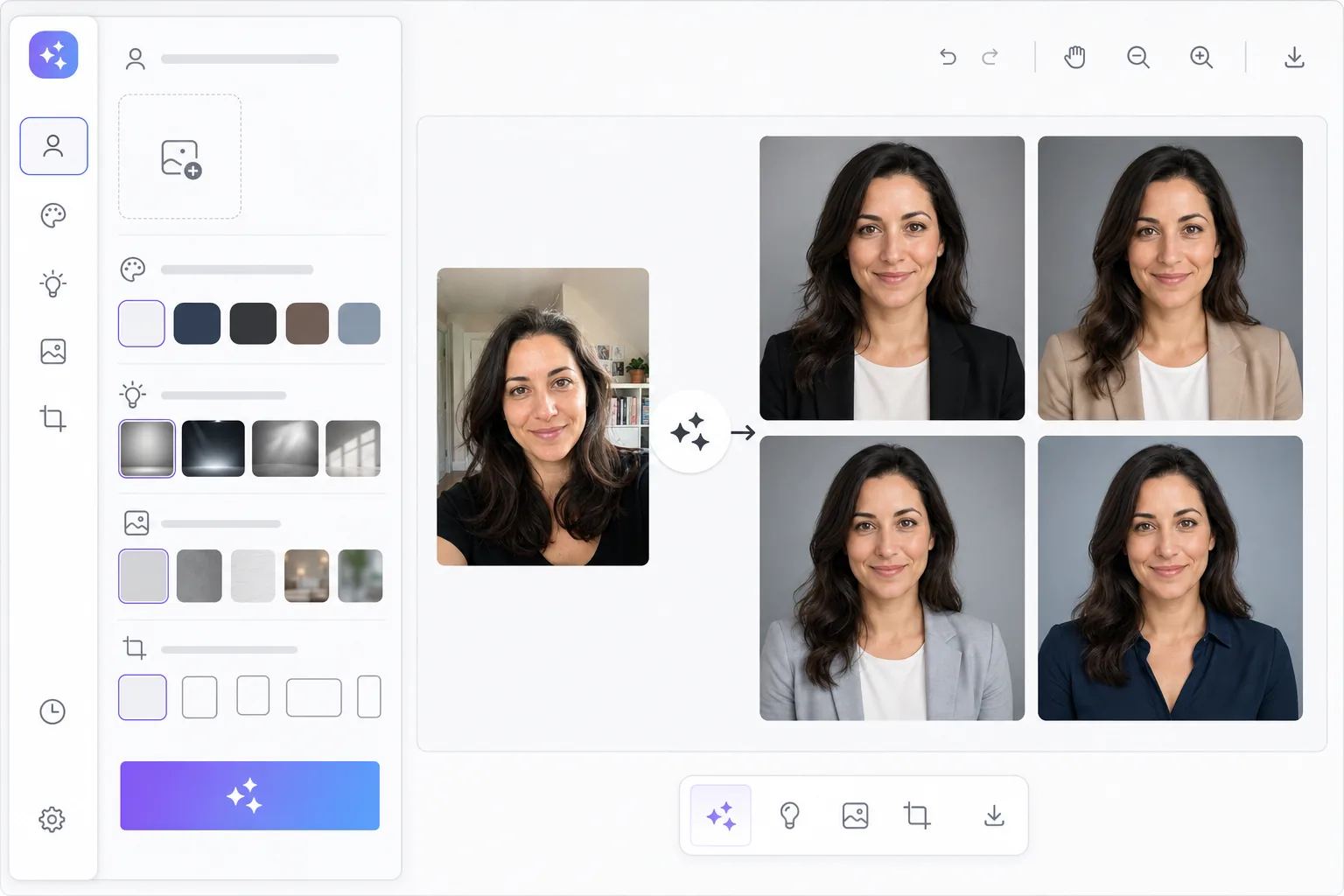
स्टूडियो के बिना पेशेवर हेडशॉट्स
एक पेशेवर हेडशॉट के लिए एक फोटोग्राफर की बुकिंग, स्टूडियो का समय किराये पर लेना, पोशाकें चुनना और एक सत्र के लिए 200-500 डॉलर खर्च करने की आवश्यकता होती थी। दूरदराज के श्रमिकों, फ्रीलांसरों और छात्रों के लिए, इस बाधा का मतलब है कि कई लोग पेशेवर प्रोफाइल के लिए कैज़ुअल सेल्फी का उपयोग करते हैं - या बिल्कुल भी फोटो नहीं। एआई हेडशॉट जेनरेशन एक कैज़ुअल फोटो खींचकर और पेशेवर-ग्रेड परिवर्तनों को लागू करके इस अंतर को पाटता है: पृष्ठभूमि को हटाना, स्टूडियो प्रकाश प्रभाव जोड़ना, त्वचा की स्पष्टता में सुधार करना और विषय को पेशेवर पृष्ठभूमि के सामने रखना। परिणाम एक पॉलिश हेडशॉट है जो लागत और प्रयास के एक अंश पर स्टूडियो-गुणवत्ता के रूप में गुजरता है।
Before you start
तीन चरणों में AI हेडशॉट बनाएं
Start with अपनी एक साफ़ फ़ोटो अपलोड करें. The result preview above and tips below use this guide's existing content; no separate before-and-after proof is assumed.
- 1
अपनी एक साफ़ फ़ोटो अपलोड करें
वेब, iOS या Android पर Magic Eraser खोलें। एक अच्छी रोशनी वाली फोटो अपलोड करें जिसमें आपका चेहरा स्पष्ट रूप से दिखाई दे। एक कैज़ुअल सेल्फी या स्नैपशॉट काम करता है - एआई पृष्ठभूमि, प्रकाश व्यवस्था और पॉलिश को संभालता है। सामने की ओर या हल्के कोण वाली तस्वीरें सबसे अधिक पेशेवर परिणाम देती हैं।
- 2
अपनी हेडशॉट शैली चुनें
एक पेशेवर शैली चुनें: कॉर्पोरेट (तटस्थ पृष्ठभूमि, औपचारिक प्रकाश व्यवस्था), रचनात्मक (ढाल पृष्ठभूमि, नरम रोशनी), अकादमिक (गर्म स्वर, स्वीकार्य), या स्टार्टअप (आधुनिक, जीवंत)। एआई आपकी मूल पृष्ठभूमि को हटा देता है, स्टूडियो-गुणवत्ता प्रकाश समायोजन लागू करता है, और समग्र छवि स्पष्टता को बढ़ाता है।
- 3
समीक्षा करें और डाउनलोड करें
AI आपका पेशेवर हेडशॉट उत्पन्न करता है। त्वचा की स्पष्टता, पृष्ठभूमि चयन और समग्र संरचना की समीक्षा करें। यदि आवश्यक हो तो समायोजन करें - पृष्ठभूमि बदलें, एन्हांसमेंट स्तर समायोजित करें, या एक अलग शैली आज़माएँ। लिंक्डइन, कंपनी साइटों, बायोडाटा के लिए उच्च रिज़ॉल्यूशन पर डाउनलोड करें और प्रिंट करें।
के लिए सर्वोत्तम
- दूरदराज के कर्मचारी और फ्रीलांसर जिन्हें स्टूडियो दौरे के बिना पेशेवर प्रोफ़ाइल फ़ोटो की आवश्यकता होती है
- नौकरी चाहने वाले अपने लिंक्डइन और रिज्यूमे हेडशॉट को बेहतर बना रहे हैं
- स्टार्टअप टीमें कंपनी की वेबसाइट के लिए लगातार कर्मचारी हेडशॉट बना रही हैं
- छात्र इंटर्नशिप और नौकरी अनुप्रयोगों के लिए पेशेवर तस्वीरें तैयार कर रहे हैं
- सम्मेलन के वक्ताओं और लेखकों को अल्प सूचना पर परिष्कृत जीवनी फ़ोटो की आवश्यकता है
सर्वोत्तम परिणामों के लिए युक्तियाँ
उपलब्ध उच्चतम गुणवत्ता वाली फोटो अपलोड करें - अच्छे इनडोर या आउटडोर प्रकाश व्यवस्था में फोन की तस्वीरें अच्छी तरह से काम करती हैं। चेहरे पर भारी छाया, अत्यधिक कोण या धूप के चश्मे वाली तस्वीरों से बचें। वही पहनें जो आप पेशेवर मीटिंग में पहनेंगे: एआई कपड़े नहीं बदलता है। एक साधारण, ठोस रंग का शीर्ष तस्वीरें सबसे अच्छी होती हैं। स्वाभाविक रूप से मुस्कुराएं - एआई प्रसंस्करण के बाद मजबूर मुस्कुराहट खराब दिखती है। टीम पेजों के लिए, दृश्य स्थिरता के लिए सभी को एक ही हेडशॉट शैली का उपयोग करने को कहें। एआई उन तस्वीरों से बेहतर परिणाम उत्पन्न करता है जहां चेहरा अच्छी रोशनी में होता है और फ्रेम का कम से कम 30% हिस्सा घेरता है।
अक्सर पूछे जाने वाले प्रश्नों
- क्या हेडशॉट मेरे जैसा दिखेगा?
- हाँ। आपके द्वारा प्रदान किया गया AI Enhance फ़ोटो - यह कोई नया चेहरा उत्पन्न नहीं करता है या आपकी विशेषताओं को नहीं बदलता है। संवर्द्धन पेशेवर फोटो संपादन के समान हैं: पृष्ठभूमि हटाना, प्रकाश सुधार, त्वचा की स्पष्टता और संरचना समायोजन।
- क्या मैं इसे लिंक्डइन के लिए उपयोग कर सकता हूँ?
- हाँ। आउटपुट उच्च रिज़ॉल्यूशन पर एक मानक छवि फ़ाइल है। इसे सीधे लिंक्डइन, कंपनी की वेबसाइटों, ईमेल हस्ताक्षरों, स्लैक प्रोफाइल या प्रोफ़ाइल फ़ोटो स्वीकार करने वाले किसी भी प्लेटफ़ॉर्म पर अपलोड करें।
- क्या AI हेडशॉट निर्माण निःशुल्क है?
- हाँ। पृष्ठभूमि हटाने और बढ़ाने की सुविधाएँ दैनिक उपयोग सीमा के साथ निःशुल्क स्तर पर उपलब्ध हैं। प्रीमियम सीमाएं हटाता है और टीम हेडशॉट्स के लिए बैच प्रोसेसिंग सक्षम करता है।