
एक कुशल मोबाइल एडिटिंग वर्कफ़्लो बनाना
व्यवस्थित स्टोरेज, पुन: प्रयोज्य प्रीसेट, और कुशल बैच प्रोसेसिंग आदतों के साथ एक व्यक्तिगत मोबाइल एडिटिंग प्रणाली डिज़ाइन करें।
Lesson context before the long read
Review the result preview above, then scan the learning objectives below before reading the full lesson. Updated 2026-05-17.
Example visual uses an existing public asset: /content-images/mobile-workflow-tips-academy.webp.
Learning Objectives
- 1तेज़ एडिटिंग सत्र पहुँच के लिए अपनी मोबाइल फोटो लाइब्रेरी को एल्बम और टैगिंग के साथ व्यवस्थित करें
- 2कस्टम एडिटिंग प्रीसेट बनाएँ और सहेजें जो आपकी फोटो में एक सुसंगत दृश्य शैली बनाए रखें
- 3एक ही शूट से फोटो की श्रृंखला में सुसंगत समायोजन लागू करने के लिए बैच एडिटिंग का उपयोग करें
एक कुशल मोबाइल-फर्स्ट वर्कफ़्लो बनाना
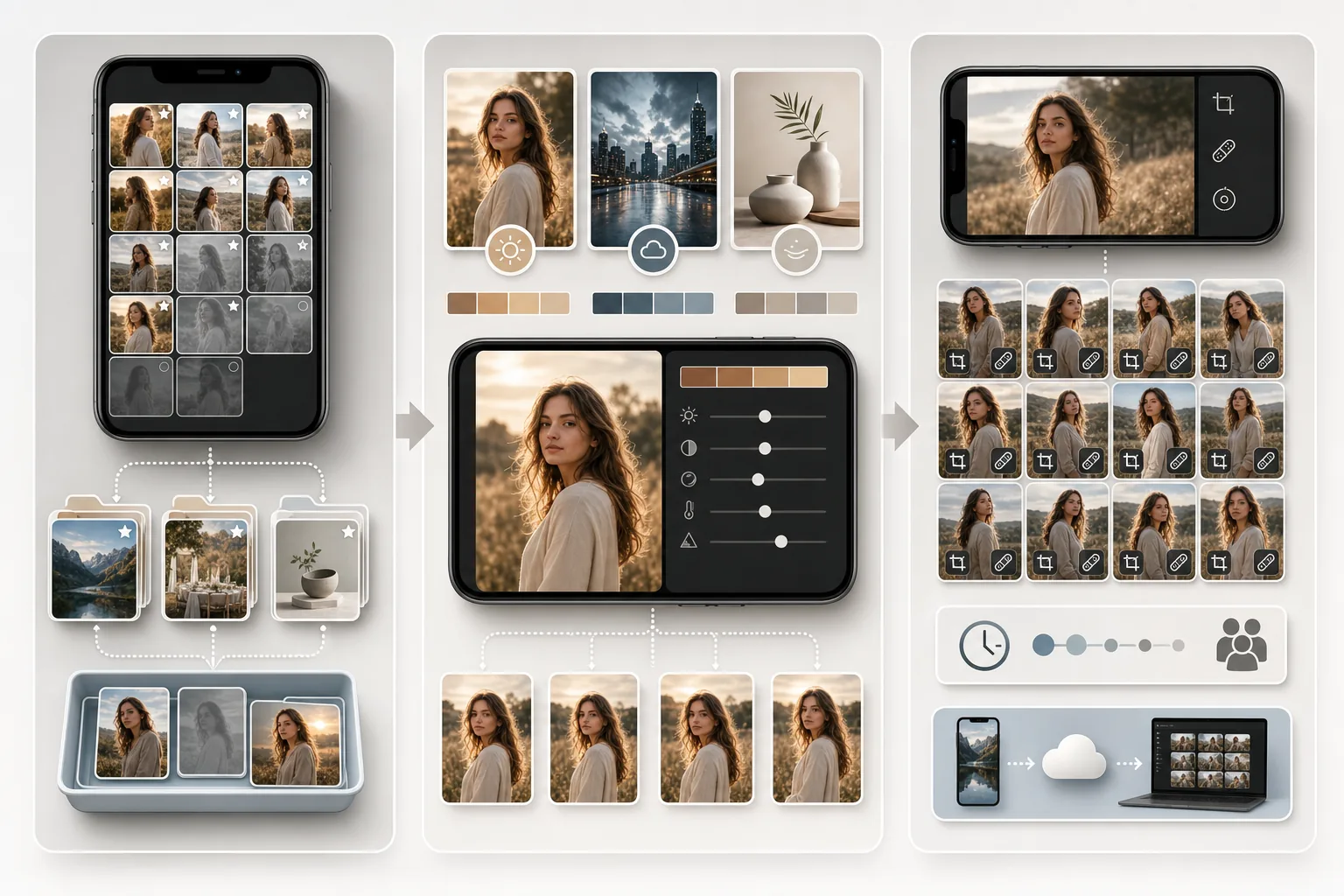
एक कुशल वर्कफ़्लो संगठन से शुरू होता है। एडिट करने से पहले, नए कैप्चर को प्रोजेक्ट, इवेंट, या उद्देश्य के अनुसार एल्बम में सॉर्ट करने में कुछ सेकंड बिताएँ। यह सरल आदत बाद में महत्वपूर्ण समय बचाती है जब आपको एडिटिंग, पोस्टिंग, या क्लाइंट डिलीवरी के लिए विशिष्ट फोटो खोजने की आवश्यकता होती है। शूटिंग के तुरंत बाद प्रत्येक बैच से सर्वश्रेष्ठ शॉट को फ्लैग करने के लिए अपने फोन की फेवरिट या स्टार सुविधा का उपयोग करें जबकि सत्र की आपकी याद ताज़ा हो। एक अनुशासित ट्राइएज प्रक्रिया, अच्छे शॉट्स को फ्लैग करें, स्पष्ट अस्वीकृतियों को हटाएँ, और शायद वालों को बाद के लिए छोड़ दें, आपकी लाइब्रेरी को हज़ारों बिना सॉर्ट की गई इमेज के अव्यवस्थित संग्रह बनने से रोकती है।
गति और सुसंगतता के लिए एडिट व्यवस्थित करना
प्रीसेट एडिटिंग समायोजन के सहेजे गए संयोजन हैं जिन्हें आप एक ही टैप से किसी भी फोटो पर लागू कर सकते हैं। अपने सबसे आम एडिटिंग परिदृश्यों के लिए प्रीसेट बनाएँ: दिन के समय के पोर्ट्रेट के लिए एक गर्म, उज्ज्वल प्रीसेट, शहरी फोटोग्राफी के लिए एक ठंडा, उच्च-कंट्रास्ट प्रीसेट, और प्रोडक्ट फोटो के लिए एक स्वच्छ, तटस्थ प्रीसेट। जब आप एक फोटो पर एडिट का ऐसा संयोजन पाते हैं जो आपको पसंद हो, तो इसे प्रीसेट के रूप में सहेजें और इसे उसी शूट से समान फोटो पर लागू करें। प्रीसेट आपके पोर्टफोलियो में दृश्य सुसंगतता सुनिश्चित करते हैं और प्रति-इमेज एडिटिंग समय को मिनटों से सेकंडों तक नाटकीय रूप से कम करते हैं।
मोबाइल कार्य को डेस्कटॉप टूल के साथ सिंक करना
बैच एडिटिंग अंतिम दक्षता गुणक है। जब आपके पास एक ही स्थान से एक ही लाइटिंग में ली गई दस फोटो हों, तो पहली को सावधानी से तब तक एडिट करें जब तक आप परिणाम से खुश न हों, फिर उन्हीं समायोजनों को शेष नौ पर लागू करें। एक ही सत्र की अधिकांश फोटो को बैच समायोजन के बाद केवल मामूली व्यक्तिगत ट्वीक की आवश्यकता होती है, जैसे थोड़ी अलग क्रॉपिंग या हटाने के लिए एक अतिरिक्त दाग। दिन भर एक समय में एक फोटो एडिट करने के बजाय अपनी एडिटिंग को केंद्रित सत्रों में निर्धारित करें। बीस केंद्रित मिनट दिन भर बिखरे बीस अलग एक-मिनट के एडिटिंग सत्रों की तुलना में बेहतर परिणाम और अधिक सुसंगत गुणवत्ता देते हैं।
Key Takeaways
- ✓फोटो को एल्बम में व्यवस्थित करें और प्रत्येक शूटिंग सत्र के तुरंत बाद सर्वश्रेष्ठ शॉट्स को फ्लैग करें
- ✓सुसंगतता बनाए रखने और समय बचाने के लिए आम एडिटिंग परिदृश्यों के लिए पुन: प्रयोज्य प्रीसेट बनाएँ
- ✓अधिकतम दक्षता के लिए एक ही सत्र की फोटो को केंद्रित एडिटिंग सत्रों में एक साथ बैच-एडिट करें