
Photo de blog de voyage
Transformez des clichés de voyage bondés en photographies de destination dignes d'une publication. Ce modèle supprime les touristes, les intrus et le désordre visuel des prises de vue de monuments et de paysages grâce à Magic Eraser, puis applique AI Enhance pour corriger les conditions d'exposition difficiles courantes en photographie de voyage — soleil dur de midi, intérieurs de temples sombres, couchers de soleil à contre-jour — et rehausse les couleurs naturelles pour des images qui donnent aux lecteurs envie de réserver le voyage.
Essayer ce modèle gratuitementPersonal template preview
Ce que fait ce modèle
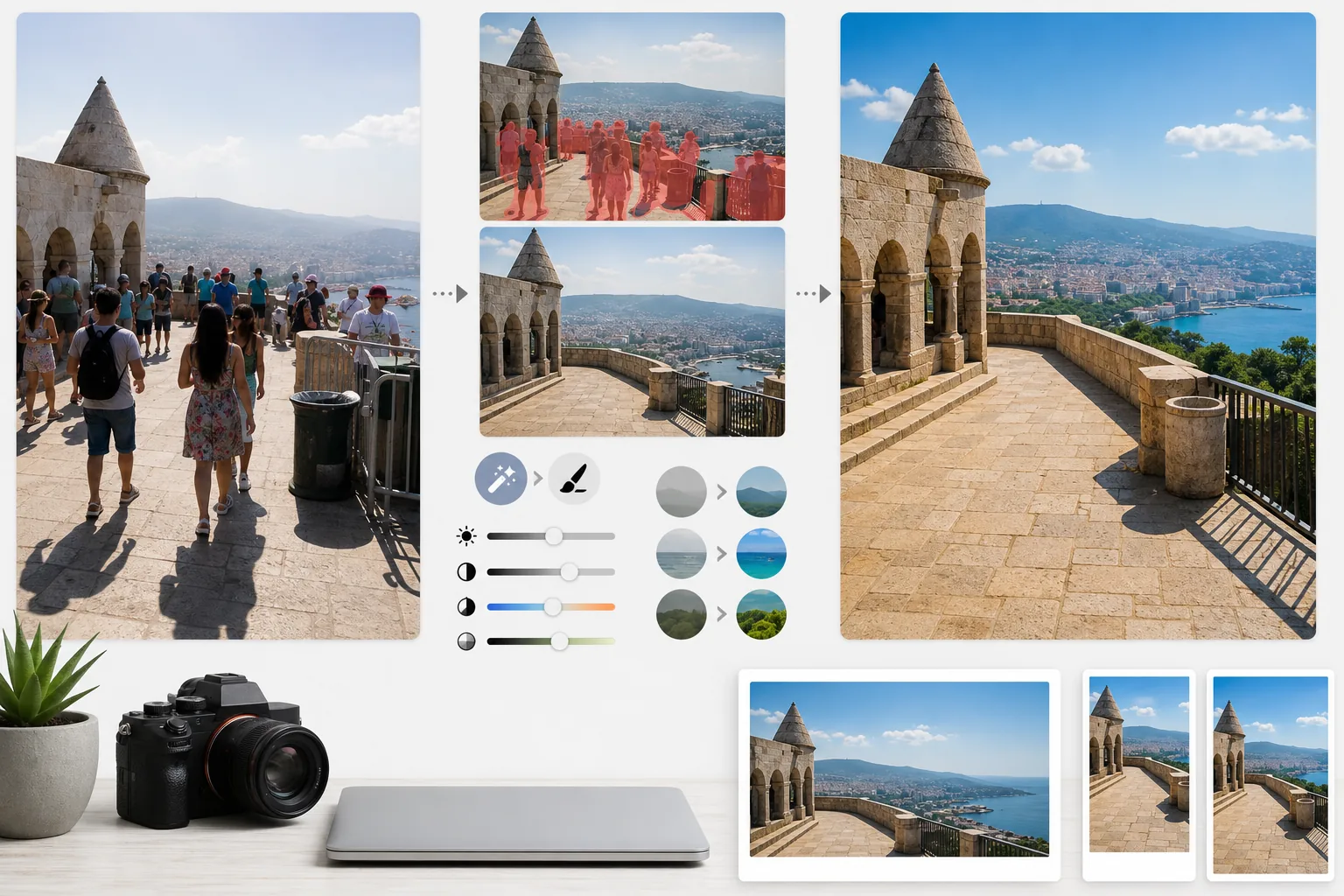
Il résout les deux plus grands problèmes de la photographie de voyage : la foule et la mauvaise lumière. Magic Eraser supprime les touristes plantés devant les monuments, les intrus qui traversent votre cadre et le désordre visuel comme les poubelles, les barrières de chantier et la signalisation temporaire qui gâchent l'atmosphère du lieu. L'IA reconstruit l'architecture, le pavé et le paysage derrière les personnes et les objets supprimés en s'appuyant sur le contexte environnant. AI Enhance s'attaque ensuite aux défis d'exposition propres au voyage — intérieurs de cathédrales et de temples où les fenêtres sont surexposées et les ombres noires, soleil dur de midi qui aplatit les couleurs dans les destinations tropicales, et scènes de coucher de soleil à contre-jour où le premier plan est en silhouette. Les couleurs sont rehaussées pour refléter l'aspect réel de la destination tel que le perçoit l'œil humain, ce que les appareils photo sous-représentent systématiquement dans leur plage dynamique.
Paramètres du modèle
| Suppression des touristes | Détection et suppression automatiques des personnes sur les prises de monuments et de paysages |
| Correction de l'exposition | Récupération de type HDR des hautes lumières et des ombres pour une lumière difficile |
| Amélioration des couleurs | Rehausser la saturation naturelle (ciel, eau, végétation) sans rendu artificiel |
| Suppression de la brume | Percer la brume atmosphérique pour des paysages lointains plus nets |
| Résolution de sortie | 4000px sur le grand côté (images d'en-tête de blog en qualité Retina) |
Comment utiliser ce modèle
Importez votre photo de voyage
Importez n'importe quelle photo de voyage — monuments bondés, vastes panoramas, scènes de rue, architecture intérieure. Le modèle prend en charge les JPEG des smartphones, des appareils hybrides et des caméras d'action. Les fichiers RAW sont également acceptés pour une flexibilité d'édition maximale.
Supprimez la foule et le désordre
Magic Eraser détecte les personnes dans le cadre et les supprime. Vous pouvez choisir de supprimer toutes les personnes, d'en conserver certaines (vous-même ou vos compagnons de voyage), ou de supprimer de manière sélective uniquement celles qui masquent des éléments architecturaux ou paysagers importants. L'IA comble les zones manquantes avec un sol, des murs et un décor reconstruits.
Améliorez la lumière et la couleur
AI Enhance applique un traitement de type HDR qui récupère les ciels surexposés et éclaircit les ombres profondes — fréquentes dans les intérieurs de temples et les rues étroites européennes. Les couleurs sont rehaussées pour correspondre à ce que vos yeux ont vu sur place, en particulier les bleus du ciel, les turquoises de l'océan et les verts de la végétation. La brume atmosphérique est réduite pour des panoramas de montagne et de ville plus nets.
Exportez pour le blog et les réseaux sociaux
Téléchargez en 4000px sur le grand côté pour des images d'en-tête de blog en qualité Retina, ou aux tailles spécifiques d'Instagram, Pinterest et Facebook. Le fichier conserve les données EXIF optimisées pour les photographes qui géolocalisent leurs œuvres.
Conseils de pro pour de meilleurs résultats
- ✓Prenez plusieurs clichés de la même scène à quelques secondes d'intervalle. Lorsque les touristes se déplacent entre les images, l'IA dispose d'informations de référence sur le sol et les murs derrière eux, ce qui produit des reconstructions plus propres qu'une seule image.
- ✓Pour les intérieurs d'églises, de temples et de musées, surexposez légèrement la photo à la prise de vue. Il est plus facile pour l'IA de récupérer des hautes lumières que d'éclaircir des ombres extrêmement sombres, et les prises de vue en intérieur ont tendance à être sous-exposées par défaut.
- ✓Photographiez les paysages à l'heure dorée ou à l'heure bleue lorsque c'est possible. AI Enhance peut rehausser les couleurs dans la lumière plate de midi, mais la lumière chaude et directionnelle de l'heure dorée crée dans les paysages des ombres et un relief qu'aucun étalonnage des couleurs ne peut reproduire.
Outils
Questions fréquentes
Puis-je rester sur la photo tout en supprimant les autres touristes ?
+
Oui. Vous pouvez marquer vous-même ou vos compagnons de voyage comme sujets protégés. L'IA supprime toutes les autres personnes de la scène tout en conservant les personnes protégées à leur place, avec leur position, leur éclairage et leur ombre d'origine intacts.
Dans quelle mesure cela fonctionne-t-il avec les scènes très bondées ?
+
Cela fonctionne mieux lorsque la foule couvre moins d'environ 40 % du cadre. Les scènes extrêmement bondées — comme une place comble où l'on ne voit pas le sol entre les gens — offrent trop peu de références d'arrière-plan pour une reconstruction propre. Dans ces cas-là, la suppression partielle des premiers rangs donne souvent un résultat convaincant.
La suppression de la brume rendra-t-elle la photo artificielle ?
+
La réduction de la brume est calibrée pour un rendu naturel. Elle supprime la diffusion atmosphérique gris-bleu qui masque les montagnes et les bâtiments lointains, tout en préservant la subtile perspective aérienne qui donne de la profondeur aux photos de paysage. Le résultat ressemble à une prise de vue par une journée claire et limpide plutôt qu'à une image filtrée ou trop retouchée.
Montrez chaque destination sous son meilleur jour, sans la foule
Importez vos photos de voyage et obtenez des images sans touristes, aux couleurs rehaussées, qui donneront à vos lecteurs l'envie de faire leurs valises.
Essayer gratuitementRelated templates
More personal templates for your workflow.
Créez des photos d'identité conformes pour les visas, les permis de conduire et les pièces d'identité nationales avec des exigences appropriées en matière de couleur d'arrière-plan, de taille de tête et d'expression faciale.
Améliorez les photos de remise de diplômes avec le nettoyage de l'arrière-plan, la casquette et la toge Color correction, la suppression des imperfections et la netteté des cadres et des annonces prêts à l'impression.
Améliorez les photos de concerts et d'événements grâce à la réduction du bruit en faible luminosité, à l'éclairage de scène correction des couleurs, à la suppression des distractions de la foule et à la récupération des détails des prises de vue dans des lieux sombres.
Créez de superbes photos de faire-part de nouveau-né avec des arrière-plans doux, un étalonnage doux des couleurs, l'élimination de l'encombrement de l'hôpital et des dimensions prêtes à imprimer pour l'envoi.
Préparez des photos de famille et des portraits pour des cartes de vœux de Noël avec des arrière-plans festifs, un étalonnage de couleurs chaudes, des effets de neige et des dimensions de carte standard pour l'impression.
Restaurez et améliorez les photos d'hommage commémoratif avec des retouches douces, une simplification de l'arrière-plan, un étalonnage des couleurs chaleureux et respectueux et des dimensions prêtes à imprimer pour les services.