
Faire-part de naissance
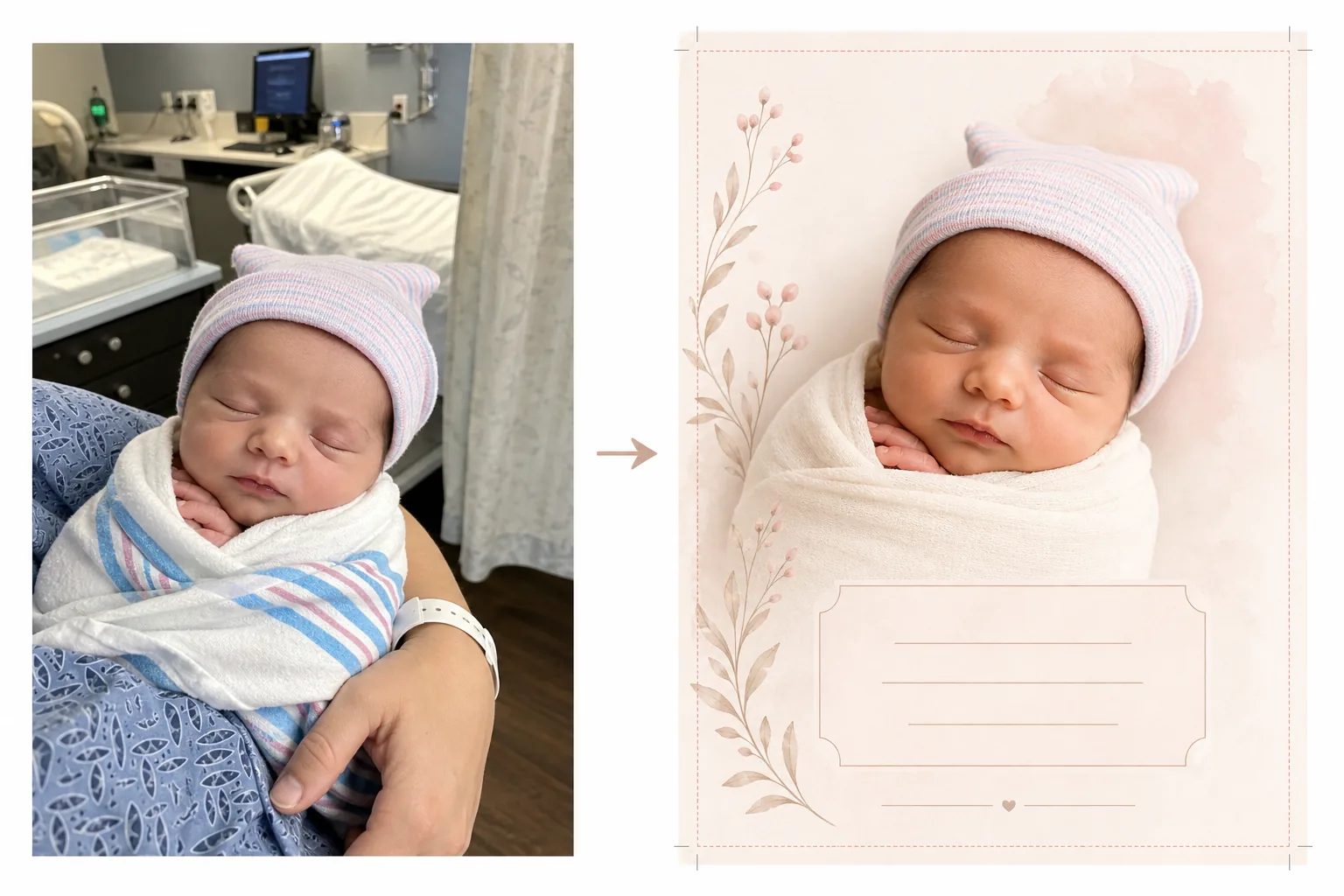
Transformez les photos prises à l'hôpital et le premier jour en magnifiques images de faire-part. Ce modèle élimine l'encombrement de l'arrière-plan hospitalier, applique un étalonnage de couleur chaud et doux, isole le nouveau-né sur des fonds épurés ou pastel, et produit des images prêtes à imprimer aux dimensions de carte standard pour l'envoi physique et le partage numérique.
Essayer ce modèle gratuitementPersonal template preview
Ce que fait ce modèle
Prépare les photos de nouveau-né pour les faire-part de naissance en transformant les clichés pris en chambre d'hôpital en images épurées et tendres, adaptées aux cartes imprimées comme aux annonces numériques. Les chambres d'hôpital comportent du matériel médical, un éclairage fluorescent et des arrière-plans institutionnels qui nuisent à l'intimité d'une photo de nouveau-né. Background Eraser isole le bébé et remplace le décor hospitalier par un fond doux et épuré dans des tons blancs, crème ou pastel. AI Enhance corrige l'éclairage fluorescent froid de l'hôpital en tons chauds et doux qui donnent à la peau un aspect sain et naturel. Le résultat est une photo digne d'un faire-part, entièrement centrée sur le nouvel arrivant, sans aucun contexte médical visible.
Paramètres du modèle
| Arrière-plan | Blanc doux, crème, rose poudré ou vert sauge (adapté aux faire-part) |
| Étalonnage des couleurs | Tons chauds et doux (corrige le fluorescent de l'hôpital en chaleur naturelle) |
| Teint | Amélioration naturelle de la peau du nouveau-né (douce, chaude, saine) |
| Dimensions de la carte | 5×7 in, 4×6 in ou A6 (tailles de faire-part standard) |
| Résolution de sortie | 300 DPI à la taille de la carte (prête pour imprimeur et imprimante domestique) |
Comment utiliser ce modèle
Téléchargez la photo du nouveau-né
Téléchargez une photo du nouveau-né — dans le berceau de l'hôpital, dans les bras d'un parent ou emmailloté dans une couverture. Le modèle gère diverses compositions, notamment les gros plans du visage, les poses emmaillotées en pied et les portraits parent-enfant. Les blouses d'hôpital, les moniteurs et les bracelets visibles sur le parent sont nettoyés automatiquement.
Transformation de l'arrière-plan et des couleurs
Background Eraser supprime la chambre d'hôpital et la remplace par un fond doux et épuré dans la couleur de votre choix. L'éclairage fluorescent froid est corrigé en tons chauds et naturels. La peau est délicatement améliorée pour paraître saine et naturelle, avec l'éclat chaud et doux associé à la photographie de nouveau-né.
Mise en page de la carte
L'image est mise au format des dimensions de carte de votre choix, avec des marges de fond perdu appropriées pour une impression professionnelle. De l'espace est réservé aux superpositions de texte — nom, date, poids et taille — positionnées selon les mises en page de faire-part standard, avec la photo du bébé comme élément visuel central.
Exportez pour l'impression et le partage
Téléchargez en 300 DPI à la taille de carte de votre choix pour une impression chez un imprimeur professionnel, un service de cartes en ligne ou une imprimante domestique. Une version optimisée pour le web est également fournie pour les annonces par e-mail et le partage sur les réseaux sociaux.
Conseils de pro pour de meilleurs résultats
- ✓Pour la photo de faire-part la plus exploitable, prenez un gros plan du visage du nouveau-né pendant qu'il dort. Les bébés endormis ont des expressions détendues et sereines qui se photographient magnifiquement et fonctionnent bien comme point focal d'une mise en page de carte.
- ✓Emmaillotez le bébé dans une couverture blanche ou de couleur claire avant de le photographier. Cela crée une limite visuelle nette entre le bébé et l'arrière-plan qui aide Background Eraser à produire le contour le plus net possible, en particulier autour des minuscules doigts et des cheveux fins.
- ✓Si les mains ou les bras d'un parent sont visibles en train de tenir le bébé, ce n'est pas un problème — le modèle améliore aussi le teint du parent. Les bracelets d'hôpital au poignet du parent sont supprimés automatiquement pour un rendu plus net.
- ✓Prenez plusieurs photos et choisissez celle avec la meilleure expression et la meilleure position des mains. Les nouveau-nés bougent de façon imprévisible — capturer plusieurs options garantit d'avoir un cliché où les minuscules doigts, la bouche et les yeux sont les plus photogéniques.
Outils
Questions fréquentes
Cela peut-il supprimer le matériel hospitalier de l'arrière-plan ?
+
Oui. Le modèle est conçu spécifiquement à cette fin — il supprime les berceaux d'hôpital, les moniteurs, les pieds à perfusion, les rideaux et les plafonniers fluorescents, en les remplaçant par un arrière-plan épuré adapté à un faire-part. Le bébé et tout parent le tenant sont isolés de l'environnement médical.
Quelles tailles de carte sont disponibles ?
+
Les tailles de faire-part standard sont prises en charge : 5×7 pouces (la plus populaire pour les faire-part envoyés par courrier), 4×6 pouces (style carte postale) et A6 (standard international). La sortie comprend des marges de fond perdu appropriées pour une impression professionnelle.
Puis-je ajouter du texte à la carte ?
+
Le modèle prépare la photo avec de l'espace réservé aux superpositions de texte mais n'ajoute pas de texte directement. Utilisez l'image exportée dans Canva, Shutterfly, Minted ou tout service de conception de cartes pour ajouter le nom du bébé, sa date de naissance, son poids, sa taille et un message personnel.
Annoncez votre nouvel arrivant avec une magnifique photo
Téléchargez les photos prises à l'hôpital ou le premier jour et obtenez des images douces, chaudes et prêtes à imprimer, parfaites pour les faire-part de naissance.
Essayer gratuitementRelated templates
More personal templates for your workflow.
Créez des photos d'identité conformes pour les visas, les permis de conduire et les pièces d'identité nationales avec des exigences appropriées en matière de couleur d'arrière-plan, de taille de tête et d'expression faciale.
Améliorez les photos de remise de diplômes avec le nettoyage de l'arrière-plan, la casquette et la toge Color correction, la suppression des imperfections et la netteté des cadres et des annonces prêts à l'impression.
Améliorez les photos de concerts et d'événements grâce à la réduction du bruit en faible luminosité, à l'éclairage de scène correction des couleurs, à la suppression des distractions de la foule et à la récupération des détails des prises de vue dans des lieux sombres.
Préparez des photos de famille et des portraits pour des cartes de vœux de Noël avec des arrière-plans festifs, un étalonnage de couleurs chaudes, des effets de neige et des dimensions de carte standard pour l'impression.
Restaurez et améliorez les photos d'hommage commémoratif avec des retouches douces, une simplification de l'arrière-plan, un étalonnage des couleurs chaleureux et respectueux et des dimensions prêtes à imprimer pour les services.
Transformez les photos d'animaux de refuge et de sauvetage avec le remplacement de l'arrière-plan, la correction de l'éclairage et l'amélioration des détails de la fourrure pour aider les animaux à trouver leur foyer plus rapidement.