
Modèle de photo d'identité
Générez des photos d'identité conformes pour les visas, les permis de conduire, les cartes d'identité nationales et les badges d'employé à partir de n'importe quel selfie ou portrait. Ce modèle remplace l'arrière-plan par la couleur unie requise, ajuste la taille et le positionnement de la tête pour respecter les spécifications officielles, corrige l'éclairage pour une illumination uniforme du visage et exporte exactement aux dimensions d'impression requises.
Essayer ce modèle gratuitementPersonal template preview
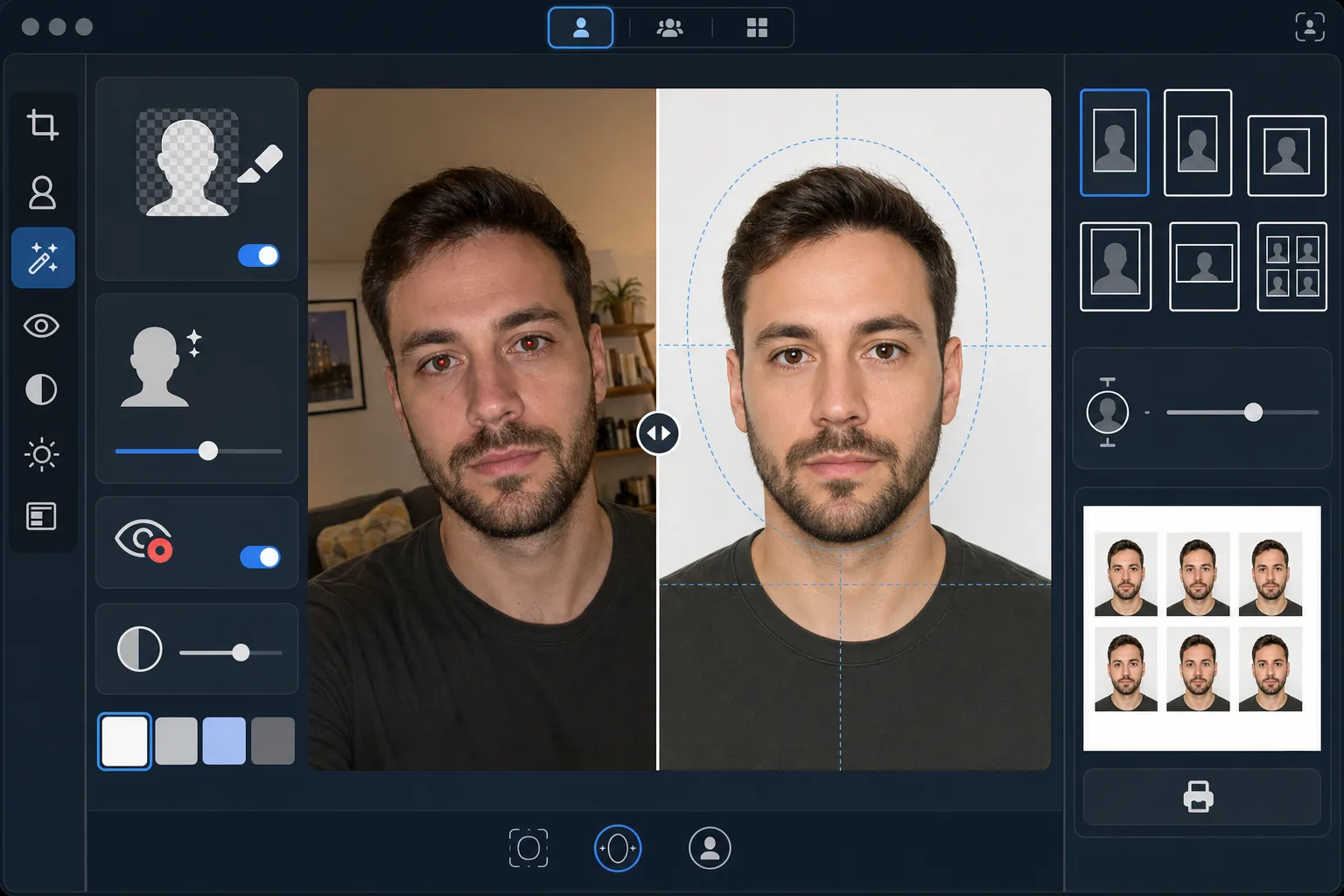
Ce que fait ce modèle
Convertit n'importe quelle photo de portrait en photo d'identité conforme aux exigences gouvernementales. Chaque document a ses propres spécifications — les passeports américains exigent un arrière-plan blanc avec une hauteur de tête comprise entre 25 et 35 mm sur un tirage de 2×2 pouces, tandis que les visas Schengen requièrent un arrière-plan gris clair ou blanc au format 35×45 mm. Ce modèle gère automatiquement les normes de photo d'identité les plus courantes. Background Eraser supprime l'arrière-plan d'origine et le remplace par la couleur unie requise. AI Enhance corrige l'éclairage inégal, élimine les yeux rouges dus au flash et garantit un visage uniformément éclairé, sans ombres marquées d'un côté, un motif de rejet fréquent dans les administrations.
Paramètres du modèle
| Couleur d'arrière-plan | Blanc (#FFFFFF) ou gris clair (#E5E5E5) — au choix selon le type de pièce d'identité |
| Taille de la tête | Ajustement automatique de la hauteur de tête à 70–80 % du cadre (réglable selon la norme) |
| Dimensions d'impression | 2×2 in (US), 35×45 mm (UE/Schengen), 33×48 mm (Royaume-Uni) — au choix |
| Correction de l'éclairage | Illumination uniforme du visage — aucune ombre d'un côté ou de l'autre |
| Résolution de sortie | 600 DPI pour l'impression photo (compatible bornes et imprimantes domestiques) |
Comment utiliser ce modèle
Téléchargez une photo de face
Téléchargez un portrait net, de face, pris à hauteur des yeux. La photo doit montrer l'intégralité de votre visage et le haut des épaules, avec une expression neutre et les deux yeux ouverts. Retirez lunettes, chapeaux et couvre-chefs (sauf pour motifs religieux) avant de photographier.
Sélectionnez votre type de pièce d'identité
Choisissez le type de document — passeport américain, visa UE/Schengen, passeport britannique, permis de conduire ou carte d'identité nationale. Le modèle ajuste automatiquement la couleur d'arrière-plan, la taille de la tête, les dimensions d'impression et le rapport hauteur/largeur pour correspondre aux exigences officielles du document choisi.
Correction de l'arrière-plan et de l'éclairage
Background Eraser supprime l'arrière-plan d'origine et le remplace par la couleur unie requise. AI Enhance corrige l'éclairage inégal afin que les deux côtés du visage soient uniformément éclairés et élimine toute dominante de couleur due à l'éclairage artificiel. Les yeux rouges dus au flash sont corrigés automatiquement.
Exportez pour l'impression
Téléchargez en 600 DPI exactement aux dimensions d'impression requises pour votre type de document. La sortie est mise en forme pour du papier photo standard 4×6 pouces, avec plusieurs photos d'identité disposées sur une seule feuille, pour une impression à domicile, à une borne photo de pharmacie ou dans une boutique d'impression professionnelle.
Conseils de pro pour de meilleurs résultats
- ✓Prenez votre photo devant un mur uni dans une pièce bien éclairée, face à une fenêtre. Même si le modèle remplace l'arrière-plan, partir d'un éclairage naturel uniforme sur le visage donne un meilleur résultat que de corriger des ombres marquées dues à l'éclairage artificiel.
- ✓Gardez une expression neutre, bouche fermée et les deux yeux ouverts. Les exigences gouvernementales pour les photos d'identité rejettent systématiquement les photos avec sourire, yeux plissés ou bouche ouverte — ces règles sont appliquées par des systèmes de vérification automatique dans de nombreuses administrations.
- ✓Veillez à ce qu'aucune mèche de cheveux ne tombe sur votre visage ni ne masque vos sourcils. Le visage doit être entièrement visible, du bas du menton au haut du front. Attachez les cheveux qui traversent le visage avant de prendre la photo.
- ✓Portez un haut qui contraste avec la couleur de l'arrière-plan. Si l'arrière-plan est blanc, évitez les vêtements blancs — un haut foncé ou coloré assure une séparation nette des contours et évite que vos épaules ne se fondent dans l'arrière-plan.
Questions fréquentes
Sera-t-elle acceptée par les administrations ?
+
Le modèle suit les spécifications officielles de chaque type de document (ICAO 9303 pour les documents de voyage internationaux, exigences nationales spécifiques pour les pièces d'identité locales). Toutefois, l'acceptation dépend en dernier ressort de l'agent qui examine le dossier. Le modèle garantit que les dimensions, la couleur d'arrière-plan, la taille de la tête et l'éclairage respectent les exigences publiées.
Puis-je porter des lunettes sur la photo ?
+
La plupart des pays (dont les États-Unis depuis 2016) exigent désormais que les lunettes soient retirées pour les photos de passeport et de visa. Le modèle ne retire pas les lunettes numériquement — enlevez-les avant de prendre la photo source. Les couvre-chefs religieux sont autorisés dans la plupart des juridictions.
Comment imprimer le résultat ?
+
Le modèle produit une feuille de 4×6 pouces avec plusieurs photos d'identité disposées à la bonne taille. Imprimez à n'importe quelle borne photo de pharmacie (CVS, Walgreens, Boots), à domicile sur papier photo en 600 DPI, ou dans une boutique d'impression professionnelle. Utilisez du papier photo brillant ou mat — pas du papier d'imprimante ordinaire.
Obtenez des photos d'identité conformes sans sortir de chez vous
Téléchargez un selfie et obtenez des photos d'identité conformes aux exigences gouvernementales, prêtes à imprimer — pour passeports, visas, permis de conduire et plus encore.
Essayer gratuitementRelated templates
More personal templates for your workflow.
Améliorez les photos de remise de diplômes avec le nettoyage de l'arrière-plan, la casquette et la toge Color correction, la suppression des imperfections et la netteté des cadres et des annonces prêts à l'impression.
Améliorez les photos de concerts et d'événements grâce à la réduction du bruit en faible luminosité, à l'éclairage de scène correction des couleurs, à la suppression des distractions de la foule et à la récupération des détails des prises de vue dans des lieux sombres.
Créez de superbes photos de faire-part de nouveau-né avec des arrière-plans doux, un étalonnage doux des couleurs, l'élimination de l'encombrement de l'hôpital et des dimensions prêtes à imprimer pour l'envoi.
Préparez des photos de famille et des portraits pour des cartes de vœux de Noël avec des arrière-plans festifs, un étalonnage de couleurs chaudes, des effets de neige et des dimensions de carte standard pour l'impression.
Restaurez et améliorez les photos d'hommage commémoratif avec des retouches douces, une simplification de l'arrière-plan, un étalonnage des couleurs chaleureux et respectueux et des dimensions prêtes à imprimer pour les services.
Transformez les photos d'animaux de refuge et de sauvetage avec le remplacement de l'arrière-plan, la correction de l'éclairage et l'amélioration des détails de la fourrure pour aider les animaux à trouver leur foyer plus rapidement.