
Amélioration de photo de remise des diplômes
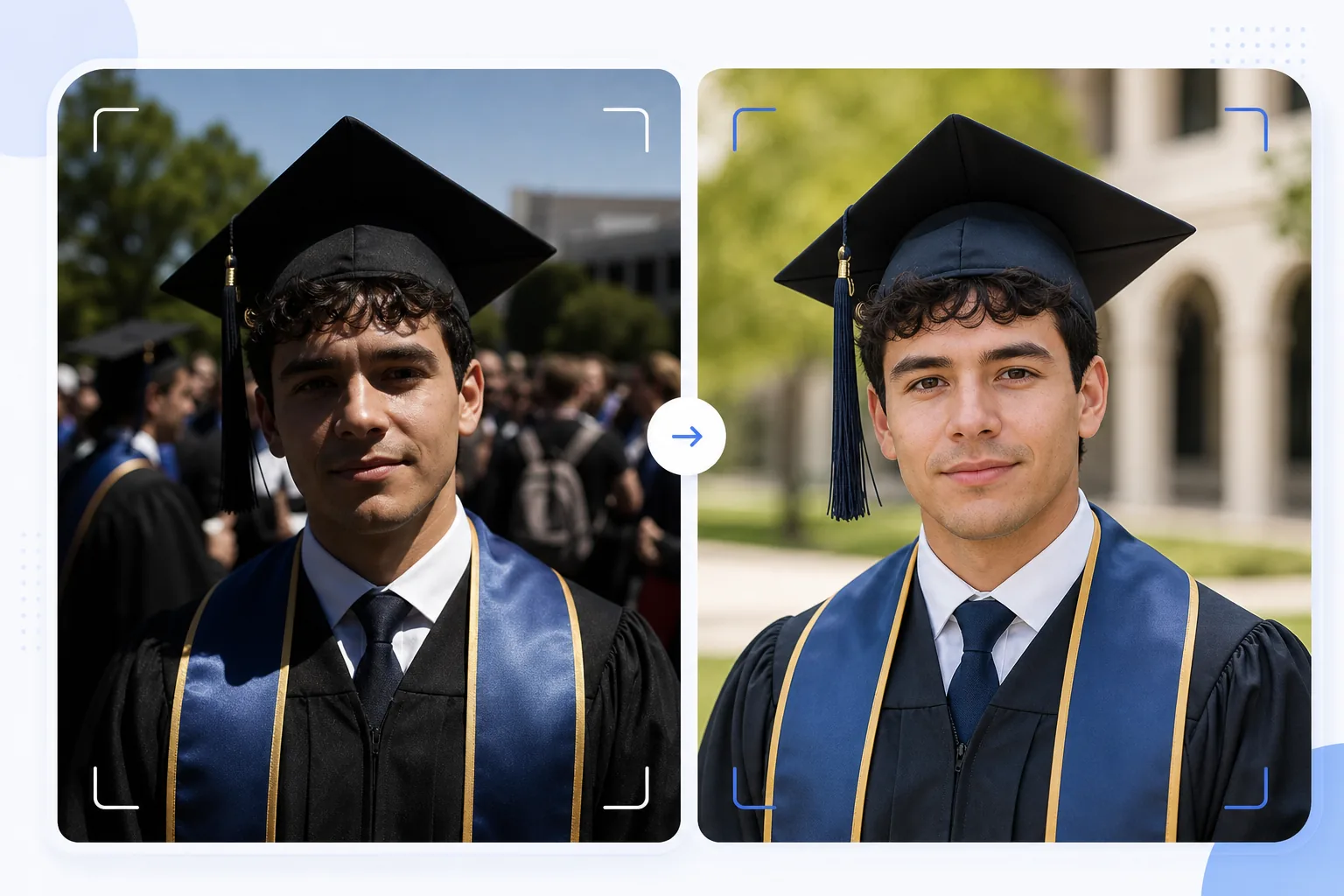
Transformez les clichés spontanés de remise des diplômes en portraits dignes d'être encadrés. Ce modèle corrige la lumière extérieure dure courante lors des cérémonies, supprime les intrus et le désordre de la foule derrière le diplômé, met en valeur les couleurs de la coiffe et de la toge, et affine l'image pour une impression en grand format destinée aux murs et aux cheminées.
Essayer ce modèle gratuitementPersonal template preview
Ce que fait ce modèle
Transforme les clichés rapides du jour de la remise des diplômes en portraits soignés, parfaits pour l'encadrement, les faire-part et le partage sur les réseaux sociaux. Les cérémonies de remise des diplômes sont photographiées dans des conditions difficiles : le soleil dur de midi crée des cernes d'ombre sous la visière de la coiffe, les arrière-plans de foule sont chaotiques et les couleurs des toges paraissent délavées en plein soleil. AI Enhance corrige l'exposition pour combler les ombres sous la coiffe, restitue des couleurs riches aux toges et aux étoles, et affine les détails du visage qui deviennent flous dans les prises hâtives en pleine foule. Magic Eraser supprime les intrus, les membres de la foule visibles derrière le diplômé, les panneaux gênants et autres éléments encombrants de la cérémonie afin d'isoler le diplômé sur un arrière-plan plus net.
Paramètres du modèle
| Récupération des ombres | Comblement des ombres sous la coiffe (éclaircit le visage sans brûler les hautes lumières) |
| Amélioration de la couleur de la toge | Restauration de la couleur du tissu pour les toges noires, bleu marine, cardinal et or |
| Lissage de la peau | Réduction légère des imperfections tout en préservant la texture naturelle de la peau |
| Nettoyage de l'arrière-plan | Supprimer les intrus et les membres de la foule derrière le diplômé |
| Résolution de sortie | 5000px sur le côté long (prêt à imprimer à 300 DPI jusqu'à 16×12 pouces) |
| Netteté | Netteté optimisée pour le portrait (détails du visage + texture du tissu de la toge) |
Comment utiliser ce modèle
Téléchargez votre photo de remise des diplômes
Téléchargez n'importe quelle photo de cérémonie de remise des diplômes : portrait posé, cliché en traversant la scène, lancer de coiffe ou moment de célébration spontané. Le modèle gère les photos prises avec des smartphones et des reflex numériques dans toutes les conditions d'éclairage, du plein soleil extérieur aux auditoriums intérieurs faiblement éclairés.
Corrigez l'éclairage et la couleur
AI Enhance corrige les ombres dures projetées par la coiffe carrée, qui assombrissent généralement les yeux et le haut du visage du diplômé. Les couleurs de la toge et de l'étole sont restituées dans leurs tons riches d'origine : les toges noires retrouvent de la profondeur au lieu de paraître gris foncé, et les étoles d'honneur révèlent toute leur saturation de couleur.
Supprimez les distractions
Magic Eraser supprime les membres de la foule, les autres diplômés, les chaises pliantes et les panneaux visibles derrière le sujet. L'IA reconstruit l'arrière-plan avec une version nette du lieu (pelouse, façade de bâtiment ou rideau), créant une composition de type portrait à partir d'une scène de foule.
Exportez pour l'impression et le partage
Téléchargez en 5000px sur le côté long pour des tirages encadrés jusqu'à 16×12 pouces à 300 DPI, ou en 2000px pour les réseaux sociaux et les faire-part numériques. Le profil colorimétrique est défini sur sRGB pour l'affichage à l'écran ou Adobe RGB pour l'impression professionnelle.
Conseils de pro pour de meilleurs résultats
- ✓Si vous pouvez anticiper, prenez le portrait officiel juste après la cérémonie dans une zone ombragée plutôt qu'en plein soleil. L'ombre élimine les ombres dures de la coiffe, qui constituent le problème le plus difficile à corriger. Le modèle peut corriger les ombres du soleil, mais l'ombre produit le résultat le plus naturel.
- ✓Capturez à la fois un portrait posé traditionnel et un moment de célébration spontané (étreinte familiale, lancer de coiffe). Le modèle améliore les deux styles, et disposer d'une version soignée de chacun vous offre des options entre tirages encadrés et publications sur les réseaux sociaux.
- ✓Pour les photos de groupe en famille, placez le diplômé légèrement en avant du groupe. Cela crée une séparation de profondeur naturelle qui aide Magic Eraser à isoler et supprimer les distractions de l'arrière-plan sans affecter les membres de la famille.
Outils
Questions fréquentes
Cela peut-il corriger des photos de remise des diplômes floues ?
+
AI Enhance peut affiner les photos présentant un léger flou dû à un petit tremblement de main ou à une mise au point automatique légèrement décalée. Cependant, les photos très floues à cause d'un fort flou de mouvement (comme un cliché pris de loin en traversant la scène) ne peuvent pas être entièrement récupérées : le modèle améliore les détails mais ne peut pas créer une netteté qui n'a jamais été capturée.
Qu'en est-il des photos de cérémonie en intérieur ?
+
Les photos de remise des diplômes prises en intérieur avec un éclairage d'auditorium (jaune chaud ou fluorescent mixte) sont corrigées en température de couleur. Le modèle ajuste la balance des blancs afin que les tons de peau paraissent naturels et que les couleurs des toges soient fidèles. Le bruit en basse lumière dû à des réglages ISO élevés est réduit tout en préservant les détails du visage.
Puis-je supprimer entièrement l'arrière-plan ?
+
Oui. Vous pouvez utiliser le nettoyage de l'arrière-plan pour supprimer tous les éléments d'arrière-plan et les remplacer par une couleur unie ou un dégradé pour un rendu de portrait studio. Cela fonctionne bien lorsque l'arrière-plan d'origine de la cérémonie est trop encombré pour une suppression sélective.
Des portraits de remise des diplômes dignes d'un cadre à partir de clichés de cérémonie
Téléchargez vos photos du jour de la remise des diplômes et obtenez des portraits améliorés, prêts à imprimer, avec des arrière-plans nets et des couleurs vives de coiffe et de toge.
Essayer gratuitementRelated templates
More personal templates for your workflow.
Créez des photos d'identité conformes pour les visas, les permis de conduire et les pièces d'identité nationales avec des exigences appropriées en matière de couleur d'arrière-plan, de taille de tête et d'expression faciale.
Améliorez les photos de concerts et d'événements grâce à la réduction du bruit en faible luminosité, à l'éclairage de scène correction des couleurs, à la suppression des distractions de la foule et à la récupération des détails des prises de vue dans des lieux sombres.
Créez de superbes photos de faire-part de nouveau-né avec des arrière-plans doux, un étalonnage doux des couleurs, l'élimination de l'encombrement de l'hôpital et des dimensions prêtes à imprimer pour l'envoi.
Préparez des photos de famille et des portraits pour des cartes de vœux de Noël avec des arrière-plans festifs, un étalonnage de couleurs chaudes, des effets de neige et des dimensions de carte standard pour l'impression.
Restaurez et améliorez les photos d'hommage commémoratif avec des retouches douces, une simplification de l'arrière-plan, un étalonnage des couleurs chaleureux et respectueux et des dimensions prêtes à imprimer pour les services.
Transformez les photos d'animaux de refuge et de sauvetage avec le remplacement de l'arrière-plan, la correction de l'éclairage et l'amélioration des détails de la fourrure pour aider les animaux à trouver leur foyer plus rapidement.