
Photo de concert et d'événement
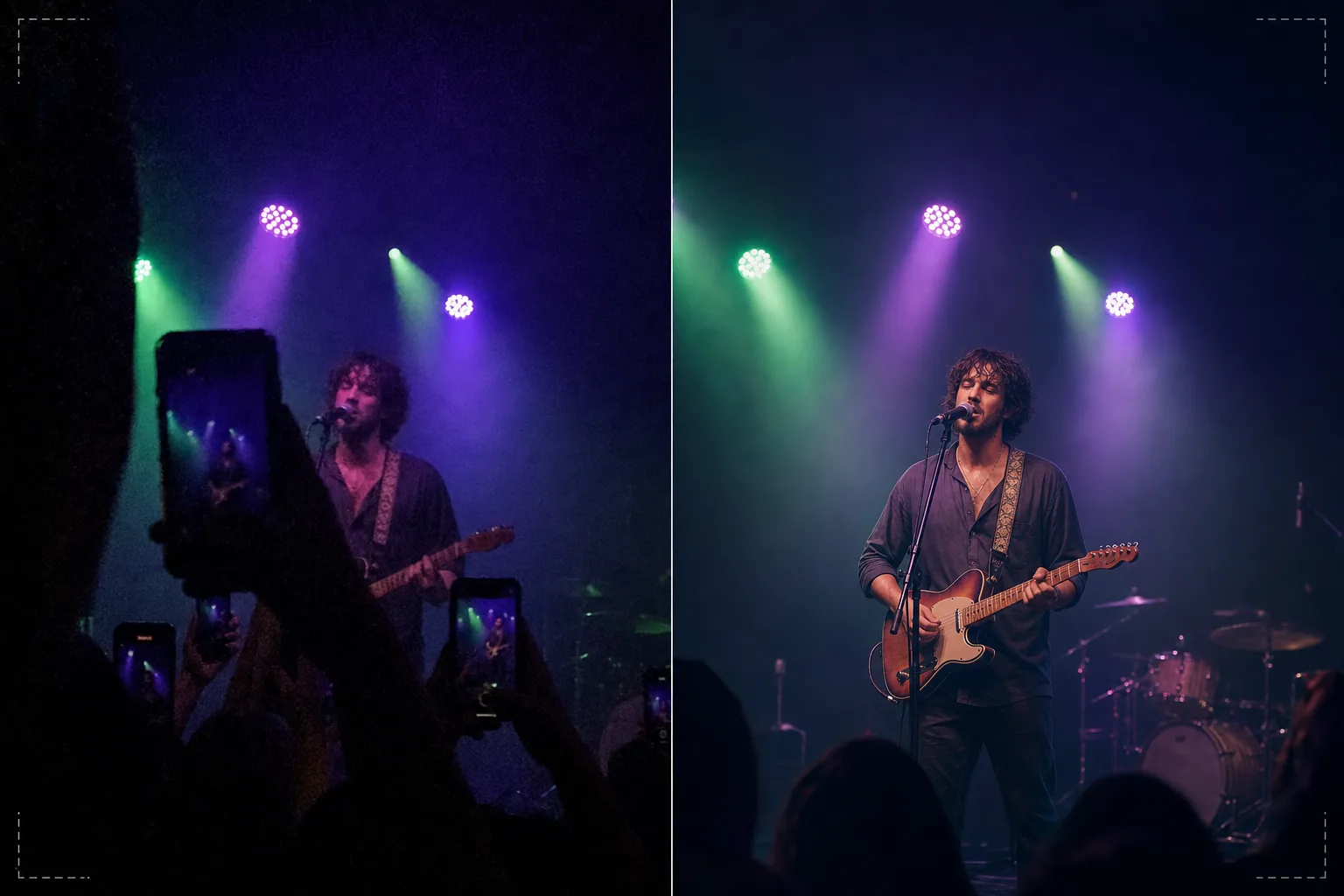
Sauvez vos photos de concerts et d'événements sombres et bruitées pour en faire des souvenirs partageables. Ce modèle réduit considérablement le bruit en basse lumière, récupère les détails des prises sous-exposées, corrige les dominantes de couleur agressives de l'éclairage de scène, supprime les bras et téléphones qui bloquent votre vue, et accentue l'artiste ou le sujet de l'événement.
Essayer ce modèle gratuitementPersonal template preview
Ce que fait ce modèle
Sauve les photos difficiles prises lors de concerts, festivals, événements sportifs et spectacles en intérieur où les conditions d'éclairage mettent en échec les appareils photo des smartphones. Les photos de concert sont les prises les plus difficiles techniquement que les gens réalisent régulièrement — la très basse lumière impose un bruit ISO élevé, l'éclairage de scène coloré et mélangé crée d'étranges dominantes de couleur, et la distance par rapport à la scène rend les visages et les détails petits et flous. AI Enhance applique une réduction de bruit intelligente qui élimine le grain tout en récupérant les détails sous-jacents, corrige les dominantes violettes, vertes et rouges de l'éclairage de scène pour révéler des teintes de peau et d'instruments naturelles, et accentue l'artiste pour faire ressortir les expressions du visage et les détails des instruments. Magic Eraser supprime les bras levés, les téléphones et les têtes d'autres spectateurs qui bloquent votre vue.
Paramètres du modèle
| Réduction du bruit | Débruitage IA (récupère les détails du grain à ISO élevé jusqu'à ISO 12800) |
| Correction des couleurs | Suppression des dominantes d'éclairage de scène (violet, vert, rouge, bleu neutralisés) |
| Récupération des ombres | Relever les zones sous-exposées jusqu'à 3 diaphragmes |
| Suppression de la foule | Supprimer les bras levés, les téléphones et les têtes gênantes |
| Accentuation du sujet | Accentuation sélective de l'artiste/de la scène (préserve l'atmosphère du bokeh) |
Comment utiliser ce modèle
Importez votre photo de concert
Importez des photos de téléphone ou d'appareil photo prises lors de concerts, festivals, représentations théâtrales, spectacles comiques ou événements sportifs. Le modèle gère les conditions extrêmes que présentent ces lieux — expositions quasi sombres, éclairages de scène très colorés, flou de mouvement des artistes en mouvement et vues obstruées par les spectateurs.
Réduction du bruit et récupération des détails
AI Enhance élimine le grain de bruit à ISO élevé tout en préservant les détails sous-jacents de l'image. Les ombres sous-exposées sont relevées pour révéler des visages, des instruments et des éléments de scène quasi invisibles dans la prise originale. La réduction du bruit est calibrée pour préserver la qualité atmosphérique du lieu plutôt que de rendre l'image artificiellement lisse.
Correction des couleurs et de l'éclairage
Les dominantes de couleur agressives de l'éclairage de scène sont corrigées afin que les teintes de peau, les vêtements et les instruments apparaissent dans des couleurs reconnaissables. Vous pouvez choisir de neutraliser entièrement l'éclairage de scène pour un rendu naturel, ou de corriger partiellement pour conserver une partie de l'éclairage coloré atmosphérique tout en réduisant les dominantes les plus extrêmes.
Exportez vos souvenirs améliorés
Téléchargez la photo améliorée pour la partager sur les réseaux sociaux, l'archiver personnellement ou l'imprimer. Le résultat préserve la qualité atmosphérique de l'événement en direct tout en rendant l'image suffisamment nette pour que les visages, les expressions et les moments soient visibles et significatifs en tant que souvenirs.
Conseils de pro pour de meilleurs résultats
- ✓Photographiez pendant les moments d'éclairage de scène intense — projecteurs, pyrotechnie, transitions d'écran — plutôt que pendant les segments sombres et atmosphériques. Le modèle peut récupérer des détails d'ombre importants, mais les photos prises lors des moments les plus lumineux disposent du plus de données sous-jacentes à exploiter.
- ✓Utilisez le mode rafale pour photographier des artistes en mouvement. Le flou de mouvement du geste de la main d'un chanteur ou du bras d'un guitariste grattant les cordes ne peut pas être supprimé après coup, mais une image dans une rafale de dix peut capturer un moment net que le modèle peut ensuite améliorer.
- ✓Tenez votre téléphone à deux mains et calez vos coudes contre votre corps pour minimiser le tremblement. Le bougé d'appareil aggrave la difficulté de la photographie de concert en basse lumière. Une photo source plus stable fournit à l'algorithme de réduction du bruit des données plus propres et produit une image finale plus nette.
Outils
Questions fréquentes
Cela peut-il corriger des photos presque entièrement sombres ?
+
Le modèle peut récupérer les détails de prises sous-exposées de 2 à 3 diaphragmes — des images où l'on distingue à peine le sujet. Au-delà de 3 diaphragmes en moins, les données du capteur sont essentiellement du bruit et l'image récupérée présentera d'importants artefacts. Plus la capture d'origine est lumineuse, meilleur est le résultat.
Qu'en est-il des séquences vidéo de concert ?
+
Extrayez les meilleures images fixes de votre vidéo de concert et traitez-les individuellement. Les images vidéo ont une résolution inférieure aux photos fixes mais bénéficient grandement de la réduction du bruit et de la correction des couleurs, produisant des images partageables à partir de séquences trop bruitées en vidéo.
La suppression des obstructions de la foule aura-t-elle l'air naturelle ?
+
Supprimer les téléphones levés, les bras et les têtes de la foule devant vous fonctionne bien lorsque l'obstruction couvre une petite partie du cadre. L'IA reconstruit la scène et l'arrière-plan derrière les éléments supprimés. Supprimer de grandes obstructions couvrant la majorité du sujet est moins efficace.
Transformez les prises de concert sombres en souvenirs éclatants
Importez vos photos d'événement et récupérez les moments que votre appareil a eu du mal à capturer dans un éclairage de lieu difficile.
Essayer gratuitementRelated templates
More personal templates for your workflow.
Créez des photos d'identité conformes pour les visas, les permis de conduire et les pièces d'identité nationales avec des exigences appropriées en matière de couleur d'arrière-plan, de taille de tête et d'expression faciale.
Améliorez les photos de remise de diplômes avec le nettoyage de l'arrière-plan, la casquette et la toge Color correction, la suppression des imperfections et la netteté des cadres et des annonces prêts à l'impression.
Créez de superbes photos de faire-part de nouveau-né avec des arrière-plans doux, un étalonnage doux des couleurs, l'élimination de l'encombrement de l'hôpital et des dimensions prêtes à imprimer pour l'envoi.
Préparez des photos de famille et des portraits pour des cartes de vœux de Noël avec des arrière-plans festifs, un étalonnage de couleurs chaudes, des effets de neige et des dimensions de carte standard pour l'impression.
Restaurez et améliorez les photos d'hommage commémoratif avec des retouches douces, une simplification de l'arrière-plan, un étalonnage des couleurs chaleureux et respectueux et des dimensions prêtes à imprimer pour les services.
Transformez les photos d'animaux de refuge et de sauvetage avec le remplacement de l'arrière-plan, la correction de l'éclairage et l'amélioration des détails de la fourrure pour aider les animaux à trouver leur foyer plus rapidement.